





PGAlign (Peak-Group Alignment of mass spectrometry data) is a peak-group-based algorithm for aligning mass spectrometry (MS) spectra onto a common m/z grid. It is designed for imaging and spatial metabolomics data such as MALDI-MS, where spectra from different runs or tissues often exhibit small m/z shifts that prevent direct comparison.
Anji Deng, Yuyang Zhang, and Qihuang Zhang* McGill University (corresponding author: qihuang.zhang@mcgill.ca)
Documentation: https://stagill.github.io/PGAlign/
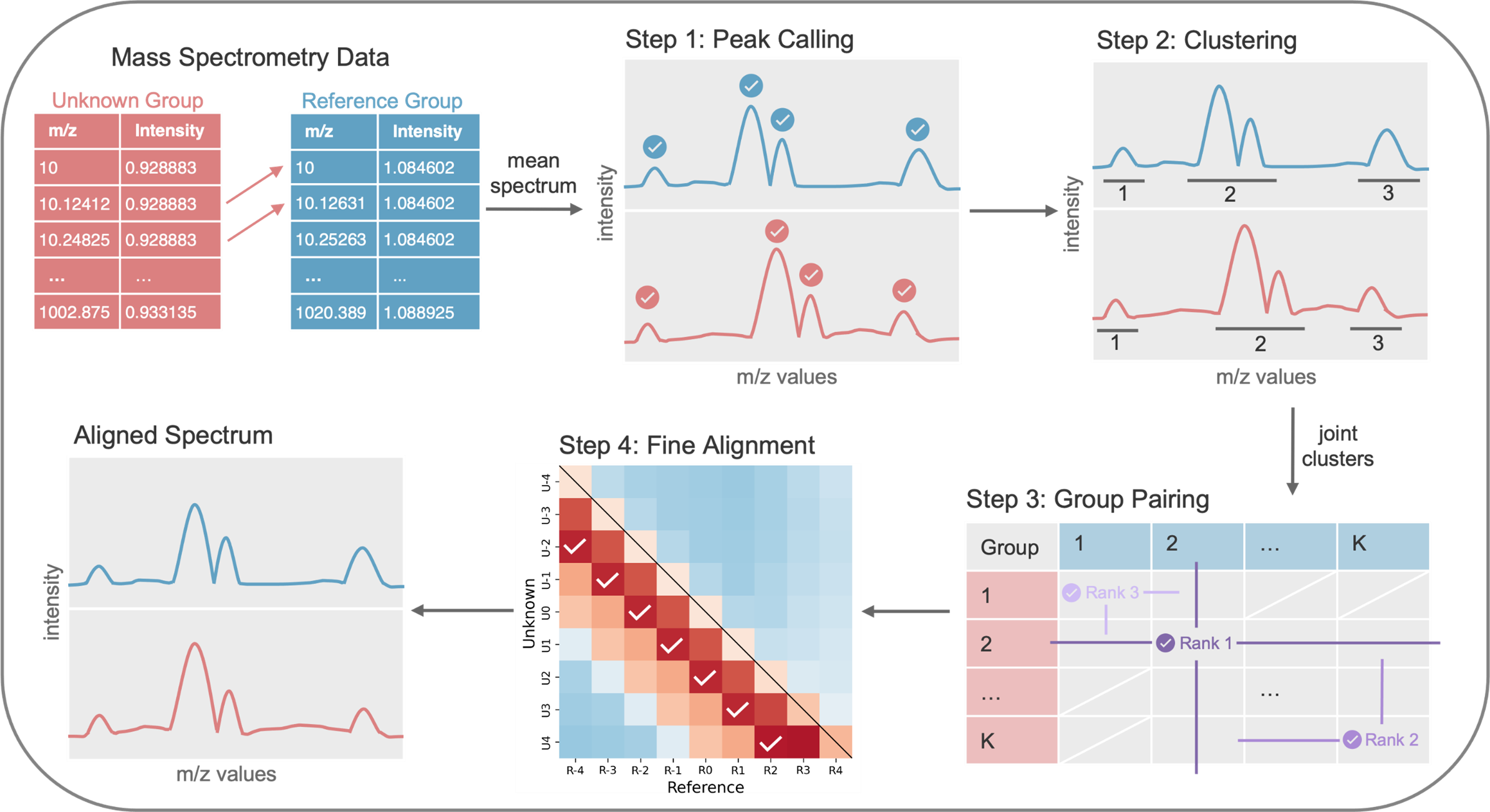
By aligning an "unknown" spectrum (or dataset) to a reference while forcing matched spectra to share the same m/z values, PGAlign enables downstream analyses such as:
- joint spatial segmentation across tissues or time points
- classification using combined datasets
- other multi-sample analyses that require a common m/z grid
This repository contains the reference Python implementation accompanying the PGAlign manuscript (Deng, Zhang & Zhang, 2026; under peer review).
Repository layout
pgalign/: Core Python implementation of PGAlign (alignment and peak-group functions).CodeInPaper/: Scripts that reproduce the figures and results in the manuscript. SeeCodeInPaper/README.md.Tutorial_PGAlign.ipynb: A Jupyter notebook that walks through aligning two MALDI datasets (e.g., Week 2 and Week 5 macrophage samples) and preparing them for joint segmentation.tests/: Smoke tests (pytest).CITATION.cff: Citation metadata.LICENSE: MIT license.
Installation
pip install pgalign # or "pgalign[imzml]" to read imzML files
To work from the source, clone the repository and install it with pip:
git clone https://github.com/StaGill/PGAlign.git
cd PGAlign
pip install -e .
The package's importable name is pgalign:
import pgalign as pg
print(pg.__version__)
API at a glance
The four-step pipeline in the paper maps to the following public methods:
| Step | Manuscript section | Object · method |
|---|---|---|
| 1 | Peak Calling | PeakCalling.peak_calling(threshold=0.9) |
| 2 | Peak Grouping | PeakCalling.peak_grouping(percentile=0.9) |
| 3 | Peak Group Pairing | AnnDataMALDI.peak_group_pairing(criteria=0) |
| 4 | Fine Alignment Assessment | AnnDataMALDI.fine_alignment_assessment(threshold=0.2) |
Similarity is measured with Pearson's correlation; Step 3 uses a sliding
window of +/- 4 grid points (see Methods of the paper). pg.align(unk, ref)
runs all four steps in one call (see Quick start).
The pre-2026 method names (callpeak, grouppeaks, greedy_match,
fine_align) are kept as deprecated aliases and emit DeprecationWarning.
Toy data
A 120-spectrum / 601-m/z-bin slice of the public mouse pancreas dataset (Prade et al., 2020, Zenodo 10.5281/zenodo.3607915, CC BY 4.0) ships with the package for tutorials and tests:
import pgalign as pg
unk, ref = pg.datasets.load_mouse_pancreas_toy()
The "unknown" spectrum has a planted +2-bin rigid shift relative to the reference, so PGAlign should recover a shift of about +2 m/z bins.
Reading your data
unk = pg.read_imzml("unknown.imzML", increment=0.25)     # pip install "pgalign[imzml]"
ref = pg.read_imzml("reference.imzML", increment=0.25)
pg.read_imzml reads continuous imzML as it is and puts processed imzML, where
each spectrum carries its own m/z values, on a common grid. pg.read_scils_csv
reads SCiLS Lab CSV exports, and pg.read_h5ad reads .h5ad files. Each gives an
AnnData with the m/z values in var["m/z"], ready for pg.align. Save results
with pg.write_h5ad(res.aligned, "aligned.h5ad"): anndata 0.13 and later cannot write a column named m/z, so pg.write_h5ad stores
it as mz and pg.read_h5ad restores it.
Command line
pgalign align unknown.imzML reference.imzML -o aligned.h5ad --increment 0.25
This prints the summary line and writes the aligned unknown spectra to
aligned.h5ad, the reference on the same bins to aligned_reference.h5ad, and
the two tables to aligned_shifts.csv and aligned_ambiguity.csv; read the
.h5ad files back with pg.read_h5ad. Inputs can be
.imzML, .h5ad or SCiLS .csv exports. pgalign align --help lists the
options, which mirror those of pg.align.
Quick start
import pgalign as pg

unk, ref = pg.datasets.load_mouse_pancreas_toy()   # or your own two AnnData objects
res = pg.align(unk, ref)
print(res.summary())     # 7 groups paired, 7 shifted, 0 flagged at tau = 0.1
aligned = res.aligned    # the unknown spectra on the reference m/z grid
pg.align normalizes each spectrum, runs the four steps with the manuscript's
defaults and returns the aligned dataset with two tables: res.shifts, one row
per paired peak group with its offset, and res.ambiguity, the diagnostic
described under Flagging ambiguous alignments.
By default it calls peaks on the three-point moving average described in the
Methods; pass smooth=False for the peak caller used in the simulation study
and the canine sarcoma analysis. The inputs are not modified.
Step by step
The notebooks under CodeInPaper/ run the pipeline one step at a time, and
Tutorial_PGAlign.ipynb gives a worked example. The basic workflow is:
- Load two MALDI datasets (e.g., two time points or two tissues) with optional spatial coordinates.
- Wrap them as
AnnDataobjects (viascanpy/anndata). - Normalize intensities per spectrum.
- Run the four PGAlign steps.
- Extract the aligned spectra for joint downstream analyses (e.g., PCA + Harmony + clustering).
import scanpy as sc
import pgalign as pg

# X = spectra, var = m/z table, obs = coordinates (see Tutorial_PGAlign.ipynb)
MALDIdataAnn1 = ...   # unknown spectrum
MALDIdataAnn2 = ...   # reference spectrum

# Per-spectrum normalisation
sc.pp.normalize_per_cell(MALDIdataAnn1)
sc.pp.normalize_per_cell(MALDIdataAnn2)

# Step 1 + Step 2: peak calling and peak grouping
PeakGroup = pg.PeakCalling(MALDIdataAnn1, MALDIdataAnn2)   # pg.align uses pg.PeakCallingmv by default
PeakGroup.peak_calling(threshold=0.9)
PeakGroup.peak_grouping(percentile=0.9)

# Step 3: peak group pairing
ExactAlign = pg.AnnDataMALDI(MALDIdataAnn1, MALDIdataAnn2)
ExactAlign.get_corr_peakgroup_refined(PeakGroup.jointcluster)
ExactAlign.peak_group_pairing(criteria=0)

# Step 4: fine alignment assessment
ExactAlign.fine_alignment_assessment(threshold=0.2, ignore=True)
ExactAlign.summarize()

# The aligned dataset: the unknown spectra on the reference m/z grid
MALDIdataAnn1_aligned = pg.PGmzalign(ExactAlign).getAnnSim()
getAnnSim() returns the unknown spectra as an AnnData whose var["m/z"]
are the reference's m/z values, so it can be analysed jointly with the
reference. Despite the method's name, nothing is simulated. The result is cut
to the shorter of the two m/z axes, so it can lack a few bins at the top of the
range.
Please refer to Tutorial_PGAlign.ipynb for a fully worked example with real
data and plots.
Flagging ambiguous alignments
A shifted peak group always has one alternative: staying at its original
position. After Step 4, flag_ambiguous_alignments flags a shifted group when
staying scores within delta (default 0.1) of the chosen alignment, using the
pairing similarity for groups matched to a different reference group and the
zero-offset diagonal for groups moved by a non-zero offset. Flagged groups are
reported with both scores, so you can inspect them before downstream analysis.
ExactAlign.fine_alignment_assessment(threshold=0.2, ignore=True)
table = ExactAlign.flag_ambiguous_alignments(delta=0.1)
print(table[table["flagged"]])
print(f"{table['flagged'].sum()} of {len(table)} shifted groups flagged")
print(table.groupby("rule")["flagged"].agg(["sum", "size"]))
The rule column says which comparison a row was assessed by: "group" for
a group paired with a different reference group, "offset" for a group
paired at its own position but moved by a non-zero offset.
Reproducing results from the manuscript
Release v1.0.1 is the version that accompanies the manuscript. Later releases may change the results, so install that version to reproduce them:
pip install "git+https://github.com/StaGill/PGAlign@v1.0.1"
The notebooks under CodeInPaper/ reproduce the main analyses; run them from a
checkout of the same release (git checkout v1.0.1). Each subfolder has its
own README.md with dataset access instructions:
- Simulation study (mouse pancreas MALDI): alignment error under
controlled peak shifts and noise. See
CodeInPaper/MousePancreate.ipynb. - Macrophage metabolomics (atherosclerosis regression): aligns Week 5
MALDI spectra to Week 2 and performs joint spatial segmentation. See
CodeInPaper/Maaike/. - Canine sarcoma classification: aligns cancer tissue spectra to normal
tissue and assesses classification performance before/after alignment. See
CodeInPaper/Sarcomas/.
Data sources:
- Mouse pancreas MALDI: https://doi.org/10.5281/zenodo.3607915
- Atherosclerosis regression MALDI: mean spectra on Zenodo (https://zenodo.org/records/20533948); the per-spot spectra that the notebooks read are available from the data owners upon reasonable request.
- Canine sarcoma MALDI: ProteomeXchange PRIDE accession
PXD010990(https://proteomecentral.proteomexchange.org/cgi/GetDataset?ID=PXD010990).
Citation
The PGAlign manuscript is currently under peer review. If you use PGAlign in
your research, please cite this repository (see CITATION.cff, which GitHub
renders as a "Cite this repository" button) and contact the corresponding
author for the latest preprint:
Deng A, Zhang Y, Zhang Q. PGAlign: peak group alignment of mass spectrometry data. Under review at the Journal of Proteome Research, 2026.
License
MIT (see LICENSE).
1 maintainer

Metadata
1 maintainer
Release files for pgalign 1.1.0
For a detailed explanation of source distributions (sdists) and built distributions (wheels), please see the package formats documentation.
Source distribution (sdist)
| File | Size | Uploaded | Provenance | Actions |
|---|---|---|---|---|
| pgalign-1.1.0.tar.gz | 744.7 kB | With provenance | Details for pgalign-1.1.0.tar.gz |
Built distribution (wheel)
| File | Interpreter | ABI | Platform | Actions Reset |
|---|---|---|---|---|
| pgalign-1.1.0-py3-none-any.whl | Python 3 | none | any | Details for pgalign-1.1.0-py3-none-any.whl |
Total release size: 1.0 MB
Release files / pgalign-1.1.0.tar.gz
| Download URL | pgalign-1.1.0.tar.gz |
|---|---|
| Size | 744.7 kB |
| Tags | Source |
|
SHA-256 checksum How to use checksums |
5a2ec367384c5ca3cb12ed0412e79799c2b3bf3c0ecc7716f803f9445bcba694
|
|
BLAKE2b-256 checksum How to use checksums |
5f3a40fe345e66b98eab0211c586ac5ea1ed23dc8e72260711d2eacb268f68cc
|
| Upload date | |
|
Uploaded using Trusted Publishing? What is trusted publishing? |
Yes |
| Uploaded via |
twine/7.0.0 CPython/3.13.14
|
Provenance
Provenance describes where a file came from. On PyPI, provenance is shared via attestations, which provide a verifiable record of the build or publishing details. View details, limitations and caveats.


PyPI Publish Attestation
PyPI verified that this artifact, at this checksum, originated from the publisher listed below.
Signed by GitHub Actions, verified by PyPI on Oct 14, 2026.
Transparency logRelease files / pgalign-1.1.0-py3-none-any.whl
| Download URL | pgalign-1.1.0-py3-none-any.whl |
|---|---|
| Size | 262.0 kB |
| Tags | Python 3 |
|
SHA-256 checksum How to use checksums |
e292584bce0bc03fcb329235926f473b6a175fd1e8061cd3e1ce2571e7bf4d66
|
|
BLAKE2b-256 checksum How to use checksums |
fa74b23e464bce4490ef94d8909b51792e88dc96a21f782e4bede267fc273d82
|
| Upload date | |
|
Uploaded using Trusted Publishing? What is trusted publishing? |
Yes |
| Uploaded via |
twine/7.0.0 CPython/3.13.14
|
Provenance
Provenance describes where a file came from. On PyPI, provenance is shared via attestations, which provide a verifiable record of the build or publishing details. View details, limitations and caveats.
PyPI Publish Attestation
PyPI verified that this artifact, at this checksum, originated from the publisher listed below.
Signed by GitHub Actions, verified by PyPI on Oct 14, 2026.
Transparency logSecurity for pgalign 1.1.0
Provenance
Provenance describes where a file came from. On PyPI, provenance is shared via attestations, which provide a verifiable record of the build or publishing details. View details, limitations and caveats.
Full provenance
Both files in this release have been uploaded with provenance metadata.
Attestation for pgalign-1.1.0.tar.gz
PyPI Publish Attestation
PyPI verified that this artifact, at this checksum, originated from the publisher listed below.
Signed by GitHub Actions, verified by PyPI on Oct 14, 2026.
Transparency logA note on package security
PyPI is a repository for distributing packages, not a service for auditing them. While third-party security researchers and our staff do their best to detect and remove malicious packages, PyPI cannot guarantee the quality, security or suitability of any given package.
To learn more about protecting yourself from malicious actors, visit our package security documentation.














