

PG Rewards SDK - Python
Table of Contents
- Python Django Example
- Getting an API Key
- Payment with Moncash
- Payment Detail
- Send Rewards
- Create Card
- Card Detail
- List Cards
Python Django Example
$ cd example
$ virtualenv env
$ source env/bin/activate
$ pip install -r requirements.txt
$ python manage.py runserver
Getting an API Key
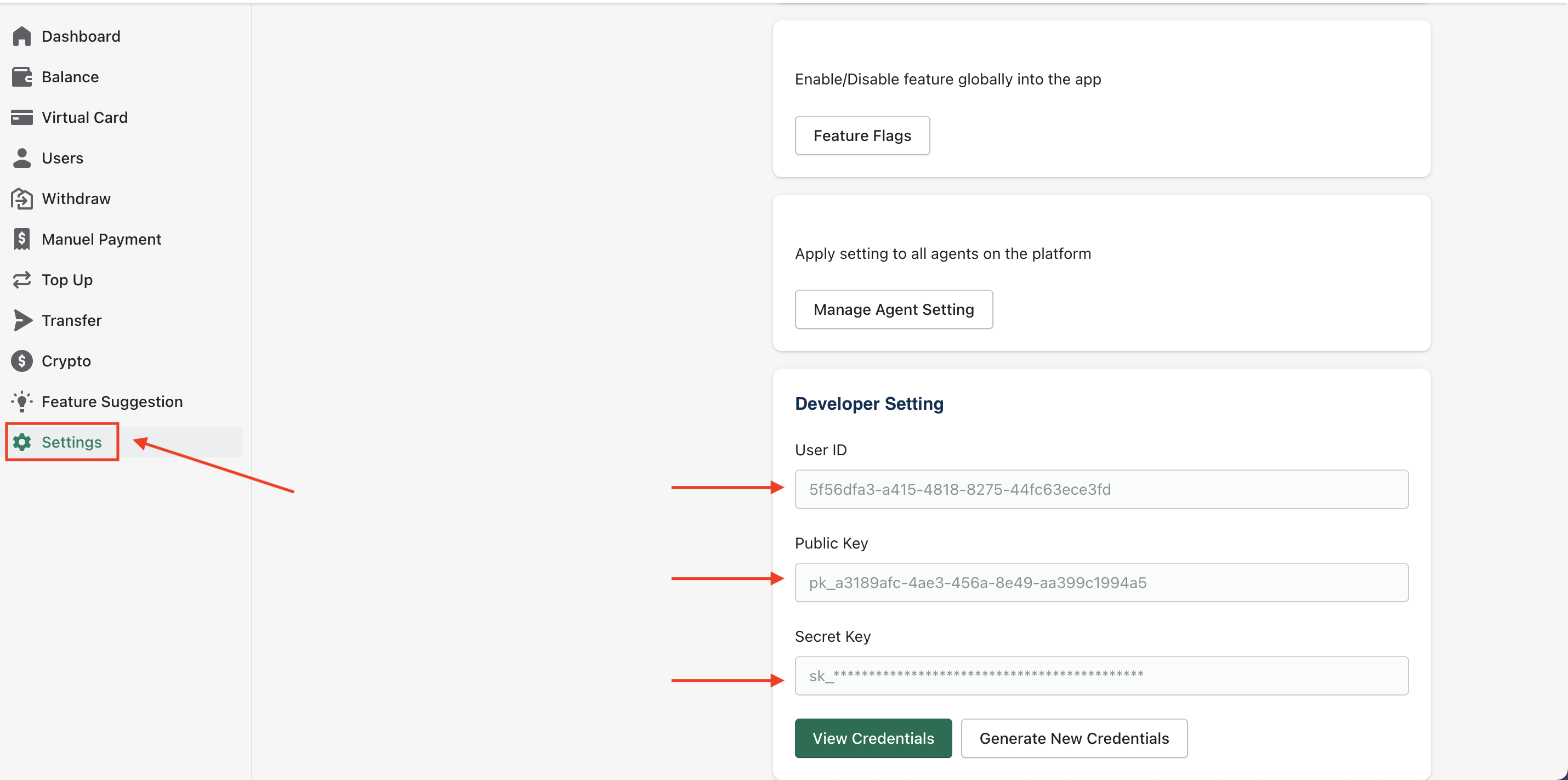
- Registered for a PG Rewards developer Account
- Navigate to Settings > Developer Setting
- Click on Generate New Credentials to get new credentials
Install pip package
$ pip install pgrwpy
Getting Started
You need to setup your key and secret using the following:
To work in production mode you need to specify your production PG_USER_ID & PG_SECRET_KEY along with a production_mode True boolean flag
import pgrwpy

client = pgrwpy.Client(auth=(PG_USER_ID, PG_SECRET_KEY),
                         production_mode=True)
or
To work in sandbox mode you need to specify your sandbox PG_USER_ID & PG_SECRET_KEY keys along with a False boolean flag or you could just omit the production_mode flag since it defaults to False if not specified
import pgrwpy

client = pgrwpy.Client(auth=(PG_USER_ID, PG_SECRET_KEY),
                         production_mode=False)
After setting up the client instance you can get the current pgrwpy SDK version using the following:
print(client.get_version())
Create a paymet with Mon Cash
In order to receive payments using this flow, first of all you will need to create a Moncash payment. Following are the important parameters that you can provide for this method:
| Field | Required | Type | Description |
|---|---|---|---|
| amount | Yes | number | Amount in Haitian Currency (gourdes) |
| referenceId | Yes | string | Your internal reference ID into your own system for tracking purposes |
| successUrl | Yes | string | Send the user back once the transaction is successfully complete |
| errorUrl | Yes | string | Send the user back if there is an error with the transaction |
For details of all the request and response parameters , check our PG API Documentation guide
data = {
    "amount": 500,
    "referenceId": "12345test",
    "successUrl": "https://example.com",
    "errorUrl": "https://example.com"
}

payment = client.Payment.moncash(data)
print(payment['redirectUrl']) #the redirect moncash link
Did you get a HTTP 201 response, if yes then you are all set for the next step.
Get Payment Details
Now that you have created a payment, the next step is to implement polling to get Payment Details. We recommend a 4-5 second interval between requests. Following are the important parameters that you can provide for this method:
| Field | Required | Type | Description |
|---|---|---|---|
| orderId | Yes | string | Your internal reference ID into your own system for tracking purposes |
Fetch a particular Moncash payment details
res = client.Payment.get_payment_details("<orderId>")
print(res) # 200: OK
For details of all the request and response parameters , check our PG API Documentation guide On successful payment, the status in the response will change to COMPLETED In case of a pending for Payment, the status in the response will change to PENDING
Rewards Schema
You can use send rewards as a way to recharge a user's account. The funds will automatically be available on their virtual or physical card. Following are the important parameters that you can provide for this method:
| Field | Required | Type | Description |
|---|---|---|---|
| Yes | string | Recipient email | |
| amount | Yes | number | Amount for the recipient |
| prepaid | Yes | boolean | User created via your platform, default true |
Send rewards
data = {
    "email": "info@pgecom.com",
    "amount": 10,
    "prepaid": False,
}
res = client.Reward.send(data)
print(res) # 200: OK
For details of all the request and response parameters , check our PG API Documentation guide Did you get a HTTP 201 response, if yes then you are all set for the next step.
Card Schema
In order to create a card, you will need to send a request to us with the following parameters:
| Field | Required | Type | Description |
|---|---|---|---|
| fullName | Yes | number | Recipient that needs to be on the card |
| amount | Yes | string | Available mount to spend with the card |
| Yes | string | Email of the card recipient | |
| billingAddress | Yes | object | Recipient address on the card. The country is required inside billingAddress |
| physical | Yes | boolean | If set to true, then card shipped to the provided address - only shipping for physical USA |
| person | Yes | string | prepaid/user - user is a registered user on the platform, and prepaid is just temporary prepaid card with a limited amount and limited feature |
The billing address object reference above
| Field | Required | Type | Description |
|---|---|---|---|
| line1 | Yes | string | recipient street address |
| city | Yes | string | recipient city |
| country | Yes | string | recipient country |
| state | Yes | string | recipient state |
| postal_code | Yes | number | recipient postal code |
For details of all the request and response parameters , check our PG API Documentation guide
data = {
    "fullName": "Stanley Castin",
    "amount": 5,
    "email": "stanley@ninja.root",
    "billingAddress": {
        "line1": "9700 Medlock Bridge Road",
        "city": "John Creeks",
        "country": "US",
        "state": "WA",
        "postal_code": "90098"
    },
    "physical": False,
    "person": "prepaid" # prepaid | user
}

res = client.Card.create(data)
print(res) # 200: OK
Did you get a HTTP 201 response, if yes then you are all set for the next step.
Retrieve a single card
Now that you have created a card, the next step is to implement polling to get Card Details. We recommend a 4-5 second interval between requests. Following are the important parameters that you can provide for this method:
| Field | Required | Type | Description |
|---|---|---|---|
| cardId | Yes | string | the actual card id |
| cardHolderId | Yes | string | The owner of the card |
Fetch a particular Card details
res = client.Card.get_card_details("<cardId>", "<cardHolderId>")
print(res) # 200: OK
For details of all the request and response parameters , check our PG API Documentation guide
List cards
the next step is to implement polling to get all Cards. We recommend a 4-5 second interval between requests. Following are the important parameters that you can provide for this method:
| Field | Required | Type | Description |
|---|---|---|---|
| cardHolderId | Yes | string | The owner of the card |
Fetch all Cards
res = client.Card.get_all_cards("<cardHolderId>")
print(res) # 200: OK
For details of all the request and response parameters , check our PG API Documentation guide
Task | workflow
- Payment with Moncash
- Payment Detail
- Send Rewards
- Create Card
- Card Detail
- List Cards
1 maintainer

Release files for pgrwpy 0.1.4
For a detailed explanation of source distributions (sdists) and built distributions (wheels), please see the package formats documentation.
Source distribution (sdist)
| File | Size | Uploaded | |
|---|---|---|---|
| pgrwpy-0.1.4.tar.gz | 12.9 kB | Details |
Built distribution (wheel)
| File | Interpreter | ABI | Platform | Reset |
|---|---|---|---|---|
| pgrwpy-0.1.4-py3-none-any.whl | Python 3 | none | any | Details |
Total release size: 25.0 kB
Release files / pgrwpy-0.1.4.tar.gz
| Download URL | pgrwpy-0.1.4.tar.gz |
|---|---|
| Size | 12.9 kB |
| Tags | Source |
|
SHA-256 checksum How to use checksums |
b3d8d123d938ddb81255ab94e2a92ab1106599812e13643defcb23357a4e6b60
|
|
BLAKE2b-256 checksum How to use checksums |
0c09982e723b22dc805e1d794c0bf91caf9412917f83b3c82d04c12d367097cd
|
| Upload date | |
|
Uploaded using Trusted Publishing? What is trusted publishing? |
No |
| Uploaded via |
twine/4.0.1 CPython/3.10.5
|
Release files / pgrwpy-0.1.4-py3-none-any.whl
| Download URL | pgrwpy-0.1.4-py3-none-any.whl |
|---|---|
| Size | 12.2 kB |
| Tags | Python 3 |
|
SHA-256 checksum How to use checksums |
26897233d4f52684d5e7f32aee26860feaba3a685e42936ecff5fa21f71d2baf
|
|
BLAKE2b-256 checksum How to use checksums |
021b8b742a5073c2b6e36ed56510bc16e66d4e4f19077438cb5e1c7c945caf3d
|
| Upload date | |
|
Uploaded using Trusted Publishing? What is trusted publishing? |
No |
| Uploaded via |
twine/4.0.1 CPython/3.10.5
|














