
PG Rewards python SDK

Project description
PG Rewards SDK - Python
So you are a developer and will start accepting payments with moncash. The PG Rewards Payments SDK is the easiest way to complete the integration in record time. With the PG Rewards Payment SDK, you can create a payment process through moncash to meet the unique needs of your projects.
Getting an API Key
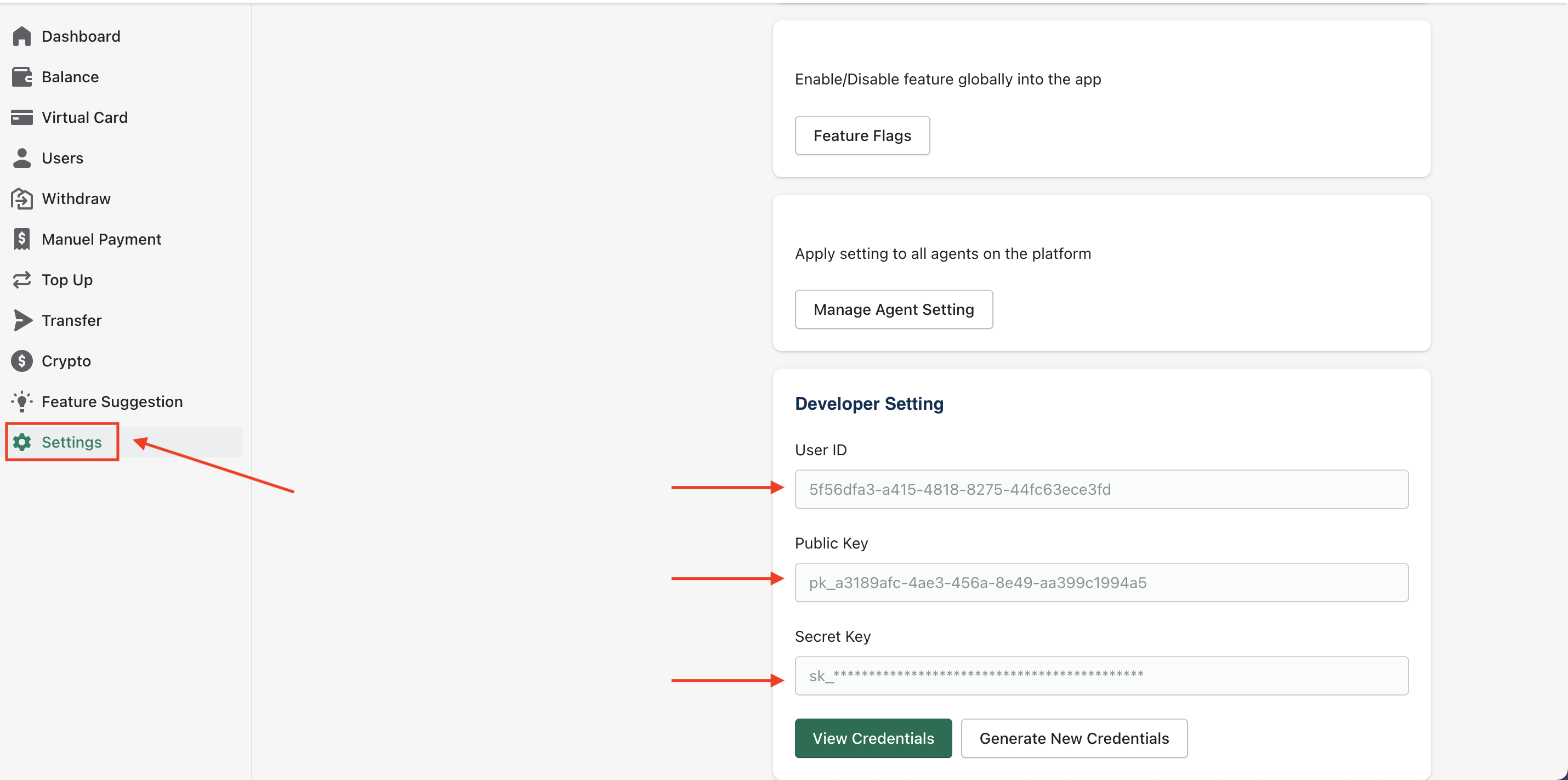
- Registered for a PG Rewards developer Account
- Navigate to Settings > Developer Setting
- Click on Generate New Credentials to get new credentials
Install pip package
$ pip install pgrwpy
Getting Started
You need to setup your key and secret using the following:
To work in production mode you need to specify your production PG_USER_ID & PG_SECRET_KEY along with a production_mode True boolean flag
import pgrwpy

client = pgrwpy.Client(auth=(PG_USER_ID, PG_SECRET_KEY),
                         production_mode=True)
or
To work in sandbox mode you need to specify your sandbox PG_USER_ID & PG_SECRET_KEY keys along with a False boolean flag or you could just omit the production_mode flag since it defaults to False if not specified
import pgrwpy

client = pgrwpy.Client(auth=(PG_USER_ID, PG_SECRET_KEY),
                         production_mode=False)
After setting up the client instance you can get the current pgrwpy SDK version using the following:
print(client.get_version())
Create a paymet with Mon Cash
In order to receive payments using this flow, first of all you will need to create a Moncash payment. Following are the important parameters that you can provide for this method:
| Field | Required | Type | Description |
|---|---|---|---|
| amount | Yes | number | Amount in Haitian Currency (gourdes) |
| referenceId | Yes | string | Your internal reference ID into your own system for tracking purposes |
| successUrl | Yes | string | Send the user back once the transaction is successfully complete |
| errorUrl | Yes | string | Send the user back if there is an error with the transaction |
For details of all the request and response parameters , check our PG API Documentation guide
data = {
    "amount": 500,
    "referenceId": "12345test",
    "successUrl": "https://example.com",
    "errorUrl": "https://example.com"
}

payment = client.Payment.moncash(data)
payment['redirectUrl'] #the redirect moncash link
Did you get a HTTP 201 response, if yes then you are all set for the next step.
Get Payment Details
Now that you have created a payment, the next step is to implement polling to get Payment Details. We recommend a 4-5 second interval between requests. Following are the important parameters that you can provide for this method:
| Field | Required | Type | Description |
|---|---|---|---|
| orderId | Yes | string | Your internal reference ID into your own system for tracking purposes |
Fetch a particular Moncash payment details
client.Payment.get_payment_details("<orderId>")
For details of all the request and response parameters , check our PG API Documentation guide On successful payment, the status in the response will change to COMPLETED In case of a pending for Payment, the status in the response will change to PENDING
Task | workflow
- Moncash
- Payment details
- Card


Download files
Download the file for your platform. If you're not sure which to choose, learn more about installing packages.
Source Distribution
Built Distribution
Filter files by name, interpreter, ABI, and platform.
If you're not sure about the file name format, learn more about wheel file names.
Copy a direct link to the current filters
File details
Details for the file pgrwpy-0.1.3.tar.gz.
File metadata
- Download URL: pgrwpy-0.1.3.tar.gz
- Upload date:
- Size: 9.8 kB
- Tags: Source
- Uploaded using Trusted Publishing? No
- Uploaded via: twine/4.0.1 CPython/3.10.5
File hashes
| Algorithm | Hash digest | |
|---|---|---|
| SHA256 |
acb1570c7d207257ce55fcad03ab3330f5d24838d222c51f1019b221d67991e1
|
|
| MD5 |
368b75b93eeb0e0d77136c42c61287da
|
|
| BLAKE2b-256 |
05940d98dc5a23d9ebdb3a22e52a1202c6dd6170f6b445996d29984237845a3a
|
File details
Details for the file pgrwpy-0.1.3-py3-none-any.whl.
File metadata
- Download URL: pgrwpy-0.1.3-py3-none-any.whl
- Upload date:
- Size: 10.1 kB
- Tags: Python 3
- Uploaded using Trusted Publishing? No
- Uploaded via: twine/4.0.1 CPython/3.10.5
File hashes
| Algorithm | Hash digest | |
|---|---|---|
| SHA256 |
b25b6e8afe16da531428a4922adeab72f52adbeb1f5473561a9ea1b141e09f44
|
|
| MD5 |
b9ae597bfd72c2c9409d5ed58455a733
|
|
| BLAKE2b-256 |
0bae2a005e9aa2dde0d692acaebcfd93bdbbbe6bd84c91c100fbe345db6ddfc2
|






