

pgsesame
Declarative permission management for PostgreSQL and Amazon Redshift. Define roles, users, groups and grants in YAML, then plan and apply changes like Terraform.
Status: 0.1, alpha.
validate,plan,applyand change sets work for roles, users, groups, memberships and privileges on PostgreSQL and Redshift, tested against PostgreSQL 14 to 18, oblako's redshift-local and Redshift Serverless, on Python 3.10 to 3.13. Ownership (owns) and default privileges are validated but not yet planned; see the roadmap.
Why
Granting access by hand leaves a trail of GRANT statements nobody can review.
pgsesame keeps the intended state in one file: changes go through pull requests,
sesame plan shows exactly which statements a change needs, and sesame apply
runs them. A second plan after apply is empty.
It is built on what went wrong with earlier tools (redtape for Redshift, pgbedrock for PostgreSQL): it reads the real catalog without crashing on what it doesn't model, issues only the difference instead of every grant on every run, and plans revokes and drops but applies them only when you ask.
Where it runs
PostgreSQL 14 to 18 and Amazon Redshift (provisioned or Serverless). PostgreSQL services work through the same connection, as the platform's admin role: Supabase (tested, with its built-in roles and row-level security), Google's AlloyDB, Amazon RDS and Aurora, Cloud SQL, Neon.
On Amazon RDS and Aurora PostgreSQL, --rds names the instance or cluster and
pgsesame finds the rest:
sesame plan permissions.yaml --iam --rds my-cluster        # a signed IAM token, over TLS
sesame plan permissions.yaml --data-api --rds my-cluster --secret-arn arn:aws:secretsmanager:...
--iam signs an authentication token for the admin user (or --db-user), which
is the only way into an Aurora cluster made with express configuration; the
caller needs rds-db:connect on that database user, which AmazonRDSFullAccess
doesn't include. A user the spec creates signs in the same way once it is a
member of rds_iam (member_of: [rds_iam], with rds_iam: {type: builtin}). The RDS
Data API runs apply in one transaction. The admin user isn't a superuser: from
PostgreSQL 16 on it changes only the roles it has ADMIN OPTION on, so a login or
membership change it can't make is noted in the plan, not attempted.
Install
uv tool install pgsesame               # installs the `sesame` command
uv tool install "pgsesame[redshift]"   # adds IAM credentials and the Data API for Redshift
uvx pgsesame --help                    # or try it without installing
pip install pgsesame                   # or into an environment
In CI without Python, use the image (amd64 and arm64):
docker run --rm -v "$PWD:/work" -e SESAME_DSN ghcr.io/almostly/pgsesame plan permissions.yaml
pgsesame connects the way you already do: a DSN or the standard PG* variables
with a password (PostgreSQL and Redshift), temporary credentials from IAM for a
Redshift cluster or Serverless workgroup, or the Redshift Data API when the
database isn't reachable over the network.
A spec
version: 1
engine: redshift            # or postgres

principals:
  reader:
    type: role
    privileges:
      schemas:
        usage: [analytics]
      tables:
        select: [analytics.*]

  alice:
    type: user
    password_env: ALICE_PASSWORD
    member_of: [reader]

  support:
    type: role
    privileges:
      columns:                # some columns of a table, not all of it
        select: [crm.customers.id, crm.customers.email]
        update: [crm.customers.email]
Connect once with sesame login, then plan and apply by name. The password goes
to the operating system's keychain, never to a file; a Redshift target with IAM or
the Data API keeps no secret at all:
sesame login prod --host db.example.com --user admin --database app   # asks for the password
sesame login analytics --engine redshift --iam --workgroup analytics --database dev
sesame login aurora --iam --rds my-cluster            # RDS or Aurora: an IAM token
sesame targets                     # the saved targets; * marks the default
sesame use prod                    # the default for plan and apply
sesame plan permissions.yaml --target analytics
sesame logout prod                 # forget it and its password
A target can instead take its password from an environment variable when it
connects, so a .env file or a CI secret supplies it and nothing is stored:
sesame login staging --host db.staging.example.com --user admin --password-env STAGING_DB_PASSWORD
uv run --env-file .env sesame plan permissions.yaml -t staging
Targets to share go in the project, committed next to the spec: sesame login --project writes sesame.toml (or put the same tables under [tool.sesame] in
pyproject.toml). sesame looks for it from the current directory up to the
repository root; a project target wins over your own of the same name, and your
sesame use wins over the project's default. A project target takes no typed
password, only --password-env, so the file stays free of secrets:
# sesame.toml
default = "staging"

[targets.staging]
host = "db.staging.example.com"
user = "admin"
database = "app"
sslmode = "require"
password_env = "STAGING_DB_PASSWORD"
The same file then serves CI, with STAGING_DB_PASSWORD as a repository secret.
SESAME_DSN and the standard PG* variables keep working too.
sesame validate permissions.yaml
sesame plan permissions.yaml       # exit code 2 when there are changes
sesame apply permissions.yaml      # revokes and drops need --allow-revoke / --allow-drop

sesame plan permissions.yaml -o changes.json   # save the plan as a change set
sesame show changes.json                       # review it, no database needed
sesame apply changes.json                      # run exactly that, or refuse if it's stale
Passwords never go in the spec: name an environment variable with password_env,
use IAM, or set password: disabled.
A platform's own roles (Supabase's authenticated, RDS's rds_iam) are type: builtin: granted to and joined, never created or altered, and their privileges are
managed only in the schemas the spec names for them. Row-level security is
declared per table:
principals:
  authenticated:
    type: builtin
    privileges:
      schemas: {usage: [app]}
      tables: {select: [app.notes]}

row_level_security:
  app.notes:
    policies:
      own_notes:
        command: select          # all, select, insert, update, delete
        to: [authenticated]
        using: "auth.uid() = owner"
Policy expressions are compared in the form PostgreSQL stores them, so a re-plan
after apply is empty; dropping a policy or disabling row-level security needs
--allow-drop.
On Redshift, dynamic data masking is declared per column: what everyone sees, which roles see the raw value, and which see their own mask:
masking:
  policies:
    redact: {type: varchar(256), using: "'***'::varchar(256)"}
    email_domain: {type: varchar(256), using: "regexp_replace(value, '^[^@]+', '***')"}
  columns:
    crm.customers.email:
      mask: redact               # everyone else
      unmasked: [pii_reader]     # the raw value
      roles:
        support: email_domain    # their own mask; later entries win
pgsesame works out Redshift's mechanics: the mask is attached to PUBLIC at
priority 10, each role's policy at 20, 30 ... in the order written, and the
unmasked roles get a pass-through policy of pgsesame's own
(sesame_unmasked_varchar_256) at 1000. A constant needs its type ('***'::varchar(256)): Redshift
refuses an expression of ambiguous type. Expressions are compared in the form
Redshift stores them; moving a role's priority is a change, taking a role off a
column needs --allow-revoke, and a policy whose type changes is replaced only
with --allow-drop. Planning masking needs a superuser or the sys:secadmin
role, as Redshift shows policies to no one else.
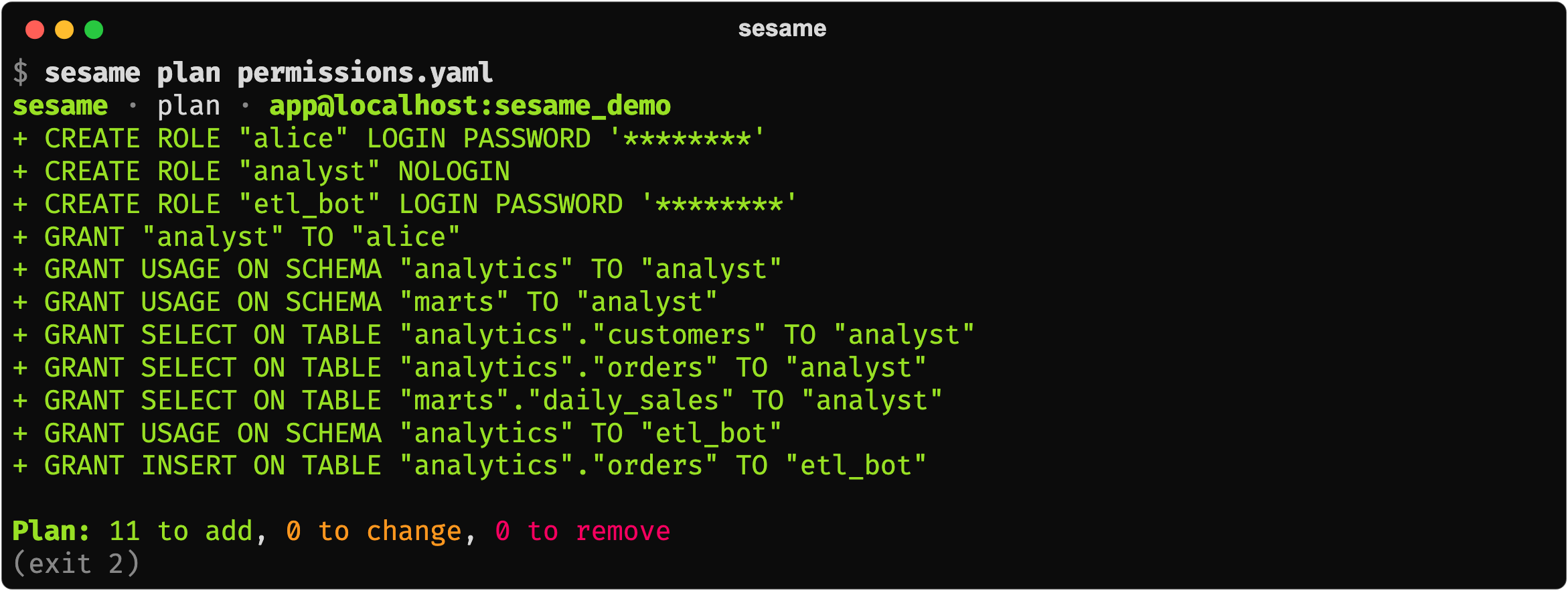
A first plan creates the roles and grants the spec declares:
Later, two grants someone made by hand show up as drift; they are revoked only
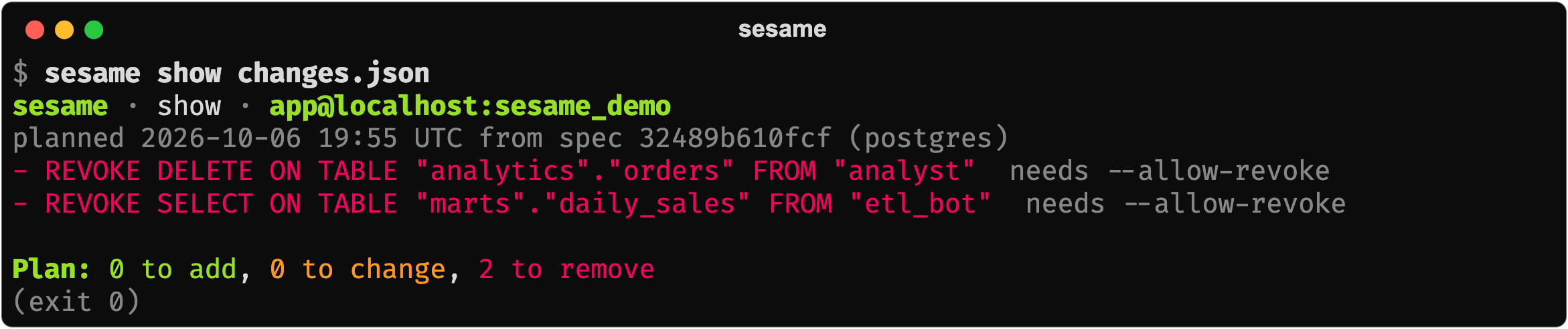
with --allow-revoke:

A saved change set can be reviewed without a database, then applied exactly:
In GitHub Actions
Review the plan on the pull request; apply the reviewed change set on merge. The
connection comes from a secret (SESAME_DSN), and the production environment
can require a reviewer's approval before apply runs.
on:
  pull_request:
  push:
    branches: [main]

jobs:
  plan:
    runs-on: ubuntu-latest
    permissions: {contents: read, pull-requests: write}
    env: {SESAME_DSN: "${{ secrets.SESAME_DSN }}"}
    steps:
      - uses: actions/checkout@v4
      - uses: almostly/pgsesame@v0.2.0
        with: {command: plan, spec: permissions.yaml}

  apply:
    if: github.event_name == 'push'
    needs: plan
    runs-on: ubuntu-latest
    environment: production
    env: {SESAME_DSN: "${{ secrets.SESAME_DSN }}"}
    steps:
      - uses: almostly/pgsesame@v0.2.0
        with: {command: apply}
On a pull request the plan is posted as one comment, updated on each push. On
merge, apply runs exactly the change set the plan job saved, or refuses if the
database changed since. Revokes need allow-revoke: true. The step's outputs
(has-changes, to-add, to-change, to-remove) can drive other steps. For
Redshift with IAM, sign in with aws-actions/configure-aws-credentials and pass
args: --iam --workgroup analytics.
Outside GitHub, run uvx pgsesame or the image
(docker run --rm -v "$PWD:/work" -e SESAME_DSN ghcr.io/almostly/pgsesame plan permissions.yaml); plan exits 2 when it has changes.
Testing locally
The integration tests run against PostgreSQL in Docker and against oblako's local Redshift, so a spec can be planned and applied in CI before it touches a real cluster.
License
Apache-2.0
1 maintainer

Metadata
1 maintainer
Release files for pgsesame 0.2.0
For a detailed explanation of source distributions (sdists) and built distributions (wheels), please see the package formats documentation.
Source distribution (sdist)
| File | Size | Uploaded | |
|---|---|---|---|
| pgsesame-0.2.0.tar.gz | 569.2 kB | Details |
Built distribution (wheel)
| File | Interpreter | ABI | Platform | Reset |
|---|---|---|---|---|
| pgsesame-0.2.0-py3-none-any.whl | Python 3 | none | any | Details |
Total release size: 624.2 kB
Release files / pgsesame-0.2.0.tar.gz
| Download URL | pgsesame-0.2.0.tar.gz |
|---|---|
| Size | 569.2 kB |
| Tags | Source |
|
SHA-256 checksum How to use checksums |
6ac0e827b88e2bd78a6672f6c32116fec72b84ff167446bb8ca0351d8b202e32
|
|
BLAKE2b-256 checksum How to use checksums |
eff759fccebd04847aa41797c959ebc4a0bca348f2b9161834ffbc0eed0fcfd1
|
| Upload date | |
|
Uploaded using Trusted Publishing? What is trusted publishing? |
Yes |
| Uploaded via |
twine/7.0.0 CPython/3.13.14
|
Provenance
Provenance describes where a file came from. On PyPI, provenance is shared via attestations, which provide a verifiable record of the build or publishing details. View details, limitations and caveats.


PyPI Publish Attestation
PyPI verified that this artifact, at this checksum, originated from the publisher listed below.
Signed by GitHub Actions, verified by PyPI on Oct 7, 2026.
Transparency logRelease files / pgsesame-0.2.0-py3-none-any.whl
| Download URL | pgsesame-0.2.0-py3-none-any.whl |
|---|---|
| Size | 55.0 kB |
| Tags | Python 3 |
|
SHA-256 checksum How to use checksums |
39e1b2ee8af78197921fc0e43275e15d6abdea6024dbcc4eb69589a27918e06a
|
|
BLAKE2b-256 checksum How to use checksums |
f19c7a4c399f1ca2384a805e207468baa698cd460887e73169d0ea6753eb21e2
|
| Upload date | |
|
Uploaded using Trusted Publishing? What is trusted publishing? |
Yes |
| Uploaded via |
twine/7.0.0 CPython/3.13.14
|
Provenance
Provenance describes where a file came from. On PyPI, provenance is shared via attestations, which provide a verifiable record of the build or publishing details. View details, limitations and caveats.
PyPI Publish Attestation
PyPI verified that this artifact, at this checksum, originated from the publisher listed below.
Signed by GitHub Actions, verified by PyPI on Oct 7, 2026.
Transparency log













