
Unix process tree search

Project description








pgtree
Unix process hierachy tree display for specific processes (kind of mixed pgrep + pstree)
You can now take a look at joknarf/pgtreeawk, a pgtree implementation using bash/awk (more portable, no python needed)
And also a pure bash implementation (but a little slower) joknarf/pgt
Features
- display process tree (parent + children) and optionnally threads
- filter process/threads tree using pgrep options / pattern
- limit tree to processes and their children
- customize ps fields to output
- can send kill or kill -9 to processes and their children
- watch process tree
- supports all unix/linux/macos
The purpose is to have the tool working out of the box on any Unix box, using the default OS python installed, without installing anything else. The code must be compatible with python 2.x + 3.x
Should work on any Unix that can execute :
# /usr/bin/pgrep
# /usr/bin/ps ax -o pid,ppid,stime,user,ucomm,args
if pgrep command not available (AIX), pgtree uses built-in pgrep (-f -i -x -u <user> supported).
-T option to display threads only works if ps ax -T -o spid,ppid / pgrep -w available on system (ubuntu/redhat...)
pgtree Tested on various versions of RedHat / CentOS / Ubuntu / Debian / Suse / FreeBSD / ArchLinux / MacOS / Solaris / AIX including old versions
(uses -o fname on Solaris)
Examples
show all parents and children of processes matching bash
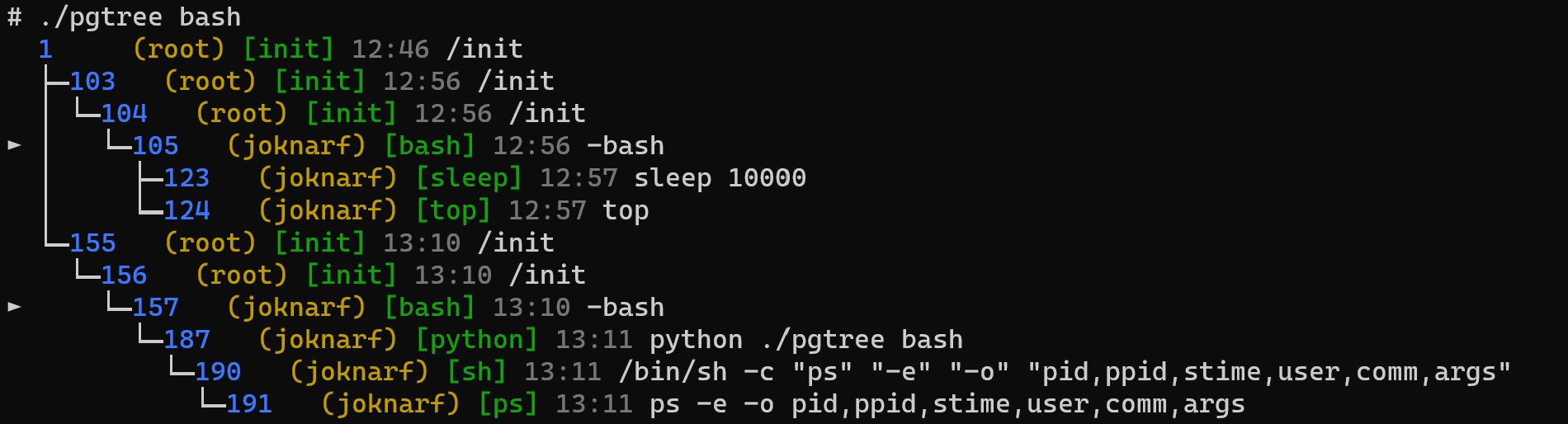
show processes matching bash and their children

kill all sh processes of user joknarf and their children

Customize ps output fields:
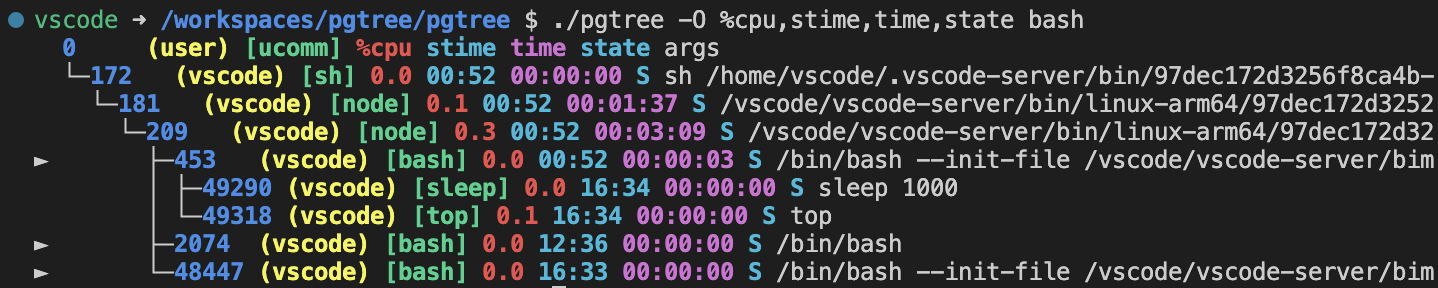
Put default options in PGTREE env variable:
# export PGTREE='-1 -O %cpu,stime -C y'
# pgtree
Use watch utility to follow process tree:
# pgtree -W bash
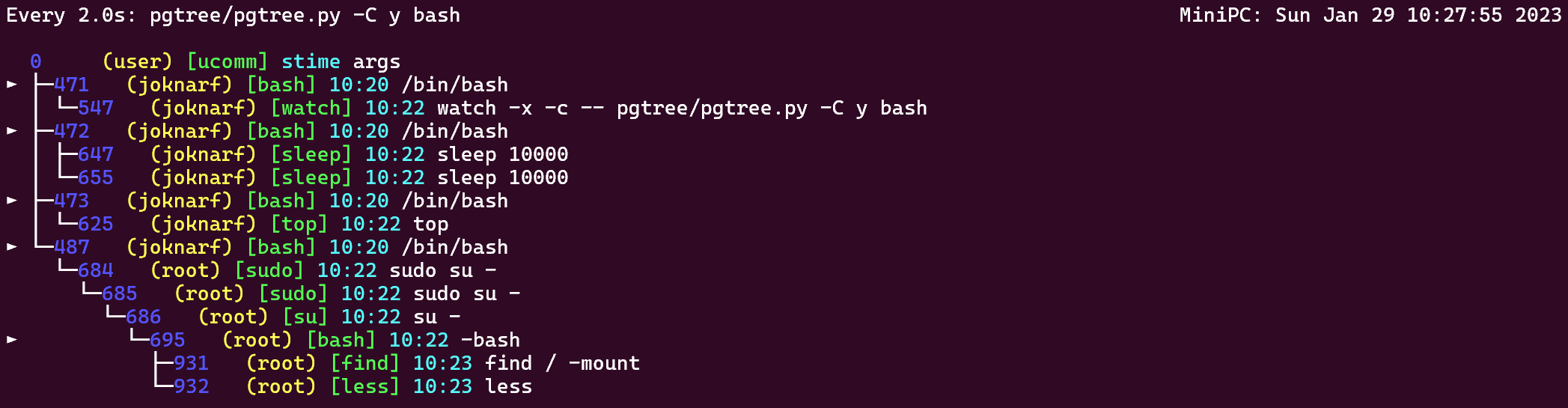
Demo

Install
FYI, the pgtree/pgtree.py is standalone and can be directly copied/used anywhere without any installation.
install using pip:
# pip install pgtree
or use your prefered method according to your OS:
brew install joknarf/tools/pgtree
sudo dnf install https://github.com/joknarf/pgtree/releases/latest/download/pgtree.rpm
curl -OL https://github.com/joknarf/pgtree/releases/latest/download/pgtree.deb
sudo dpkg -i pgtree.deb
curl -OL https://github.com/joknarf/pgtree/releases/latest/download/pgtree.apk
sudo apk add --allow-untrusted pgtree.apk
curl -OL https://github.com/joknarf/pgtree/releases/latest/download/pgtree.pkg
sudo installer -pkg pgtree.pkg -target /
Usage
# pgtree -h
    usage: pgtree.py [-W] [-RIya] [-C <when>] [-O <psfield>] [-c|-k|-K] [-1|-p <pid1>,...|<pgrep args>]

    -I : use -o uid instead of -o user for ps command
         (if uid/user mapping is broken ps command can be stuck)
    -c : display processes and children only
    -k : kill -TERM processes and children
    -K : kill -KILL processes and children
    -y : do not ask for confirmation to kill
    -R : force use of internal pgrep
    -C : color preference : y/yes/always or n/no/never (default auto)
    -w : tty wrap text : y/yes or n/no (default y)
    -W : watch and follow process tree every 2s
    -a : use ascii characters
    -T : display threads (ps -T)
    -O <psfield>[,psfield,...] : display multiple <psfield> instead of 'stime' in output
                   <psfield> must be valid with ps -o <psfield> command

    by default display full process hierarchy (parents + children of selected processes)

    -p <pids> : select processes pids to display hierarchy (default 0)
    -1 : display hierachy children of pid 1 (not including pid 0)
    <pgrep args> : use pgrep to select processes (see pgrep -h)

    found pids are prefixed with ▶
Release history Release notifications | RSS feed


Download files
Download the file for your platform. If you're not sure which to choose, learn more about installing packages.
Source Distribution
Built Distribution
Filter files by name, interpreter, ABI, and platform.
If you're not sure about the file name format, learn more about wheel file names.
Copy a direct link to the current filters
File details
Details for the file pgtree-1.1.11.tar.gz.
File metadata
- Download URL: pgtree-1.1.11.tar.gz
- Upload date:
- Size: 22.6 kB
- Tags: Source
- Uploaded using Trusted Publishing? No
- Uploaded via: twine/6.2.0 CPython/3.9.25
File hashes
| Algorithm | Hash digest | |
|---|---|---|
| SHA256 |
90c0194e01623df0d6dc2ae626e979ae2bd5e75289c71267db0a463f6c6bbb65
|
|
| MD5 |
6dbd3396f9e5a940a06c65fb4b4d6215
|
|
| BLAKE2b-256 |
a2479d5dadeaea935480f08551697d92475c5abc2cd9def4d07a6e2ec9515928
|
File details
Details for the file pgtree-1.1.11-py2.py3-none-any.whl.
File metadata
- Download URL: pgtree-1.1.11-py2.py3-none-any.whl
- Upload date:
- Size: 24.0 kB
- Tags: Python 2, Python 3
- Uploaded using Trusted Publishing? No
- Uploaded via: twine/6.2.0 CPython/3.9.25
File hashes
| Algorithm | Hash digest | |
|---|---|---|
| SHA256 |
3e072802ba14f115526a58fd5c0fe41eee30eb0d75e716de006f8368a98330d6
|
|
| MD5 |
e4ba4303883e3c1debc1f9ac215bc804
|
|
| BLAKE2b-256 |
d18f3c119bb6486a3536bd2827c33b5a20d942202bac142da9ab7f9632bcbff2
|






