
phabfive
CLI for Phabricator and Phorge - built for humans and AI agents.
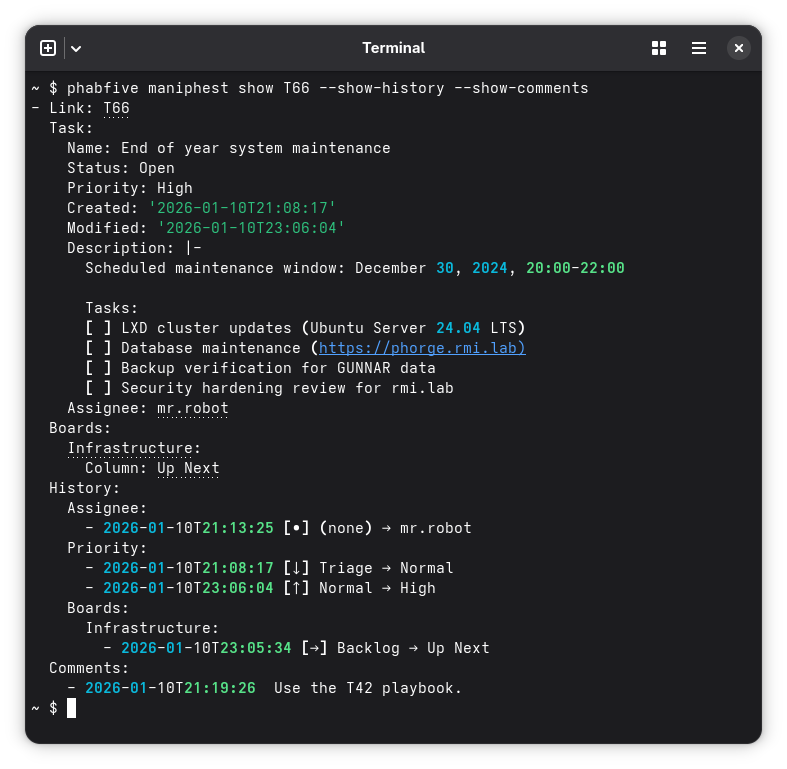
Features
- Maniphest - Full task management: create, show, edit, search, comment, parents/subtasks
- Paste - Create, show, edit, search, and comment on pastes
- Diffusion - Repository management, branches and tags, and URI configuration
- Projects - Create, show, edit and search projects, subprojects and milestones, with their members and roles
- Passphrase - Search, list, and retrieve secrets (passwords, tokens, SSH keys, notes)
- User - Search users and filter them by role, user info, and an interactive setup wizard
Cross-cutting features:
- Monogram shortcuts -
phabfive T123expands tophabfive maniphest show T123 - Batch editing - Edit multiple objects at once:
phabfive edit T1,T2,T3 --status=resolved - Policies - Read and set who can see, edit, join and push to repositories, tasks and projects:
--show-policy,--visible-to,--editable-by,--joinable-by,--can-push - Shell completion - Tab completion for commands, options, and values
- Machine-readable output -
--format=json,--format=jsonlor--format=yamlfor scripting and AI agents - Table output -
--format=tablerenders a grid for the commands that answer with a list - Bare values -
--format=valueprints the secret, the paste content or the monograms with nothing around them, for piping - Agent skill -
phabfive --skillprints a ready-to-use skill file for AI agents - Quiet by default -
-vreports which filters a search actually applied
For complete documentation, see Read the Docs.
Installation
uv is a fast Python package installer (10-100x faster than pip):
# Install uv if you haven't already
curl -LsSf https://astral.sh/uv/install.sh | sh

# Install from pypi.org
uv tool install phabfive

# Install from Github to get unreleased features and fixes
uv tool install git+https://github.com/dynamist/phabfive
If you prefer mise-en-place the polyglot tool version manager:
# Install mise if you haven't already
curl https://mise.run | sh

# Install from pypi.org, needs a Python toolchain
mise use --global --pin pipx:phabfive

# Install the standalone executable instead, needs nothing
mise use --global github:dynamist/phabfive
The two differ in what they fetch. pipx: resolves the wheel from pypi.org and so needs Python
present, the same as uv above. github: downloads the release executable described below, which
bundles its own Python, so it is the one to reach for on a machine without a toolchain. Either way
mise handles pinning and upgrades.
Standalone executable
Every release ships a single file executable that bundles its own Python, so it needs nothing
installed. Download it, make it executable and put it on your PATH:
# Linux amd64 - swap the asset name for your platform
curl -LO https://github.com/dynamist/phabfive/releases/latest/download/phabfive-linux-amd64
chmod +x phabfive-linux-amd64
sudo install phabfive-linux-amd64 /usr/local/bin/phabfive
The asset names are phabfive-linux-amd64, phabfive-linux-arm64, phabfive-macos-amd64,
phabfive-macos-arm64, phabfive-windows-amd64.exe and phabfive-windows-arm64.exe.
latest/download/ always resolves to the newest release; pin a version by using
download/v0.10.0/ instead. All builds are listed on the
releases page.
The executable unpacks itself on every run, so it starts in about two seconds against a fraction of
that for an installed phabfive. Where a Python toolchain is available, prefer an installed phabfive
via uv or mise use pipx:phabfive, and keep the executable for machines without one, such as a
bare CI image or a locked down workstation. mise use github:dynamist/phabfive installs this same
executable, and is the easier route to it if you already run mise.
macOS: the binaries are not notarized, so Gatekeeper refuses them after a browser download.
Clear the quarantine flag with xattr -d com.apple.quarantine phabfive-macos-arm64.
Verifying signatures
Every executable except phabfive-windows-arm64.exe is signed with
Sigstore and ships a .sigstore.json bundle beside it. Download both
files and verify with cosign:
cosign verify-blob phabfive-linux-amd64 \
  --bundle phabfive-linux-amd64.sigstore.json \
  --certificate-identity-regexp="https://github.com/dynamist/phabfive" \
  --certificate-oidc-issuer="https://token.actions.githubusercontent.com"
Container image
ghcr.io/dynamist/phabfive is a scratch image containing only phabfive and its own Python. It can't run by itself. Instead, copy phabfive from it into your own image, for example in CI:
FROM debian:trixie-slim
COPY --from=ghcr.io/dynamist/phabfive:latest /opt/phabfive /opt/phabfive
ENV PATH=/opt/phabfive/bin:$PATH
Use the -musl tags (e.g. latest-musl) for Alpine based images. The files must stay at /opt/phabfive, because the install contains absolute paths.
Quick Start
Run the interactive setup wizard:
phabfive user setup
The wizard will prompt for your Phabricator/Phorge URL and API token, then store them in ~/.arcrc (Arcanist-compatible format). If you have multiple servers configured, phabfive will let you choose which one to use.
Then start using phabfive:
# Show tasks and pastes with monogram shortcuts
phabfive T123
phabfive P456

# Search and filter
phabfive maniphest search "migration tasks" --tag myproject
phabfive maniphest search --tag myproject --order updated --limit 10
phabfive maniphest search --author=@me          # tasks you created
phabfive maniphest search --assigned=@me        # tasks assigned to you
phabfive paste search "config"

# Create and edit
phabfive maniphest create "Fix the bug" --priority=high --tag myproject
phabfive maniphest edit T123 "New Title" --status=resolved

# Spaces - place a new task in one, or move a task between them
phabfive maniphest create "Quarterly cleanup" --space=Archive
phabfive maniphest edit T123 --space=S3

# Policies - read who can see and change an object, and set it
phabfive maniphest show T123 --show-policy
phabfive maniphest edit T123 --visible-to='#infra' --editable-by=admin --dry-run
phabfive diffusion repo edit R5 --visible-to=public --can-push='#infra' --dry-run

# Projects - members with their roles, subprojects and milestones
phabfive project show '#backend' --show-members
phabfive project create "Sprint 7" --milestone-of='#backend' --dry-run
phabfive project edit '#backend' --add-member=@alice,@bob --joinable-by=admin --dry-run
phabfive --format=jsonl project search --status=any --space='*' --show-policy -l 0

# Users - every person, with bots, mailing lists and disabled accounts left out
phabfive --format=jsonl user search --not-role=bot,list,disabled -l 0

# Smart navigation - raise/lower priority, move columns forward/backward
phabfive edit T123 --priority=raise
phabfive edit T123 --tag=MyBoard --column=forward

# Batch operations
phabfive edit T1,T2,T3 --status=resolved
phabfive maniphest search --assigned=@me | phabfive edit --column=Done

# Fewer results than expected? -v shows which filters were applied
phabfive -v maniphest search --tag myproject
Shell Completion
Enable tab completion for bash, zsh or fish:
phabfive --install-completion
It installs for the shell you are in: the option takes no argument, so run
it from bash to get bash completion and from fish to get fish's. phabfive --show-completion prints the script instead of writing it, if you would rather
put it somewhere yourself.
After installation, restart your shell or source your profile.
Completions that come from the server, such as usernames, are cached on disk so
only the first TAB waits for a round trip. Run phabfive cache clear after
somebody joins, leaves or is renamed, or set PHAB_CACHE=0 to switch caching
off. See Caching for what is cached and for how long;
secrets never are.
Manual configuration (advanced)
Arcanist-compatible ~/.arcrc (recommended):
{
  "hosts": {
    "https://yourserver.com/api/": {
      "token": "cli-ABC123"
    }
  }
}
Or environment variables:
export PHAB_TOKEN=cli-ABC123
export PHAB_URL=https://yourserver.com/api/
Windows SSL certificates: If you encounter certificate errors, install pip-system-certs to use the Windows certificate store: pip install pip-system-certs
Using phabfive as a library
The command is built on classes that return plain data, and those are exported from the top level:
from phabfive import Maniphest, User

maniphest = Maniphest(url="https://phorge.example.com", token="api-...")

result = maniphest.task_show([123])
for task in result["tasks"]:
    print(task["_url"], task["Task"]["Name"], task["Task"]["Status"])

created = maniphest.create_task("Rotate the build keys", tags=["Security"])
print(created["uri"])
A record is the same one --format=json prints, so the shapes described for the
CLI hold here too.
Configuration. Passing url, token or config configures an instance from
those alone - the /api/ suffix is added when missing, and config takes the
other settings, such as {"PHAB_SPACE": "S2"}. Nothing is read from the
environment or any file, so the program behaves the same whoever runs it.
With no arguments, Maniphest() discovers its configuration exactly as the
command does: PHAB_URL and PHAB_TOKEN from the environment, ~/.arcrc,
.arcconfig in the git root, and the yaml files under /etc and
~/.config. When ~/.arcrc holds several hosts and nothing picks one,
select_host= is called with the list to choose from; without it that is an
error, never a prompt.
Connecting. Constructing makes no request. The client is built on the first
call, so a wrong token shows up as a PhabfiveRemoteException from that call;
pass verify=True to check the connection immediately instead. An app that
uses another internally - Diffusion reading credentials through Passphrase -
shares one client with it.
The library prints nothing, prompts for nothing and leaves os.environ alone.
It logs through the logging module under the phabfive logger, and the
records it returns hold plain strings.
Editing. Edit.plan() works out what an edit would change on each task and
changes nothing; Edit.apply() makes one planned edit. The review, confirmation
and preview the command puts between them are yours to decide:
from phabfive import Edit

edit = Edit(url=url, token=token)
plan = edit.plan("T1,T2,T3", status="resolved", comment="Done in the migration")

for failure in plan.failures:
    print(f"{failure.monogram}: {failure.error}")

for task_edit in plan.edits:
    if task_edit.noop:
        continue  # already resolved
    for change in task_edit.changes:
        print(task_edit.monogram, change["field"], change["old"], "->", change["new"])
    edit.apply(task_edit)
Validation is all or nothing: if any task cannot be fetched, or is on several
boards when a column was asked for without tag=, plan() raises
PhabfiveValidationException naming every one and plans nothing.
plan.needs_confirmation says whether a title, description or policy would
change - the edits the command asks about. edit.apply_all(plan) applies every
edit and stops at the first the server refuses.
Errors. Everything phabfive raises on purpose is a PhabfiveException:
PhabfiveConfigException |
configuration missing or malformed, or an argument phabfive cannot use |
PhabfiveInputException |
an argument's value is wrong - also a ValueError |
PhabfiveDataException |
the data does not allow it |
PhabfiveValidationException |
some of several tasks failed validation, so none was changed; carries .problems |
PhabfiveNotFoundException |
the object does not exist, or is not visible - also a LookupError |
PhabfiveNameCollisionException |
a new name is too close to an existing one |
PhabfiveRemoteException |
the server could not be asked, or refused |
PhabfiveAPIException |
Conduit answered with an error; carries .code and .message |
PhabfiveConnectionException |
the server could not be reached |
A program never needs to import phabricator or requests to catch what
phabfive raises:
from phabfive import Maniphest, PhabfiveAPIException, PhabfiveNotFoundException

try:
    Maniphest(url=url, token=token).task_show([123])
except PhabfiveNotFoundException:
    ...
except PhabfiveAPIException as e:
    if e.code == "ERR-INVALID-AUTH":
        ...
Every public name is resolved lazily, so import phabfive loads no third-party
module; the module holding a name is imported the first time the name is used.
| Apps | Maniphest, Paste, Diffusion, Passphrase, Project, User, Edit, and their base Phabfive |
| Edits | EditPlan, TaskEdit, EditFailure |
| Errors | PhabfiveException, and its subclasses - see below |
| Version | __version__ |
Other modules keep their own __all__ - phabfive.transitions,
phabfive.policy, phabfive.constants - and are public from there, but are
not part of the narrower promise above. phabfive.cli and the display modules
are not library code at all.
Documentation
- Full CLI Reference - Complete command documentation
- Development Guide - Set up dev environment, run tests, local Phorge/Phabricator setup
- Release Process - How to build and publish releases
Contributing
See docs/development.md for instructions on setting up your development environment.
License
Copyright (c) 2017-2026 Dynamist AB
See the LICENSE file provided with the source distribution for full details.


Release files for phabfive 0.11.0
For a detailed explanation of source distributions (sdists) and built distributions (wheels), please see the package formats documentation.
Source distribution (sdist)
| File | Size | Uploaded | |
|---|---|---|---|
| phabfive-0.11.0.tar.gz | 1.2 MB | Details |
Built distribution (wheel)
| File | Interpreter | ABI | Platform | Reset |
|---|---|---|---|---|
| phabfive-0.11.0-py3-none-any.whl | Python 3 | none | any | Details |
Total release size: 1.7 MB
Release files / phabfive-0.11.0.tar.gz
| Download URL | phabfive-0.11.0.tar.gz |
|---|---|
| Size | 1.2 MB |
| Tags | Source |
|
SHA-256 checksum How to use checksums |
bc4aba47fe0479af1ee8ead961cd5e9f634f9139e0233158cf125c8375c3ccbf
|
|
BLAKE2b-256 checksum How to use checksums |
ae7d4f43a970db3f023f351f682c7035dbbc3c22a64ad76877efaf1f1bdf0503
|
| Upload date | |
|
Uploaded using Trusted Publishing? What is trusted publishing? |
Yes |
| Uploaded via |
twine/7.0.0 CPython/3.13.14
|
Provenance
Provenance describes where a file came from. On PyPI, provenance is shared via attestations, which provide a verifiable record of the build or publishing details. View details, limitations and caveats.


PyPI Publish Attestation
PyPI verified that this artifact, at this checksum, originated from the publisher listed below.
Signed by GitHub Actions, verified by PyPI on Sep 24, 2026.
Transparency logRelease files / phabfive-0.11.0-py3-none-any.whl
| Download URL | phabfive-0.11.0-py3-none-any.whl |
|---|---|
| Size | 494.7 kB |
| Tags | Python 3 |
|
SHA-256 checksum How to use checksums |
6e81254e09f409ade2be62b276d2fca129b9fc469206e58b4dcca05d3e49d445
|
|
BLAKE2b-256 checksum How to use checksums |
6207d73744b9eb5d910ac2b3b4bb3a2b7ab0862912ec52a79ef7948e75fb4247
|
| Upload date | |
|
Uploaded using Trusted Publishing? What is trusted publishing? |
Yes |
| Uploaded via |
twine/7.0.0 CPython/3.13.14
|
Provenance
Provenance describes where a file came from. On PyPI, provenance is shared via attestations, which provide a verifiable record of the build or publishing details. View details, limitations and caveats.
PyPI Publish Attestation
PyPI verified that this artifact, at this checksum, originated from the publisher listed below.
Signed by GitHub Actions, verified by PyPI on Sep 24, 2026.
Transparency log













