
PhantomTrace




pipx install phantom-trace-ntfs
phantom-trace --gui            # or: phantom-trace disk.img
NTFS describes the same disk in several places. Honest activity keeps those descriptions in agreement; tampering (and corruption) often doesn't. PhantomTrace reads a raw NTFS image or device, read-only, and reports where the layers disagree.
  ___ _                 _               _____
 | _ \ |_  __ _ _ _  __| |_ ___ _ __   |_   _| _ __ _ __ ___
 |  _/ ' \/ _` | ' \/ _|  _/ _ \ '  \    | || '_/ _` / _/ -_)
 |_| |_||_\__,_|_||_\__|\__\___/_|_|_|   |_||_| \__,_\__\___|
  v0.6.0  |  read-only NTFS cross-layer consistency checker

  Target  tests/demo/tampered.img
  Volume  4096 B clusters | 1024 B MFT records | 88 records | 16383 clusters

  [HIGH] mft_flag_vs_bitmap x1
      • Record 66 is free in its header but allocated in the MFT bitmap  (file2.bin)
      The MFT record flag and the $MFT record bitmap should always agree. A mismatch can come from direct edits to the MFT, a rootkit hiding or resurrecting entries, or crash damage.

  [HIGH] clusters_free_in_bitmap x1
      • Record 65 owns 3 cluster(s) that the volume bitmap marks free  (file1.bin)
      A file's data runs point at clusters the volume bitmap says are free. The next write may overwrite them. This is a classic sign of the bitmap being altered to hide data, or of corruption.

  [HIGH] cross_allocated x1
      • Records 67 and 69 both claim cluster 8711
      Two records claim the same clusters. Normal NTFS never does this; it points at manual run-list edits or serious damage.

  [MEDIUM] bad_fixup x1
      • Record 68 failed its update-sequence check  (file4.bin)
      The update-sequence check on this MFT record failed, so the record was not written by NTFS in one piece. It may be torn, corrupt or hand-edited.

  Summary  high 3  medium 1  low 0   (0.00s)
  Verdict  3 high-severity inconsistencies found. Verify with a second tool before drawing conclusions.
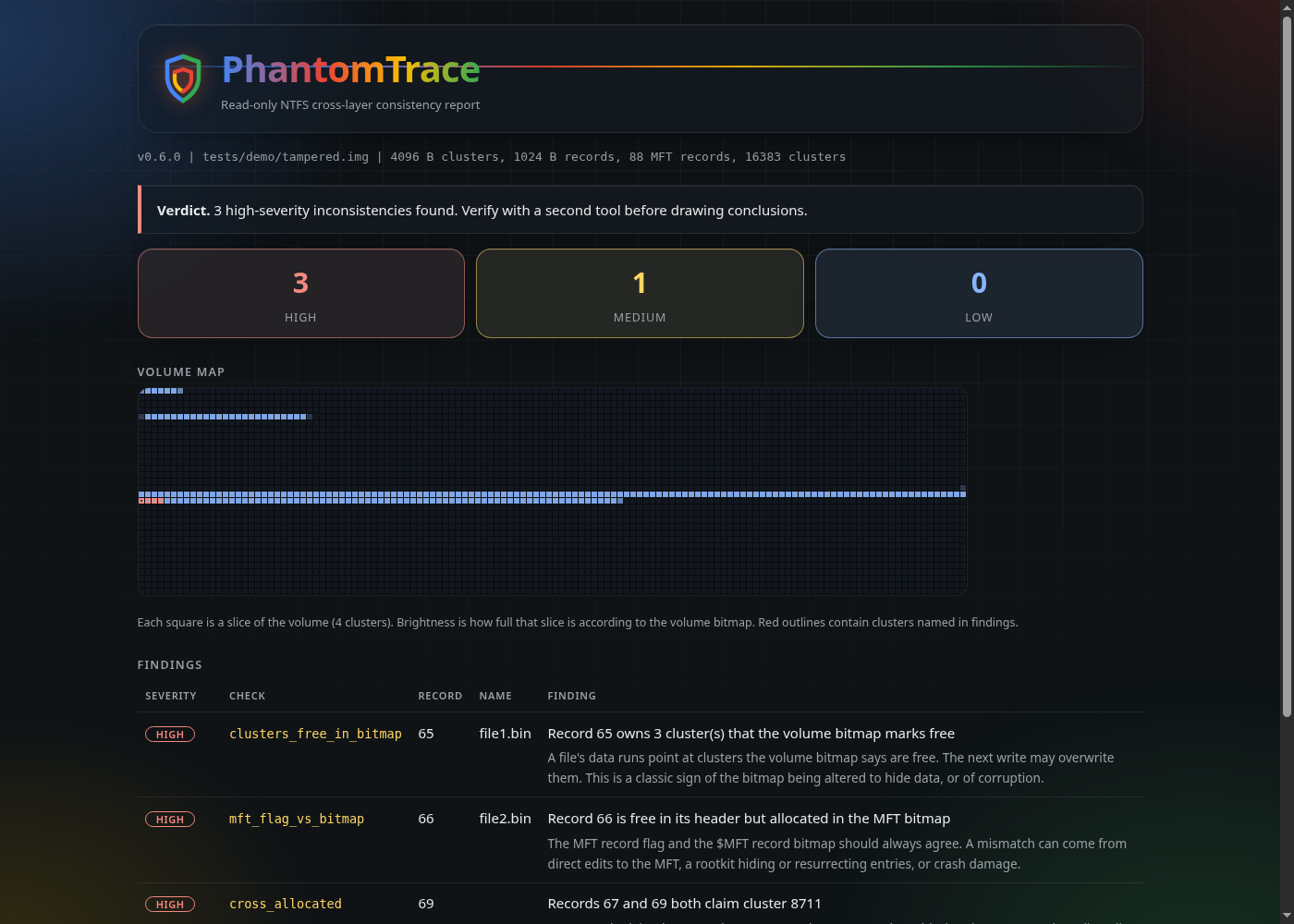
Also writes a shareable report (--html report.html):
Why would anyone use this?
Most NTFS tools show you what the file system says. PhantomTrace checks whether the file system agrees with itself. Honest activity keeps the MFT, the cluster bitmap and the run lists consistent; tampering (and corruption) often doesn't.
- Incident responders and forensic examiners get a quick, read-only second opinion on a disk image: hidden or resurrected MFT entries, a bitmap edited to hide data, clusters claimed by two files, forged run lists, torn records.
- Students and researchers of anti-forensics get a small, readable reference implementation (one Python file, no dependencies) of cross-layer checks, with a test suite that builds real NTFS volumes and tampers with them on purpose.
- Anyone triaging a suspect disk can run it safely: it never writes to the image or device, and it explains every finding in plain English.
What it is not: a replacement for The Sleuth Kit, MFTECmd or an examiner. It reports inconsistencies, which can come from tampering, corruption or a live system that was still writing. Every finding is a lead to verify with a second tool, not proof.
Install
pipx install phantom-trace-ntfs                                 # from PyPI; gives you the `phantom-trace` and `phantom-trace-gui` commands
pipx install git+https://github.com/JackSessions/PhantomTrace   # latest from GitHub
# or just run the single file:
python3 phantom_trace.py image.img
Point-and-click GUI
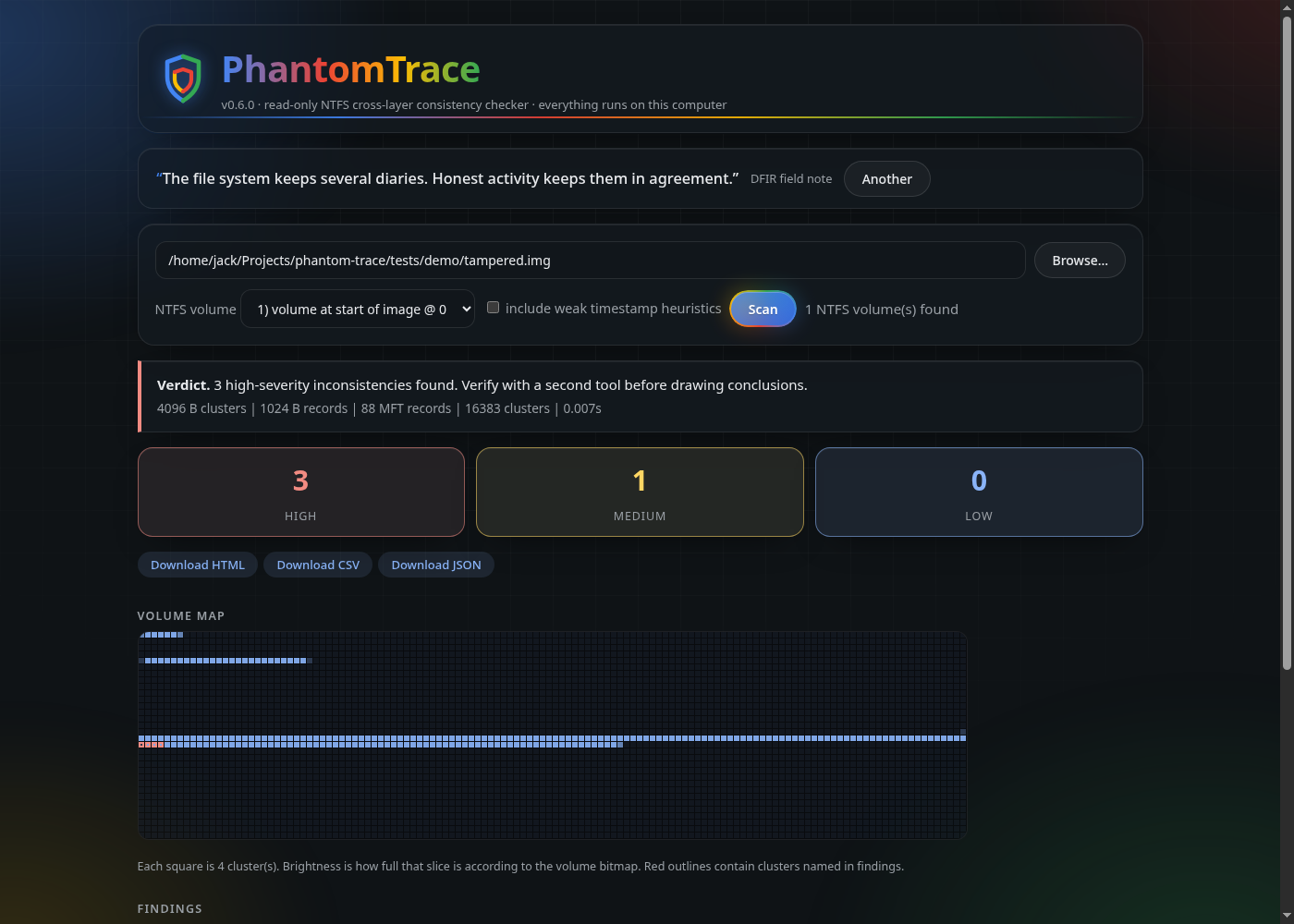
phantom-trace --gui # or: phantom-trace-gui (and optionally an image path to scan straight away)
Opens a page in your browser: pick an image (a built-in file browser helps), choose the NTFS volume, press Scan. You get the verdict, severity counts, the volume map and a findings table you can click for explanations, plus HTML / CSV / JSON downloads. It runs only on your own computer: it listens on 127.0.0.1, needs a random one-time token in the address, and only ever reads. No extra packages, no Tk required, same on Windows and Linux.
Windows
Python 3.9+ is all you need (no extra packages). In an Administrator terminal:
python phantom_trace.py disk.img                  # a raw image: best option
python phantom_trace.py \\.\C:                     # a live volume (read-only, but it changes while you read it)
Prefer an image or a volume snapshot: a live system keeps writing, which can produce harmless mismatches. Tools like FTK Imager can make a raw (.dd/.img) copy, and VHD/VHDX "fixed" disks are readable directly. Whole-disk images (MBR or GPT) are handled automatically; the NTFS partition is found for you (--partition N picks another).
The windows workflow in .github/workflows formats a real NTFS volume with Windows, uses it (creates, deletes, copies, alternate data stream), and checks that PhantomTrace reports it clean. Run it from the Actions tab.
Quick test on Linux
sudo apt install ntfs-3g          # provides mkntfs, ntfscp and ntfs-3g
./tests/quick.sh                  # unit tests, then the clean vs tampered demo
It builds a clean NTFS image and a tampered copy: the clean one should report nothing (exit 0), the tampered one should report findings (exit 1).
To check a real NTFS disk or USB stick, image it first and analyse the image, so the original is never touched:
sudo dd if=/dev/sdXN of=disk.img bs=4M status=progress   # or: sudo ddrescue /dev/sdXN disk.img
phantom-trace disk.img
# a whole-disk image: find the partition start with `fdisk -l disk.img`, then pass --offset <start sector * 512>
Checks
| ID | What it compares | Why it matters |
|---|---|---|
mft_flag_vs_bitmap |
A record's "in use" flag vs the $MFT's own record bitmap ($MFT:$BITMAP) |
Hidden or resurrected entries, edited MFT, crash damage |
clusters_free_in_bitmap |
Clusters a file's data runs claim vs the volume $Bitmap |
Bitmap altered to hide data, or corruption; the next write may overwrite it |
cross_allocated |
Two records claiming the same cluster | Manual run-list edits or serious damage |
run_out_of_bounds |
A data run outside the volume | Invalid or forged run list |
bad_fixup |
MFT update-sequence (fix-up) verification | Torn, corrupt or hand-edited records |
mirror_mismatch |
First MFT records vs $MFTMirr (low confidence) |
Worth a look; crashes can cause it too |
Usage
phantom-trace image.img                       # coloured, human-readable
phantom-trace image.img --json                # for scripts
phantom-trace image.img --html report.html    # self-contained report
phantom-trace image.img --csv findings.csv    # spreadsheet / timeline work
phantom-trace image.img -q                    # just the verdict (good for scripts)
phantom-trace disk.img --offset 1048576       # NTFS partition inside a disk image
Standard library only (Python 3.9+). Use a raw image where you can; a live device needs admin/root. It never writes. Exit codes: 0 clean, 1 findings, 2 error.
How it is tested
The test suite builds real NTFS volumes with mkntfs/ntfscp, then makes controlled changes and checks the result:
| Scenario | Expected |
|---|---|
| Fresh volume with 24 files; a second with 700 files | no findings (no false positives) |
Clear a file's clusters in $Bitmap |
clusters_free_in_bitmap |
| Flip an in-use record to "deleted" in its header only | mft_flag_vs_bitmap |
| Point one file's run at another file's clusters | cross_allocated |
| Corrupt a record's fix-up bytes | bad_fixup |
Alter a $MFTMirr record |
mirror_mismatch |
Run them with python3 -m unittest discover -s tests -v (needs ntfs-3g for the image tools).
Beyond the integrity checks
--heuristics adds weaker, higher-false-positive timestamp checks: $STANDARD_INFORMATION vs $FILE_NAME times (a classic timestomp sign) and zero sub-second timestamps. They are off by default and always reported as low severity.
The HTML report includes a volume map: every square is a slice of the disk, brightness shows how full it is, and red outlines contain clusters named in findings.
Known limitations
- The test images were made with the ntfs-3g tools and tampered with by this project's own helper. They have not yet been checked against volumes formatted and used by Windows, or against known real-world anti-forensic tooling. Treat a finding as a lead to verify with another tool (for example The Sleuth Kit), not as proof.
- A heavily fragmented
$MFTthat uses an$ATTRIBUTE_LISTis only read from its first extent (the tool warns when it sees this). - Compressed and sparse files: sparse runs are skipped; compressed streams are not checked in depth.
- The Windows workflow has been written but not run yet; until it passes, treat Windows results as unverified.
- Only the unnamed and named non-resident attributes in in-use records are checked;
$LogFileand$UsnJrnlanalysis are not implemented.
Roadmap
- Validate against Windows-made images and real tampering tools
$ATTRIBUTE_LISTand fragmented-MFT support- Timeline output (CSV / bodyfile) and
$STANDARD_INFORMATIONvs$FILE_NAMEtimestamp comparison - Compare results with The Sleuth Kit and MFTECmd on shared images
Author
Created and maintained by Jack Sessions (jacksessions, security researcher in mobile security, DFIR and counterintelligence). Parts of the code were written with AI assistance (Claude, and Qwen for the first prototype); every check is covered by the tests above, and findings are leads to verify, not proof.
Licence and credit
MIT licence (see LICENSE): free to use, change and share, as long as the copyright notice and licence text stay with the code. If you use PhantomTrace in a report, talk, course or another tool, please credit Jack Sessions and link to https://github.com/JackSessions/PhantomTrace. CITATION.cff has the details (GitHub shows a "Cite this repository" button).
1 maintainer

Metadata
1 maintainer
Release files for phantom-trace-ntfs 0.6.0
For a detailed explanation of source distributions (sdists) and built distributions (wheels), please see the package formats documentation.
Source distribution (sdist)
| File | Size | Uploaded | |
|---|---|---|---|
| phantom_trace_ntfs-0.6.0.tar.gz | 248.6 kB | Details |
Built distribution (wheel)
| File | Interpreter | ABI | Platform | Reset |
|---|---|---|---|---|
| phantom_trace_ntfs-0.6.0-py3-none-any.whl | Python 3 | none | any | Details |
Total release size: 276.5 kB
Release files / phantom_trace_ntfs-0.6.0.tar.gz
| Download URL | phantom_trace_ntfs-0.6.0.tar.gz |
|---|---|
| Size | 248.6 kB |
| Tags | Source |
|
SHA-256 checksum How to use checksums |
b9f258d8e3ce24c6ad174149bfffde57be80373b2a6b2e9485340c262e7c05c8
|
|
BLAKE2b-256 checksum How to use checksums |
cdb85357be5b9488a2725c6e646304fcd1d8f3a58cf883aa1d3d0e0e2f1c2a4d
|
| Upload date | |
|
Uploaded using Trusted Publishing? What is trusted publishing? |
Yes |
| Uploaded via |
twine/7.0.0 CPython/3.13.14
|
Provenance
Provenance describes where a file came from. On PyPI, provenance is shared via attestations, which provide a verifiable record of the build or publishing details. View details, limitations and caveats.


PyPI Publish Attestation
PyPI verified that this artifact, at this checksum, originated from the publisher listed below.
Signed by GitHub Actions, verified by PyPI on Oct 3, 2026.
Transparency logRelease files / phantom_trace_ntfs-0.6.0-py3-none-any.whl
| Download URL | phantom_trace_ntfs-0.6.0-py3-none-any.whl |
|---|---|
| Size | 27.9 kB |
| Tags | Python 3 |
|
SHA-256 checksum How to use checksums |
ab5beb5c5c306cc5ad21c27b16ef830771d20071921a6fc996516b61d16da4dd
|
|
BLAKE2b-256 checksum How to use checksums |
d38ad14355cd79374a049337db57726529feddbe757ab30a23c7df92db1d4fa9
|
| Upload date | |
|
Uploaded using Trusted Publishing? What is trusted publishing? |
Yes |
| Uploaded via |
twine/7.0.0 CPython/3.13.14
|
Provenance
Provenance describes where a file came from. On PyPI, provenance is shared via attestations, which provide a verifiable record of the build or publishing details. View details, limitations and caveats.
PyPI Publish Attestation
PyPI verified that this artifact, at this checksum, originated from the publisher listed below.
Signed by GitHub Actions, verified by PyPI on Oct 3, 2026.
Transparency log












