
pharmacode-toolkit
Generate, detect and decode one-track Pharmacode barcodes in PNG, JPEG and TIFF images. Pure Python on numpy and OpenCV.
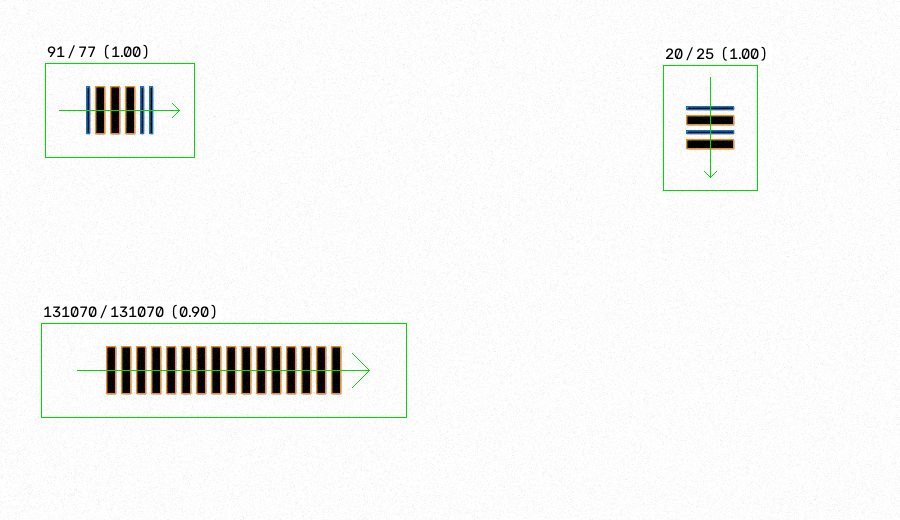
{
  "detections": [
    {"bbox": {"x": 45, "y": 63, "width": 149, "height": 94}, "orientation_deg": 0.0,
     "bars": ["narrow", "wide", "wide", "wide", "narrow", "narrow"],
     "bar_widths_px": [3, 9, 9, 9, 3, 3],
     "value": 91, "mirror_value": 77, "confidence": 1.0, "warnings": []}
  ],
  "errors": []
}
What it does
- Encodes any value from 3 to 131070 into the 2..16 narrow/wide bars of the format.
- Writes codes as SVG in exact millimetres, ready for packaging artwork.
- Renders synthetic codes with the Laetus physical dimensions at any DPI, with optional rotation, blur, noise, JPEG artefacts, contrast loss, uneven lighting, perspective and scaling, all seeded and reproducible.
- Finds one or more codes in an image at 0, 90, 180 and 270 degrees and small tilts,
dark on light or, with
--polarity lightorauto, light on dark. - Classifies bars, checks quiet zones and geometry, and reports both reading directions, because the format has no start or stop pattern.
- Writes a JSON result with stable error codes and an annotated image; optionally checks the code against an expected value and reports bar, gap and quiet-zone sizes in mm against the Laetus tolerances.
- Decodes whole directories in parallel into JSON Lines and CSV, and shows every intermediate step of a decode for diagnosis.
- Ships a benchmark that reports a matrix of conditions, not one number.
Install
pip install pharmacode-toolkit
From a clone of the repository: pip install . (or pip install -e .[dev] for
development). Requires Python 3.10 or newer. Runtime dependencies: numpy,
opencv-python-headless.
Quick start
pharmacode generate --value 12345 --dpi 300 --output sample.png
pharmacode generate --value 12345 --output artwork.svg     # vector, in mm
pharmacode decode sample.png --dpi 300
pharmacode decode sample.png --dpi 300 --json result.json --annotated result.png
pharmacode decode sample.png --dpi 300 --min-confidence 0.8
pharmacode decode sample.png --dpi auto    # the DPI generate stored in the file
pharmacode decode sample.png --dpi 300 --expect 12345      # exit 0 only if it reads 12345
pharmacode decode sample.png --dpi 300 --report-geometry   # sizes in mm vs Laetus tolerances
pharmacode decode photo.jpg --debug-dir debug/              # every intermediate step, to see why
pharmacode batch scans/ --dpi auto --jsonl out.jsonl --csv out.csv --jobs 4
python -m pharmacode ... works the same as the pharmacode command above,
for environments where installing a console script is inconvenient.
From Python:
from pharmacode import DecoderConfig, decode_file, decode_image, load_image

result = decode_image(load_image("sample.png"), DecoderConfig(dpi=300))
for code in result.detections:
    print(code.value, code.mirror_value, code.confidence)

# load, take the DPI from the file's metadata, decode; check against an expected value
result = decode_file("sample.png", DecoderConfig(polarity="auto"), auto_dpi=True)
print(result.matches(12345), result.to_dict(include_geometry=True))
Supported input
8-bit grayscale or colour PNG, JPEG and TIFF; dark bars on a light background
(or light on dark with --polarity light or auto); codes upright, rotated by multiples of 90 degrees, or tilted a few degrees.
Pass --dpi whenever you know the resolution: it enables physical checks and
reliable classification of codes that use a single bar width. --dpi auto
takes it from a scan's or a generated image's metadata.
Limitations
See docs/limitations.md. In short: no two-track or colour Pharmacode, and no DPI from a camera photo's metadata. Thresholds come from the specification and a synthetic benchmark; on top of that the decoder is checked against real-world sample images (codes as they appear in the wild: with captions, tightly cropped, with a rule drawn across the bars, inside a chart of symbologies).
Documentation
Disclaimer
This project is an independent implementation from public descriptions of the format. It is not validated for regulated pharmaceutical packaging control and must not be used as the sole check in such a process.
Author
Konstantin Dotsenko (LinkedIn).
License
MIT, see LICENSE.
1 maintainer

Metadata
1 maintainer
Release files for pharmacode-toolkit 0.3.0
For a detailed explanation of source distributions (sdists) and built distributions (wheels), please see the package formats documentation.
Source distribution (sdist)
| File | Size | Uploaded | |
|---|---|---|---|
| pharmacode_toolkit-0.3.0.tar.gz | 371.1 kB | Details |
Built distribution (wheel)
| File | Interpreter | ABI | Platform | Reset |
|---|---|---|---|---|
| pharmacode_toolkit-0.3.0-py3-none-any.whl | Python 3 | none | any | Details |
Total release size: 425.5 kB
Release files / pharmacode_toolkit-0.3.0.tar.gz
| Download URL | pharmacode_toolkit-0.3.0.tar.gz |
|---|---|
| Size | 371.1 kB |
| Tags | Source |
|
SHA-256 checksum How to use checksums |
b82ad86f7fcd4b906ff20576967e8c483c7ce6998daf0833786e55a6c815deb1
|
|
BLAKE2b-256 checksum How to use checksums |
59a6d7e80389f543090c692106f1c3cbeab4694e091ae20925ae0737ffb93456
|
| Upload date | |
|
Uploaded using Trusted Publishing? What is trusted publishing? |
Yes |
| Uploaded via |
twine/7.0.0 CPython/3.13.14
|
Provenance
Provenance describes where a file came from. On PyPI, provenance is shared via attestations, which provide a verifiable record of the build or publishing details. View details, limitations and caveats.


PyPI Publish Attestation
PyPI verified that this artifact, at this checksum, originated from the publisher listed below.
Signed by GitHub Actions, verified by PyPI on Sep 24, 2026.
Transparency logRelease files / pharmacode_toolkit-0.3.0-py3-none-any.whl
| Download URL | pharmacode_toolkit-0.3.0-py3-none-any.whl |
|---|---|
| Size | 54.4 kB |
| Tags | Python 3 |
|
SHA-256 checksum How to use checksums |
16562e193a44dda913d89bd6abf6a76546a394e638bd9acbf6e431d8e309ad7b
|
|
BLAKE2b-256 checksum How to use checksums |
3f1e6749e713cce81c63992003a4473aaf16ef10310d6a20567af90f5c8c110f
|
| Upload date | |
|
Uploaded using Trusted Publishing? What is trusted publishing? |
Yes |
| Uploaded via |
twine/7.0.0 CPython/3.13.14
|
Provenance
Provenance describes where a file came from. On PyPI, provenance is shared via attestations, which provide a verifiable record of the build or publishing details. View details, limitations and caveats.
PyPI Publish Attestation
PyPI verified that this artifact, at this checksum, originated from the publisher listed below.
Signed by GitHub Actions, verified by PyPI on Sep 24, 2026.
Transparency log













