
phart
PHART: The Python Hierarchical ASCII Representation Tool - A Pure Python tool for graph visualization via charts and diagrams rendered in ASCII.
Release status:
- Current PyPI release:
2.0.6 - Previous long-lived PyPI release:
1.1.4 - Concise publish notes: PYPI-RELEASE-NOTES-2.0.6.md
Quick Start
Install from PyPI:
pip install phart
Render a graph file:
phart graph.dot
Render from a Python script that builds a graph:
phart your_graph_script.py
See phart --help for full CLI options.
When working directly from a source checkout, you can bypass any installed console-script shim and run the CLI module directly:
PYTHONPATH=src python -m phart --version
What does phart do?
For a quick visual rundown of the types of things you might do with phart, take a look at LAYOUT-STRATEGIES.md
New!
This 2.0 release is bigger than any single update in the two years phart has been in development.
I'll try to document all of the new features, but alas, I tend to get too wordy so I've trashed and reverted back the old README several times already. For deep dives into new topics, I'm creating separate docs in the docs directory in the repo.
Features (some pre-date v2.0 but hadn't been documented yet.)
New stuff is bolded.
- Render using ASCII (7-bit) or Unicode characters
- Optional ANSI color for either charset
- Multiple node styles (square, round, diamond, custom)
- Customizable edge characters
- Support for directed and undirected graphs
- Handles cycles and complex layouts
- Bidirectional edge support
- Edge attribute support (and attribute-based coloring of edges)
- Edge label rendering from edge
labelattributes - Over ten layout strategies
- Orthogonal edge paths (all 90 degree turns, "Manhattan" style)
- Node labels using multi-column character sets (such as CJK)
- Optional width/height pagination for text output
- Optional multiline node labels in bounding boxes
- mermaid flowchart, svg, and html source output
- pagination (horizontal and vertical) with CLI page-selector support
- partitioning (horizontal and vertical): set the screen canvas size as a constraint, and adjust ranks/routes to fit within canvas constraints
- nodes and edges support arbitrary attributes now, not just label, color, etc)
- those attributes can be displayed as labels on nodes and edges
- styling, coloring, etc based on attributes is now done with a single unified, simple, and flexible syntax.
- not that you asked for it, but connectors and panel headers can now be styled too
- and the phart 0.1.4 original node styling and edge styling is now fully realized.
- what's a panel header? Check out the new docs in the docs/ directory for deep dives architecturally
- the rest I'll try to touch on in this README
- docs/architecture/cli-runtime-architecture.md
- docs/architecture/style-rules-spec.md
- docs/architecture/layout-partitioning-spec.md
Some details on new v2.0 stuff:
Label Synthesis and Multiline BBoxes
When node labels are enabled with --labels (or --node-labels), and a node does not define label, PHART can synthesize label text from ordered attribute paths:
phart --labels --bboxes \
  --node-label-lines name,birt.date,deat.date \
  examples/gedcom.py
Notes:
name,birt.date,deat.daterenders those three values in order (multiline in bboxes by default).- You can also use dotted paths directly, such as
name,birt.date,deat.date. - Use
--bbox-singleline-labelsif you want to flatten embedded newlines to one rendered line.
Text Pagination
Pagination is available for --output-format text and is useful for wide/tall renders:
phart --labels --bboxes \
  --paginate-output-width 100 \
  --paginate-output-height 30 \
  --page-x 1 --page-y 0 \
  --list-pages \
  examples/gedcom.py
Notes:
--paginate-output-width autoand--paginate-output-height autorequire terminal stdout.- Pagination is ANSI-aware: escape sequences are not counted toward visible width, and page slices preserve complete ANSI sequences.
Constrained Layout Panels and Partition Metadata
Constrained layout is different from output pagination: it partitions during layout/routing, then renders panelized output with connector cues between panels.
phart --layout layered --constrained \
  --target-canvas-width 80 \
  --target-canvas-height 24 \
  --partition-overlap 1 \
  --partition-affinity-strength 1 \
  --panel-headers lineage \
  --connector-ref label \
  --connector-compaction partition \
  examples/gedcom.py
Notes:
- Constrained mode currently supports
--layout auto|bfs|hierarchical|layered. --partition-affinity-strength 0disables split-affinity heuristics. Values greater than zero bias boundaries to keep close family/group relationships together.- Constrained splitting uses affinity-aware boundary selection; if no valid optimized split is found, it falls back to deterministic greedy splitting.
- If a single node cannot fit inside the target canvas width, that node is kept intact and the panel can overflow.
--target-canvas-width autoand--target-canvas-height autorequire terminal stdout.
Programmatic export of partition metadata:
import networkx as nx
from phart import ASCIIRenderer, LayoutOptions, NodeStyle

G = nx.DiGraph()
G.add_edges_from(
    [("R", "A1"), ("R", "A2"), ("R", "A3"), ("A1", "B1"), ("A2", "B2")]
)

renderer = ASCIIRenderer(
    G,
    options=LayoutOptions(
        node_style=NodeStyle.MINIMAL,
        layout_strategy="layered",
        constrained=True,
        target_canvas_width=12,
        partition_affinity_strength=1,
        connector_compaction="partition",
        connector_ref_mode="label",
    ),
)

print(renderer.render())

plan = renderer.get_partition_plan()  # PartitionPlan | None
metadata = renderer.export_partition_metadata()  # dict (schema_version=1.0)
print(metadata["partition_count"])
print(metadata["cross_partition_edges"][:2])
Why export metadata?
- Build your own panel index/navigation around constrained output.
- Assert deterministic partitioning in tests/CI.
- Compare effects of
partition_affinity_strength,partition_order, and overlap settings during tuning.
Of course, this is supported via the CLI as well.
Edge Glyph Presets and Arrow Styles
You can set global edge line-art and arrowhead style without per-glyph mapping:
phart --edge-glyph-preset thick --edge-arrow-style unicode your_graph.py
Full style-rule semantics and field reference: docs/architecture/style-rules-spec.md
Node decorators can also be driven by style rules:
phart --labels \
  --style-rule 'node: sex=="F" -> prefix=(,suffix=)' \
  --style-rule 'node: sex=="M" -> prefix=[,suffix=]' \
  examples/gedcom.py
Style rules still win for keys they set:
phart --edge-glyph-preset thick \
  --style-rule 'edge: role=="link" -> line_vertical=!,arrow_down=x' \
  your_graph.py
Legacy note:
- Legacy global style fields continue to work.
- Style rules are the preferred per-node/per-edge customization path and take precedence for overlapping keys.
Compatibility / breaking-notes:
- Style-rule validation is strict: unknown
setkeys and wrong target/key combinations now fail fast with explicit errors. - Edge glyph rule values must be single-cell glyphs (multi-character and wide glyphs are rejected).
--edge-arrow-style unicodeis automatically coerced to ASCII when using ASCII charset mode.
mermaid output
flowchart TD is now a supported output. Read about it here.
TL;DR:
--output-format mmdalong with, optionally--output yourfile.mmd(or you can just redirect stdout with> yourfile.mdWill generate a Mermaidflowchart TDfrom your graph.
New Layout Strategies
See LAYOUT-STRATEGIES.md in the repo for some examples of output.
I have also documented one of the scripts in the examples/ directory and shown its output here in TRIADIC-CENSUS.md
Node ordering
  --node-order {layout-default,preserve,alpha,natural,numeric}
                        Node ordering policy: layout-default (default), preserve, alpha, natural, or numeric
  --node-order-attr NODE_ORDER_ATTR
                        Optional node attribute name to use as the ordering key
  --node-order-reverse
                        The result of the sorting method used by the layout strategy will be reversed
Intended usage examples:
--node-order natural--node-order-attr label --node-order alpha--node-order-attr rank --node-order numeric--node-order alpha --node-order-reverse
Also added were:
  --shared-ports {any,minimize,none}
                        Terminal port sharing policy: any (default), minimize (prefer unused points on the same face),
                        or none (avoid sharing until the node has no free terminal slots)
  --bidirectional-mode {coalesce,separate}
                        How to render reciprocal directed edges: coalesce (default) draws one shared route with arrows
                        at both ends; separate draws each direction independently
Regarding shared_ports_mode, which was added to LayoutOptions in styles.py and exposed in the cli as --shared-ports {any,minimize,none}:
any: legacy compact behavior. Reuse within the local face pool is allowed once that local pool is exhausted. This is the default.minimize: avoid reuse on the same face by expanding to the rest of that face before sharing a terminal slot.none: do the minimize behavior, and also rebalance endpoints across other node faces so sharing is avoided until the node has no free terminal slots left anywhere.
When testing changes or debugging expected rendered graph output, I make use of variations on:
$ phart --shared-ports none --bidirectional-mode separate ...
$ phart --shared-ports minimize --bidirectional-mode separate ...
$ phart --shared-ports any --bidirectional-mode coalesce ...
# and so on...
Often, I'll combine those with variations on --hpad/--vpad, --layer/node-sizing and --colors ..., but hopefully unless you're adding a new layout strategy or other such enhancement, you aren't having to do a lot of puzzling about output. If you are, feel free to open an Issue.
Additionally, a public get_edge_route_length() function was added to ASCIIRenderer class.
get_edge_route_length()is in canvas grid units: one unit per character cell step in the renderer’s virtual grid. Concretely, it returns abs(dx) + abs(dy) between the final chosen edge anchors, so it is “orthogonal steps,” not a geometric or graph-theoretic distance.
You probably won't need it.
Why "PHART"?
The acronym was a fortuitous accident from the non-abbreviated words that the letters represent: Python Hierarchical ASCII Rendering Tool.
Really, why?
When I point out that phart is not a Perl or a PHP webapp, it may appear that I am throwing shade at the existing solutions, but it is meant in a good-hearted way. Wrapping the OG perl Graph::Easy is a straightforward way to go about it, and a web interface to the same is a project I might create as well, but it is no longer a certainty that a system you are working on will have Perl installed these days, and spinning up a Docker container in order to add ascii line art graph visualizations to a python tool seemed a bit excessive, even for me.
Also, I'm not sure how I didn't find pydot2ascii - which is native python - when I first looked for a solution, but even if I had, it may not have obvious to me that I could have exported my NX DAG to DOT, and then used pydot2ascii to go from DOT to an ascii diagram.
So, for better or worse, we have PHART, and the ability to render a NX digraph in ASCII and Unicode, to read a DOT file, read GraphML, and a few other things in a well-tested Python module published to PyPi. I hope you find it useful.
Installation
Requires Python >= 3.14 and NetworkX >= 3.3.
From PyPI:
pip install phart
From source (latest main):
git clone https://github.com/scottvr/phart
cd phart
python3 -m venv .venv
. .venv/bin/activate
# or .venv\Scripts\activate on Windows
pip install .
Optional dependency groups are available by category:
- Examples/DOT support:
pip install -e '.[examples]' - SVG support:
pip install -e '.[svg]' - Extra bundle:
pip install -e '.[extra]' - Everything:
pip install -e '.[all]'
If installing from PyPI instead of source, use pip install 'phart[all]' (or any specific extra group).
The CLI
The following is a snapshot; use phart --help in your installed version for the latest options.
$ phart --help
usage: phart [-h] [--output OUTPUT] [--version] [--output-format {ditaa,ditaa-puml,html,latex-markdown,mmd,svg,text}] [--style {minimal,square,round,diamond,custom,bbox}] [--node-spacing NODE_SPACING]
             [--layer-spacing LAYER_SPACING] [--charset {ascii,ansi,unicode}] [--ascii] [--function FUNCTION] [--binary-tree]
             [--layout {arf,auto,bfs,bipartite,circular,hierarchical,kamada-kawai,layered,multipartite,planar,random,shell,spiral,spring,vertical}] [--constrained]
             [--node-order {layout-default,preserve,alpha,natural,numeric}] [--node-order-attr NODE_ORDER_ATTR] [--node-order-reverse] [--flow-direction {down,up,left,right}]
             [--target-canvas-width [WIDTH|auto]] [--target-canvas-height [HEIGHT|auto]] [--partition-overlap PARTITION_OVERLAP] [--partition-affinity-strength PARTITION_AFFINITY_STRENGTH]
             [--cross-partition-edge-style {stub,none}] [--connector-compaction {none,partition}] [--partition-order {natural,size}] [--panel-headers {none,basic,lineage}]
             [--connector-ref {auto,id,label,both}] [--bboxes] [--hpad HPAD] [--vpad VPAD] [--uniform] [--edge-anchors {auto,center,ports}] [--shared-ports {any,minimize,none}]
             [--bidirectional-mode {coalesce,separate}] [--labels] [--node-labels [ATTR]] [--edge-labels [ATTR]] [--node-label-lines SPEC] [--node-label-sep NODE_LABEL_SEP]
             [--node-label-max-lines NODE_LABEL_MAX_LINES] [--bbox-multiline-labels] [--bbox-singleline-labels] [--subgraph-fit-edge-labels] [--colors {attr,none,path,source,target}] [--no-color-nodes] [--edge-glyph-preset {default,thick,double}]
             [--edge-arrow-style {ascii,unicode}] [--edge-color-rule RULE] [--style-rule RULE] [--style-rules-file FILE] [--svg-cell-size SVG_CELL_SIZE] [--svg-font-family SVG_FONT_FAMILY]
             [--svg-text-mode {text,path}] [--svg-font-path SVG_FONT_PATH] [--svg-fg SVG_FG] [--svg-bg SVG_BG] [--whitespace {auto,ascii-space,nbsp}] [--paginate-output-width [WIDTH|auto]]
             [--paginate-output-height [HEIGHT|auto]] [--paginate-overlap COLUMNS] [--select-output-page-x PAGE_X] [--select-output-page-y PAGE_Y] [--list-pages] [--write-pages DIR]
             input

PHART: Python Hierarchical ASCII Rendering Tool

positional arguments:
  input                 Input file (.dot, .graphml, or .py format)

options:
  -h, --help            show this help message and exit
  --output, -o OUTPUT   Output file (if not specified, prints to stdout)
  --version, -v         show program's version number and exit
  --output-format {ditaa,ditaa-puml,html,latex-markdown,mmd,svg,text}
                        Output format: text (default), ditaa, ditaa-puml, svg, html, mmd, or latex-markdown
  --style {minimal,square,round,diamond,custom,bbox}
                        Node style (default: square, or minimal when --bboxes is enabled)
  --node-spacing NODE_SPACING
                        Horizontal space between nodes (default: 4)
  --layer-spacing LAYER_SPACING
                        Vertical space between layers (default: 3)
  --charset {ascii,ansi,unicode}
                        Character set to use for rendering (default: unicode)
  --ascii               Force ASCII output (deprecated, use --charset ascii instead)
  --function, -f FUNCTION
                        Function to call in Python file (default: main)
  --binary-tree         Enable binary tree layout (respects edge 'side' attributes)
  --layout, --layout-strategy {arf,auto,bfs,bipartite,circular,hierarchical,kamada-kawai,layered,multipartite,planar,random,shell,spiral,spring,vertical}
                        Node positioning strategy (default: auto)
  --constrained         Enable constrained partitioning mode for compatible layout strategies
  --node-order {layout-default,preserve,alpha,natural,numeric}
                        Node ordering policy: layout-default (default), preserve, alpha, natural, or numeric
  --node-order-attr NODE_ORDER_ATTR
                        Optional node attribute name to use as the ordering key
  --node-order-reverse  The result of the sorting method used by the layout strategy will be reversed
  --flow-direction, --flow {down,up,left,right}
                        Layout flow direction: down (default, root at top), up (root at bottom), left (root at right), right (root at left)
  --target-canvas-width [WIDTH|auto]
                        Target width for constrained mode. Accepts WIDTH columns or 'auto' (terminal width on terminal stdout).
  --target-canvas-height [HEIGHT|auto]
                        Optional target height for constrained partitioning. Accepts HEIGHT rows or 'auto' (terminal height on terminal stdout).
  --partition-overlap PARTITION_OVERLAP
                        Context overlap between neighboring constrained partitions (default: 0)
  --partition-affinity-strength PARTITION_AFFINITY_STRENGTH
                        Affinity weight used to keep closely related nodes together while splitting constrained partitions (0 disables)
  --cross-partition-edge-style {stub,none}
                        Cross-partition edge rendering style for constrained layout (default: stub)
  --connector-compaction {none,partition}
                        Connector listing compaction mode for constrained panels: none (default) or partition
  --partition-order {natural,size}
                        Constrained partition ordering: natural rank order or size (default: natural)
  --panel-headers {none,basic,lineage}
                        Constrained panel header mode: none, basic (default), or lineage
  --connector-ref {auto,id,label,both}
                        Connector endpoint reference mode: auto (default), id, label, or both
  --bboxes, --bbox      Draw line-art boxes around nodes
  --hpad HPAD           Horizontal padding inside node boxes (default: 1)
  --vpad VPAD           Vertical padding inside node boxes (default: 0)
  --uniform, --size-to-widest
                        Use widest node text as the width baseline for all node boxes
  --edge-anchors {auto,center,ports}
                        Edge anchor strategy: auto (default), center, or ports (distributed on box edges)
  --shared-ports {any,minimize,none}
                        Terminal port sharing policy: any (default), minimize (prefer unused points on the same face), or none (avoid sharing until the node has no free terminal slots)
  --bidirectional-mode {coalesce,separate}
                        How to render reciprocal directed edges: coalesce (default) draws one shared route with arrows at both ends; separate draws each direction independently
  --labels              Enable both node and edge labels using each element's 'label' attribute. Equivalent to --node-labels --edge-labels.
  --node-labels [ATTR]  Enable node labels. Optionally provide the node attribute name to display (default: label). Use 'none' to disable node labels explicitly.
  --edge-labels [ATTR]  Enable edge labels. Optionally provide the edge attribute name to display (default: label). Use 'none' to disable edge labels explicitly.
  --node-label-lines SPEC
                        Comma-separated ordered label line specs used when --labels is enabled and node 'label' is absent. Supports dotted paths (e.g. name,birt.date,deat.date).
  --node-label-sep NODE_LABEL_SEP
                        Separator for joining multi-value parts within one synthesized label line
  --node-label-max-lines NODE_LABEL_MAX_LINES
                        Optional maximum number of synthesized label lines
  --bbox-multiline-labels
                        Compatibility alias; multiline node labels in bboxes are enabled by default.
  --bbox-singleline-labels
                        Disable multiline node labels in bboxes (flatten embedded newlines to one line)
  --subgraph-fit-edge-labels
                        Expand subgraph container bounds to include long fallback edge labels for edges fully inside each subgraph.
  --colors {attr,none,path,source,target}
                        ANSI edge coloring mode: none (default), source, target, path, or attr
  --no-color-nodes      Color edges only, not nodes
  --edge-glyph-preset {default,thick,double}
                        Global edge line-art preset: default (thin), thick, or double (Unicode mode only for thick/double; ASCII falls back to standard glyphs)
  --edge-arrow-style {ascii,unicode}
                        Global arrowhead style for edges: ascii (default) or unicode. Unicode arrows are disabled automatically in ASCII charset mode.
  --edge-color-rule RULE
                        Attribute-driven edge color rule for --colors attr. Format: <attribute>:<value>=<color>[,<value>=<color>...] (repeatable)
  --style-rule RULE     Advanced style rule expression. Format: '<target>: <predicate> -> color=<color>' where target is edge|node|connector|panel_header. Repeat to add multiple rules.
  --style-rules-file FILE
                        JSON or YAML file containing {'rules': [...]} canonical style rules. YAML requires PyYAML.
  --svg-cell-size SVG_CELL_SIZE
                        Cell size in pixels for SVG output (default: 12)
  --svg-font-family SVG_FONT_FAMILY
                        Font family for SVG/HTML output (default: monospace)
  --svg-text-mode {text,path}
                        Render SVG characters as <text> (default) or glyph paths
  --svg-font-path SVG_FONT_PATH
                        Font file path required when --svg-text-mode path is used
  --svg-fg SVG_FG       Foreground color for SVG/HTML/LaTeX output
  --svg-bg SVG_BG       Background color for SVG/HTML output
  --whitespace {auto,ascii-space,nbsp}
                        Text output whitespace mode: auto (default), ascii-space, or nbsp. In auto mode, output-format defaults are used.
  --paginate-output-width [WIDTH|auto]
                        Paginate text output horizontally by terminal width (auto) or WIDTH columns. With no value, defaults to auto.
  --paginate-output-height [HEIGHT|auto]
                        Paginate text output vertically by terminal height (auto) or HEIGHT rows. If omitted, row pagination is disabled and all rows remain in one page.
  --paginate-overlap COLUMNS
                        Overlap columns between neighboring output pages (default: 8)
  --select-output-page-x, --page-x, -x PAGE_X
                        Select horizontal page index (default: 0)
  --select-output-page-y, --page-y, -y PAGE_Y
                        Select vertical page index (currently must be 0)
  --list-pages          Print page index metadata when pagination is enabled
  --write-pages DIR     Write all paginated pages to DIR as page_xNN_yNN.txt files
RAINBOW COLORING DEMOS
NEW Features Feb 2026
- binary_tree sort mode
- binary_tree sort can respect "side" properties ("left", 'right")
- bounding box mode (line art rectangles with configurable inner padding)
- (optionally) use labels instead of node names when rendering diagram.
- (optionally) synthesize labels from ordered node attributes and render multiline bbox labels
- (optionally) color edges with ANSI colors to help discern edge paths in dense complex diagrams
- and several new layout strategies including
circular,bfs,shell,Kamada-Kawai, and others.
NEWER! - Accidental Features
So, I inadvertently merged some code into main that was not intended to be released yet, because it's - while not not working, per se - still a little half-baked, and not documented well.
LaTeX/GFM
Nevertheless, some might notice the command-line options, when running phart --help for example, and try to use some of the features, so I figured I may as well explain one of the goofier ones. I've written about it here in GHM-LATEX.md.
SVG/HTML enhancements
I just finished updating the SVG documentation with a couple of surprising results achieved by what was intended to be a silly and useless feature that I didn't actually plan to release. Check out the two vector diagrams at the top of svg-renderer.md.
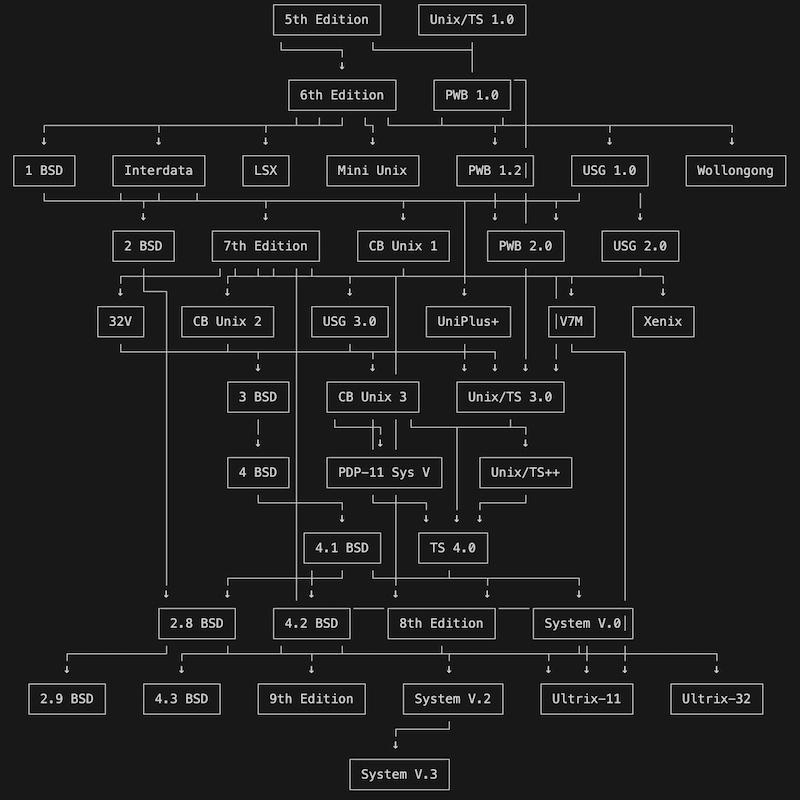
Labelling with label properties
The label support can make an interesting but uninformative diagram suddenly more meaningful, and beautiful IMHO. Take a look at this Unix Family Tree (also from a .dot file); I think it's gorgeous.
ANSI color edge paths
ANSI color support turned out more interesting than I expected. Not completely satisfied with it, I ended up enabling four modes to the feature: color by source, color by target, color by path, and color by edge attributes. Here's an example of edge_anchors=ports, colors=source, using a graph of Golang package dependencies.
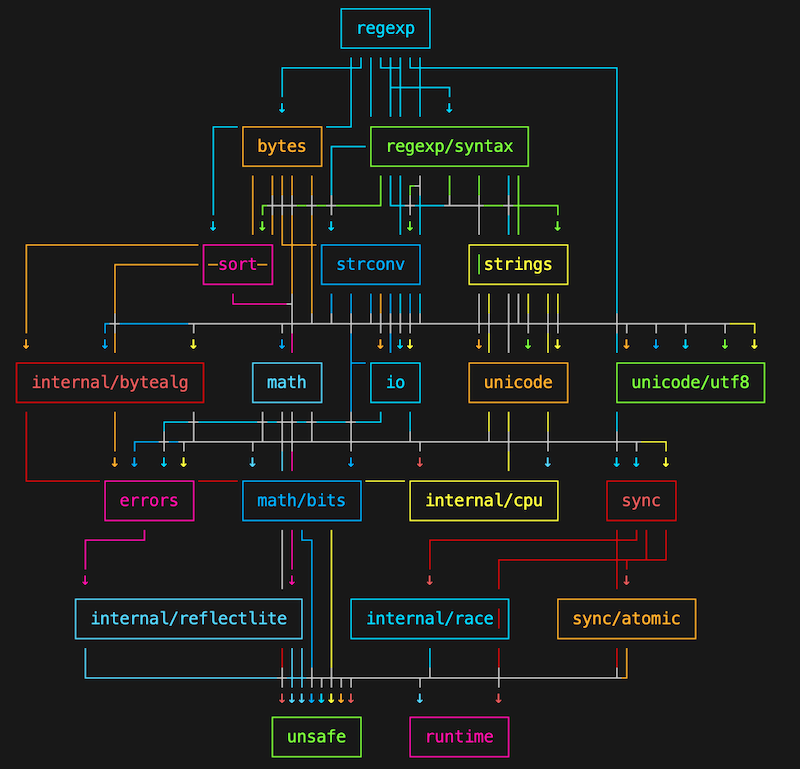
I'm not sure it's all that much easier to discern what goes to where, but it sure is fun to look at.
Usage Examples
phart can be used programmatically:
import networkx as nx
from phart import ASCIIRenderer, NodeStyle

def demonstrate_basic_graph():
    print("\nBasic Directed Graph:")
    G = nx.DiGraph()
    G.add_edges_from([("A", "B"), ("A", "C"), ("B", "D"), ("C", "D")])

    renderer = ASCIIRenderer(G)
    print(renderer.render())
which will output this very underwhelming diagram:
Basic Directed Graph:

   [A]
 +--+---+
 v      v
[B]    [C]
 +--+---+
    v
   [D]
phart also comes as a handy CLI tool, set up for you when you pip install phart.
The phart CLI can read graphs in graphml or dot format. Additionally, the phart CLI
can read python code that itself makes use of phart such as that above, so that it can be tested from the command-line, allowing you to try out various display options without having to edit your code repeatedly to see what works best.
phart supports ASCII and Unicode, and will try to use the sensible default for your terminal environment.
Let's try another one
Let's make a simple balanced tree:
$ cat > balanced_tree.py
import networkx as nx
from phart import ASCIIRenderer, NodeStyle
G = nx.balanced_tree(2, 2, create_using=nx.DiGraph)
renderer = ASCIIRenderer(G, node_style=NodeStyle.SQUARE)
print(renderer.render())
and when we run that tiny script, we see:
$ python balanced_tree.py
          [0]
    ┌──────┴──────┐
    ↓             ↓
   [1]           [2]
 ┌──┴───┐      ┌──┴───┐
 ↓      ↓      ↓      ↓
[3]    [4]    [5]    [6]
Output options
phart has lots of output options. Here's a good use for the cli as I described above. We can test other options, without having to edit that python script we just wrote.
Let's see how the balanced tree looks with the nodes in bounding boxes:
$ phart balanced_tree.py --bboxes --hpad 2 --style minimal --layer-spacing 3  --ascii
                +-----+
                |  0  |
                +-----+
        +----------+----------+
        v                     v
     +-----+               +-----+
     |  1  |               |  2  |
     +-----+               +-----+
   +----+-----+          +----+-----+
   v          v          v          v
+-----+    +-----+    +-----+    +-----+
|  3  |    |  4  |    |  5  |    |  6  |
+-----+    +-----+    +-----+    +-----+
We can increase the space between "layers" of nodes, we can move the edges to connect to/from "ports" on the most efficient side of the nodes, and we can render in unicode, using the same script, by passing the options via the command-line until we find what we like:
$ phart balanced_tree.py --bboxes --hpad 2 --style minimal --layer-spacing 4 --edge-anchors ports
                ┌─────┐
                │  0  │
                └─────┘
        ┌────────┘   └────────┐
        │                     │
        ↓                     ↓
     ┌─────┐               ┌─────┐
     │  1  │               │  2  │
     └─────┘               └─────┘
   ┌──┘   └───┐          ┌──┘   └───┐
   │          │          │          │
   ↓          ↓          ↓          ↓
┌─────┐    ┌─────┐    ┌─────┐    ┌─────┐
│  3  │    │  4  │    │  5  │    │  6  │
└─────┘    └─────┘    └─────┘    └─────┘
We can put a NodeStyle around our label, and put a bounding box around that, and have all edges come out of the center of the boxes.
$ phart balanced_tree.py --bboxes --hpad 0 --style round --layer-spacing 4 --edge-anchors center
             ┌───┐
             │(0)│
             └───┘
      ┌────────┤
      │        └────────┐
      ↓                 ↓
    ┌───┐             ┌───┐
    │(1)│             │(2)│
    └───┘             └───┘
  ┌───┤             ┌───┤
  │   └────┐        │   └────┐
  ↓        ↓        ↓        ↓
┌───┐    ┌───┐    ┌───┐    ┌───┐
│(3)│    │(4)│    │(5)│    │(6)│
└───┘    └───┘    └───┘    └───┘
Let's look a slightly more interesting graph, courtesy of a user in the Discussions.
His script generates a Collatz Tree, and takes an argument for the depth for which you wish to calculate terms. As you will see, we can pass arguments for the phart cli to use as
arguments for the script you've given it as an input file. We will just separate the
switches meant for phart from any switches meant for the script it is loading by an extra
--, like so:
phart --charset unicode --style minimal --hpad 1 --binary-tree --node-spacing 1 --layer-spacing 4 --vpad 0 --edge-anchors ports --bboxes examples/collatz.py -- 1
This results in the following graph:
depth: 1
max_depth: 1
max_val 2
          ┌────┐
          │ 1  │
          └────┘
         ┌─┘  └──┐
         │       │
         v       v
     ┌────┐    ┌────┐
     │ 2  │    │ Z1 │
     └────┘    └────┘
    ┌─┘  └──┐
    │       │
    v       v
┌────┐    ┌────┐
│ L1 │    │ L2 │
└────┘    └────┘
You can see that all of the number terms are on the left, while Leaves, Zero, Fractals, etc are to the right (and also the terminal Leaves at the bottom of the tree.)
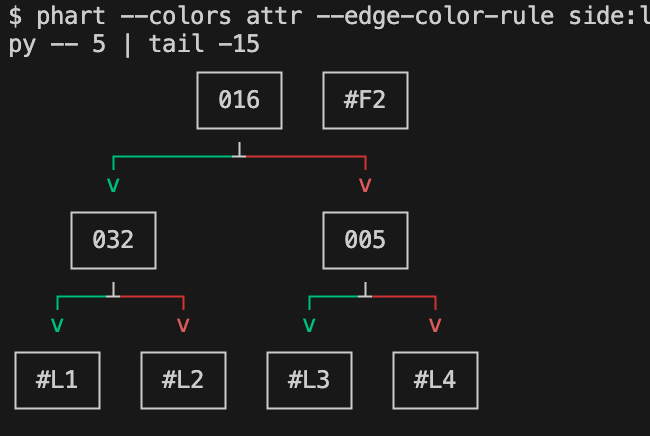
Now that phart has ANSI color support, we can also use the same 'side' edge attribute
that enables the left/right sorting to apply color to the paths representing edges in
the output. (And, because it is simply console text, you can pipe it elsewhere, redirect it, and so on.
As we'll see here, I will tail to just the last 15 lines of output so I can just see
something new and interesting, further down the tree:
$ phart --colors attr --edge-color-rule side:left=green,right=red --bboxes -- \
 --charset unicode --no-color-nodes examples/collatz.py -- 5 | tail -15
This gives us the following output, which I'll share via screenshot, because GitHub is picky about letting one color a markdown document:
There are more examples scripts in the repo, along with a README in the examples/ directory
Quick Start
import networkx as nx
from phart import ASCIIRenderer

def create_circular_deps():
    """Create a dependency graph with circular references."""
    G = nx.DiGraph()

    # Circular dependency example
    dependencies = {
        "package_a": ["package_b", "requests"],
        "package_b": ["package_c"],
        "package_c": ["package_a"],  # Creates cycle
        "requests": ["urllib3", "certifi"],
    }

    for package, deps in dependencies.items():
        for dep in deps:
            G.add_edge(package, dep)

    return G

def main():
    # Circular dependencies
    print("\nCircular Dependencies:")
    G = create_circular_deps()
    renderer = ASCIIRenderer(G)
    print(renderer.render())

if __name__ == "__main__":
    main()
This will output:
Circular Dependencies:
             [package_a]
           ┌──────┼───────┐
           ↓      ↑       ↓
      [package_b] │  [requests]
    ┌──────┴──────┼───────┴─────┐
    ↓             │             ↓
[certifi]    [package_c]    [urllib3]
You can also run phart yourscript.py and tweak the output variables via command-line arguments.
We might want to tweak the spacing, the character set, add some bounding boxes, etc. The phart cli is your friend for experimenting with styling.
The renderer shows edge direction using arrows:
- v : downward flow
- ^ : upward flow
- > or < : horizontal flow
Speaking of "circular", there are examples of the Circular Layout strategy, among many others in docs dedicated to that purpose.
See LAYOUT-STRATEGIES.md in the repo for these demos.
Extras
Character Sets
--charset unicode(default): Uses Unicode box drawing characters and arrows for cleaner visualization--charset ascii: Uses only 7-bit ASCII characters, ensuring maximum compatibility with all terminals--charset ansi: Uses ASCII glyphs while allowing ANSI color escapes (good for older terminals that support ANSI colors but not Unicode line-art)
File Format Support
SVG Renderer Modes
PHART now supports two SVG text rendering modes:
--svg-text-mode text(default): emits<text>nodes using the configured font family.--svg-text-mode path: emits each visible character as a glyph outline<path>for deterministic vector output.
Path mode requirements:
- install optional dependencies:
pip install phart[svg] - provide either:
--svg-font-path /path/to/font.ttf(recommended), or--svg-font-family "Family Name"with matplotlib-based font lookup available
Example:
phart --output-format svg \
  --svg-text-mode path \
  --svg-font-path /System/Library/Fonts/SFNSMono.ttf \
  graph.dot > graph.svg
See docs/svg-renderer.md for details and troubleshooting.
DOT Files
- DOT file support
- requires pydot
pip install phart[extra]
or using requirements file
pip install -r requirements/extra.txt
DOT Example
$ python
>>> from phart import ASCIIRenderer
>>> import networkx as nx
>>> dot = '''
... digraph G {
...     A -> B
...     B -> C
... }
... '''
>>> renderer = ASCIIRenderer.from_dot(dot)
>>> print(renderer.render())
[A]
 │
 ↓
[B]
 │
 ↓
[C]
Note on DOT format support:
PHART uses pydot for DOT format support. When processing DOT strings containing multiple graph definitions, only the first graph will be rendered. For more complex DOT processing needs, you can convert your graphs using NetworkX's various graph reading utilities before passing them to PHART.
GraphML Files
PHART supports reading GraphML files:
renderer = ASCIIRenderer.from_graphml("graph.graphml")
print(renderer.render())
or, of course just
phart [--options] graph.graphml
Python Files
While developing and testing some new functionality, I had some demo scripts that themselves contained functions for spitting out various graphs and I wanted to test just a specific graph's function from a given file, so this feature was added; likely no one else will ever need this functionality.
PHART can directly execute Python files that create and render graphs. When given a Python file, PHART will:
- First try to execute the specified function (if
--functionis provided) - Otherwise, try to execute a
main()function if one exists - Finally, execute code in the
if __name__ == "__main__":block
You can execute the phart python file in a couple of ways:
# Execute main() or __main__ block (default behavior)
phart graph.py

# Execute a specific function
phart graph.py --function demonstrate_graph

# Use specific rendering options (as already shown)
phart graph.py --charset ascii --style round
Option handling when passed a .py file
- Command-line options will override general settings (like --charset or --style)
- Custom settings (like custom_decorators) are
nevermostly never overridden by command-line defaults. Sometimes you can even combine multiple conflicting style options to interesting effect. (I will get around to fixing those things.)
This means you can set specific options in your code while still using command-line options to adjust general rendering settings.
I hope you enjoy it, and include many surprising plain-text diagrams in your next paper/book/website/video. Let me know if you do something cool with it, or if it breaks on your graph.
License
MIT License
1 maintainer

Metadata
1 maintainer
Release files for phart 2.1.0
For a detailed explanation of source distributions (sdists) and built distributions (wheels), please see the package formats documentation.
Source distribution (sdist)
| File | Size | Uploaded | |
|---|---|---|---|
| phart-2.1.0.tar.gz | 646.0 kB | Details |
Built distribution (wheel)
| File | Interpreter | ABI | Platform | Reset |
|---|---|---|---|---|
| phart-2.1.0-py3-none-any.whl | Python 3 | none | any | Details |
Total release size: 757.5 kB
Release files / phart-2.1.0.tar.gz
| Download URL | phart-2.1.0.tar.gz |
|---|---|
| Size | 646.0 kB |
| Tags | Source |
|
SHA-256 checksum How to use checksums |
b7d8676bc79945e1cab61a3f9a788b395806d63e6c458143183de89f6bf7c763
|
|
BLAKE2b-256 checksum How to use checksums |
a8858861d0d7f7cc298c973b2cbf9f52dc9d0ebd11c767aacbd7462a548714a3
|
| Upload date | |
|
Uploaded using Trusted Publishing? What is trusted publishing? |
No |
| Uploaded via |
twine/7.0.0 CPython/3.14.6
|
Release files / phart-2.1.0-py3-none-any.whl
| Download URL | phart-2.1.0-py3-none-any.whl |
|---|---|
| Size | 111.5 kB |
| Tags | Python 3 |
|
SHA-256 checksum How to use checksums |
8b703973a66ba72c1616d464cf7610688e2357bd7f9a98d57d2fa2bb35b0267d
|
|
BLAKE2b-256 checksum How to use checksums |
6b2897f1634c542b51692830b8e9e2007441b155bce647b54b6d769fa9ecb7f3
|
| Upload date | |
|
Uploaded using Trusted Publishing? What is trusted publishing? |
No |
| Uploaded via |
twine/7.0.0 CPython/3.14.6
|














