
A Python package for efficient cloud masking in satellite imagery using deep learning models 🚀




GitHub: https://github.com/IPL-UV/satalign 🌐
PyPI: https://pypi.org/project/satalign/ 🛠️
Overview 📊
phicloudmask is a Python package designed to generate cloud masks from Sentinel-2 satellite imagery using a deep learning model. The model can classify different semantic categories such as land, water, snow, various types of clouds, shadows, and areas with no data. This project is inspired by and builds upon the SEnSeIv2 model developed by Francis et al.
Background 🛰️
The original code by Francis was complex and hard to understand, so this project aims to provide a more Pythonic and user-friendly implementation. The goal is to offer a straightforward way to apply cloud masking to Sentinel-2 imagery and to provide a foundation for building custom models.
Relevant links 🔗
- 📄 Research Paper: SEnSeIv2: Improved Cloud Masking for Sentinel-2 Imagery
- 🗃️ Original Repository: GitHub - SEnSeIv2
- 🤗 Model on Hugging Face: Hugging Face - SEnSeIv2
Installation ⚙️
To install the phicloudmask package, run the following command:
pip install phicloudmask
Usage 🚀
The following sections provide detailed instructions on how to use the phicloudmask model for cloud masking.
Load data and weights 📥
Before you begin, ensure that you have the necessary weights and data files in the weights/ directory:
spectral_embedding.pt: Weights for the embedding model.cloudmask_weights.pt: Weights for the cloud mask model.demo.pkl: Sample data file containing Sentinel-2 imagery and cloud masks.
Load the data and weights into your Python environment:
import torch
import pickle
import pathlib
import numpy as np
from phicloudmask import CloudMask
from phicloudmask.constant import SENTINEL2_DESCRIPTORS

# Define the semantic categories mapping
cloudsen12_style = {
    0: 0, 1: 0, 2: 0, 6: 0,  # Merged into category 0 (land, water, snow, no_data)
    4: 1,                   # Thick cloud -> category 1
    3: 2,                   # Thin cloud -> category 2
    5: 3                    # Shadow -> category 3
}
map_values = lambda x: cloudsen12_style.get(x, x)

# Load the weights
weights_folder = pathlib.Path("weights/")
embedding_weights = torch.load(weights_folder / "spectral_embedding.pt")
cloudmask_weights = torch.load(weights_folder / "cloudmask_weights.pt")

# Load a sample image
with open(weights_folder / "demo.pkl", "rb") as f:
    dict_demo = pickle.load(f)
    array_demo = dict_demo["s2"][:, 0:512, 0:512]  # S2 L1C image
    mask_demo = dict_demo["cloud_mask"][:, 0:512, 0:512]  # Original mask
Generate cloud masks ☁️
Using all spectral bands 🌈
To generate cloud masks using all Sentinel-2 spectral bands:
1. Initialize the model:
# Initialize the cloud mask model
model = CloudMask(descriptor=SENTINEL2_DESCRIPTORS, device="cuda")
model.embedding_model.load_state_dict(embedding_weights)
model.cloud_model.load_state_dict(cloudmask_weights)
model.eval()
2. Generate cloud mask:
with torch.no_grad():
    image = torch.from_numpy(array_demo[None]).float().to("cuda")
    cloud_probs_all = model(image)
    cloud_mask_all = cloud_probs_all.argmax(dim=0).cpu().numpy()
    cloud_4class_all = np.vectorize(map_values)(cloud_mask_all)
Using RGB bands only 🎨
To generate cloud masks using only the RGB bands:
1. Define RGB bands descriptors:
RGB_DESCRIPTORS = [
    {"band_type": "TOA Reflectance", "min_wavelength": 645.5, "max_wavelength": 684.5},
    {"band_type": "TOA Reflectance", "min_wavelength": 537.5, "max_wavelength": 582.5},
    {"band_type": "TOA Reflectance", "min_wavelength": 446.0, "max_wavelength": 542.0},
]
2. Reinitialize the model for RGB:
model = CloudMask(descriptor=RGB_DESCRIPTORS, device="cuda")
model.embedding_model.load_state_dict(embedding_weights)
model.cloud_model.load_state_dict(cloudmask_weights)
model.eval()
3. Generate cloud mask for RGB bands:
with torch.no_grad():
    image = torch.from_numpy(array_demo[[3, 2, 1]][None]).float().to("cuda")
    cloud_probs_rgb = model(image)
    cloud_mask_rgb = cloud_probs_rgb.argmax(dim=0).cpu().numpy()
    cloud_4class_rgb = np.vectorize(map_values)(cloud_mask_rgb)
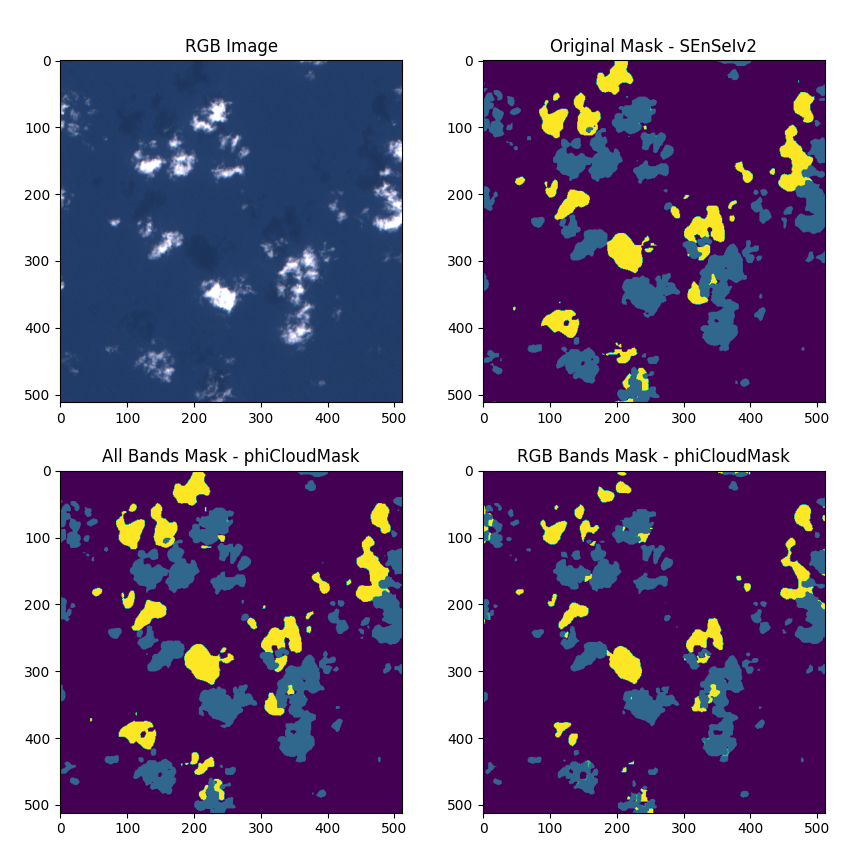
Visualize the results 📊
To visualize the original RGB image, the ground truth mask, and the predicted cloud masks:
import matplotlib.pyplot as plt

fig, axes = plt.subplots(2, 2, figsize=(10, 10))
axes = axes.flatten()
axes[0].imshow(image[0].permute(1, 2, 0).cpu().numpy() * 5)
axes[0].set_title("RGB Image")
axes[1].imshow(mask_demo[0])
axes[1].set_title("Original Mask - SEnSeIv2")
axes[2].imshow(cloud_4class_all)
axes[2].set_title("All Bands Mask - phiCloudMask")
axes[3].imshow(cloud_4class_rgb)
axes[3].set_title("RGB Bands Mask - phiCloudMask")
plt.show()
Additional information ✔️
Understanding the model 🧠
The phiCloudMask model leverages a pre-trained neural network architecture to predict cloud masks. It uses two main sets of weights:
- Embedding weights: Used to convert the spectral data into a meaningful representation for the model.
- Cloud mask weights: Used for the final classification of each pixel into the predefined categories.
2 maintainers


Metadata
2 maintainers
Release files for phicloudmask 0.0.3
For a detailed explanation of source distributions (sdists) and built distributions (wheels), please see the package formats documentation.
Source distribution (sdist)
| File | Size | Uploaded | |
|---|---|---|---|
| phicloudmask-0.0.3.tar.gz | 10.8 kB | Details |
Built distribution (wheel)
| File | Interpreter | ABI | Platform | Reset |
|---|---|---|---|---|
| phicloudmask-0.0.3-py3-none-any.whl | Python 3 | none | any | Details |
Total release size: 23.0 kB
Release files / phicloudmask-0.0.3.tar.gz
| Download URL | phicloudmask-0.0.3.tar.gz |
|---|---|
| Size | 10.8 kB |
| Tags | Source |
|
SHA-256 checksum How to use checksums |
339e2ba21e921ea3781d66572410632db0f16136b81ce9419db780746a1f62f2
|
|
BLAKE2b-256 checksum How to use checksums |
a0dd6a61871847bad212ffbc6f10d2c47f4f28b504a8bbdcd9012fe64dd05d25
|
| Upload date | |
|
Uploaded using Trusted Publishing? What is trusted publishing? |
No |
| Uploaded via |
poetry/2.4.1 CPython/3.12.13 Windows/11
|
Release files / phicloudmask-0.0.3-py3-none-any.whl
| Download URL | phicloudmask-0.0.3-py3-none-any.whl |
|---|---|
| Size | 12.2 kB |
| Tags | Python 3 |
|
SHA-256 checksum How to use checksums |
139e130ee536a86d68ac68171a624b21cb17996b678b855d2bcaabad0282c6cd
|
|
BLAKE2b-256 checksum How to use checksums |
af18e417e9b3c7a3492e4fc4b0c088a274065d636e5ed43c650e9838574964ce
|
| Upload date | |
|
Uploaded using Trusted Publishing? What is trusted publishing? |
No |
| Uploaded via |
poetry/2.4.1 CPython/3.12.13 Windows/11
|














