
A graph editor for SageMath/Jupyter

Project description
Phitigra

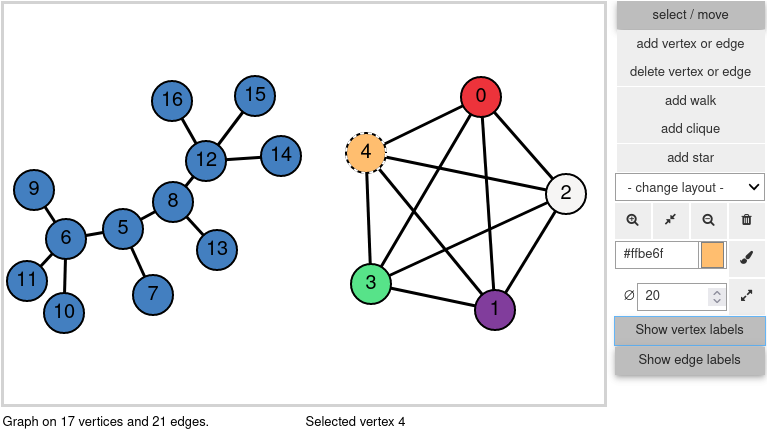
Phitigra is a graph editor widget for SageMath when using the Jupyter notebook.
Try the demo notebook on mybinder!
Note: for some unknown reason the above link stopped working.
Features
With phitigra one can:
- draw graphs using the mouse to add vertices and edges
- move the vertices positions, zoom in and out
- draw undirected as well as directed graphs
- choose the color of vertices and edges
- apply various layout algorithms
- easily retrieve the drawn graph for use with SageMath
- run step-by-step a custom script on the drawn graph
- change and refresh the drawing with external functions
Non-features
The following are not supported:
- multigraphs: multiple edges will not be drawn
- large graphs: the rendering will be unpraticably slow
Dependencies
- ipywidgets, for user interaction
- ipycanvas, for the drawing
You might need the following
jupyter nbextension enable --py widgetsnbextension
after you install ipywidgets (see the documentation).
Note: phitigra is not known to work with JupyterLab at the moment.
How to try it?
On mybinder
(Runs online, nothing to install.)
Clicking here will open the demo notebook on mybinder in a new tab. Note that this uses the stable version of phitigra (that from the master branch), which may differ from the one in the develop branch.
Note: for some unknown reason the above link stopped working.
From a standalone SageMath installation
This assumes that SageMath is installed on your system. See http://www.sagemath.org for install instructions.
Stable version
The stable version is on pypi so it can be installed as follows
sage -pip install --upgrade phitigra
Development version
Clone the source from the repository
git clone https://github.com/jfraymond/phitigra.git
Install or upgrade with pip:
sage -pip install --upgrade path/to/the/cloned/repository
That's it!
To uninstall:
sage -pip uninstall phitigra
Note that the above commands should not be run from the repository directory, otherwise pip might complain that it did not find files to uninstall.
Usage
from phitigra import GraphEditor
editor = GraphEditor(graphs.RandomGNP(10, 0.5))
editor.show()
# Now you can play with the graph!
A copy of the currently drawn graph can be obtained with the get_graph function:
G = editor.get_graph()
# Now G is a copy of the graph drawn in editor e
There are many more examples in the demo notebook.
Tests
As with SageMath's code, tests and code quality checks can be started with the --tox option (from the cloned directory):
sage --tox src/phitigra
Building the documentation
From the package directory
cd docs
sage -sh -c "make html"
The main file of the documentation is then in docs/build/html/index.html.
A recent build of the documentation can be found here.
What's new
v0.2.4
- show/hide edge labels
- user-defined vertex labels
- exposing vertex positioning functions
- removing the
Nextbutton - updating links after move to github
- more examples in the demo notebook
v0.2.3
- Improved doc
- Polished code, which now passes all tests
- Changed package structure to follows python guidelines
v0.2.2
- Single (major) change: renaming
SimpleGraphEditorintoGraphEditor. Code written for previous versions is not compatible with this one, but can be easily fixed.
v0.2.1
- Demo notebook
- Binder link
- Improved update time when moving vertices
- Minor fixes
v0.2.0
- Docstrings and doctests in (almost) all functions
- Hiding of internal objects
- Cleaning code


Download files
Download the file for your platform. If you're not sure which to choose, learn more about installing packages.
Source Distribution
Built Distribution
Filter files by name, interpreter, ABI, and platform.
If you're not sure about the file name format, learn more about wheel file names.
Copy a direct link to the current filters
File details
Details for the file phitigra-0.2.4.tar.gz.
File metadata
- Download URL: phitigra-0.2.4.tar.gz
- Upload date:
- Size: 22.0 kB
- Tags: Source
- Uploaded using Trusted Publishing? No
- Uploaded via: twine/3.4.2 importlib_metadata/4.8.1 pkginfo/1.7.1 requests/2.26.0 requests-toolbelt/0.9.1 tqdm/4.62.2 CPython/3.9.7
File hashes
| Algorithm | Hash digest | |
|---|---|---|
| SHA256 |
c22d136054e9c2a1fa781bb2606573a011c1e406a574d7db3da3a5d28691a061
|
|
| MD5 |
ebf21b27bdd1e9564cd06d6061fb9675
|
|
| BLAKE2b-256 |
80fda327e0dc51522f5a7e73aa49f9ac57cfc65681431c39e34e60dd10bb1115
|
File details
Details for the file phitigra-0.2.4-py3-none-any.whl.
File metadata
- Download URL: phitigra-0.2.4-py3-none-any.whl
- Upload date:
- Size: 20.2 kB
- Tags: Python 3
- Uploaded using Trusted Publishing? No
- Uploaded via: twine/3.4.2 importlib_metadata/4.8.1 pkginfo/1.7.1 requests/2.26.0 requests-toolbelt/0.9.1 tqdm/4.62.2 CPython/3.9.7
File hashes
| Algorithm | Hash digest | |
|---|---|---|
| SHA256 |
c67381b7bc3788f7c191644807b913797ab85a9e12576d63e80c47a8e4fc633e
|
|
| MD5 |
656ca1ef7a2e569d8c61d9ba5c03a2c2
|
|
| BLAKE2b-256 |
c6371ca57635414e47cb2cea7e010d3c7476e19c973efbbb71ac31f65e1e1353
|






