
phonectl-mcp
An MCP server that lets AI agents see and drive a real iPhone over a USB cable: screenshots, the text on screen, taps, swipes, typing, hardware buttons, apps and the clipboard. macOS only.
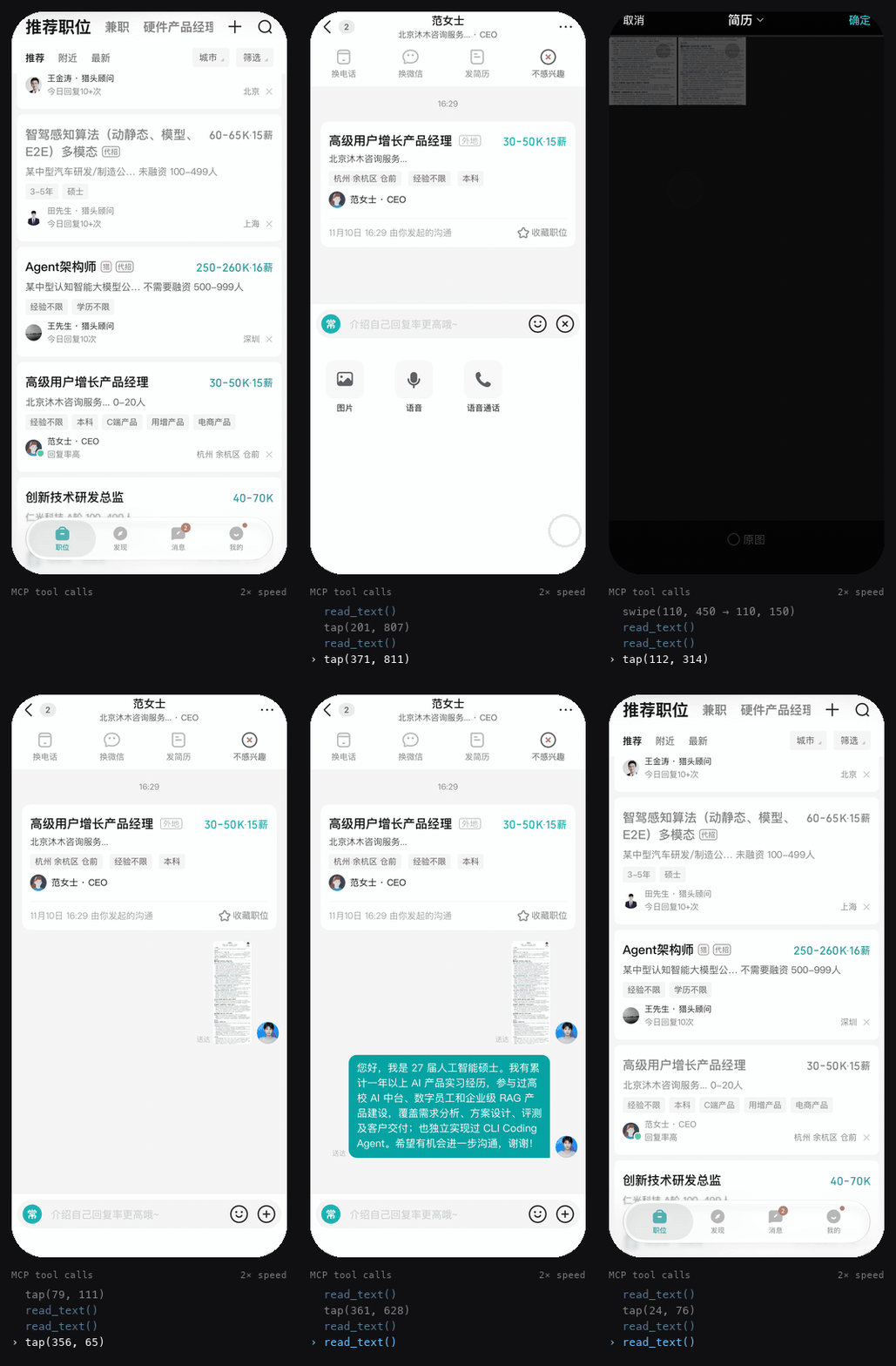
A script applying to one job in a recruiting app through phonectl-mcp: read_text finds the buttons, tap presses them. Personal details are pixelated; 2× speed.
Nothing is installed on the phone and nothing is jailbroken. It uses the developer services iOS already exposes to a trusted Mac (the same ones Xcode uses), and the touch and keyboard input path that iOS 27 opened over USB.
Requirements
- A Mac. The USB tunnel and the on-screen text recognition (Apple Vision) are macOS-only.
- An iPhone on iOS 27 or later. Taps, swipes and typing need iOS 27. Screenshots and app control may also work on iOS 17–26, but this is untested.
- A USB data cable (a charge-only cable won't work).
- On the phone: Developer Mode turned on, and this Mac trusted.
phonectl doctorwalks you through both. - uv.
Tested on an iPhone 17 Pro with iOS 27.2 and macOS 27.
Install
uv tool install phonectl-mcp
phonectl install-service
phonectl doctor
install-serviceruns the server at login as a launchd job. It listens onhttp://127.0.0.1:47321/mcpand creates an access token in~/.config/phonectl/token. It also prints the client setup below.doctorchecks every link from the cable to the server and says what to do about anything that fails.phonectl doctor --fixmounts the developer disk image if it is missing.
Connect a client
Claude Code:
claude mcp add --scope user --transport http phone http://127.0.0.1:47321/mcp \
  --header "Authorization: Bearer $(cat ~/.config/phonectl/token)"
Any other client that speaks streamable HTTP needs two things: the URL above, and the header Authorization: Bearer <token>.
Why one server for every client
The phone keeps a single control connection to the Mac. If two programs each open their own, they keep knocking each other off. So one resident server owns the phone, and every agent and script connects to that server. Your own scripts can call the same tools with any MCP client library.
This only makes the connection safe to share. The server does not stop two agents from tapping the screen at the same time, so let one drive at a time.
Tools
Coordinates are iOS points, which match the pixels of the screenshot the server returns (402×874 on an iPhone 17 Pro).
| Tool | What it does |
|---|---|
screenshot(native=False) |
Captures the screen. native=True returns the full-resolution PNG, for scripts. |
read_text() |
Returns the text on screen with positions in points, as JSON. Much cheaper than an image when an agent or script only needs to find a button. |
tap(x, y), long_press(x, y, duration_ms) |
Touch. |
swipe(x1, y1, x2, y2, duration_ms) |
Drag. To scroll down, swipe upward. |
type_text(text) |
Types into the focused field. ASCII is typed key by key. Other text (Chinese, emoji) is pasted through the clipboard, which replaces what was on it. |
press_key(key) |
Presses a key or chord, such as enter, backspace or cmd+a. |
press_button(name) |
Presses a hardware button: home, lock, volume-up, volume-down, mute or siri. |
launch_app(bundle_id, restart=False), list_apps(query) |
Opens apps and finds their bundle ids. |
get_clipboard(), set_clipboard(text) |
Reads and writes the phone's clipboard. |
status() |
Reports the server and the phone link. |
The tools that act on the phone (tap, long_press, swipe, type_text, press_key, press_button, launch_app) return a screenshot taken afterwards; pass screenshot=False to skip it. Taps are not confirmed by the phone, so use that screenshot to see whether a tap landed.
Settings
Set these environment variables before running phonectl install-service; it copies them into the service.
| Variable | Default | Meaning |
|---|---|---|
PHONECTL_UDID |
first USB iPhone | Which phone to use when more than one is connected. |
PHONECTL_PORT |
47321 |
HTTP port. The server only listens on 127.0.0.1. |
PHONECTL_TOKEN_FILE |
~/.config/phonectl/token |
Where the access token is kept. |
PHONECTL_SCALE |
3 |
Pixels per point. Use 2 on an iPhone SE, XR or 11. It only sets the screenshot size; taps stay correct either way. |
PHONECTL_OCR_LANGS |
zh-Hans,en-US |
Languages for read_text, in priority order. |
PHONECTL_SETTLE |
0.6 |
Seconds to wait before the screenshot that follows an action. |
PHONECTL_TOUCH_IDLE |
30 |
Seconds without input after which the input stream to the phone is closed. The next input reopens it, which takes about 0.6 s. |
PHONECTL_CALL_TIMEOUT |
15 |
Seconds to wait for the phone before a call fails, on top of the time a gesture takes. |
PHONECTL_LOG |
WARNING |
Log level (INFO for the installed service). Logs are in ~/Library/Logs/phonectl*.log. |
Other commands: phonectl restart restarts the server (for example after upgrading with uv tool upgrade phonectl-mcp), and phonectl uninstall-service removes it. Running phonectl-mcp with no arguments speaks stdio for a single client; this is meant for debugging.
Troubleshooting
Run phonectl doctor first. It tells you which link is broken.
| Symptom | Fix |
|---|---|
| No iPhone found | Use a data cable, unlock the phone, then replug. |
| "Mac is not trusted" | Unlock the phone, replug, and tap Trust. |
| Developer Mode switch is missing | Open Xcode once with the phone connected. The switch then appears under Settings › Privacy & Security. |
| Screenshots fail | Run phonectl doctor --fix to mount the developer disk image. |
| Taps do nothing | Taps need iOS 27 or later. Also make sure the screen is on and unlocked. |
| Clients cannot connect | Run phonectl restart and check ~/Library/Logs/phonectl.error.log. |
Security
- The server listens only on
127.0.0.1and rejects any request without the token. - An agent connected to it can do anything you could do with your finger: send messages, buy things, delete data. Give it the narrowest instructions you can, and watch the screen while it works.
- You use it at your own risk. Automating third-party apps may break their terms of service.
Development
git clone https://github.com/jiefeng-ai/phonectl-mcp
cd phonectl-mcp
uv sync
uv run pytest
To run your working copy as the service, run uv run phonectl install-service from the clone.
License
MIT
1 maintainer

Metadata
1 maintainer
Release files for phonectl-mcp 0.1.0
For a detailed explanation of source distributions (sdists) and built distributions (wheels), please see the package formats documentation.
Source distribution (sdist)
| File | Size | Uploaded | Provenance | Actions |
|---|---|---|---|---|
| phonectl_mcp-0.1.0.tar.gz | 126.8 kB | With provenance | Details for phonectl_mcp-0.1.0.tar.gz |
Built distribution (wheel)
| File | Interpreter | ABI | Platform | Actions Reset |
|---|---|---|---|---|
| phonectl_mcp-0.1.0-py3-none-any.whl | Python 3 | none | any | Details for phonectl_mcp-0.1.0-py3-none-any.whl |
Total release size: 150.6 kB
Release files / phonectl_mcp-0.1.0.tar.gz
| Download URL | phonectl_mcp-0.1.0.tar.gz |
|---|---|
| Size | 126.8 kB |
| Tags | Source |
|
SHA-256 checksum How to use checksums |
9e1ec5c34bb6efcce3d5db89aacff95006d55c11091c43d5211097ee183fe2ef
|
|
BLAKE2b-256 checksum How to use checksums |
86d1dbf762ab60796001ea39934e68328a5cd1da6445babb1493aec7f26b623d
|
| Upload date | |
|
Uploaded using Trusted Publishing? What is trusted publishing? |
Yes |
| Uploaded via |
twine/7.0.0 CPython/3.13.16
|
Provenance
Provenance describes where a file came from. On PyPI, provenance is shared via attestations, which provide a verifiable record of the build or publishing details. View details, limitations and caveats.


PyPI Publish Attestation
PyPI verified that this artifact, at this checksum, originated from the publisher listed below.
Signed by GitHub Actions, verified by PyPI on Nov 10, 2026.
Transparency logRelease files / phonectl_mcp-0.1.0-py3-none-any.whl
| Download URL | phonectl_mcp-0.1.0-py3-none-any.whl |
|---|---|
| Size | 23.9 kB |
| Tags | Python 3 |
|
SHA-256 checksum How to use checksums |
b56f51ee058899f494cdc1e659fa8ab9f6c56ddab30d5b7be42c8bebb82d52d1
|
|
BLAKE2b-256 checksum How to use checksums |
00bc3a346b8ad30740347d851654023c12ca4ba087dcebc9ca59ee2fa0673ca6
|
| Upload date | |
|
Uploaded using Trusted Publishing? What is trusted publishing? |
Yes |
| Uploaded via |
twine/7.0.0 CPython/3.13.16
|
Provenance
Provenance describes where a file came from. On PyPI, provenance is shared via attestations, which provide a verifiable record of the build or publishing details. View details, limitations and caveats.
PyPI Publish Attestation
PyPI verified that this artifact, at this checksum, originated from the publisher listed below.
Signed by GitHub Actions, verified by PyPI on Nov 10, 2026.
Transparency logSecurity for phonectl-mcp 0.1.0
Provenance
Provenance describes where a file came from. On PyPI, provenance is shared via attestations, which provide a verifiable record of the build or publishing details. View details, limitations and caveats.
Full provenance
Both files in this release have been uploaded with provenance metadata.
Attestation for phonectl_mcp-0.1.0.tar.gz
PyPI Publish Attestation
PyPI verified that this artifact, at this checksum, originated from the publisher listed below.
Signed by GitHub Actions, verified by PyPI on Nov 10, 2026.
Transparency logA note on package security
PyPI is a repository for distributing packages, not a service for auditing them. While third-party security researchers and our staff do their best to detect and remove malicious packages, PyPI cannot guarantee the quality, security or suitability of any given package.
To learn more about protecting yourself from malicious actors, visit our package security documentation.














