







photon-mosaic-pipeline
photon-mosaic-pipeline is a Snakemake-based toolkit for processing multiphoton datasets. It orchestrates a curated collection of algorithms to transform your raw data (e.g., TIFF files) into analysis-ready outputs, such as ΔF/F traces, NWB files, or inferred spikes.
[!NOTE] This project was renamed from
photon-mosaictophoton-mosaic-pipeline.The name
photon-mosaicnow refers to a separate package under the same organisation:photon-mosaic, a Python API (built on SpikeInterface) for exploring and comparing multiphoton analysis methods interactively: mixing and matching algorithms for each step to find what works for your data.
photon-mosaic-pipeline(this repository) is the complementary package for running the analysis you settled on as a reproducible, batch-processed workflow at scale.This rename is a breaking change. The PyPI package, CLI command, and import name all move to
photon-mosaic-pipeline/photon_mosaic_pipeline, as do the config dir (~/.photon_mosaic_pipeline/) and output folder (derivatives/photon-mosaic-pipeline/). Existing configs and derivatives under the old names are not picked up automatically: move or re-generate them after upgrading.Both are part of the broader PhotonMosaic framework, and we plan to integrate the two so the pipeline can run the methods you prototype with the API.
Each analysis step is integrated into an automated workflow, allowing you to chain preprocessing, registration, signal extraction, and post-processing steps into a single, reproducible pipeline. The design prioritizes usability for labs that process many imaging sessions and need to scale across an HPC cluster.
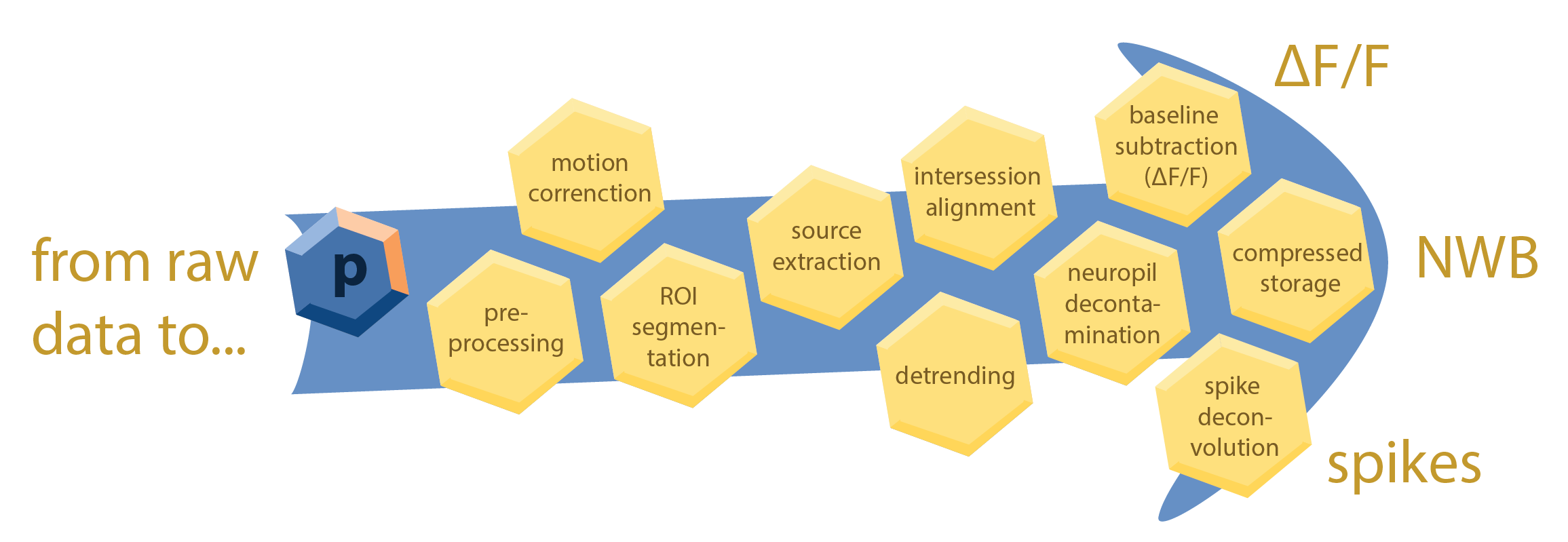
This is made possible by Snakemake, a workflow management system that provides a powerful and flexible framework for defining and executing complex data processing pipelines. Snakemake automatically builds a directed acyclic graph (DAG) of all the steps in your analysis, ensuring that each step is executed in the correct order and that intermediate results are cached to avoid redundant computations. photon-mosaic-pipeline also includes a SLURM executor plugin for Snakemake to seamlessly scale your analysis across an HPC cluster. To ensure consistency and reproducibility, photon-mosaic-pipeline writes processed data according to the NeuroBlueprint data standard for organizing and storing multiphoton imaging data.
The goal of photon-mosaic-pipeline is to provide a modular, extensible, and user-friendly framework for multiphoton data analysis that can be easily adapted to different experimental designs and analysis requirements. For each processing step, we aim to vet and integrate the best available open-source tools, providing sensible defaults tailored to the specific data type and experimental modality.
Roadmap
Current features
- Preprocessing: derotation and contrast enhancement (see
photon_mosaic_pipeline/preprocessing). - Registration & source extraction using Suite2p.
- Cell detection / anatomical ROI extraction using Cellpose (v3 or v4, including Cellpose-SAM).
Planned additions
- Registration using NoRMCorre for non-rigid motion correction.
- ROI matching using ROICat for inter-session / inter-plane ROI matching.
- Neuropil subtraction / decontamination: methods from the AllenSDK and AST-model.
- Spike deconvolution: OASIS and CASCADE.
See issues on GitHub for more details and participate in planning. Please refer to our guidelines to understand how to contribute.
Installation
photon-mosaic-pipeline requires Python 3.11 or 3.12.
conda create -n photon-mosaic-pipeline python=3.12
conda activate photon-mosaic-pipeline
pip install photon-mosaic-pipeline
To install with developer tools (e.g., testing and linting):
pip install 'photon-mosaic-pipeline[dev]'
1 maintainer

Metadata
1 maintainer
Release files for photon-mosaic-pipeline 0.4.0
For a detailed explanation of source distributions (sdists) and built distributions (wheels), please see the package formats documentation.
Source distribution (sdist)
| File | Size | Uploaded | Provenance | Actions |
|---|---|---|---|---|
| photon_mosaic_pipeline-0.4.0.tar.gz | 40.3 kB | Without provenance | Details for photon_mosaic_pipeline-0.4.0.tar.gz |
Built distribution (wheel)
| File | Interpreter | ABI | Platform | Actions Reset |
|---|---|---|---|---|
| photon_mosaic_pipeline-0.4.0-py3-none-any.whl | Python 3 | none | any | Details for photon_mosaic_pipeline-0.4.0-py3-none-any.whl |
Total release size: 83.4 kB
Release files / photon_mosaic_pipeline-0.4.0.tar.gz
| Download URL | photon_mosaic_pipeline-0.4.0.tar.gz |
|---|---|
| Size | 40.3 kB |
| Tags | Source |
|
SHA-256 checksum How to use checksums |
5857a95aa4f866058c801dade8e75beb13b657c9eb310f4d4977c9a4921228cc
|
|
BLAKE2b-256 checksum How to use checksums |
177dc3f164e6464668e3ca447f3878dc8e4e63ce335bacb35caddc2e00dbcb49
|
| Upload date | |
|
Uploaded using Trusted Publishing? What is trusted publishing? |
No |
| Uploaded via |
twine/6.1.0 CPython/3.13.12
|
Release files / photon_mosaic_pipeline-0.4.0-py3-none-any.whl
| Download URL | photon_mosaic_pipeline-0.4.0-py3-none-any.whl |
|---|---|
| Size | 43.0 kB |
| Tags | Python 3 |
|
SHA-256 checksum How to use checksums |
896a2c5c8b05f7e790bfa49c38a8cf47b466398f45c22969a4b24e0647732c3d
|
|
BLAKE2b-256 checksum How to use checksums |
ad516775ad9e26bf15606a42ade9344c99fca579921a3bd05e0fc78d16b014bb
|
| Upload date | |
|
Uploaded using Trusted Publishing? What is trusted publishing? |
No |
| Uploaded via |
twine/6.1.0 CPython/3.13.12
|
Security for photon-mosaic-pipeline 0.4.0
Provenance
Provenance describes where a file came from. On PyPI, provenance is shared via attestations, which provide a verifiable record of the build or publishing details. View details, limitations and caveats.
No provenance found
None of the files in this release were uploaded with provenance metadata.
A note on package security
PyPI is a repository for distributing packages, not a service for auditing them. While third-party security researchers and our staff do their best to detect and remove malicious packages, PyPI cannot guarantee the quality, security or suitability of any given package.
To learn more about protecting yourself from malicious actors, visit our package security documentation.














