



















Python API for Photoshop.
The example above was created with Photoshop Python API. Check it out at https://loonghao.github.io/photoshop-python-api/examples.
Has been tested and used Photoshop version:
| Photoshop Version | Supported |
|---|---|
| 2023 | ✅ |
| 2022 | ✅ |
| 2021 | ✅ |
| 2020 | ✅ |
| cc2019 | ✅ |
| cc2018 | ✅ |
| cc2017 | ✅ |
Installing
You can install via pip.
pip install photoshop_python_api
Since it uses COM (Component Object Model) connect Photoshop, it can be used in any DCC software with a python interpreter.
Hello World
import photoshop.api as ps
app = ps.Application()
doc = app.documents.add()
new_doc = doc.artLayers.add()
text_color = ps.SolidColor()
text_color.rgb.red = 0
text_color.rgb.green = 255
text_color.rgb.blue = 0
new_text_layer = new_doc
new_text_layer.kind = ps.LayerKind.TextLayer
new_text_layer.textItem.contents = 'Hello, World!'
new_text_layer.textItem.position = [160, 167]
new_text_layer.textItem.size = 40
new_text_layer.textItem.color = text_color
options = ps.JPEGSaveOptions(quality=5)
# # save to jpg
jpg = 'd:/hello_world.jpg'
doc.saveAs(jpg, options, asCopy=True)
app.doJavaScript(f'alert("save to jpg: {jpg}")')
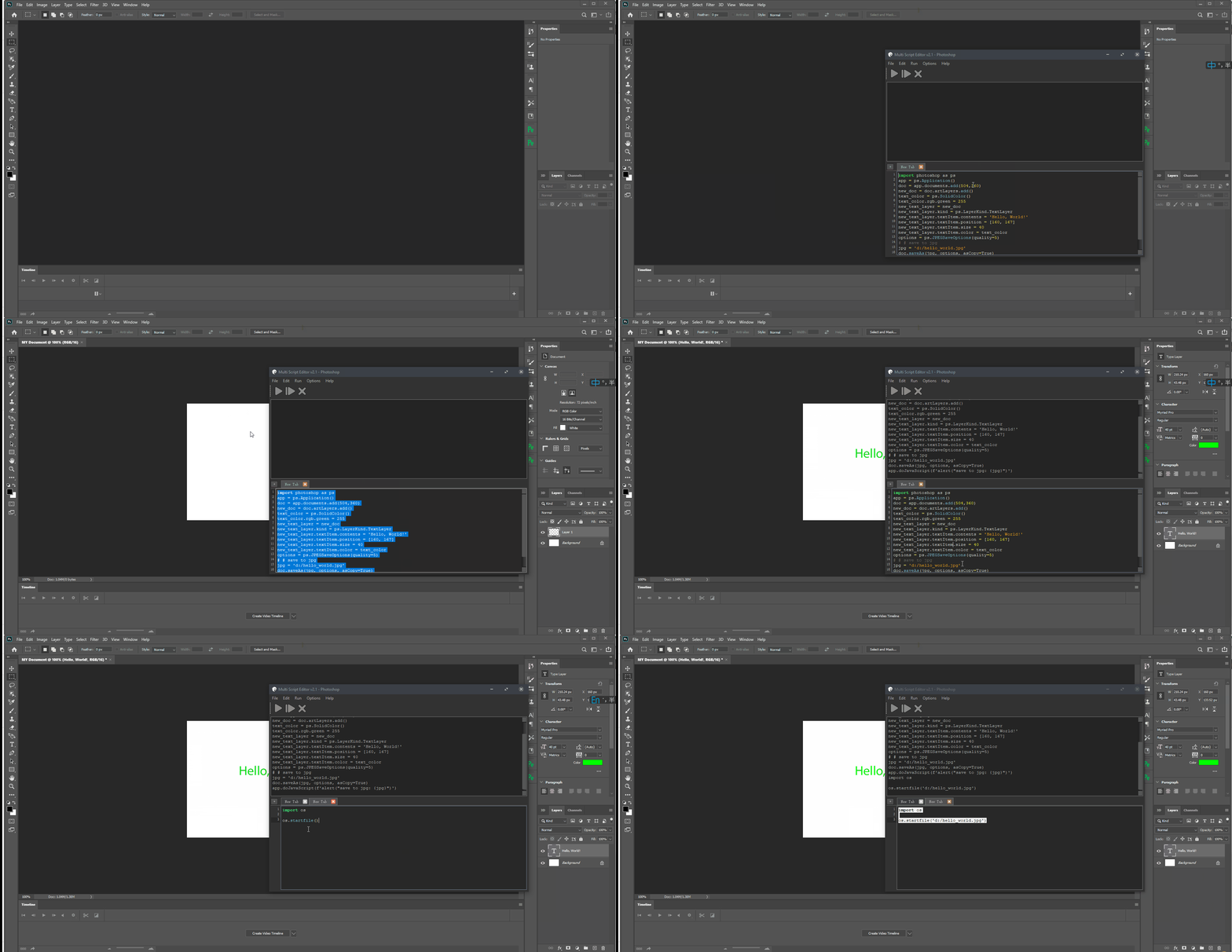
Photoshop Session
Use it as context.
from photoshop import Session


with Session(action="new_document") as ps:
    doc = ps.active_document
    text_color = ps.SolidColor()
    text_color.rgb.green = 255
    new_text_layer = doc.artLayers.add()
    new_text_layer.kind = ps.LayerKind.TextLayer
    new_text_layer.textItem.contents = 'Hello, World!'
    new_text_layer.textItem.position = [160, 167]
    new_text_layer.textItem.size = 40
    new_text_layer.textItem.color = text_color
    options = ps.JPEGSaveOptions(quality=5)
    jpg = 'd:/hello_world.jpg'
    doc.saveAs(jpg, options, asCopy=True)
    ps.app.doJavaScript(f'alert("save to jpg: {jpg}")')
Contributors ✨
Thanks goes to these wonderful people (emoji key):















This project follows the all-contributors specification. Contributions of any kind are welcome!
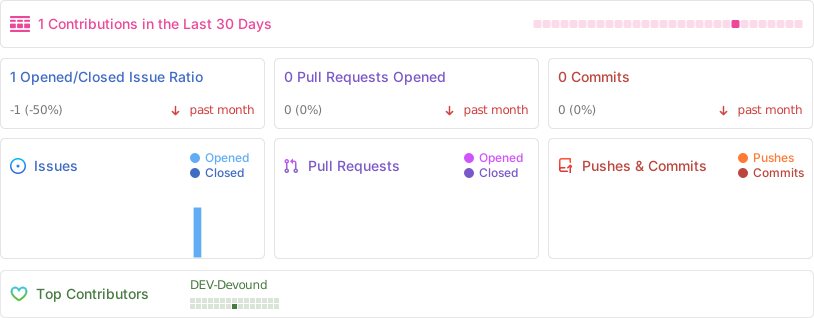
Repobeats analytics
how to get Photoshop program ID
Get-ChildItem "HKLM:\SOFTWARE\Classes" |
  ?{ ($_.PSChildName -match "^[a-z]+\.[a-z]+(\.\d+)?$") -and ($_.GetSubKeyNames() -contains "CLSID") } |
  ?{ $_.PSChildName -match "Photoshop.Application" } | ft PSChildName

How to get a list of COM objects from the registry
Useful links
- https://theiviaxx.github.io/photoshop-docs/Photoshop/
- http://wwwimages.adobe.com/www.adobe.com/content/dam/acom/en/devnet/photoshop/pdfs/photoshop-cc-javascript-ref-2015.pdf
- https://github.com/lohriialo/photoshop-scripting-python
- https://www.adobe.com/devnet/photoshop/scripting.html
- https://www.youtube.com/playlist?list=PLUEniN8BpU8-Qmjyv3zyWaNvDYwJOJZ4m
- http://yearbook.github.io/esdocs/#/Photoshop/Application
- http://www.shining-lucy.com/wiki/page.php?id=appwiki:photoshop:ps_script
- http://www.tonton-pixel.com/wp-content/uploads/DecisionTable.pdf
- http://jongware.mit.edu/pscs5js_html/psjscs5/pc_Application.html
- https://indd.adobe.com/view/a0207571-ff5b-4bbf-a540-07079bd21d75
- http://shining-lucy.com/wiki/page.php?id=appwiki:photoshop:ps_script
- http://web.archive.org/web/20140121053819/http://www.pcpix.com/Photoshop/char.html
- http://www.tonton-pixel.com/scripts/utility-scripts/get-equivalent-id-code/index.html
- https://github.com/Adobe-CEP/Samples/tree/master/PhotoshopEvents
- https://evanmccall.wordpress.com/2015/03/09/how-to-develop-photoshop-tools-in-python
1 maintainer

Release files for photoshop 0.21.9
For a detailed explanation of source distributions (sdists) and built distributions (wheels), please see the package formats documentation.
Source distribution (sdist)
| File | Size | Uploaded | |
|---|---|---|---|
| photoshop-0.21.9.tar.gz | 53.8 kB | Details |
Built distribution (wheel)
| File | Interpreter | ABI | Platform | Reset |
|---|---|---|---|---|
| photoshop-0.21.9-py3-none-any.whl | Python 3 | none | any | Details |
Total release size: 122.3 kB
Release files / photoshop-0.21.9.tar.gz
| Download URL | photoshop-0.21.9.tar.gz |
|---|---|
| Size | 53.8 kB |
| Tags | Source |
|
SHA-256 checksum How to use checksums |
a30bdbdb20661e5169412458d80e71f9a120aaf0da0ff7b6f41428bf20fc83ab
|
|
BLAKE2b-256 checksum How to use checksums |
dac1410e6249de1fe6ed2fcac9842180ee48bd661857b6088d06c5fa012f982a
|
| Upload date | |
|
Uploaded using Trusted Publishing? What is trusted publishing? |
No |
| Uploaded via |
poetry/1.2.2 CPython/3.10.12 Linux/5.15.0-79-generic
|
Release files / photoshop-0.21.9-py3-none-any.whl
| Download URL | photoshop-0.21.9-py3-none-any.whl |
|---|---|
| Size | 68.5 kB |
| Tags | Python 3 |
|
SHA-256 checksum How to use checksums |
2c5fba768f955ef92b8b8a009b0bf41379bae0899b0fb840386564e2eb3455c8
|
|
BLAKE2b-256 checksum How to use checksums |
38c6d891b110ca5092983bf4ebd7d7b7ee023fc137c829f32ae9479fbfd3d075
|
| Upload date | |
|
Uploaded using Trusted Publishing? What is trusted publishing? |
No |
| Uploaded via |
poetry/1.2.2 CPython/3.10.12 Linux/5.15.0-79-generic
|














