
Manage photos in a directory tree

Project description
photree







A CLI tool to import, organize, verify, and export iOS photo albums as plain directories — preserving originals, edits, and sidecars without any proprietary database.
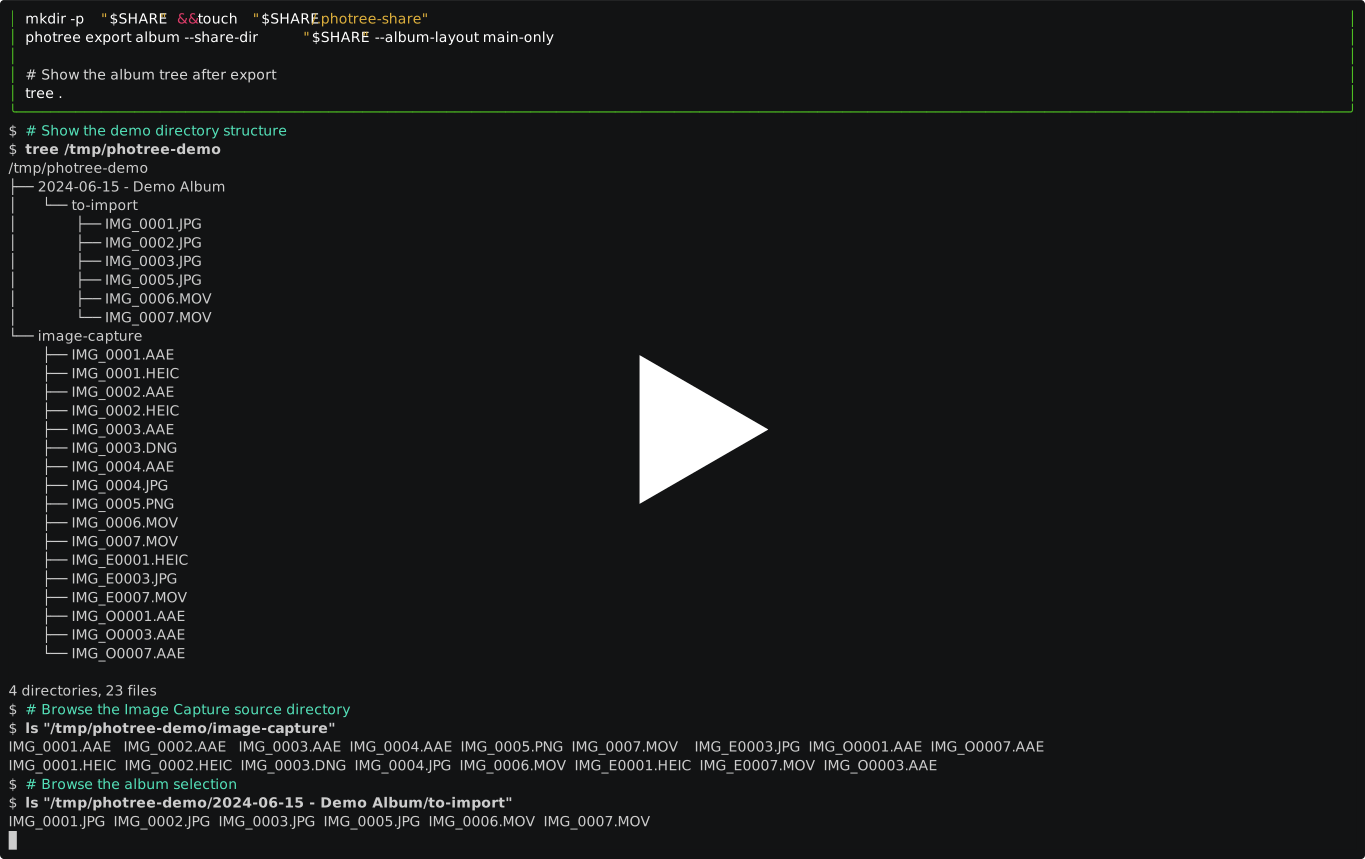
Main Use Cases
- Import iOS photos into organized album directories, preserving originals, edits, and AAE sidecars from macOS Image Capture
- Browse and curate using the
main-img/,main-jpg/, andmain-vid/directories — the best version of each photo/video, ready to view - Share albums by exporting JPEG-compatible versions to cloud sync folders (MEGAsync, Syncthing, etc.) or external drives
- Back up to external volumes with full album structure (originals + edits + sidecars) using symlinks or hardlinks to save disk space
- Verify album integrity with checksums and structural validation, with actionable fix suggestions
Non-Goals
- Not a photo viewer or editor. photree organizes files on disk — use your favorite viewer (Finder, feh, etc.) to browse
main-img/ormain-jpg/. - Not a photo management database. There is no catalog, index, or metadata database. Albums are plain directories, readable by any tool.
- Not a cloud service. photree exports to directories — pair it with your own sync tool (MEGAsync, Syncthing, rsync, etc.).
- Not cross-platform for import. The import pipeline requires macOS (
sipsfor HEIC-to-JPEG conversion). Exported albums are portable.
Known Limitations
- macOS required for import. The
sipstool (included with macOS) is used for HEIC/DNG-to-JPEG conversion. Import is not supported on Linux. Exported albums work everywhere. - iOS-only import source. The import pipeline is built around macOS Image Capture conventions (IMG_* naming, AAE sidecars, IMG_E* edits). Other camera sources are not currently supported.
- No EXIF-based organization. Album names and dates are derived from directory names (YYYY-MM-DD convention), not from EXIF metadata.
Philosophy
- Plain directories, no lock-in. Albums are standard filesystem directories. No database, no proprietary format. You can always
ls,cp,rsync, or browse with any tool. - Preserve everything, organize intelligently. Originals, edits, and sidecars are archived under
ios/. Themain-*directories provide a clean, browsable view without losing source material. - Explicit over magic. Every operation has a dry-run mode. Destructive fixes require explicit flags. The tool tells you what it would do before doing it.
- Composable with existing tools. photree handles album structure — pair it with rsync for backups, MEGAsync for cloud sync, or any viewer for browsing.
Related Projects
- Apple Photos — Apple's built-in photo manager. Great for editing, but uses a proprietary database. photree is for people who want plain directories.
- Immich / PhotoPrism — Self-hosted photo management with a web UI. A good complement if you want a browsable gallery on top of your photree albums.
- immich-go — CLI tool to bulk-upload photos to Immich. Can be used to upload photree albums.
- rsync / Syncthing / MEGAsync — File sync tools. photree exports to directories that these tools can sync.
- ExifTool — Metadata extraction and editing. Useful alongside photree for EXIF-based workflows.
Installation
See docs/installation.md.
Usage
See docs/usage.md.
Development
See docs/setup-development-environment.md.
Contribute
Practical information:
- docs/setup-development-environment.md — development setup
- docs/building-and-testing.md — running tests and checks
- docs/releasing-and-publishing.md — releases and PyPI publishing
- docs/guidelines.md — project-specific guidelines
- common-guidelines — shared coding guidelines
Conceptual information:
- docs/internals.md — runtime behavior, design decisions, and external commands
- docs/architecture.md — module dependency graph


Download files
Download the file for your platform. If you're not sure which to choose, learn more about installing packages.
Source Distribution
Built Distribution
Filter files by name, interpreter, ABI, and platform.
If you're not sure about the file name format, learn more about wheel file names.
Copy a direct link to the current filters
File details
Details for the file photree-0.3.0.tar.gz.
File metadata
- Download URL: photree-0.3.0.tar.gz
- Upload date:
- Size: 88.1 kB
- Tags: Source
- Uploaded using Trusted Publishing? Yes
- Uploaded via: twine/6.1.0 CPython/3.13.7
File hashes
| Algorithm | Hash digest | |
|---|---|---|
| SHA256 |
163a0787c63535b2ac2b98a437da19bb2692336a1f725ba50fc1ed77a6da7c7a
|
|
| MD5 |
9ee6c8bf070faee6e4a392d38bd350ea
|
|
| BLAKE2b-256 |
d60d201cc9bb8c09718a156b2b756c61ded5dbe4f671a750509bc76d3d672bd9
|
Provenance
The following attestation bundles were made for photree-0.3.0.tar.gz:
Publisher:
publish.yml on iglootools/photree
-
Statement:
-
Statement type:
https://in-toto.io/Statement/v1 -
Predicate type:
https://docs.pypi.org/attestations/publish/v1 -
Subject name:
photree-0.3.0.tar.gz -
Subject digest:
163a0787c63535b2ac2b98a437da19bb2692336a1f725ba50fc1ed77a6da7c7a - Sigstore transparency entry: 1191607156
- Sigstore integration time:
-
Permalink:
iglootools/photree@4690fbb8d4e61b7e9eff043718176e331201b702 -
Branch / Tag:
refs/heads/main - Owner: https://github.com/iglootools
-
Access:
public
-
Token Issuer:
https://token.actions.githubusercontent.com -
Runner Environment:
github-hosted -
Publication workflow:
publish.yml@4690fbb8d4e61b7e9eff043718176e331201b702 -
Trigger Event:
workflow_run
-
Statement type:
File details
Details for the file photree-0.3.0-py3-none-any.whl.
File metadata
- Download URL: photree-0.3.0-py3-none-any.whl
- Upload date:
- Size: 109.3 kB
- Tags: Python 3
- Uploaded using Trusted Publishing? Yes
- Uploaded via: twine/6.1.0 CPython/3.13.7
File hashes
| Algorithm | Hash digest | |
|---|---|---|
| SHA256 |
15f07b555070d1aed68dcdd5fdd6b54cc645c9ee50b88a85c1562c188ee29a78
|
|
| MD5 |
185435c98126fb953be119162027524c
|
|
| BLAKE2b-256 |
efabbb75dd9c25fa147a615fa489a643c32ccb39585d783df35fdfd2652c40b4
|
Provenance
The following attestation bundles were made for photree-0.3.0-py3-none-any.whl:
Publisher:
publish.yml on iglootools/photree
-
Statement:
-
Statement type:
https://in-toto.io/Statement/v1 -
Predicate type:
https://docs.pypi.org/attestations/publish/v1 -
Subject name:
photree-0.3.0-py3-none-any.whl -
Subject digest:
15f07b555070d1aed68dcdd5fdd6b54cc645c9ee50b88a85c1562c188ee29a78 - Sigstore transparency entry: 1191607163
- Sigstore integration time:
-
Permalink:
iglootools/photree@4690fbb8d4e61b7e9eff043718176e331201b702 -
Branch / Tag:
refs/heads/main - Owner: https://github.com/iglootools
-
Access:
public
-
Token Issuer:
https://token.actions.githubusercontent.com -
Runner Environment:
github-hosted -
Publication workflow:
publish.yml@4690fbb8d4e61b7e9eff043718176e331201b702 -
Trigger Event:
workflow_run
-
Statement type:






