
Python behavioral captcha library with click, slide, drag, and rotate challenges

Project description

pi-captcha
Behavior Captcha Of Python






English | 中文
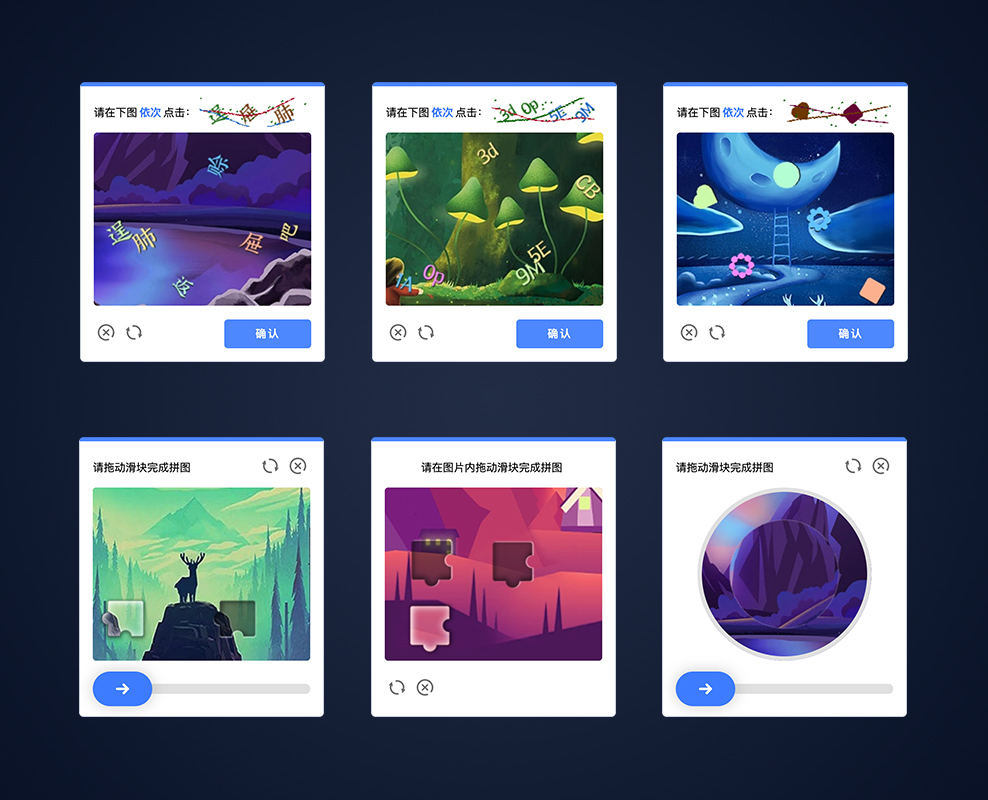
pi-captcha is a powerful, modular, and highly customizable behavioral CAPTCHA library that supports multiple interactive CAPTCHA types: Click, Slide, Drag-Drop, and Rotate.
⭐️ If it helps you, please give a star.
Ecosystem
| Project | Desc |
|---|---|
| document | Captcha Documentation |
| online demo | Captcha Online Demo |
| pi-captcha | Python CAPTCHA Library |
| go-captcha | Golang CAPTCHA Library |
| next-captcha | Node.js CAPTCHA Library |
| go-captcha-example | Golang + Web + APP Example |
| go-captcha-assets | Embedded Resource Assets for Golang |
| go-captcha-jslib | JavaScript CAPTCHA Library |
| go-captcha-vue | Vue CAPTCHA Library |
| go-captcha-react | React CAPTCHA Library |
| go-captcha-angular | Angular CAPTCHA Library |
| go-captcha-svelte | Svelte CAPTCHA Library |
| go-captcha-solid | Solid CAPTCHA Library |
| go-captcha-uni | UniApp CAPTCHA, compatible with Apps, Mini-Programs, and Fast Apps |
| go-captcha-flutter | Flutter CAPTCHA Library |
| go-captcha-service | GoCaptcha Service, supports binary and Docker image deployment, provides HTTP/gRPC interfaces, supports standalone and distributed modes (service discovery, load balancing, dynamic configuration) |
| go-captcha-service-sdk | GoCaptcha Service SDK Toolkit, includes HTTP/gRPC request interfaces, supports static mode, service discovery, and load balancing. |
| ... |
Core Features
- Diverse CAPTCHA Types: Supports Click, Slide, Rotate, and Drag behavioral CAPTCHAs, suitable for various interaction scenarios.
- Highly Customizable: Flexible configuration of images, fonts, colors, angles, sizes, etc., through Options and Resources.
- Advanced Image Processing: Built-in dynamic image generation and processing, supporting main images, thumbnails, puzzle pieces, and shadow effects.
- Modular Architecture: Clear code structure, following Python best practices, making it easy to extend and maintain.
- High-Performance Design: Optimized resource management and image generation, suitable for high-concurrency scenarios.
- Cross-Platform Compatibility: Generated CAPTCHA images can be seamlessly integrated into web applications, mobile apps, or other systems requiring CAPTCHAs.
CAPTCHA Types
pi-captcha supports the following four CAPTCHA types, each with unique interaction methods, generation logic, and application scenarios:
- Click CAPTCHA: Users click specified points or characters on the main image, supporting text and graphic modes.
- Slide CAPTCHA: Users slide a puzzle piece to the correct position on the main image, supporting basic and drag-drop modes.
- Drag-Drop CAPTCHA: A variant of the Slide CAPTCHA, allowing users to drag-drop a puzzle piece to a target position within a larger range.
- Rotate CAPTCHA: Users rotate a thumbnail to align with the main image's angle.
Install
$ pip install pi-captcha
Import Module
from pi_captcha import ClickBuilder, SlideBuilder, RotateBuilder

# Or import specific modules
from pi_captcha.click import ClickBuilder
from pi_captcha.slide import SlideBuilder
from pi_captcha.rotate import RotateBuilder
🖖 Click CAPTCHA
The Click CAPTCHA requires users to click specified points or characters on the main image, ideal for quick verification scenarios. It supports two modes:
- Text Mode: Displays characters (e.g., letters, numbers, or Chinese characters), and users click the corresponding characters.
- Graphic Mode: Displays graphics (e.g., icons or shapes), and users click the corresponding graphics.
How It Works
- Generate Main Image (
master_image): Contains randomly distributed points or characters, typically in JPEG format. - Generate Thumbnail (
thumb_image): Displays the target points or characters to be clicked, typically in PNG format. - User Interaction: Users click coordinates on the main image, and the frontend captures and sends the coordinates to the backend.
- Verification Logic: The backend compares the clicked coordinates with the target points (
dots) to verify a match.
Code Example
from pi_captcha import ClickBuilder
from pi_captcha.base import option
from PIL import Image

# Create builder
builder = ClickBuilder(
    range_len=option.RangeVal(min=4, max=6),
    range_verify_len=option.RangeVal(min=2, max=4),
)

# Load resources
fonts = ['path/to/font.ttf']
backgrounds = [Image.open('path/to/bg.jpg')]

# Set resources
builder.set_resources(
    chars=['A', 'B', 'C', 'D', 'E', 'F', 'G', 'H'],
    fonts=fonts,
    backgrounds=backgrounds,
)

# Generate captcha
captcha = builder.make()
capt_data = captcha.generate()

# Get data
dots = capt_data.get_data()
master_image = capt_data.get_master_image()
thumb_image = capt_data.get_thumb_image()

# Convert to base64
master_base64 = master_image.to_base64()
thumb_base64 = thumb_image.to_base64()

print(f"Dots: {dots}")
print(f"Master Image: {master_base64}")
print(f"Thumb Image: {thumb_base64}")
Make Instance
builder.make()- Text mode (text/alphanumeric click)builder.make_shape()- Graphic mode (shape click)
Configuration Options
ClickBuilder(option_name=value, ...)ORbuilder.set_options(option_name=value, ...)
| Options | Desc |
|---|---|
| Main Image | |
image_size |
Set main image size, default (300, 220) |
range_len |
Set range for random content length |
range_angle_pos |
Set range for random angles |
range_size |
Set range for random content size |
range_colors |
Set random colors |
display_shadow |
Enable/disable shadow display |
shadow_color |
Set shadow color |
shadow_point |
Set shadow offset position |
image_alpha |
Set main image transparency |
use_shape_original_color |
Use original graphic color (valid for graphic mode) |
| Thumbnail | |
thumb_image_size |
Set thumbnail size, default (150, 40) |
range_verify_len |
Set range for random verification content length |
disabled_range_verify_len |
Disable random verification length, matches main content |
range_thumb_size |
Set range for random thumbnail content size |
range_thumb_colors |
Set range for random thumbnail colors |
range_thumb_bg_colors |
Set range for random thumbnail background colors |
is_thumb_non_deform_ability |
Prevent thumbnail content deformation |
thumb_bg_distort |
Set thumbnail background distortion level (1-5) |
thumb_bg_circles_num |
Set number of small circles in thumbnail background |
thumb_bg_slim_line_num |
Set number of lines in thumbnail background |
Set Resources
builder.set_resources(chars=..., fonts=..., backgrounds=..., ...)
| Options | Desc |
|---|---|
chars |
Set text seed |
shapes |
Set graphic seed (dict) |
fonts |
Set fonts (list of paths) |
backgrounds |
Set main image backgrounds |
thumb_backgrounds |
Set thumbnail backgrounds |
Captcha Data
capt_data = captcha.generate()
| Method | Desc |
|---|---|
get_data() |
Get verification data |
get_master_image() |
Get main image |
get_thumb_image() |
Get thumbnail |
Validate the captcha
result = click_validate(src_x, src_y, x, y, width, height, padding_value)
| Params | Desc |
|---|---|
src_x |
User X-axis |
src_y |
User Y-axis |
x |
X-axis |
y |
Y-axis |
width |
Width |
height |
Height |
padding_value |
Set the padding value |
Notes
- The character set (
chars) or graphic set (shapes) must be longer thanrange_len.max, otherwise an error will be triggered. - Graphic mode requires valid image resources (
shapes), otherwise an error will be triggered. - Background images must not be empty, otherwise an error will be triggered.
🖖 Slide Or Drag-Drop CAPTCHA
The Slide CAPTCHA requires users to slide a puzzle piece to the correct position on the main image. It supports two modes:
- Basic Mode: The puzzle piece slides along a fixed Y-axis, suitable for simple verification scenarios.
- Drag-Drop Mode: The puzzle piece can be freely dragged within a larger range, suitable for scenarios requiring higher interaction freedom.
How It Works
- Generate Main Image (
master_image): Contains the puzzle piece's notch and shadow effects, typically in JPEG format. - Generate Tile Image (
tile_image): The puzzle piece users need to slide, typically in PNG format. - User Interaction: Users slide the puzzle piece to the target position (
tile_x,tile_y), and the frontend captures the final coordinates. - Verification Logic: The backend compares the user's slide position with the target position to verify a match.
Code Example
from pi_captcha import SlideBuilder
from pi_captcha.slide.block import GraphImage
from PIL import Image

# Create builder
builder = SlideBuilder()

# Load resources
backgrounds = [Image.open('path/to/bg.jpg')]

# Build graph images
graph_images = []
graph_image = GraphImage()
graph_image.overlay_image = Image.open('path/to/tile.png')
graph_image.shadow_image = Image.open('path/to/tile-shadow.png')
graph_image.mask_image = Image.open('path/to/tile-mask.png')
graph_images.append(graph_image)

# Set resources
builder.set_resources(
    graph_images=graph_images,
    backgrounds=backgrounds,
)

# Generate captcha
captcha = builder.make()
capt_data = captcha.generate()

# Get data
block = capt_data.get_data()
master_image = capt_data.get_master_image()
tile_image = capt_data.get_tile_image()

# Convert to base64
master_base64 = master_image.to_base64()
tile_base64 = tile_image.to_base64()

print(f"Block: {block}")
print(f"Master Image: {master_base64}")
print(f"Tile Image: {tile_base64}")
Make Instance
builder.make()- Basic mode (fixed Y-axis slide)builder.make_drag_drop()- Drag-drop mode (free drag within range)
Configuration Options
SlideBuilder(option_name=value, ...)ORbuilder.set_options(option_name=value, ...)
| Options | Desc |
|---|---|
image_size |
Set main image size, default (300, 220) |
image_alpha |
Set main image transparency |
range_graph_size |
Set range for random graphic size |
range_graph_angle_pos |
Set range for random graphic angles |
gen_graph_number |
Set number of graphics |
enable_graph_vertical_random |
Enable/disable random vertical graphic sorting |
range_dead_zone_directions |
Set dead zone directions for puzzle pieces |
Set Resources
builder.set_resources(graph_images=..., backgrounds=..., ...)
| Options | Desc |
|---|---|
backgrounds |
Set main image backgrounds |
graph_images |
Set puzzle piece graphics |
Captcha Data
capt_data = captcha.generate()
| Method | Desc |
|---|---|
get_data() |
Get verification data |
get_master_image() |
Get main image |
get_tile_image() |
Get tile image |
Validate the captcha
result = slide_validate(src_x, src_y, x, y, padding_value)
| Params | Desc |
|---|---|
src_x |
User X-axis |
src_y |
User Y-axis |
x |
X-axis |
y |
Y-axis |
padding_value |
Set the padding value |
Notes
- Puzzle piece image resources (
overlay_image,shadow_image,mask_image) must be valid, otherwise an error will be triggered. - Background images must not be empty, otherwise an error will be triggered.
- In Basic Mode, the puzzle piece's Y-coordinate is fixed; in Drag Mode, the Y-coordinate can vary based on
range_dead_zone_directions. - Drag Mode is suitable for scenarios requiring higher interaction freedom but may increase user operation time.
🖖 Rotate CAPTCHA
The Rotate CAPTCHA requires users to rotate a thumbnail to align with the main image's angle, suitable for intuitive interaction scenarios.
How It Works
- Generate Main Image (
master_image): Contains a rotated background image, typically in PNG format. - Generate Thumbnail (
thumb_image): Cropped from the main image with circular cropping and transparency effects, typically in PNG format. - User Interaction: Users rotate the thumbnail to the target angle (
block.angle), and the frontend captures the rotation angle. - Verification Logic: The backend compares the user's rotation angle with the target angle to verify a match.
Code Example
from pi_captcha import RotateBuilder
from PIL import Image

# Create builder
builder = RotateBuilder()

# Load resources
backgrounds = [
    Image.open('path/to/bg.jpg'),
    Image.open('path/to/bg1.jpg'),
]

# Set resources
builder.set_resources(
    images=backgrounds,
)

# Generate captcha
captcha = builder.make()
capt_data = captcha.generate()

# Get data
block = capt_data.get_data()
master_image = capt_data.get_master_image()
thumb_image = capt_data.get_thumb_image()

# Convert to base64
master_base64 = master_image.to_base64()
thumb_base64 = thumb_image.to_base64()

print(f"Block: {block}")
print(f"Master Image: {master_base64}")
print(f"Thumb Image: {thumb_base64}")
Make Instance
builder.make()- Rotate mode
Configuration Options
RotateBuilder(option_name=value, ...)ORbuilder.set_options(option_name=value, ...)
| Options | Desc |
|---|---|
image_square_size |
Set main image size, default 220x220 |
range_angle_pos |
Set range for random verification angles |
range_thumb_image_square_size |
Set thumbnail size |
thumb_image_alpha |
Set thumbnail transparency |
Set Resources
builder.set_resources(images=..., ...)
| Options | Desc |
|---|---|
images |
Set main image backgrounds |
Captcha Data
capt_data = captcha.generate()
| Method | Desc |
|---|---|
get_data() |
Get verification data |
get_master_image() |
Get main image |
get_thumb_image() |
Get thumbnail |
Validate the captcha
result = rotate_validate(src_angle, angle, padding_value)
| Params | Desc |
|---|---|
src_angle |
User Angle |
angle |
Angle |
padding_value |
Set the padding value |
Notes
- Background images must not be empty, otherwise an error will be triggered.
- Ensure background images are valid
PIL.Image.Imagetypes, otherwise an error will be triggered. - Thumbnails are automatically cropped with a circular effect; ensure background images have sufficient resolution to avoid blurriness.
Captcha Image Data
JPEGImageData
| Method | Desc |
|---|---|
get() |
Get original image |
to_bytes() |
Convert to bytes |
to_bytes_with_quality(quality) |
Convert to bytes with quality |
to_base64() |
Convert to Base64 string with data URI prefix |
to_base64_data() |
Convert to Base64 string |
to_base64_with_quality(quality) |
Convert to Base64 string with quality and data URI prefix |
to_base64_data_with_quality(quality) |
Convert to Base64 string with quality |
save_to_file(filepath, quality) |
Save JPEG to file |
PNGImageData
| Method | Desc |
|---|---|
get() |
Get original image |
to_bytes() |
Convert to bytes |
to_base64() |
Convert to Base64 string with data URI prefix |
to_base64_data() |
Convert to Base64 string |
save_to_file(filepath) |
Save to file |
LICENSE
pi-captcha source code is licensed under the Apache Licence, Version 2.0 http://www.apache.org/licenses/LICENSE-2.0.html
Release history Release notifications | RSS feed

Download files
Download the file for your platform. If you're not sure which to choose, learn more about installing packages.
Source Distribution
Built Distribution
Filter files by name, interpreter, ABI, and platform.
If you're not sure about the file name format, learn more about wheel file names.
Copy a direct link to the current filters
File details
Details for the file pi_captcha-0.0.1.tar.gz.
File metadata
- Download URL: pi_captcha-0.0.1.tar.gz
- Upload date:
- Size: 31.4 kB
- Tags: Source
- Uploaded using Trusted Publishing? No
- Uploaded via: twine/6.2.0 CPython/3.12.8
File hashes
| Algorithm | Hash digest | |
|---|---|---|
| SHA256 |
c5081b7f25fef71cfe028ae25872ae144ab8f2bd1d16c7644c4d6f8185dcdd94
|
|
| MD5 |
607e2f1c3724ad422142cb6fe799e0f5
|
|
| BLAKE2b-256 |
f85edd1d836e29974d43b4f245859fbbe3f6b7d3cb3d5bc6277bb0902241c720
|
File details
Details for the file pi_captcha-0.0.1-py3-none-any.whl.
File metadata
- Download URL: pi_captcha-0.0.1-py3-none-any.whl
- Upload date:
- Size: 37.4 kB
- Tags: Python 3
- Uploaded using Trusted Publishing? No
- Uploaded via: twine/6.2.0 CPython/3.12.8
File hashes
| Algorithm | Hash digest | |
|---|---|---|
| SHA256 |
4add96d9c5f6d967139d5e0e7e6070d6184c4462a58ce7b3c66f4586658ae5cd
|
|
| MD5 |
26482d132a4d4ae0855a20991b02e99c
|
|
| BLAKE2b-256 |
82cac757af8c3d66709ca52642fbdf98588b9288956a5fbd5feb8927e1594431
|






