
Python Gurmukhi / Punjabi
During Image Processing, Pdf Writing Or Android Dvolpment Some Errors Occur Because Python Don't Render Gurmukhi Languge Correctly. This Package Is Helpfull In Process That All Charecters Correctly.
INSTALLATION
Using Pip Or Pip3
pip install pi7gurmukhi
Pi7Gurmukhi Font
pi7font Is A TTF(True Type Font) File Which Is Used For Process & Display Correct Text.
You Can Download it From Here pi7gurmukhi.ttf Or Check Github
How To Use?
We Will See How To Write Gurmukhi Font On Image With The Help Of Pillow Library.
render_gurmukhi Function Is Used To Modify Gurmukhi String & pi7gurmukhi.ttf File Is Used For Display Output
NOTE
Dont Forget To Download pi7gurmukhi.ttf File And Use In Code.
# -*- coding: utf-8 -*-
from pi7gurmukhi import render_gurmukhi
from PIL import Image, ImageDraw, ImageFont

# Dont Forget To Include pi7gurmukhi.ttf File Path Otherwise It Will Don't Work
Pi7TTfFile = "Path/To/pi7gurmukhi.ttf"
# Use render_gurmukhi Function For Correct Output
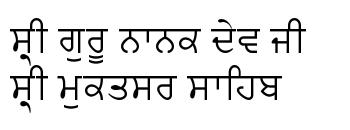
punjabi_text = render_gurmukhi(u"ਸ੍ਰੀ ਗੁਰੂ ਨਾਨਕ ਦੇਵ ਜੀ \nਸ੍ਰੀ ਮੁਕਤਸਰ ਸਾਹਿਬ")

font_size=36
width=350
height=130
back_ground_color=(255,255,255)
font_color=(0,0,0)
im = Image.new ("RGB", (width,height), back_ground_color)
draw = ImageDraw.Draw (im)
unicode_font = ImageFont.truetype(Pi7TTfFile, font_size)
draw.text((10,10), punjabi_text, font=unicode_font, fill=font_color )
im.save("text.jpg")
Output Using Pi7Gurmukhi Font And render_gurmukhi Function
This Is Correct Output
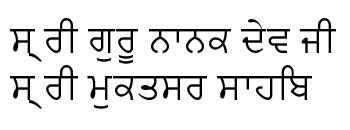
Output Without Pi7Gurmukhi Font And render_gurmukhi Function
This Is Incorrect Output Without Pi7Gurmukhi Font And Function.
Similarly You Can Use pi7gurmukhi For Write Pdf Files, Devolpment Using Kivy, Tkinter etc.
For Any Another Information Contact To bhullarshivjeet@gmail.com Or Message Me On Linkedin
1 maintainer

Release files for pi7gurmukhi 0.1.3
For a detailed explanation of source distributions (sdists) and built distributions (wheels), please see the package formats documentation.
Built distribution (wheel)
| File | Interpreter | ABI | Platform | Reset |
|---|---|---|---|---|
| pi7gurmukhi-0.1.3-py3-none-any.whl | Python 3 | none | any | Details |
Release files / pi7gurmukhi-0.1.3-py3-none-any.whl
| Download URL | pi7gurmukhi-0.1.3-py3-none-any.whl |
|---|---|
| Size | 3.9 kB |
| Tags | Python 3 |
|
SHA-256 checksum How to use checksums |
b5e2c9489d3e48ff356d8219c7191dc7cc1fdade6917d96e9f8f5782bb12ae51
|
|
BLAKE2b-256 checksum How to use checksums |
15a25f85705c0dcf5af1feb91416bebdb11cb21e741e296a1b6181cadb07023f
|
| Upload date | |
|
Uploaded using Trusted Publishing? What is trusted publishing? |
No |
| Uploaded via |
twine/3.1.1 pkginfo/1.5.0.1 requests/2.23.0 setuptools/47.3.1 requests-toolbelt/0.9.1 tqdm/4.46.1 CPython/3.7.3
|














