
πScope
πScope is a Python-based workbench for data analysis and modeling.
Goals of piScope include:
- Data browsing (scope) application for MDSplus data system (www.mdsplus.org)
- Lego blocks for gluing up large simulation codes using Python
- User frontend platform for Petra-M (MFEM based finite element simulation).
For the above purposes, πScope is equipped with:
- a data analysis environment (= Python shell, editor, data structure browser, and Matplotlib figure)
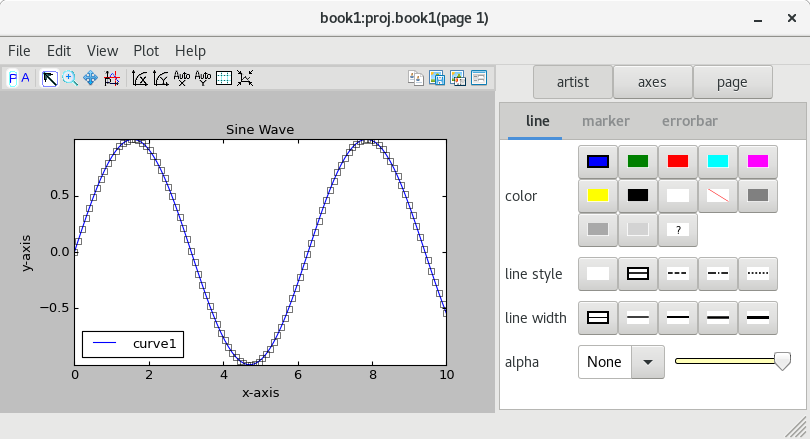
- various GUI components to work with matplotlib-based figures, which allow users to:
- save/load a figure as a figure file.
- edit artists using GUI palette for plot, contour, image, triplots and so on.
- change panel layout via an interactive layout editor.
- cut/paste of plot, axes, or an entire page.
- export data from plot to Python shell with one click.
- interactively annotate figure using text, arrow, lines, etc.
- draw 3D (OpenGL) in a Matplotlib canvas.
πScope is also used for Petra-M finite element analysis platform built on MFEM.
Install
 pip install piScope

 or

 git clone git@github.com:piScope/piScope.git; cd piScope
 pip install .
Plotting commands
The following plotting commands are available. These commands are preloaded in the Python shell inside piScope GUI. From a script, users need to load them:
- Inside a live piScope GUI process, plotting calls use the GUI interactive backend.
- Outside piScope GUI, plotting calls use the no-GUI client backend. The backend launches piScope automatically if it is in an interactive session. Otherwise, it needs to be launched by calling launch().
Figure and axes management
figure,showpage,cla,cls,clf,subplot,isec,isectionaddpage,delpage,title,suptitle,xlabel,ylabel,zlabel,clabelxlog,ylog,zlog,clog,xlinear,ylinear,zlinear,clinearxlim,ylim,zlim,clim,xauto,yauto,zauto,cautotwinx,twiny,cbar,view,threed,lighting
2D plotting
plot,oplot,loglog,semilogx,semilogy,timetrace,plotcscatter,hist,errorbar,oerrorbar,errorbarctriplot,ispline,contour,contourf,quiverimage,specgram,spec,tripcolor,tricontour,tricontourfaxline,axlinec,axspan,axspanc,fill,fill_between,fill_betweenxtext,figtext,arrow,figarrow,legend
3D plotting
surf,surface,revolve,solid,trisurf,quiver3d,fill_between_3d
Annotation and output
property,savefig,savedata
Example
|
|
LLM sessions (experimental)
To enable an LLM agent to control a persistent piScope session, copy the entire plotting skill into that agent's user skill directory:
cp -a skills/piscope-plotting <LLM_SKILLS_DIR>/
The skill includes its instructions and scripts for launching piScope and sending commands to its server.
Directories
- ../python/ifigure core program
- ../python/ifigure/example examples
- ../bin/ scripts to run πScope
- ../tests/ plotting test routines.
- ../example/ example data to look in πScope
Reference
(S Shiraiwa, T Fredian, J Hillairet, J Stillerman, "πScope: Python-based scientific workbench with MDSplus data visualization tool", Fusion Engineering and Design 112, 835 (2016) https://doi.org/10.1016/j.fusengdes.2016.06.050)
1 maintainer

Metadata
1 maintainer
Release files for piScope 26.11.23
For a detailed explanation of source distributions (sdists) and built distributions (wheels), please see the package formats documentation.
Source distribution (sdist)
| File | Size | Uploaded | Provenance | Actions |
|---|---|---|---|---|
| piscope-26.11.23.tar.gz | 1.5 MB | Without provenance | Details for piscope-26.11.23.tar.gz |
Built distribution (wheel)
| File | Interpreter | ABI | Platform | Actions Reset |
|---|---|---|---|---|
| piscope-26.11.23-py3-none-any.whl | Python 3 | none | any | Details for piscope-26.11.23-py3-none-any.whl |
Total release size: 3.3 MB
Release files / piscope-26.11.23.tar.gz
| Download URL | piscope-26.11.23.tar.gz |
|---|---|
| Size | 1.5 MB |
| Tags | Source |
|
SHA-256 checksum How to use checksums |
00c198a7d6ede0dde11f665fb20827507bd039484a5c2de51f822a27f5a53cf3
|
|
BLAKE2b-256 checksum How to use checksums |
69ac15719aa81e9aa80524339811076131567455d469f41f6d2529a88197140a
|
| Upload date | |
|
Uploaded using Trusted Publishing? What is trusted publishing? |
No |
| Uploaded via |
twine/7.0.0 CPython/3.14.4
|
Release files / piscope-26.11.23-py3-none-any.whl
| Download URL | piscope-26.11.23-py3-none-any.whl |
|---|---|
| Size | 1.8 MB |
| Tags | Python 3 |
|
SHA-256 checksum How to use checksums |
fa9f6740c359437dda729642ba8372cc757da45cae1e75bf186d3a78f0443741
|
|
BLAKE2b-256 checksum How to use checksums |
7d2ba670e09dc1b0e76ae6d8eeb4cda1261a09309f1f7683f4fbfa38a927f0bd
|
| Upload date | |
|
Uploaded using Trusted Publishing? What is trusted publishing? |
No |
| Uploaded via |
twine/7.0.0 CPython/3.14.4
|
Security for piScope 26.11.23
Provenance
Provenance describes where a file came from. On PyPI, provenance is shared via attestations, which provide a verifiable record of the build or publishing details. View details, limitations and caveats.
No provenance found
None of the files in this release were uploaded with provenance metadata.
A note on package security
PyPI is a repository for distributing packages, not a service for auditing them. While third-party security researchers and our staff do their best to detect and remove malicious packages, PyPI cannot guarantee the quality, security or suitability of any given package.
To learn more about protecting yourself from malicious actors, visit our package security documentation.














