
Automatic piano fingering generator. Finds and shows in 3D the best fingering combination to play a score.

Project description








Automatic piano fingering generator for MusicXML and MIDI scores.
PianoPlayer searches for a low-effort fingering sequence for one or both hands.
Download and Install:
pip install pianoplayer
Optional extras:
pip install "pianoplayer[visual]"  # 3D rendering with vedo
pip install "pianoplayer[midi]"    # MIDI input support
pip install "pianoplayer[sound]"   # enable playback
pip install "pianoplayer[all]"     # all optional extras
Standalone executable (basic, no 3D visualization)
Build a standalone executable with PyInstaller:
pip install "pianoplayer[build]"
python scripts/build_standalone.py
Output executable:
- Linux/macOS:
dist/pianoplayer - Windows:
dist/pianoplayer.exe
Python Setup (Beginner-Friendly)
If you are new to Python, use one of these two approaches.
Option A: Anaconda (recommended for beginners on Windows)
- Install Anaconda from https://www.anaconda.com/download
- Type Anaconda Prompt in your windows search and open it.
- Install PianoPlayer, type:
pip install pianoplayer
- Run:
pianoplayer --help
Option B: Python from python.org
Windows:
- Install Python 3.10+ from https://www.python.org/downloads/windows/
- During installation, enable Add Python to PATH.
- Open Command Prompt and run:
python -m pip install --upgrade pip
pip install pianoplayer
pianoplayer --help
macOS/Linux:
python3 -m pip install --upgrade pip
pip install pianoplayer
pianoplayer --help
To visualize the output annotated score (output.xml) install the latest
musescore, or any other renderer
of MusicXML
files.
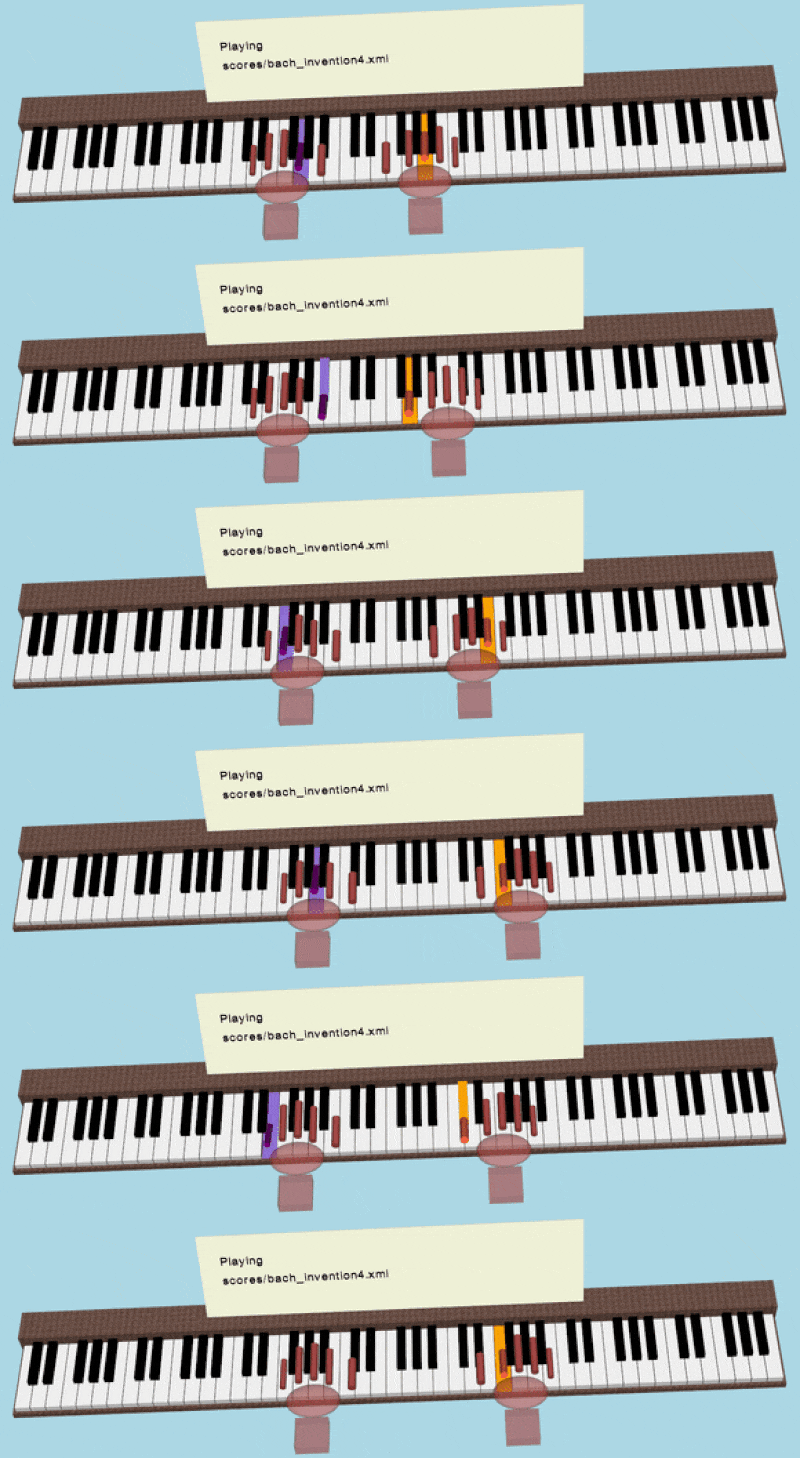
You can also inspect playback in 3D with vedo.
CLI Usage:
Example command line:
pianoplayer scores/bach_invention4.xml -n 10 -r -v -z -m
This annotates the first 10 measures for the right hand, opens 3D playback, and then opens MuseScore.
The output is saved as a MusicXML
file with name output.xml.
Pre-fingered notes are supported: if a note already has a fingering mark, PianoPlayer keeps it
and uses it as an anchor for the following optimization.
In the output score, these anchored fingers are rendered as circled numbers.
pianoplayer         # if no argument is given a GUI will pop up
# Or
pianoplayer [-h] [--gui] [-o] [-n] [-s] [-d] [-rbeam] [-lbeam] [--quiet] [-m] [-b] [-v]
            [-z] [-l] [-r] [--hand-size {XXS,XS,S,M,L,XL,XXL}] [--chord-note-stagger-s]
            filename
# Valid file formats: MusicXML, compressed MusicXML, MuseScore, MIDI, PIG
# (.xml, .mxl, .mscz, .mscx, .mid, .midi, .txt)
#
# Optional arguments:
#   -h, --help            show this help message and exit
#   --gui                 Launch the Tkinter GUI
#   -o , --outputfile     Annotated output xml file name
#   -n , --n-measures     [1000] Number of score measures to scan
#   -s , --start-measure  Start from measure number [1]
#   -d , --depth          [auto] Depth of combinatorial search, [5-9]
#   -rbeam                [0] Specify Right Hand beam number
#   -lbeam                [1] Specify Left Hand beam number
#   --quiet               Switch off verbosity
#   -m, --musescore       Open output in musescore after processing
#   -b, --below-beam      Show fingering numbers below beam line
#   -v, --with-vedo       Play 3D scene after processing
#   -z, --sound-off       Disable sound
#   -l, --left-only       Fingering for left hand only
#   -r, --right-only      Fingering for right hand only
#   --hand-size           Hand size preset [XXS, XS, S, M, L, XL, XXL]
#   --chord-note-stagger-s [0.05] Small note staggering used to represent chords
GUI Usage
Run pianoplayer with no filename to open the GUI, then:
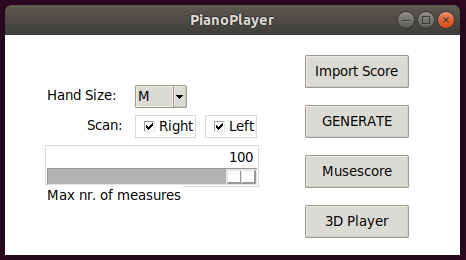
- press Import Score (valid formats: MusicXML/MXL, MuseScore, MIDI, PIG)
- press GENERATE (
output.xmlis written) - press Musescore to visualize the annotated score (Linux/macOS only)
- press Quit (or
q/Ctrl+W) to close the GUI
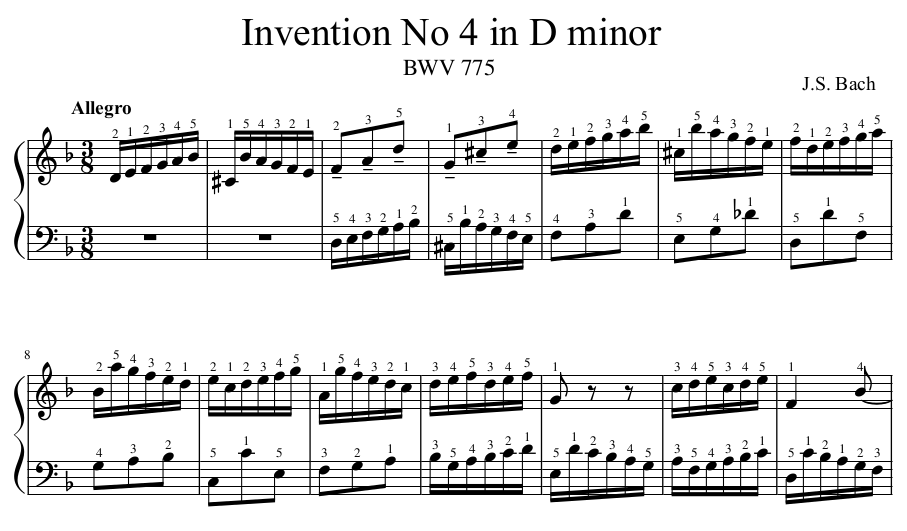
Example output, as displayed in musescore:
(If fingering numbers are not visible enough try -b option.)
How the algorithm works:
The algorithm minimizes the fingers speed needed to play a sequence of notes or chords by searching through feasible combinations of fingerings.
One possible advantage of this algorithm over similar ones is that it is completely dynamic, which means that it takes into account the physical position and speed of fingers while moving on the keyboard and the duration of each played note. It is not based on a static look-up table of likely or unlikely combinations of fingerings.
Fingering a piano score can vary a lot from individual to individual, therefore there is not such a thing as a "best" choice for fingering. This algorithm is meant to suggest a fingering combination which is "optimal" in the sense that it minimizes the effort of the hand avoiding unnecessary movements.
Parameters you can change:
- Your hand size (from 'XXS' to 'XXL') which sets the relaxed distance between thumb and pinkie.
- The beam number associated to the right hand is by default nr.0 (nr.1 for left hand).
You can change it with
-rbeamand-lbeamcommand line options. - Depth of combinatorial search, from 5 up to 9 notes ahead of the currently playing note. By default the algorithm selects this number automatically based on the duration of the notes to be played.
Limitations
- Some specific fingering combinations, considered too unlikely in the first place, are excluded from the search (e.g. the 3rd finger crossing the 4th).
- Hands are always assumed independent from each other.
- In the 3D representation with sounds enabled, notes are played one after the other (no chords), so the tempo within the measure is not always respected.
- Small notes/ornaments are ignored.
Release history Release notifications | RSS feed


Download files
Download the file for your platform. If you're not sure which to choose, learn more about installing packages.
Source Distribution
Built Distribution
Filter files by name, interpreter, ABI, and platform.
If you're not sure about the file name format, learn more about wheel file names.
Copy a direct link to the current filters
File details
Details for the file pianoplayer-3.0.1.tar.gz.
File metadata
- Download URL: pianoplayer-3.0.1.tar.gz
- Upload date:
- Size: 103.4 kB
- Tags: Source
- Uploaded using Trusted Publishing? No
- Uploaded via: twine/6.1.0 CPython/3.12.3
File hashes
| Algorithm | Hash digest | |
|---|---|---|
| SHA256 |
4b3c22a388c7ac6017d3a19f15d56a5b64d3d49405eb7728d8097cf727c38dc3
|
|
| MD5 |
d6de7ae1d151169c83e27fca5bd79d17
|
|
| BLAKE2b-256 |
f7ff4f0404dbfacbcefa0cde3423f4693d629b9646a261dd7721d350e12ccb6e
|
File details
Details for the file pianoplayer-3.0.1-py3-none-any.whl.
File metadata
- Download URL: pianoplayer-3.0.1-py3-none-any.whl
- Upload date:
- Size: 38.6 kB
- Tags: Python 3
- Uploaded using Trusted Publishing? No
- Uploaded via: twine/6.1.0 CPython/3.12.3
File hashes
| Algorithm | Hash digest | |
|---|---|---|
| SHA256 |
46e697f8b11532d8efbbf85fe9f9bbe69cbd503fb8cce97f7433882be2c29058
|
|
| MD5 |
3f55a5e6d0f618c7bb9d9bb6ad1a4add
|
|
| BLAKE2b-256 |
3d7cadb1711d24969a1c29cf829960f52efc56ef8de3c420a2492a120c5678a2
|






