



pibooth-date-folder is a plugin for the pibooth application.
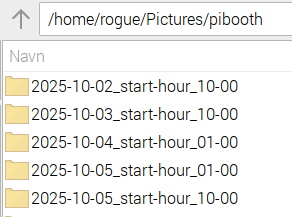
It organizes Photos and Raw folders into per-date folders with a configurable split time, supporting multiple quoted base directories.
Requirements
Python 3.6+
PiBooth 2.0.8 or later
IMPORTANT — Date/Time must be set correct before using this plugin
This plugin relies on the system date and time to determine when new folders should be created. You must ensure that the device has a correct system clock before running PiBooth. This can be achieved by one of the following:
Internet access for NTP time synchronization
A hardware RTC module (e.g., DS3231)
Manually setting the system time prior to launching PiBooth
⚠️ Important: If the system time is incorrect, the plugin will create folders under the wrong date or switch at unexpected times.
Installation
Run:
pip3 install pibooth-date-folderPiBooth will auto-discover the plugin—no edits to your pibooth.cfg are needed.
Configuration
On first launch, this plugin adds a [DATE_FOLDER] section to your ~/.config/pibooth/pibooth.cfg:
[DATE_FOLDER]
# Hour when a new date-folder starts (0–23, default: 10)
start_hour = 10
# Minute when a new date-folder starts (00–59, default: 00)
start_minute = 00
# Mode for how folder switching is handled: strict (default) or force_today
on_change_mode = strict
Adjust these values in PiBooth’s Settings menu (ESC → Settings) at any time. Changes take effect at the start of the next photo session.
Setup in Pibooth Menu
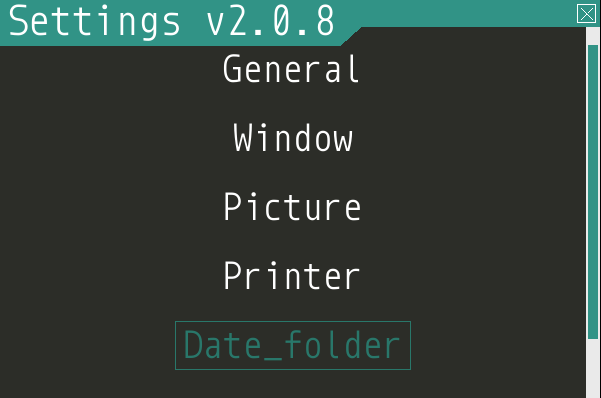
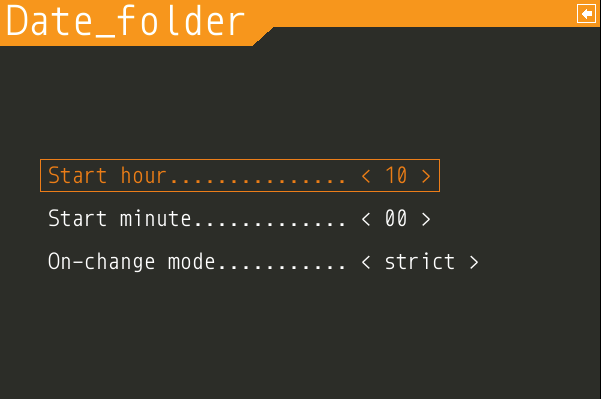
Explanation of options:
start_hour / start_minute Define the daily time when a new folder should start. Useful if your events run past midnight but should count as the same “day” (e.g. starting a new folder at 10:00 the next day).
on_change_mode
strict (default) — The folder switches exactly at the configured time every day, even if no sessions have occurred yet.
force_today — The folder automatically switches at midnight (00:00) to match the new calendar date, regardless of the configured threshold time. The configured time is still included in the folder name for consistency, but it does not affect when switching occurs like strict does.
Usage
Snapshot original bases On configure, the plugin reads your existing quoted directory setting under [GENERAL] (one or more paths) and caches them.
Per-session logic (state_wait_enter) - Builds a “threshold” datetime from start_hour:start_minute. - If you changed the threshold since the last session, it treats the next folder as today. - Otherwise, if the current time is before the threshold, it treats it as yesterday, else today. - Creates a subfolder named:
YYYY-MM-DD_start-hour_HH-MM
under each of your original base directories.
Overrides PiBooth’s in-memory directory to the quoted list of these new folders (no pibooth.cfg write).
Note: When the plugin is disabled in the Pibooth menu (General, Manage Plugins), it temporarily reverts to the default ~/Pictures/pibooth directories in memory only (no pibooth.cfg write).
Testing the Threshold
To simulate a day-boundary without waiting 24 hours:
In PiBooth’s Settings menu, set start_hour/start_minute to a time a few minutes ahead of now (e.g., it’s 13:58; set to 14:00).
Close the menu and take a photo session. Because it’s the first session after changing the threshold, the plugin treats it as today, creating a folder for today’s date.
Take another session before the threshold time; since you didn’t change the threshold again, the plugin applies “before threshold → yesterday,” creating a folder for the prior date.
Take one more session after the threshold; it creates a folder for today again.
This lets you verify both “yesterday” and “today” folder behavior within minutes.
Examples
Given in your config:
[GENERAL]
directory = "~/Pictures/pibooth", "~/Pictures/backup_booth"
Before threshold (10:00, time 09:30): Photos saved in:
"~/Pictures/pibooth/2025-07-11_start-hour_10-00", "~/Pictures/backup_booth/2025-07-11_start-hour_10-00"
After threshold (time >10:00): Photos saved in:
"~/Pictures/pibooth/2025-07-12_start-hour_10-00", "~/Pictures/backup_booth/2025-07-12_start-hour_10-00"
Uninstall
pibooth --configThen edit the [GENERAL]/directory line and remove the dated part, for example:
[GENERAL]
directory = "~/Pictures/pibooth/2025-07-11_start-hour_10-00"
Change it to:
[GENERAL]
directory = "~/Pictures/pibooth"
You may also remove the entire [DATE_FOLDER] section if you wish.
Changelog
v1.5.9 (2025-10-08)
Fixed unintended setuptools auto-upgrade caused by pyproject.toml.
Older Raspberry Pi OS environments will no longer be forced to upgrade setuptools during installation.
v1.5.8 (2025-10-07)
Fixed plugin registration so the plugin is correctly detected again.
Pip installation now works as expected.
v1.5.7 (2025-10-07) — ⚠️⚠️ Important update
🎉 Re-release of the pibooth-date-folder plugin.
Highlights
Automatically organizes photos into date-based folders
Configurable daily switch time
Works with multiple base directories
Changes
Changed behavior to no longer write dated directories into the config file
When disabled via the PiBooth menu, the plugin now temporarily reverts to the default directories in memory only (no pibooth.cfg write)
Improved folder creation to be idempotent and avoid duplicate entries
Normalize base/target paths to ensure existing folders are reused
Safe directory creation with exist_ok=True
In-memory override of GENERAL/directory
Added on_change_mode (strict default / force_today override)
Keeps multiple quoted base paths and ~ prefix
Switched hour range to 0–23 (UI/docs) for clarity
Legacy value 24 is treated as 00 (midnight) internally
Clamps minutes to 0–59 for robustness
Other
Update README image links to raw URLs for PyPI rendering
License
GPL-3.0-or-later
Links
1 maintainer

Metadata
1 maintainer
Release files for pibooth-date-folder 1.5.9
For a detailed explanation of source distributions (sdists) and built distributions (wheels), please see the package formats documentation.
Source distribution (sdist)
| File | Size | Uploaded | |
|---|---|---|---|
| pibooth_date_folder-1.5.9.tar.gz | 78.1 kB | Details |
Built distribution (wheel)
| File | Interpreter | ABI | Platform | Reset |
|---|---|---|---|---|
| pibooth_date_folder-1.5.9-py3-none-any.whl | Python 3 | none | any | Details |
Total release size: 99.4 kB
Release files / pibooth_date_folder-1.5.9.tar.gz
| Download URL | pibooth_date_folder-1.5.9.tar.gz |
|---|---|
| Size | 78.1 kB |
| Tags | Source |
|
SHA-256 checksum How to use checksums |
a15b8d78e9aa88feabed14866538b3c4043e83fc0f35cbf7dd9f476f1dfe8002
|
|
BLAKE2b-256 checksum How to use checksums |
b8a4e29a2d09cc15586031d77a3948535f13924c985610ab9075947d7e51d11b
|
| Upload date | |
|
Uploaded using Trusted Publishing? What is trusted publishing? |
Yes |
| Uploaded via |
twine/6.1.0 CPython/3.13.7
|
Provenance
Provenance describes where a file came from. On PyPI, provenance is shared via attestations, which provide a verifiable record of the build or publishing details. View details, limitations and caveats.


PyPI Publish Attestation
PyPI verified that this artifact, at this checksum, originated from the publisher listed below.
Signed by GitHub Actions, verified by PyPI on Oct 7, 2025.
Transparency logRelease files / pibooth_date_folder-1.5.9-py3-none-any.whl
| Download URL | pibooth_date_folder-1.5.9-py3-none-any.whl |
|---|---|
| Size | 21.4 kB |
| Tags | Python 3 |
|
SHA-256 checksum How to use checksums |
e52b5743eb5cd961a24172e0cf75c560f1bbde65027a2f069303ce295b1bef66
|
|
BLAKE2b-256 checksum How to use checksums |
4da059d85a0d560636ebcbd2ebc4ce4f08372abf003bdf63431245d337dd5d25
|
| Upload date | |
|
Uploaded using Trusted Publishing? What is trusted publishing? |
Yes |
| Uploaded via |
twine/6.1.0 CPython/3.13.7
|
Provenance
Provenance describes where a file came from. On PyPI, provenance is shared via attestations, which provide a verifiable record of the build or publishing details. View details, limitations and caveats.
PyPI Publish Attestation
PyPI verified that this artifact, at this checksum, originated from the publisher listed below.
Signed by GitHub Actions, verified by PyPI on Oct 7, 2025.
Transparency log












