



pibooth-dropbox is a plugin for the pibooth application.
Its permits to upload the pictures to a Dropbox folder. It requires an internet connection.
Install
$ pip3 install pibooth-dropbox
Configuration
Here below the new configuration options available in the pibooth configuration. The keys and their default values are automatically added to your configuration after first pibooth restart.
[DROPBOX]

# Dropbox folder where pictures are uploaded. Subfolders can be separated by /
album_name = Pibooth

# Dropbox Application Key
app_key =

# Dropbox Application Password
app_secret =Picture URL
Uploaded picture URL is set to app.previous_picture_url attribute at the end of processing state (state_processing_exit hook).
Grant secured access
Access to a Dropbox is granted by an APP_KEY and an APP_SECRET that shall be defined in the configuration. These are not your Dropbox credentials and it can not be used by an other application than the one defined in Dropbox.com.
Go to Dropbox App Console and click on the Create app button. |
|
Under Choose an API section, select Scoped Access. Under Choose the type of access you need, select Full Dropbox. Enter an application name (for instance My Awsome Photo Booth). |
|
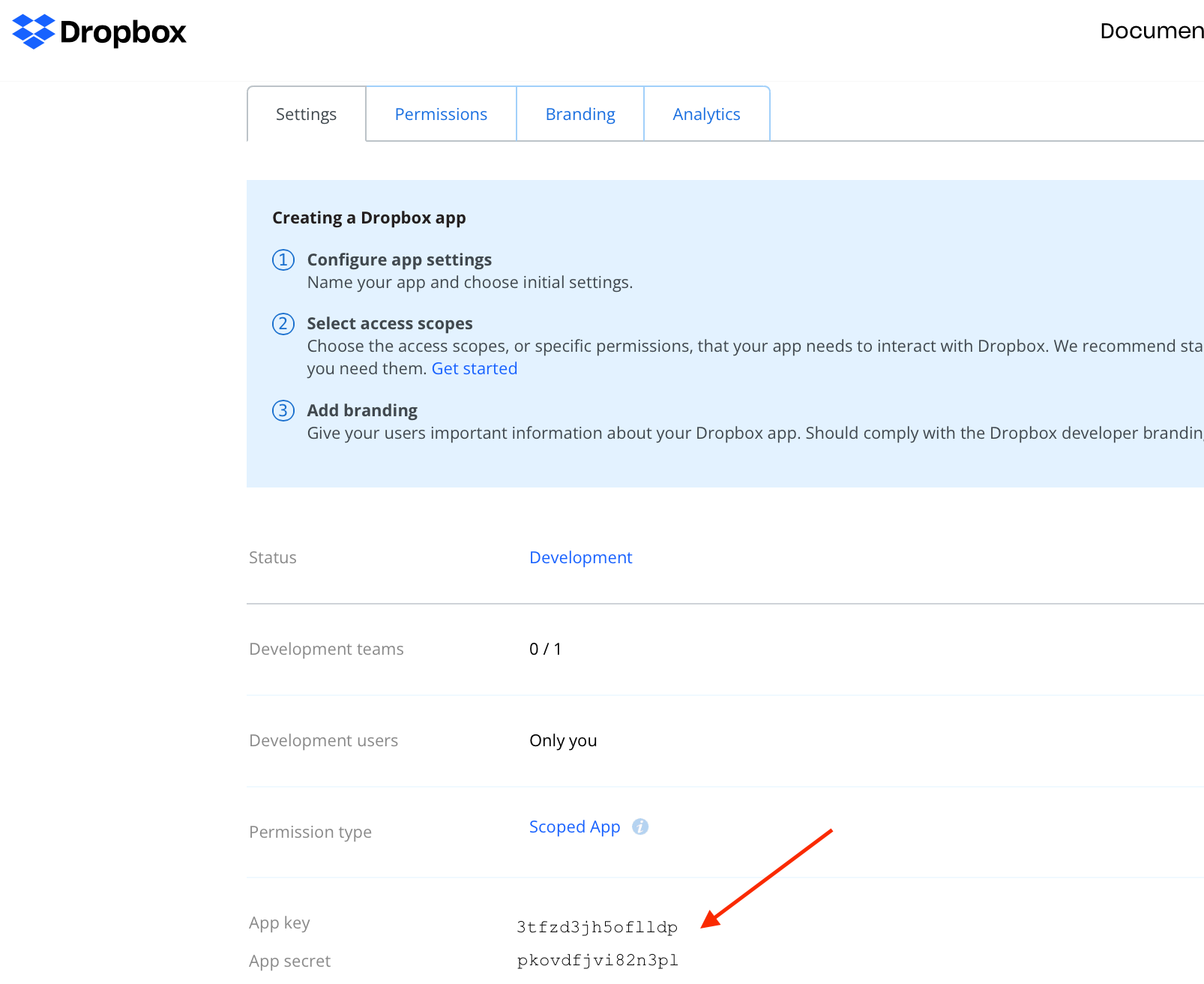
Click the Create app button. You will be redirected to the console for your app. Note the presence of your App key and App secret on this page. You will need to enter these into pibooth configuration file once you have followed the remaining steps. |
|
Add the OAuth Redirect URI http://localhost:35880/ to your Dropbox app settings under the OAuth2 Redirect URIs section. |
|
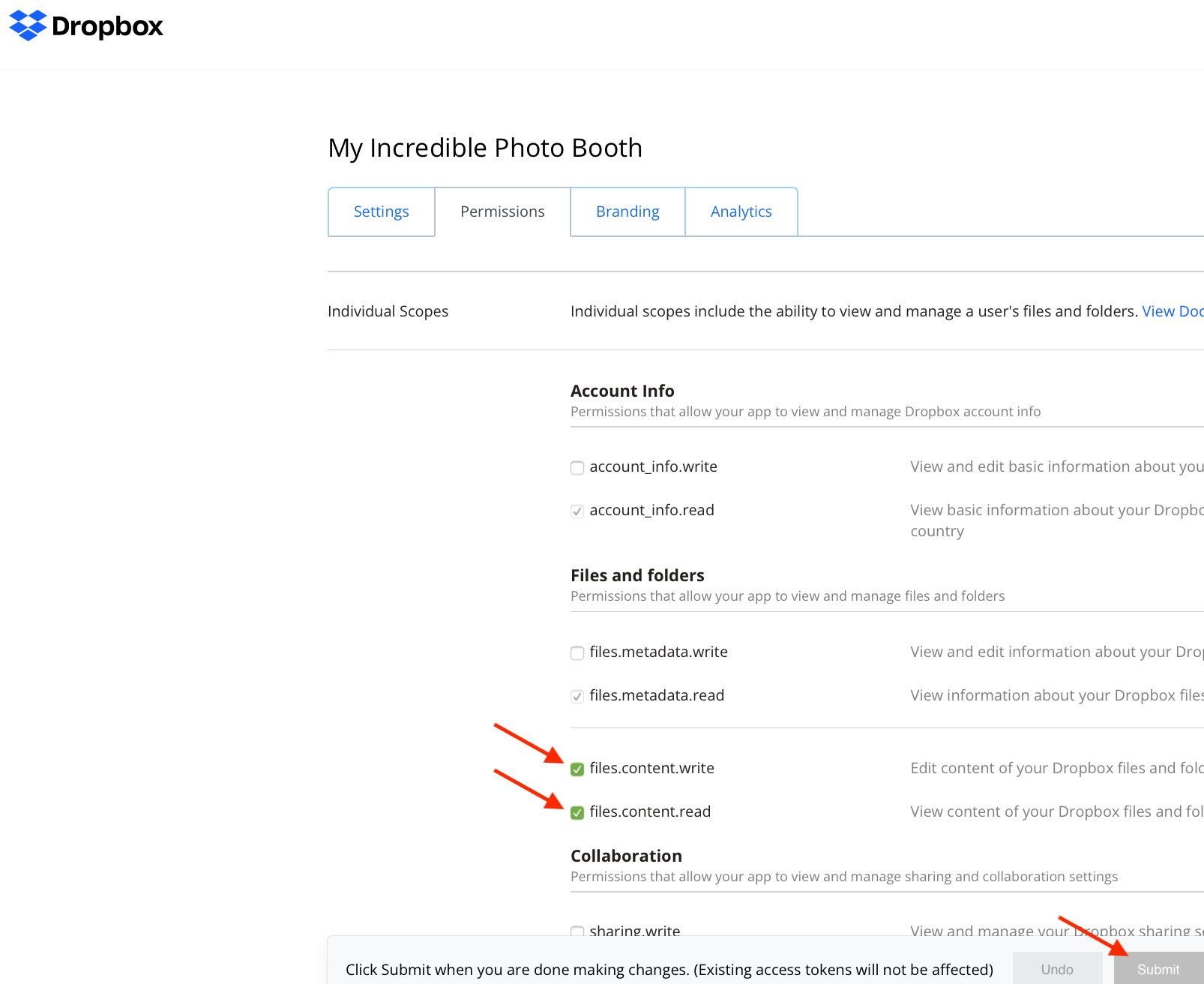
Click on the Permissions tab then select the files.content.write and files.content.read permissions in order to allow pibooth to upload pictures on your Dropbox. Finally click the Submit button at the bottom of the page for the new permissions to take effect. |



1 maintainer

Metadata
1 maintainer
Release files for pibooth-dropbox 0.0.3
For a detailed explanation of source distributions (sdists) and built distributions (wheels), please see the package formats documentation.
Source distribution (sdist)
| File | Size | Uploaded | |
|---|---|---|---|
| pibooth_dropbox-0.0.3.tar.gz | 22.3 kB | Details |
Built distribution (wheel)
| File | Interpreter | ABI | Platform | Reset |
|---|---|---|---|---|
| pibooth_dropbox-0.0.3-py3-none-any.whl | Python 3 | none | any | Details |
Total release size: 43.9 kB
Release files / pibooth_dropbox-0.0.3.tar.gz
| Download URL | pibooth_dropbox-0.0.3.tar.gz |
|---|---|
| Size | 22.3 kB |
| Tags | Source |
|
SHA-256 checksum How to use checksums |
c92aea4548749facb58097428910ec2d10c48c1ae327dc5a6676504308a98d44
|
|
BLAKE2b-256 checksum How to use checksums |
1d411e3d55c8ea93cb9fba91b46cbfd7b7bd8aa5a9002017916850a4b37b10f4
|
| Upload date | |
|
Uploaded using Trusted Publishing? What is trusted publishing? |
No |
| Uploaded via |
twine/4.0.0 CPython/3.10.4
|
Release files / pibooth_dropbox-0.0.3-py3-none-any.whl
| Download URL | pibooth_dropbox-0.0.3-py3-none-any.whl |
|---|---|
| Size | 21.6 kB |
| Tags | Python 3 |
|
SHA-256 checksum How to use checksums |
c4e439aa3a333ee2fd96c0e555e331d14fb3f0c7916a96ca1ceefd4afc398b0c
|
|
BLAKE2b-256 checksum How to use checksums |
57da921a1ea08ef9eea29a179ef39df0c6b4388b4443e9793467ad6fc46a3894
|
| Upload date | |
|
Uploaded using Trusted Publishing? What is trusted publishing? |
No |
| Uploaded via |
twine/4.0.0 CPython/3.10.4
|














