
Collection of tools for painting super-resolution images


Project description







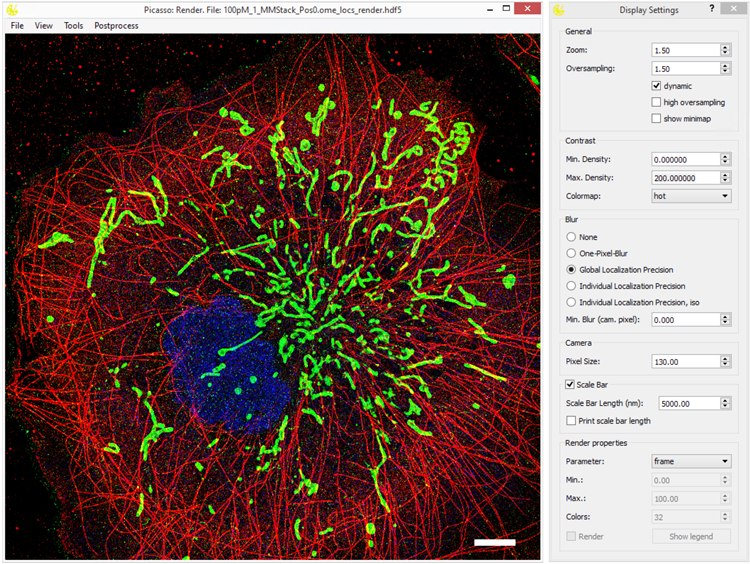
Collection of tools for painting super-resolution images. The Picasso software is complemented by our Nature Protocols publication.
A comprehensive documentation can be found here: Read the Docs.
To see all changes introduced across releases, see the changelog.
Picasso 0.10
In this version, a lot of new architectural (behind the scenes) changes were introduced to make Picasso more modular, maintainable and accessible to both developers and end-users. The adaptations include flexible dependencies and Python versions, integration of GPUfit, faster SPINNA and many more. You can explore these improvements in the changelog.
Installation
Check out the Picasso release page to download and run the latest compiled one-click installer for Windows or MacOS (the latter is experimental and feedback is welcome). Here you will also find the Nature Protocols legacy version (v0.1.0).
Python is also distributed as a PyPI package that is platform-independent (pip install picassosr) which grants not only GUI but also access to Picasso’s internal routines in custom Python programs. For more details, see the Via PyPI section below. For examples of how to use Picasso in Python scripts, see the section Example Usage below.
Note: Since v0.10.0 Picasso is more flexible in terms of dependencies and Python versions. Previously only Python 3.10 was supported, now newer versions are encouraged.
Via PyPI
Open the console/terminal and create a new conda environment: conda create --name picasso python=3.14. Note you can use other Python versions as well.
Activate the environment: conda activate picasso.
Install Picasso package using: pip install picassosr.
You can now run any Picasso function directly from the console/terminal by running: picasso render, picasso localize, etc, or import Picasso functions in your own Python scripts.
To update Picasso (you should get a notification about available updates since v0.10.0) run pip install --upgrade picassosr.
For Developers (local, editable installation)
If you wish to use your local version of Picasso with your own modifications:
Open the console/terminal and create a new conda environment: conda create --name picasso python=3.14. Note you can use other Python versions as well.
Activate the environment: conda activate picasso.
Change to the directory of choice using cd.
Clone this GitHub repository by running git clone https://github.com/jungmannlab/picasso. Alternatively, download the zip file and unzip it.
Open the Picasso directory: cd picasso.
You can modify Picasso code in this directory.
To create a local Picasso package to use it in other Python scripts, run pip install -e ".[dev]". When you change the code in the picasso directory, the changes will be reflected in the package.
You can now run any Picasso module directly from the console/terminal by running: picasso render, picasso localize, etc, or import Picasso functions in your own Python scripts.
Creating shortcuts on Windows (optional)
Run the PowerShell script “createShortcuts.ps1” in the gui directory. This should be doable by right-clicking on the script and choosing “Run with PowerShell”. Alternatively, run the command powershell ./createShortcuts.ps1 in the command line. Use the generated shortcuts in the top level directory to start GUI components. Users can drag these shortcuts to their Desktop, Start Menu or Task Bar.
Example Usage
Besides using the GUI, you can use picasso like any other Python module. Consider the following example::
from picasso import io, postprocess

path = 'testdata_locs.hdf5'
locs, info = io.load_locs(path)

# Link localizations and calculate dark times
linked_locs = postprocess.link(picked_locs, info, r_max=0.05, max_dark_time=1)
linked_locs_dark = postprocess.compute_dark_times(linked_locs)

print(f"Average bright time {linked_locs_dark['n'].mean():.2f} frames")
print(f"Average dark time {linked_locs_dark['dark'].mean():.2f} frames")
For more examples, visit the sample notebooks.
Contributing
If you have a feature request or a bug report, please post it as an issue on the GitHub issue tracker. If you want to contribute, put a PR for it. You can find more guidelines for contributing here. We will gladly guide you through the codebase and credit you accordingly. Additionally, you can check out the Projects-page on GitHub. You can also contact us via picasso@jungmannlab.org.
Contributions & Copyright
Citing Picasso
If you use Picasso in your research, please cite our Nature Protocols publication describing the software.
NeNA. DOI: 10.1007/s00418-014-1192-3
FRC. DOI: 10.1038/nmeth.2448
Theoretical lateral localization precision (Gauss LQ). DOI: 10.1038/nmeth.1447
Theoretical axial localization precision (Gauss LQ and MLE). DOI: 10.1038/s41467-026-70198-5
MLE fitting. DOI: 10.1038/nmeth.1449
GPU fitting (LQ). DOI: 10.1038/s41598-017-15313-9. License can be found here.
3D fitting via astigmatism. DOI: 10.1126/science.1153529.
RCC undrifting: DOI: 10.1364/OE.22.015982
AIM undrifting. DOI: 10.1126/sciadv.adm776
SMLM clusterer. DOIs: 10.1038/s41467-021-22606-1 and 10.1038/s41586-023-05925-9
DBSCAN: Ester, et al. Inkdd, 1996. (Vol. 96, No. 34, pp. 226-231).
Anisotropic DBSCAN inspired by: 10.1021/acs.jpcb.4c02030
HDBSCAN. DOI: 10.1007/978-3-642-37456-2_14
RESI. DOI: 10.1038/s41586-023-05925-9
Nanotron. DOI: 10.1093/bioinformatics/btaa154
Picasso: Server. DOI: 10.1038/s42003-022-03909-5
SPINNA. DOI: 10.1038/s41467-025-59500-z
SPINNA for LE fitting. DOI: 10.1038/s41592-024-02242-5
G5M. DOI: 10.1038/s41467-026-70198-5
Credits
Design icon based on “Hexagon by Creative Stalls” from the Noun Project
Simulate icon based on “Microchip by Futishia” from the Noun Project
Localize icon based on “Mountains” by MONTANA RUCOBO from the Noun Project
Filter icon based on “Funnel” by José Campos from the Noun Project
Render icon based on “Paint Palette” by Vectors Market from the Noun Project
Average icon based on “Layers” by Creative Stall from the Noun Project
Server icon based on “Database” by Nimal Raj from the Noun Project
SPINNA icon based on “Spinner” by Viktor Ostrovsky from the Noun Project
Release history Release notifications | RSS feed


Download files
Download the file for your platform. If you're not sure which to choose, learn more about installing packages.
Source Distribution
Built Distribution
Filter files by name, interpreter, ABI, and platform.
If you're not sure about the file name format, learn more about wheel file names.
Copy a direct link to the current filters
File details
Details for the file picassosr-0.10.3.tar.gz.
File metadata
- Download URL: picassosr-0.10.3.tar.gz
- Upload date:
- Size: 4.5 MB
- Tags: Source
- Uploaded using Trusted Publishing? No
- Uploaded via: twine/6.1.0 CPython/3.13.12
File hashes
| Algorithm | Hash digest | |
|---|---|---|
| SHA256 |
b855a54bb1b821e3ef8e817189db36d79e11ad4bbd7667cd73100a2facc76a29
|
|
| MD5 |
2e4a2a041155c946b7c9028c74613f17
|
|
| BLAKE2b-256 |
1f06696ef557eb14d7a7d125a99660a5937ed20bc2bc9b7e43602559fb50d7ed
|
File details
Details for the file picassosr-0.10.3-py3-none-any.whl.
File metadata
- Download URL: picassosr-0.10.3-py3-none-any.whl
- Upload date:
- Size: 4.4 MB
- Tags: Python 3
- Uploaded using Trusted Publishing? No
- Uploaded via: twine/6.1.0 CPython/3.13.12
File hashes
| Algorithm | Hash digest | |
|---|---|---|
| SHA256 |
e4d93ce2dae64c9cc018bcedf4b60a314fd6239c9d59cdf7c915ab11bfd6f347
|
|
| MD5 |
2942057f796a70db25f8b49fb5b2a460
|
|
| BLAKE2b-256 |
0b6cd64932ee23b326cf493b952a7a29e904eade823e86c4a21a17d7d1acd88f
|






