
PicDate: Quick and Simple Date Marking for Photos



Description
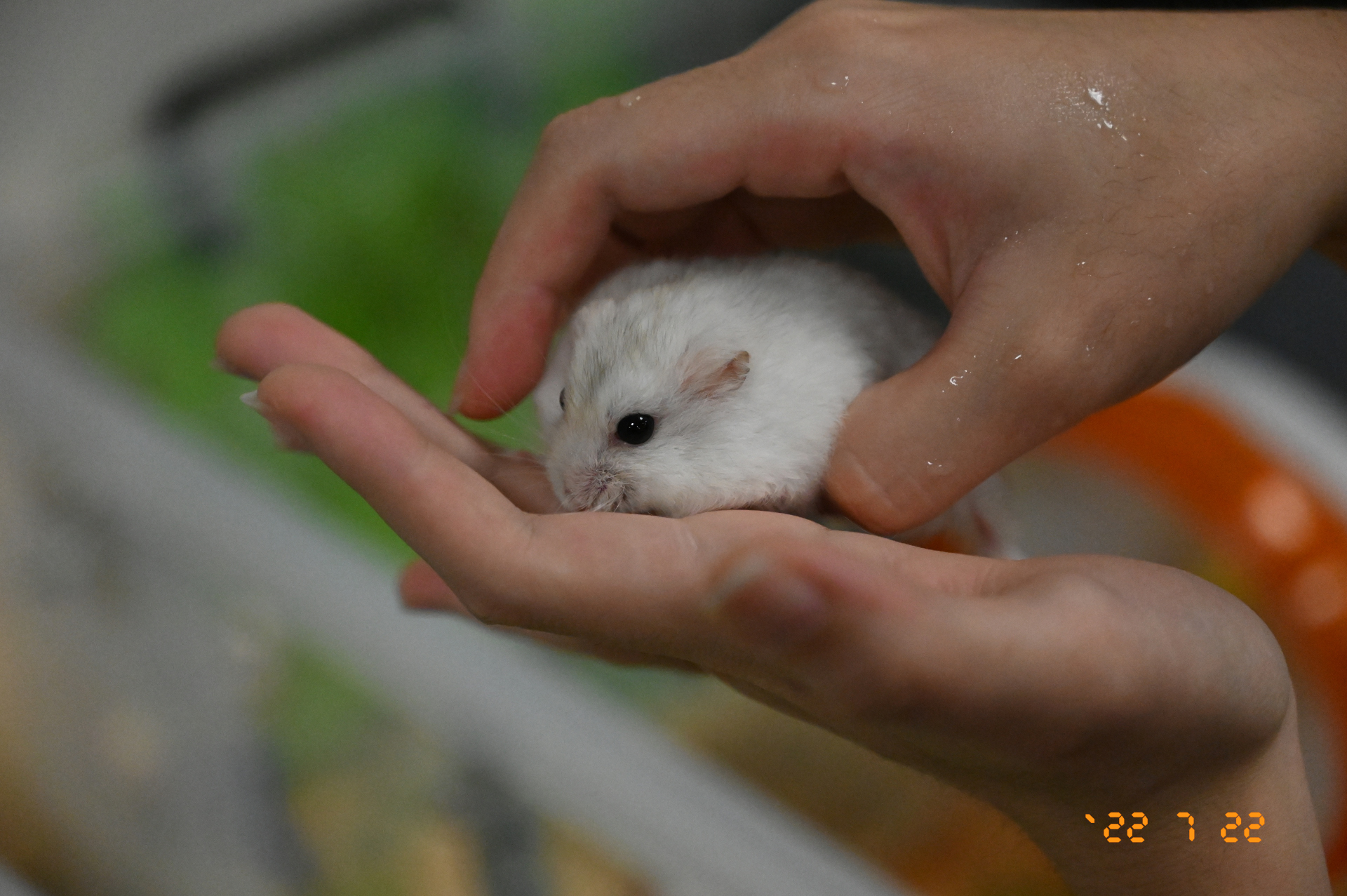
Photo studios no longer offer the service of adding dates to photos, so if you need it, you have to do it yourself. Since there didn't seem to be any tools for this, I created one. The format and style are almost fully controlled by users. The DateTimeOriginal, i.e., the date the photo was taken, is added if the exif information exists; otherwise, stat.ST_MTIME, the time of last modification, is used for those photo without exif information. Note that ST_MTIME is just close to but not the taken time. The image qualities are different after processed due to Pillow tool.
Install
from PyPi:
pip3 install picdate
# or with specific version
pip3 install picdate==2.0.1
from GitHub:
pip3 install git+https://github.com/aben20807/picdate.git
# or with specific version
pip3 install git+https://github.com/aben20807/picdate.git@v2.0.1
Usage
picdate -s 20221012/ -r
After processing, a folder named picdate_result will be created, containing the processed files.
Screenshot
Font
- CursedTimerUlil-Aznm.ttf: designed by heaven castro and licensed as Freeware
Performance
- 360 photos (1.72 GB) -> 360 photos with dates (1.31 GB): 5.967s
Help
$ picdate -h
usage: picdate [-h] -s DIR [-d DIR] [-f] [-r] [-j N] [--text_size N]
               [--text_color COLOR] [--text_anchor TEXT_ANCHOR] [--pos_x X]
               [--pos_y Y] [--fine_tune_aspect_ratio RATIO] [--stroke_width N]
               [--stroke_color COLOR] [--quality N] [--resize W,H]
               [--format FORMAT] [--img_exts IMG_EXTS]

PicDate: Quick and Simple Date Marking for Photos

options:
  -h, --help            show this help message and exit
  -s DIR, --src DIR     input dir (required) (default: None)
  -d DIR, --dst DIR     output dir (default: ./picdate_result/)
  -f, --force           overwrite existing files (default: False)
  -r, --recursive       recursively process (default: False)
  -j N, --jobs N        parallel jobs to process (default: 16)
  --text_size N         text size ('N' mm) (default: 4.24)
  --text_color COLOR    text color (default: (255, 149, 21))
  --text_anchor TEXT_ANCHOR
                        text anchor (ref:
                        https://pillow.readthedocs.io/en/stable/handbook/text-
                        anchors.html#text-anchors) (default: rb)
  --pos_x X             position for x-axis from 0 (left) to 1 (right) (default:
                        0.94)
  --pos_y Y             position for y-axis from 0 (top) to 1 (bottom) (default:
                        0.94)
  --fine_tune_aspect_ratio RATIO
                        expect aspect ratio for fine tune pos for cropping
                        ('none' or 'M/N' (M<=N)) (default: 2/3)
  --stroke_width N      stroke width for text (default: 1)
  --stroke_color COLOR  stroke color (default: (242, 97, 0))
  --quality N           jpg output quality (default: 95)
  --resize W,H          resize image to WxH (default: None)
  --format FORMAT       date format (ref: https://docs.python.org/3/library/date
                        time.html#strftime-and-strptime-format-codes) (default:
                        `%y %#m %#d)
  --img_exts IMG_EXTS   support extensions for processed photos (case
                        insensitive) (default: jpg,jpeg,png,tiff)
Known issues
strftimeexhibits different behavior across platforms, leading to invalid format strings. The current implementation detects the platform and applies a different default format: windows (`%y %#m %#d) and others (`%y %-m %-d).
License
MIT
1 maintainer

Metadata
1 maintainer
Release files for picdate 2.1.0
For a detailed explanation of source distributions (sdists) and built distributions (wheels), please see the package formats documentation.
Source distribution (sdist)
| File | Size | Uploaded | |
|---|---|---|---|
| picdate-2.1.0.tar.gz | 7.0 kB | Details |
Built distribution (wheel)
| File | Interpreter | ABI | Platform | Reset |
|---|---|---|---|---|
| picdate-2.1.0-py3-none-any.whl | Python 3 | none | any | Details |
Total release size: 15.4 kB
Release files / picdate-2.1.0.tar.gz
| Download URL | picdate-2.1.0.tar.gz |
|---|---|
| Size | 7.0 kB |
| Tags | Source |
|
SHA-256 checksum How to use checksums |
f425cb422b0235afa0a11251ee89ea27a9571d2ef95880f7d72ab678fc1f60de
|
|
BLAKE2b-256 checksum How to use checksums |
3eabc9b60f05ddb9b276d54c79e5041c3e4db9c8b04b6e108f116b1c45102fda
|
| Upload date | |
|
Uploaded using Trusted Publishing? What is trusted publishing? |
Yes |
| Uploaded via |
twine/6.1.0 CPython/3.12.8
|
Provenance
Provenance describes where a file came from. On PyPI, provenance is shared via attestations, which provide a verifiable record of the build or publishing details. View details, limitations and caveats.


PyPI Publish Attestation
PyPI verified that this artifact, at this checksum, originated from the publisher listed below.
Signed by GitHub Actions, verified by PyPI on Jan 27, 2025.
Transparency logRelease files / picdate-2.1.0-py3-none-any.whl
| Download URL | picdate-2.1.0-py3-none-any.whl |
|---|---|
| Size | 8.3 kB |
| Tags | Python 3 |
|
SHA-256 checksum How to use checksums |
66fbd96d82bcff6d33bf3c9289e3e0e1fc0bf582c645526583a9ca3c2acdc7d9
|
|
BLAKE2b-256 checksum How to use checksums |
be29c51b1a6cac928e7408e4d53c2c789ff884173349b41bb92cdaec52ff1fb5
|
| Upload date | |
|
Uploaded using Trusted Publishing? What is trusted publishing? |
Yes |
| Uploaded via |
twine/6.1.0 CPython/3.12.8
|
Provenance
Provenance describes where a file came from. On PyPI, provenance is shared via attestations, which provide a verifiable record of the build or publishing details. View details, limitations and caveats.
PyPI Publish Attestation
PyPI verified that this artifact, at this checksum, originated from the publisher listed below.
Signed by GitHub Actions, verified by PyPI on Jan 27, 2025.
Transparency log













