

Customize your kernels on launch!
Pick's magic lets you customize your virtual environments, conda environments, and Jupyter kernels. If you have mountains of data or models, you can use Pick to easily climb to peak efficiency -- composable, on-the-fly environments and kernels created within a notebook cell.
Not ready for wide installation yet. If you're ready to try it out, start with the development version detailed below.
Requirements
- Python 3.7
Development
Clone the repository and install it in dev mode:
git clone https://github.com/rgbkrk/pick
cd pick
pip3 install -e .
Create the kernelspec
pick-install --user
Purpose & Background
When working in a notebook, we want a way to choose resources to launch in the background, create a kernel environment, and inform the user when the kernel and custom resources are ready. Creating a conda environment, launching a spark cluster, or running an ipython kernel inside of a conda environment are examples of things we wanted to do from within a notebook.
When we were looking at initial design, we considered the approach of changing the Jupyter APIs to allow setting additional parameters on launch. This would have required changes at the /api/kernelspecs, /api/kernel, each of the UIs, and even the way that kernels are launched by the notebook server, jupyter client, jupyter console, and papermill. Possible, but we wanted something simpler for notebook users and developers.
Instead, we decided to use magic -- kernel magic. In the style of other cell magics, we wanted Pick to give users a flexible kernel magic in a notebook cell.
As an example, here's how a kernel magic for creating a kernel that uses a conda environment would work:
%%kernel.conda-environment

name: example-environment
channels:
  - conda-forge
dependencies:
  - numpy
  - psutil
  - toolz
  - matplotlib
  - dill
  - pandas
  - partd
  - bokeh
  - dask
In action, it works like this:
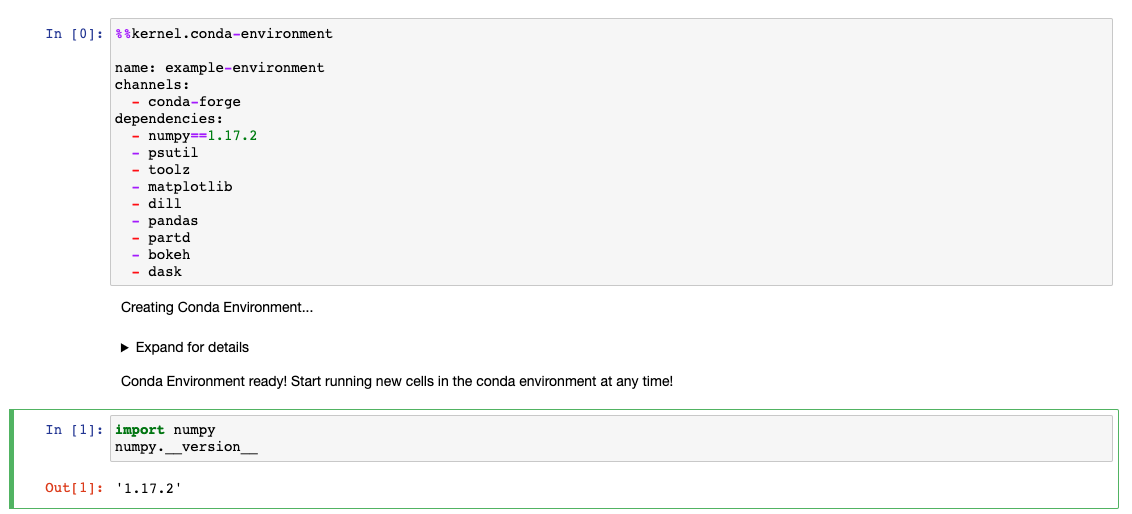
While Pick is working to get the magic's underlying kernel ready, Pick emits logs to the frontend and keeps the notebook UI responsive.
A similar example with Pick and kernel magics includes setting up spark and its associated environment variables in advance of launching the ipython kernel. Pick opens up possibilities for other creative ways of starting a kernel from an environment.
Truth: It's a kernel proxy!
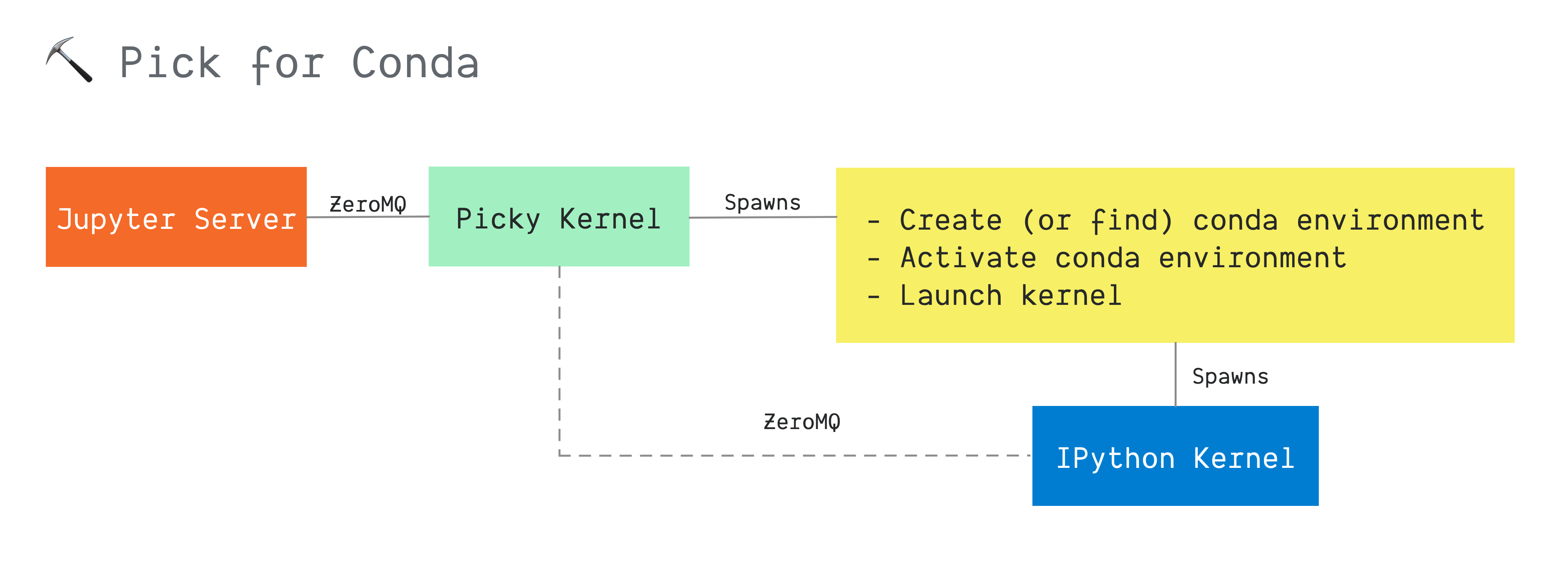
Pick's design focuses on making it really easy for a user to configure a kernel without having to mess with extensions across all the myriad jupyter projects or executing tasks from the command line. Pick works as a regular Jupyter kernel with the additional ability to create, customize, and manage a "child" kernel.
We set up Pick's initial communications protocol with the jupyter client, whether that be the notebook server or papermill. Next, the %%kernel.* magic runs, and we launch the "real" kernel.
1 maintainer

Metadata
1 maintainer
Release files for pick-kernel 0.0.4
For a detailed explanation of source distributions (sdists) and built distributions (wheels), please see the package formats documentation.
Source distribution (sdist)
| File | Size | Uploaded | |
|---|---|---|---|
| pick_kernel-0.0.4.tar.gz | 20.9 kB | Details |
Built distribution (wheel)
| File | Interpreter | ABI | Platform | Reset |
|---|---|---|---|---|
| pick_kernel-0.0.4-py3-none-any.whl | Python 3 | none | any | Details |
Total release size: 43.7 kB
Release files / pick_kernel-0.0.4.tar.gz
| Download URL | pick_kernel-0.0.4.tar.gz |
|---|---|
| Size | 20.9 kB |
| Tags | Source |
|
SHA-256 checksum How to use checksums |
321f50a46cb16668f0aa67e1cc4a4994c56fca338130cfe2695fb3c62308ea5a
|
|
BLAKE2b-256 checksum How to use checksums |
a85c68e9561e213f31fae7bdf5cca5545f47dc580b031ffec4ca8a5682189f4b
|
| Upload date | |
|
Uploaded using Trusted Publishing? What is trusted publishing? |
No |
| Uploaded via |
twine/3.1.1 pkginfo/1.5.0.1 requests/2.22.0 setuptools/45.2.0.post20200210 requests-toolbelt/0.9.1 tqdm/4.42.1 CPython/3.7.6
|
Release files / pick_kernel-0.0.4-py3-none-any.whl
| Download URL | pick_kernel-0.0.4-py3-none-any.whl |
|---|---|
| Size | 22.8 kB |
| Tags | Python 3 |
|
SHA-256 checksum How to use checksums |
cc837ccf57a79a046aecf1c4a68e6c6acaa194d546b877195d96f4c7113dc2a9
|
|
BLAKE2b-256 checksum How to use checksums |
243cffaf1941333f801f106db0b353c249d600ecdddd7f2bf919ad0f63174e51
|
| Upload date | |
|
Uploaded using Trusted Publishing? What is trusted publishing? |
No |
| Uploaded via |
twine/3.1.1 pkginfo/1.5.0.1 requests/2.22.0 setuptools/45.2.0.post20200210 requests-toolbelt/0.9.1 tqdm/4.42.1 CPython/3.7.6
|














