
Picross is a minimal and usable gemini:// browser written in Python and tkinter.
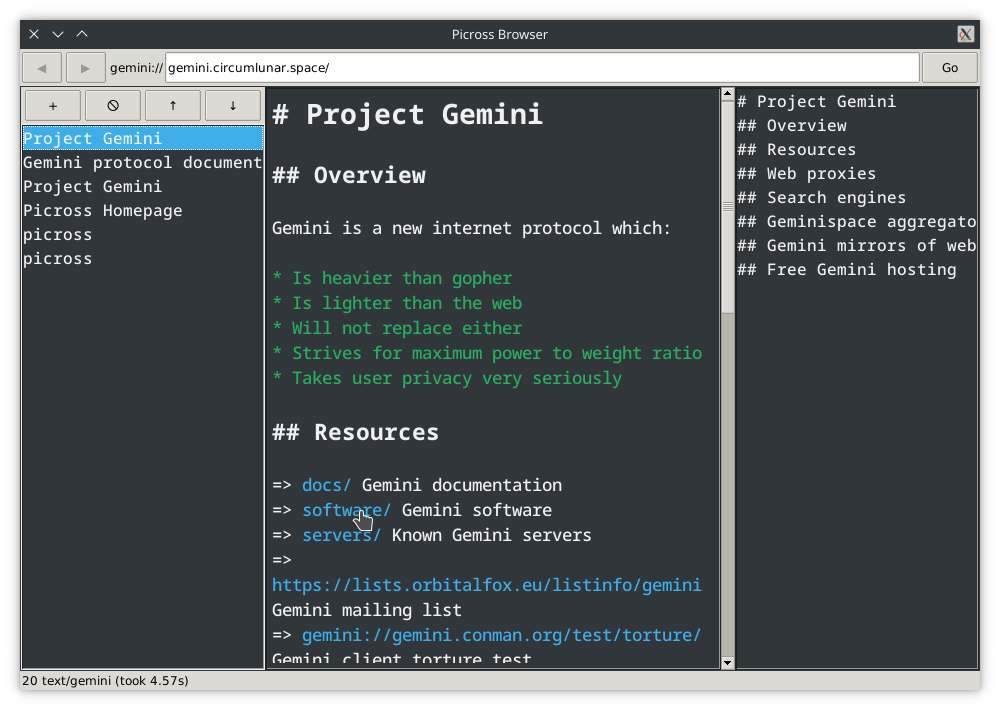
Installation
Install from PyPI for releases:
# do user install or grant privilege
pip install picross --user
or install from source:
git clone https://git.sr.ht/~fkfd/picross
cd picross
pip install -r requirements.txt --user
python setup.py install --user
Usage
Run picross to open browser, and picross -h to get a full list of CLI
arguments which modify appearance or behavior.
The priority is CLI arg > config file > default.
Keyboard shortcuts:
- Hold
Altto see possible button shortcuts underlined. This is what Qt calls Accelerator Keys. Ctrl-r/F5: refresh page.Ctrl-l: jump to address bar.Ctrl-t: open new tab.Ctrl-w: close current tab.Ctrl-PgUp/PgDown: switch to tab above/below.
Development
To get started:
git clone https://git.sr.ht/~fkfd/picross
cd picross
# you can set up virtualenv here if you want
# install dependencies
# escalate/limit privilege if necessary
pip install -r requirements.txt
python -m picross
Mailing list for sending patches and anything related to Picross: ~fkfd/picross@lists.sr.ht
If you're not familiar with the mailing list workflow, check out git-send-email.io and mailing list etiquette. useplaintext.email also has useful plaintext setup tips for various email clients.
1 maintainer

Release files for picross 0.6.2
For a detailed explanation of source distributions (sdists) and built distributions (wheels), please see the package formats documentation.
Source distribution (sdist)
| File | Size | Uploaded | |
|---|---|---|---|
| picross-0.6.2.tar.gz | 18.7 kB | Details |
Built distribution (wheel)
| File | Interpreter | ABI | Platform | Reset |
|---|---|---|---|---|
| picross-0.6.2-py3-none-any.whl | Python 3 | none | any | Details |
Total release size: 40.9 kB
Release files / picross-0.6.2.tar.gz
| Download URL | picross-0.6.2.tar.gz |
|---|---|
| Size | 18.7 kB |
| Tags | Source |
|
SHA-256 checksum How to use checksums |
64340d103419a1737a2a552f08946cfa1919a4bdd2c366a5f4208329489a0856
|
|
BLAKE2b-256 checksum How to use checksums |
9421cac6ed51a4ba5719ede13ff0ab9612aa3d23c3d61656999badb98d3c593f
|
| Upload date | |
|
Uploaded using Trusted Publishing? What is trusted publishing? |
No |
| Uploaded via |
twine/3.1.0 pkginfo/1.5.0.1 requests/2.24.0 setuptools/50.3.2 requests-toolbelt/0.8.0 tqdm/4.42.1 CPython/3.8.6
|
Release files / picross-0.6.2-py3-none-any.whl
| Download URL | picross-0.6.2-py3-none-any.whl |
|---|---|
| Size | 22.1 kB |
| Tags | Python 3 |
|
SHA-256 checksum How to use checksums |
2cfa7acb5e4da62502e1d8cc2ea0c39d3c68b2ed6e7f2a0e4a301f501c2e0e8d
|
|
BLAKE2b-256 checksum How to use checksums |
c01545419b89e9615416f99cedc7a1d0ca289ad46075376ad2536c50bb8493ae
|
| Upload date | |
|
Uploaded using Trusted Publishing? What is trusted publishing? |
No |
| Uploaded via |
twine/3.1.0 pkginfo/1.5.0.1 requests/2.24.0 setuptools/50.3.2 requests-toolbelt/0.8.0 tqdm/4.42.1 CPython/3.8.6
|














