
pictlang





Generate SVG images from a theme and style via an LLM-written Python DSL.

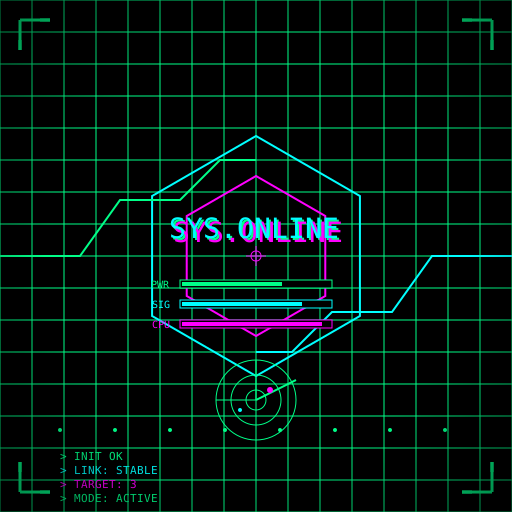



Examples generated by pictlang. See the repository for the source code and metadata.
What it is
pictlang sends a theme and a style to a model, receives a Python
function render(), and runs it in a sandbox. The function uses a
small drawing DSL instead of writing SVG directly. The result is a
valid SVG file.
The DSL approach gives three things:
- Token efficiency. A scene in the DSL is 15–30× shorter than the same scene in raw SVG. Loops and functions collapse hundreds of repeated elements into a few lines.
- Validation before execution. We check the AST for "exactly one
render(), no imports, no side effects" before running anything. - Safety. The DSL is a closed set of functions. The model cannot
emit
<script>or external references.
Install
pip install pictlang
Optional extras:
pip install "pictlang[optimize]"   # scour for SVG optimization
pip install "pictlang[socks]"      # SOCKS5 proxy support
pip install "pictlang[all]"        # everything
Quick start
Create a config and set your API key:
pictlang init --global
# edit ~/.config/pictlang/config.json
Generate an image:
pictlang "lighthouse in the fog" --style "minimalism, three colors"
Example output
UUID: 550e8400-e29b-41d4-a716-446655440000
SVG:  generated/valid/svg/550e8400-....svg
PY:   generated/valid/py/550e8400-....py
META: generated/valid/meta/550e8400-....json
The UUID is printed at the end — use it to find the files later.
CLI
| Flag | What it does |
|---|---|
THEME |
What to draw (positional) |
--style STYLE |
How to draw it (required) |
--save valid|all|py|svg |
What to persist (default valid) |
--optimize / --no-optimize |
Enable/disable SVG optimization |
--optimizer auto|scour|svgo |
Which optimizer to use |
--keep-original |
Save the SVG before optimization |
--model NAME |
Override the model |
--base-url URL |
Override the endpoint |
--proxy URL |
Proxy (http/https/socks5) |
--config PATH |
Path to a config file |
--check |
Validate config and test API connectivity |
Subcommands:
| Command | What it does |
|---|---|
pictlang init [--global] [--path] |
Write a template config |
pictlang render [uuid] [--force] |
Re-render .svg from .py without calling the API |
Configuration
pictlang reads configuration from:
--config PATH, if given../pictlang.jsonin the current directory.- The platform user-config directory:
- Linux:
~/.config/pictlang/config.json - macOS:
~/Library/Application Support/pictlang/config.json - Windows:
%APPDATA%\limloop\pictlang\config.json
- Linux:
- Built-in defaults.
See pictlang.json.example for a template.
Documentation
Development
git clone https://github.com/limloop/pictlang.git
cd pictlang
pip install -e ".[dev]"
pytest
License
Apache 2.0. See LICENSE.
Links
1 maintainer

Download files
Download the file for your platform. If you're not sure which to choose, learn more about installing packages.
Source Distribution
Built Distribution
Filter files by name, interpreter, ABI, and platform.
If you're not sure about the file name format, learn more about wheel file names.
Copy a direct link to the current filters
File details
Details for the file pictlang-0.2.1.tar.gz.
File metadata
- Download URL: pictlang-0.2.1.tar.gz
- Upload date:
- Size: 54.7 kB
- Tags: Source
- Uploaded using Trusted Publishing? Yes
- Uploaded via:
twine/7.0.0 CPython/3.13.14
File hashes
| Algorithm | Hash digest | |
|---|---|---|
| SHA256 |
a1f9bd7b722af3f58b8311e1ba34b9ee302edae7a9a0d2294d77cb0e126255cd
|
|
| MD5 |
01d32f2ac4cce49fd527af487c6c021f
|
|
| BLAKE2b-256 |
b96cf216da7c4ce7d08bb5b754ca12593cdc04cbec8170bf0417ecadbfe5eab3
|
Provenance
The following attestation bundles were made for pictlang-0.2.1.tar.gz:
Publisher:
publish.yml on limloop/pictlang
-
Statement:
-
Statement type:
https://in-toto.io/Statement/v1 -
Predicate type:
https://docs.pypi.org/attestations/publish/v1 -
Subject name:
pictlang-0.2.1.tar.gz -
Subject digest:
a1f9bd7b722af3f58b8311e1ba34b9ee302edae7a9a0d2294d77cb0e126255cd - Sigstore transparency entry: 2788606169
- Sigstore integration time:
-
Permalink:
limloop/pictlang@40a5b528e6c5eb6e250b1e13e8a543adaab8fbd4 -
Branch / Tag:
refs/tags/v0.2.1 - Owner: https://github.com/limloop
-
Access:
public
-
Token Issuer:
https://token.actions.githubusercontent.com -
Runner Environment:
github-hosted -
Publication workflow:
publish.yml@40a5b528e6c5eb6e250b1e13e8a543adaab8fbd4 -
Trigger Event:
release
-
Statement type:
File details
Details for the file pictlang-0.2.1-py3-none-any.whl.
File metadata
- Download URL: pictlang-0.2.1-py3-none-any.whl
- Upload date:
- Size: 44.2 kB
- Tags: Python 3
- Uploaded using Trusted Publishing? Yes
- Uploaded via:
twine/7.0.0 CPython/3.13.14
File hashes
| Algorithm | Hash digest | |
|---|---|---|
| SHA256 |
321114db69df91a7f0513ba64040ed1d5aa0d1287b626ac8791140fa0f15d286
|
|
| MD5 |
596749f00b1784a0280be730ea697ea5
|
|
| BLAKE2b-256 |
5830879985923fccd04477b3a56c9f1d5661a53cd6627fae66b00ed9c8ce2554
|
Provenance
The following attestation bundles were made for pictlang-0.2.1-py3-none-any.whl:
Publisher:
publish.yml on limloop/pictlang
-
Statement:
-
Statement type:
https://in-toto.io/Statement/v1 -
Predicate type:
https://docs.pypi.org/attestations/publish/v1 -
Subject name:
pictlang-0.2.1-py3-none-any.whl -
Subject digest:
321114db69df91a7f0513ba64040ed1d5aa0d1287b626ac8791140fa0f15d286 - Sigstore transparency entry: 2788606179
- Sigstore integration time:
-
Permalink:
limloop/pictlang@40a5b528e6c5eb6e250b1e13e8a543adaab8fbd4 -
Branch / Tag:
refs/tags/v0.2.1 - Owner: https://github.com/limloop
-
Access:
public
-
Token Issuer:
https://token.actions.githubusercontent.com -
Runner Environment:
github-hosted -
Publication workflow:
publish.yml@40a5b528e6c5eb6e250b1e13e8a543adaab8fbd4 -
Trigger Event:
release
-
Statement type:














