

PIEC — Python Integrated Experimental Control



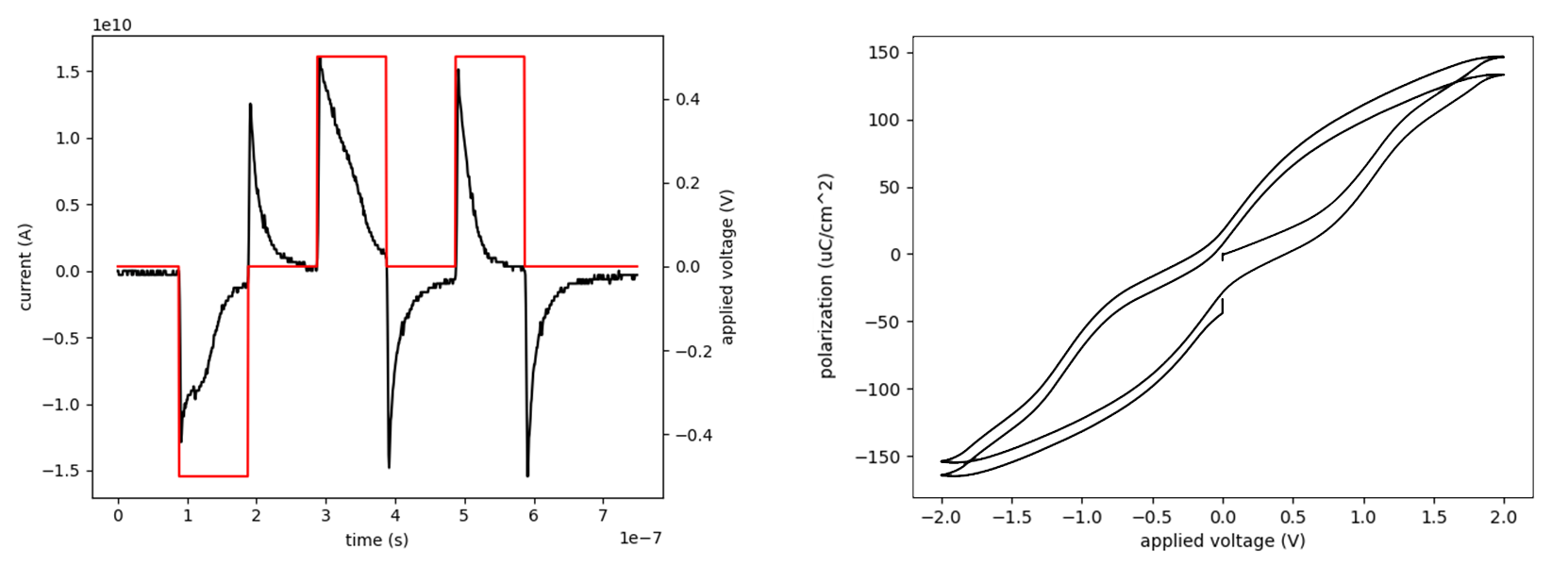
PIEC is an open-source Python library that provides infrastructure for laboratory experiment design and operation through a standardized, hierarchical, object-oriented framework. Originally developed at Brown University as a fork of the ferroelectric testing-focused EKPY Python suite, PIEC is designed to be extended to any experimental domain that requires programmable instrument control.
Installation
PIEC requires python 3.9 or higher. To install PIEC, run the following command in the terminal:
pip install piec
After this, decide whether you would like to run a specific measurment with a GUI or notebook (in which case you'll need to download the appropriate files from the Measurements folder). Otherwise, see below for information on how to start scripting. Depending on your instruments, you may also need:
| Requirement | When needed | Download |
|---|---|---|
| NI-488.2 | GPIB instruments | ni.com |
| NI-VISA | USB-TMC / Ethernet / GPIB via NI-VISA | ni.com |
MCC Universal Library + mcculw |
Digilent/MCC DAQ boards | mccdaq.com |
Overview
Instrument drivers in PIEC follow a type-first architecture with three layers of abstraction:
| Layer | Role | Examples |
|---|---|---|
| Level 1 — Instrument | Base connection management and parameter validation (wraps PyVISA) | Instrument, Scpi |
| Level 2 — Category | Defines required methods and parameter standards for each instrument type | Awg, Oscilloscope, Lockin, Sourcemeter |
| Level 3 — Model | Implements hardware-specific logic for a particular instrument | Keysight81150a, RigolDS1000Z, Keithley2400 |
Measurement code targets the Level 2 interface, so instruments are interchangeable without code changes. Each category also provides a Virtual Instrument that returns simulated responses, enabling development and testing without physical hardware.
On top of this driver layer, Measurement classes coordinate multiple instruments to execute complete experiment protocols — configuring waveforms, triggering acquisition, processing data, and saving results — in a single method call. Pre-built GUIs and Jupyter notebooks are also provided for routine tasks.
Quick Start
Virtual hysteresis loop — no hardware required:
from piec.drivers.awg.virtual_awg import VirtualAwg
from piec.drivers.oscilloscope.virtual_oscilloscope import VirtualScope
from piec.measurement.discrete_waveform import HysteresisLoop

awg = VirtualAwg()
osc = VirtualScope()
experiment = HysteresisLoop(awg, osc, save_dir='.')
experiment.run_experiment()  # configures, captures, saves, and analyzes
Swap VirtualAwg / VirtualScope for real drivers (or use autodetect) and the same code runs on hardware:
from piec.drivers.autodetect import autodetect

awg   = autodetect('awg')
scope = autodetect('scope')
For a complete walkthrough, see the User Guide.
Supported Instruments
| Category | Models |
|---|---|
| Arbitrary Waveform Generator | Keysight 81150A, Agilent 33220A, Agilent 33500, Rigol DG1000, Rigol DG4000, Siglent SDG2000X |
| Oscilloscope | Keysight DSOX3024A, Agilent DSOX5000, Rigol DS1000Z, Tektronix TDS2000, Tektronix TDS6604, LeCroy SDA6020 |
| Source Meter | Keithley 2400 |
| Lock-in Amplifier | Stanford Research SR830 |
| Digital Multimeter | Agilent 34410A, Keithley 2000, Keithley 193A |
| Pulser | Berkeley Nucleonics BNC 765 |
| DAQ | MCC USB-231 |
| DC Calibrator | EDC 522 |
| Stepper Motor | Arduino Stepper (custom serial) |
Contributing
New drivers can be added by implementing a driver subclass alongside its Virtual Instrument, following the Driver Development Guide. New experiment types require implementing a Measurement subclass without modifying existing code.
For general guidelines, see the Contributing Guide.
Support
Issues, bug reports, and feature requests: Issue Tracker
Maintainer: Geo Fratian — geo_fratian@brown.edu
Citation
Please cite this software following the CITATION.cff.
Fratian, G., Qualls, A., Phan, J., Pankaj, R., & Caretta, L. (2026).
PIEC: A Python Library for Integrated Experimental Control [Software].
https://github.com/TransluSci/piec
1 maintainer

Metadata
1 maintainer
Release files for piec 1.0.2
For a detailed explanation of source distributions (sdists) and built distributions (wheels), please see the package formats documentation.
Source distribution (sdist)
| File | Size | Uploaded | |
|---|---|---|---|
| piec-1.0.2.tar.gz | 143.9 kB | Details |
Built distribution (wheel)
| File | Interpreter | ABI | Platform | Reset |
|---|---|---|---|---|
| piec-1.0.2-py3-none-any.whl | Python 3 | none | any | Details |
Total release size: 320.2 kB
Release files / piec-1.0.2.tar.gz
| Download URL | piec-1.0.2.tar.gz |
|---|---|
| Size | 143.9 kB |
| Tags | Source |
|
SHA-256 checksum How to use checksums |
5cdf8a69da20f5b60fd2bd9b08b2a7253dc75797915ae2a9f18664eace6889bb
|
|
BLAKE2b-256 checksum How to use checksums |
712d213107c7bb68661f67314d462bda108df3315e35f45b2baf82bfedaa163e
|
| Upload date | |
|
Uploaded using Trusted Publishing? What is trusted publishing? |
No |
| Uploaded via |
twine/6.1.0 CPython/3.13.2
|
Release files / piec-1.0.2-py3-none-any.whl
| Download URL | piec-1.0.2-py3-none-any.whl |
|---|---|
| Size | 176.3 kB |
| Tags | Python 3 |
|
SHA-256 checksum How to use checksums |
45e0934eef34728c18cd8eb09e374889e9c322368846a01ecead3fe96941be9b
|
|
BLAKE2b-256 checksum How to use checksums |
76b80201801eb3c986bb655a59162ae5f1627172c6ff65899d0de55d497fcf99
|
| Upload date | |
|
Uploaded using Trusted Publishing? What is trusted publishing? |
No |
| Uploaded via |
twine/6.1.0 CPython/3.13.2
|














