
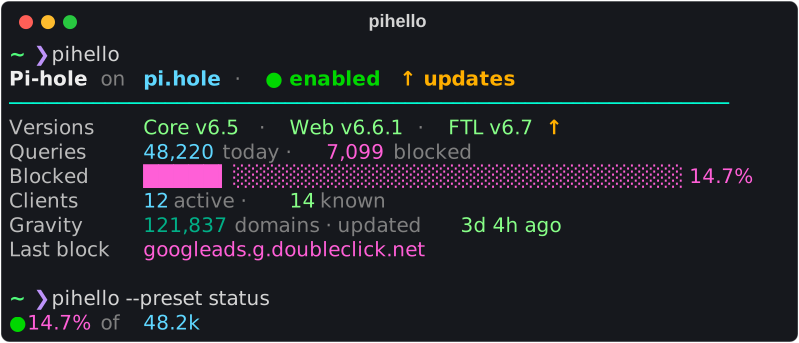




pihello prints a short, colorful summary of your Pi-hole:
whether ad blocking is on, how many queries were blocked today, versions and pending updates, and whatever else you want to see.
Put it in your shell's startup file, a MOTD or a tmux status bar, or run it as a live dashboard.
It's a pure-Python package of about 160 KB (1.2 MB installed) with no dependencies (only tomli on Python 3.10), made for Pi-hole v6.
| ⚡ About 0.1 s per greeting | 🎨 15 presets × 11 themes | 🧩 Your own templates |
|---|---|---|
The default preset needs 6 API requests: a login, 4 fetches in parallel for just what it shows, and a logout. 0.05 s from the optional cache. -q keeps new shells clean when the Pi-hole is offline. |
From a one-line tmux segment to a full dashboard. Every preset works with every theme. | Styles, conditional colors, filters, bars and sparklines, and 245 variables. |
| 🪄 Guided setup | 🔐 Careful with secrets | ✅ Every Pi-hole v6 release |
pihello init takes you through five steps (address, password, preset, theme, save), tests the connection and prints the line for your shell. |
Keep the password in a private file, a password manager or an environment variable. It's never printed. | Tested against 11 Pi-hole releases, v6.0 to v6.8, and pihello doctor explains what's wrong when something is. |
Timings: median of 15 runs of the installed package, Python 3.14 on a Ryzen 5 7500F, against a Pi-hole 2026.10.0 container on the same machine. About 35 ms of that is Pi-hole checking the password at login, which takes longer on a Raspberry Pi. Against a real Pi-hole (FTL v6.7.1 in Docker on an x86 mini PC) behind a Caddy HTTPS proxy on the same LAN, the default greeting took 0.18 s, with the reverse-proxy fix.
Install
pipx install pihello # or: uv tool install pihello
You need Python 3.10 or newer and Pi-hole v6.0 or newer.
pip install --user pihello works too, except where the system pip refuses it (Debian, Ubuntu and Raspberry Pi OS).
For Pi-hole v5, use pihello==0.3.0.
Quick start
- Create an app password in the Pi-hole web interface: Settings → Web interface / API → Configure app password. App passwords also work with two-factor authentication; your normal password works too if 2FA is off.
- Run
pihello init: five steps for the address, password, preset, theme and saving. It tests the connection, writes the config and offers to add the greeting to your shell. - Open a new terminal. There's your Pi-hole.
No Pi-hole at hand?
pihello --demo shows everything with built-in sample data.
A few of the looks
 |
 |
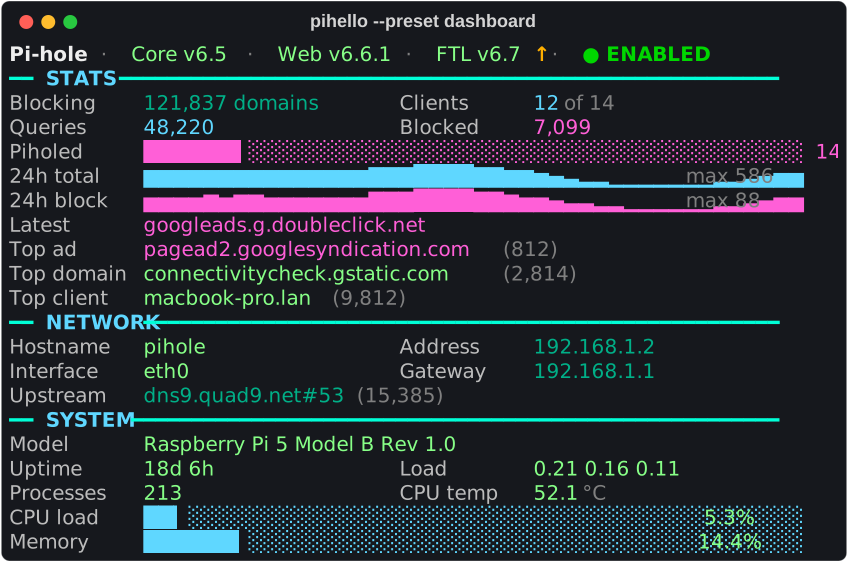
--preset dashboard: PADD-style, with bars and 24 h sparklines |
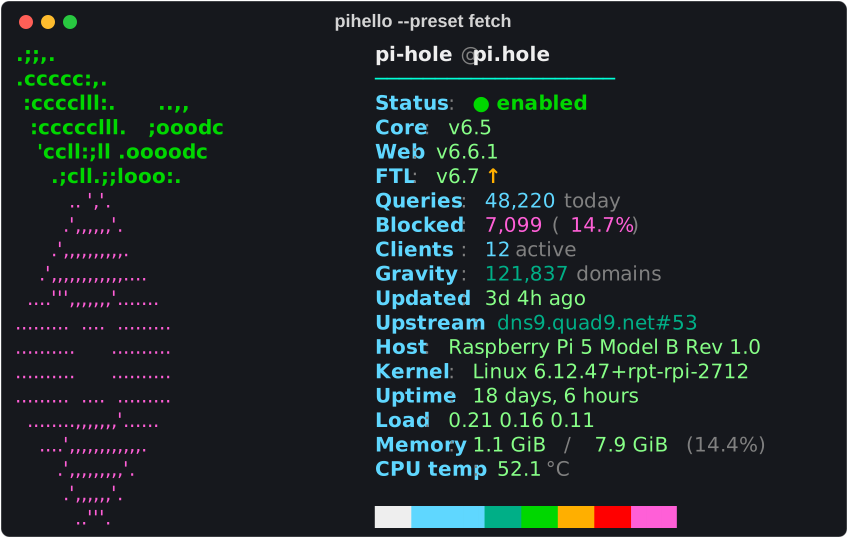
--preset fetch: neofetch-style, with the Pi-hole logo |
 |
 |
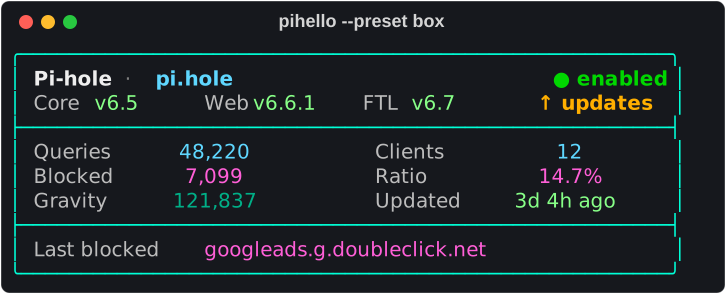
--preset box: a framed MOTD |
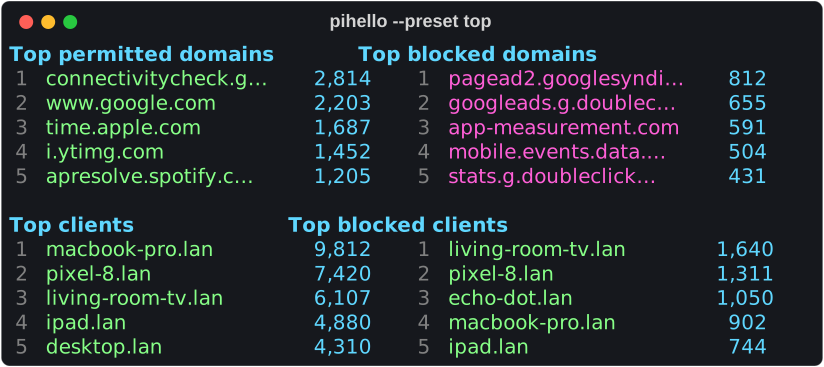
--preset top: top domains, blocked domains and clients |
There's also default, compact, minimal, status for status bars, plain for logs, classic for the exact pihello 1.x greeting, and more.
Pick the colors with --theme: nord, dracula, gruvbox, catppuccin, solarized, tokyonight, monokai, pihole, classic16 or mono.
→ See them all in the preset gallery and the theme gallery,
or in your own terminal with pihello presets and pihello themes.
Shell greeting
pihello init prints the snippet for your shell and can add it for you.
Use -q, so an unreachable Pi-hole never puts error messages into a new shell.
bash · ~/.bashrc
# Pi-hole greeting (pihello)
if [[ $- == *i* ]] && command -v pihello >/dev/null 2>&1; then
    pihello -q
fi
zsh · ~/.zshrc
# Pi-hole greeting (pihello)
if [[ -o interactive ]] && (( $+commands[pihello] )); then
    pihello -q
fi
fish · ~/.config/fish/conf.d/pihello.fish
# Pi-hole greeting (pihello): replaces fish's default greeting
function fish_greeting
    type -q pihello; and pihello -q
end
If you already have a fish_greeting function, add the type -q … line to it instead.
PowerShell · $PROFILE
# Pi-hole greeting (pihello)
if (Get-Command pihello -ErrorAction SilentlyContinue) { pihello -q }
Open the profile with notepad $PROFILE; create it first with New-Item -Force $PROFILE if it doesn't exist.
MOTD for every login · /etc/profile.d/pihello.sh
# /etc/profile.d/pihello.sh
case $- in
    *i*) command -v pihello >/dev/null 2>&1 && pihello -q ;;
esac
tmux and status bars · ~/.tmux.conf
The status preset is a short segment (● 14.7% of 48.2k).
Bars do their own coloring, so turn colors off:
# ~/.tmux.conf
set -g status-interval 30
set -g status-right '#(pihello -q --preset status --color never --cache 30) '
Integrations has more: starship, waybar, polybar, Debian's update-motd.d, scripts and cron.
Customising
Templates are plain text with [style tags] and {expressions}.
Start from a copy of a preset:
pihello presets default --source -o ~/.config/pihello/greeting.txt
Or write one from scratch:
[@title]Pi-hole {version.core.local.version}[@muted] · [{blocking|map(enabled=@good, _=@bad)}]● {blocking}
[@label]Blocked [@highlight]{queries.blocked|number}[@muted] of {queries.total|number} ({queries.percent_blocked|percent})
[@label]Top ad  [@highlight]{top_blocked.0.domain|default("none")}
[@label]24h     [@accent]{history|pluck(total)|spark(30)}
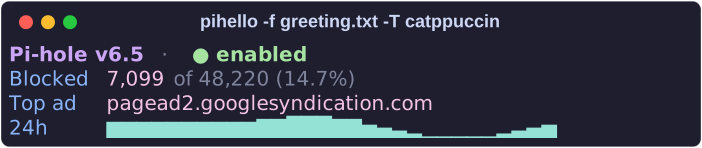
Try it with pihello --demo -f ~/.config/pihello/greeting.txt,
then replace the preset line in the config file with template = "~/.config/pihello/greeting.txt".
The template guide covers the language,
and the references list every filter and every variable you can show.
Commands
| Command | Description |
|---|---|
pihello |
Print the greeting (same as pihello show) |
pihello init |
Interactive setup: address, password, preset, theme, shell snippet |
pihello doctor |
Check config, network, HTTPS, login and API step by step |
pihello presets [NAME] |
Preview the presets; --source -o FILE saves one to edit |
pihello themes [NAME] |
Preview the themes |
pihello vars [PATTERN] |
List the template variables with their values; --json for scripts |
pihello colors |
List the color names for templates |
pihello completion SHELL |
Tab completion for bash, zsh or fish |
pihello --watch [SECONDS] |
Live dashboard, refreshed every 5 s |
pihello --cache SECONDS |
Reuse data fetched less than SECONDS ago |
pihello --demo |
Use built-in demo data instead of a Pi-hole |
Every command has --help, and Commands has examples and every option.
Configuration
pihello init writes ~/.config/pihello/config.toml (%APPDATA%\pihello\config.toml on Windows):
# ~/.config/pihello/config.toml
url = "https://pi.hole"
password_file = "~/.config/pihello/password"
verify_tls = "tls_ca.crt"
preset = "default"
theme = "nord"
cache_ttl = 30

[profiles.backup]          # pihello -P backup
url = "http://192.168.1.3"
password_command = "pass show pihole-backup"
Command-line options and PIHELLO_* environment variables override the file.
Configuration describes every setting, the password options, profiles, style overrides, HTTPS certificates and caching.
Troubleshooting
Run pihello doctor first.
It checks every step from the config file to the API session and says what to do about each problem.
Nothing appears in new shells
That's -q hiding an error: it hides connection, login and API errors and a failing password_command (a locked password manager), though not mistakes in the config file or a template.
Run pihello without -q to see it.
New shells are slow when the Pi-hole is offline
Lower the network timeout: timeout = 1 in the config (the default is 3 seconds).
could not resolve host 'pi.hole'
pi.hole only resolves on machines that use the Pi-hole as their DNS server.
Use its IP address or another host name.
TLS certificate verification failed
Pi-hole's HTTPS certificate is self-signed.
Copy /etc/pihole/tls_ca.crt from the Pi-hole and use --ca-cert tls_ca.crt (or verify_tls = "tls_ca.crt").
The certificate is issued for pi.hole, so connect with that name.
-k / --insecure skips the check.
two-factor authentication enabled
pihello can't enter TOTP codes. Create an app password (see Quick start) and use that.
Pi-hole has no free API sessions
Pi-hole allows 16 API sessions at a time by default (webserver.api.max_sessions).
pihello always logs out, but other tools may not.
Old sessions expire after 30 minutes, or delete them under Settings → Web interface / API.
Pi-hole is rate-limiting login attempts
Pi-hole accepts at most 3 logins per second, so opening many terminals at once (e.g. tmux restoring panes) can trip it.
pihello retries up to twice, after a random 0.35–1.1 s pause and within the timeout;
set cache_ttl = 30 so new shells within 30 seconds reuse the last result instead of logging in.
? instead of a value
The value isn't available on your Pi-hole, or the variable name has a typo.
pihello --strict names the culprit, and pihello vars shows what's there.
? in place of symbols like ●, ↑ or box lines
The terminal's locale isn't UTF-8 (e.g. LANG=en_GB.ISO-8859-1, common on older Raspberry Pi OS installs; check with locale),
so pihello prints ? for the characters it can't show.
Switch to a UTF-8 locale (sudo raspi-config → Localisation Options → Locale, or sudo dpkg-reconfigure locales, then pick e.g. en_GB.UTF-8),
or use --preset plain, which is ASCII-only.
Wrong or no colors
Set --color 256 or --color truecolor, check that NO_COLOR isn't set, and use --color always when piping.
Troubleshooting has the details and more error messages.
Still stuck? Open an issue with the output of pihello doctor (it never contains your password).
Upgrading from 1.x
Your pihello ADDR PASSWORD -f FILE … command and template files keep working, and the classic preset is the exact 1.x look.
Running pihello init once moves the password out of your shell history.
Upgrading from 1.x lists every change.
Documentation
| Page | Description |
|---|---|
| Commands | Every command and option, with examples |
| Configuration | The config file, passwords, profiles, HTTPS, caching, environment variables |
| Integrations | Shells, MOTD, tmux, starship, status bars, scripts |
| Templates | How to write your own greeting |
| Filters · Variables | Every filter and every value a template can use |
| Presets · Themes | The galleries |
| Troubleshooting | Problems, error messages and fixes |
| Upgrading from 1.x | What changed and what still works |
| Pi-hole compatibility | Tested versions and API details |
| Architecture | How the code fits together |
| Changelog | Release notes |
Development
Contributions are welcome.
Contributing explains the setup (uv sync), the checks and the tests.
1 maintainer

Metadata
1 maintainer
Release files for pihello 2.0.0
For a detailed explanation of source distributions (sdists) and built distributions (wheels), please see the package formats documentation.
Source distribution (sdist)
| File | Size | Uploaded | Provenance | |
|---|---|---|---|---|
| pihello-2.0.0.tar.gz | 583.7 kB | With provenance | Details |
Built distribution (wheel)
| File | Interpreter | ABI | Platform | Reset |
|---|---|---|---|---|
| pihello-2.0.0-py3-none-any.whl | Python 3 | none | any | Details |
Total release size: 755.1 kB
Release files / pihello-2.0.0.tar.gz
| Download URL | pihello-2.0.0.tar.gz |
|---|---|
| Size | 583.7 kB |
| Tags | Source |
|
SHA-256 checksum How to use checksums |
40fb19201d56efc2ad146c83610c7dfeddd40f273f93827de99affa4e10dfb30
|
|
BLAKE2b-256 checksum How to use checksums |
ece7393dafd4b51024987d32b46756e4317de0334f7cd075430ba248044c1d91
|
| Upload date | |
|
Uploaded using Trusted Publishing? What is trusted publishing? |
Yes |
| Uploaded via |
twine/7.0.0 CPython/3.13.16
|
Provenance
Provenance describes where a file came from. On PyPI, provenance is shared via attestations, which provide a verifiable record of the build or publishing details. View details, limitations and caveats.


PyPI Publish Attestation
PyPI verified that this artifact, at this checksum, originated from the publisher listed below.
Signed by GitHub Actions, verified by PyPI on Oct 24, 2026.
Transparency logRelease files / pihello-2.0.0-py3-none-any.whl
| Download URL | pihello-2.0.0-py3-none-any.whl |
|---|---|
| Size | 171.4 kB |
| Tags | Python 3 |
|
SHA-256 checksum How to use checksums |
6bc407ecb050d3e93686a3012577be702dd1ae948b59ed4d3f9e98f097bf3226
|
|
BLAKE2b-256 checksum How to use checksums |
b3224d3438d38f27987dad1a1f3ec01061ed6c38dd7df7cf6b7bde0179c75d52
|
| Upload date | |
|
Uploaded using Trusted Publishing? What is trusted publishing? |
Yes |
| Uploaded via |
twine/7.0.0 CPython/3.13.16
|
Provenance
Provenance describes where a file came from. On PyPI, provenance is shared via attestations, which provide a verifiable record of the build or publishing details. View details, limitations and caveats.
PyPI Publish Attestation
PyPI verified that this artifact, at this checksum, originated from the publisher listed below.
Signed by GitHub Actions, verified by PyPI on Oct 24, 2026.
Transparency logSecurity for pihello 2.0.0
Provenance
Provenance describes where a file came from. On PyPI, provenance is shared via attestations, which provide a verifiable record of the build or publishing details. View details, limitations and caveats.
Full provenance
All 2 files in this release have been uploaded with provenance metadata.
Attestation for pihello-2.0.0.tar.gz
PyPI Publish Attestation
PyPI verified that this artifact, at this checksum, originated from the publisher listed below.
Signed by GitHub Actions, verified by PyPI on Oct 24, 2026.
Transparency logA note on package security
PyPI is a repository for distributing packages, not a service for auditing them. While third-party security researchers and our staff do their best to detect and remove malicious packages, PyPI cannot guarantee the quality, security or suitability of any given package.
To learn more about protecting yourself from malicious actors, visit our package security documentation.














