
pil-utils
功能
- 提供
BuildImage类,方便图片尺寸修改、添加文字等操作 - 提供
Text2Image类,方便实现文字转图,支持少量BBCode标签
安装
使用 pip 安装:
pip install pil-utils
插件依赖 skia-python 来绘制文字,对于 Linux 平台,需要安装 OpenGL 和 fontconfig:
apt-get install libfontconfig1 libgl1-mesa-glx libgl1-mesa-dri
或:
yum install fontconfig mesa-libGL mesa-dri-drivers
具体安装说明请参考 skia-python 文档
已知问题
- Windows 上
SkIcuLoader: datafile missing
由于 skia 在 Windows 上需要加载 icudtl.dat 文件,临时解决办法是手动将缺失的 icudtl.dat 文件放到 Python 环境里
icudtl.dat 文件下载:https://github.com/MeetWq/pil-utils/releases/download/v0.2.0/icudtl.dat
请放置到 Python 包目录下,即 Lib\site-packages 文件夹下
相关 Issue:https://github.com/kyamagu/skia-python/issues/268
- Windows 上运行时程序直接退出
skia 使用了 C++17 的特性,需要安装 Visual C++ 运行时 2017 以上版本
- Linux 下字体异常
可能是 skia 的 bug,在 Linux 上当 locate 设置为中文时,字体选择会出现异常
临时解决办法是设置为英文 locate:
export LANG=en_US.UTF-8
相关 Issue:https://github.com/rust-skia/rust-skia/issues/963
使用示例
BuildImage
from pil_utils import BuildImage

# output: BytesIO
output = BuildImage.new("RGBA", (200, 200), "grey").circle().draw_text((0, 0, 200, 200), "测试test😂").save_png()

Text2Image
from pil_utils import Text2Image

# img: PIL.Image.Image
img = Text2Image.from_text("@mnixry 🤗", 50).to_image(bg_color="white")

- 使用
BBCode
from pil_utils import text2image

# img: PIL.Image.Image
img = text2image("N[size=40][color=red]O[/color][/size]neBo[size=40][color=blue]T[/color][/size][align=center]太强啦[/align]")
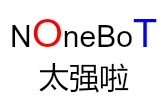
目前支持的 BBCode 标签:
[align=left|right|center][/align]: 文字对齐方式[color=#66CCFF|red|black][/color]: 字体颜色[stroke=#66CCFF|red|black][/stroke]: 描边颜色[font=Microsoft YaHei][/font]: 文字字体[size=30][/size]: 文字大小[b][/b]: 文字加粗[i][/i]: 文字斜体[u][/u]: 文字下划线[del][/del]: 文字删除线
特别感谢
- HibiKier/zhenxun_bot 基于 Nonebot2 开发,非常可爱的绪山真寻bot
- kyamagu/skia-python Python binding to Skia Graphics Library
1 maintainer

Metadata
1 maintainer
Release files for pil-utils 0.2.2
For a detailed explanation of source distributions (sdists) and built distributions (wheels), please see the package formats documentation.
Source distribution (sdist)
| File | Size | Uploaded | |
|---|---|---|---|
| pil_utils-0.2.2.tar.gz | 14.4 kB | Details |
Built distribution (wheel)
| File | Interpreter | ABI | Platform | Reset |
|---|---|---|---|---|
| pil_utils-0.2.2-py3-none-any.whl | Python 3 | none | any | Details |
Total release size: 29.9 kB
Release files / pil_utils-0.2.2.tar.gz
| Download URL | pil_utils-0.2.2.tar.gz |
|---|---|
| Size | 14.4 kB |
| Tags | Source |
|
SHA-256 checksum How to use checksums |
4d7855ec387691dec5eddaaef2583d82b4855c13006dc980c7fffb7bd35bc4ef
|
|
BLAKE2b-256 checksum How to use checksums |
a37a69d326549b848f1fcad1badd8717208256fe12bc4e72666e3e5b3d13a165
|
| Upload date | |
|
Uploaded using Trusted Publishing? What is trusted publishing? |
No |
| Uploaded via |
poetry/1.8.4 CPython/3.11.0 Linux/6.5.0-1025-azure
|
Release files / pil_utils-0.2.2-py3-none-any.whl
| Download URL | pil_utils-0.2.2-py3-none-any.whl |
|---|---|
| Size | 15.5 kB |
| Tags | Python 3 |
|
SHA-256 checksum How to use checksums |
6fec6ba0caebddffdcdb0b0b60719968173ddc15427bded47f81c7ba121a0211
|
|
BLAKE2b-256 checksum How to use checksums |
14e14f537d2f0f18f081489a678478ef675cf01eb6bdf8cf3c64be4caabaf4a9
|
| Upload date | |
|
Uploaded using Trusted Publishing? What is trusted publishing? |
No |
| Uploaded via |
poetry/1.8.4 CPython/3.11.0 Linux/6.5.0-1025-azure
|














