
piloop


Autoresearch for any git repo: coding agents try ideas, piloop scores every commit and keeps what wins.
Documentation: piloop.autoresearch.inc
You talk to one coding agent. It sets up a campaign in your repo and runs it for you. Coding agents try ideas in parallel, each one in its own git worktree. piloop runs your evaluate command on every commit. It keeps a change only when the change beats the best result so far. When your evaluate command reports a result for each example, the gain must also hold with statistical confidence.
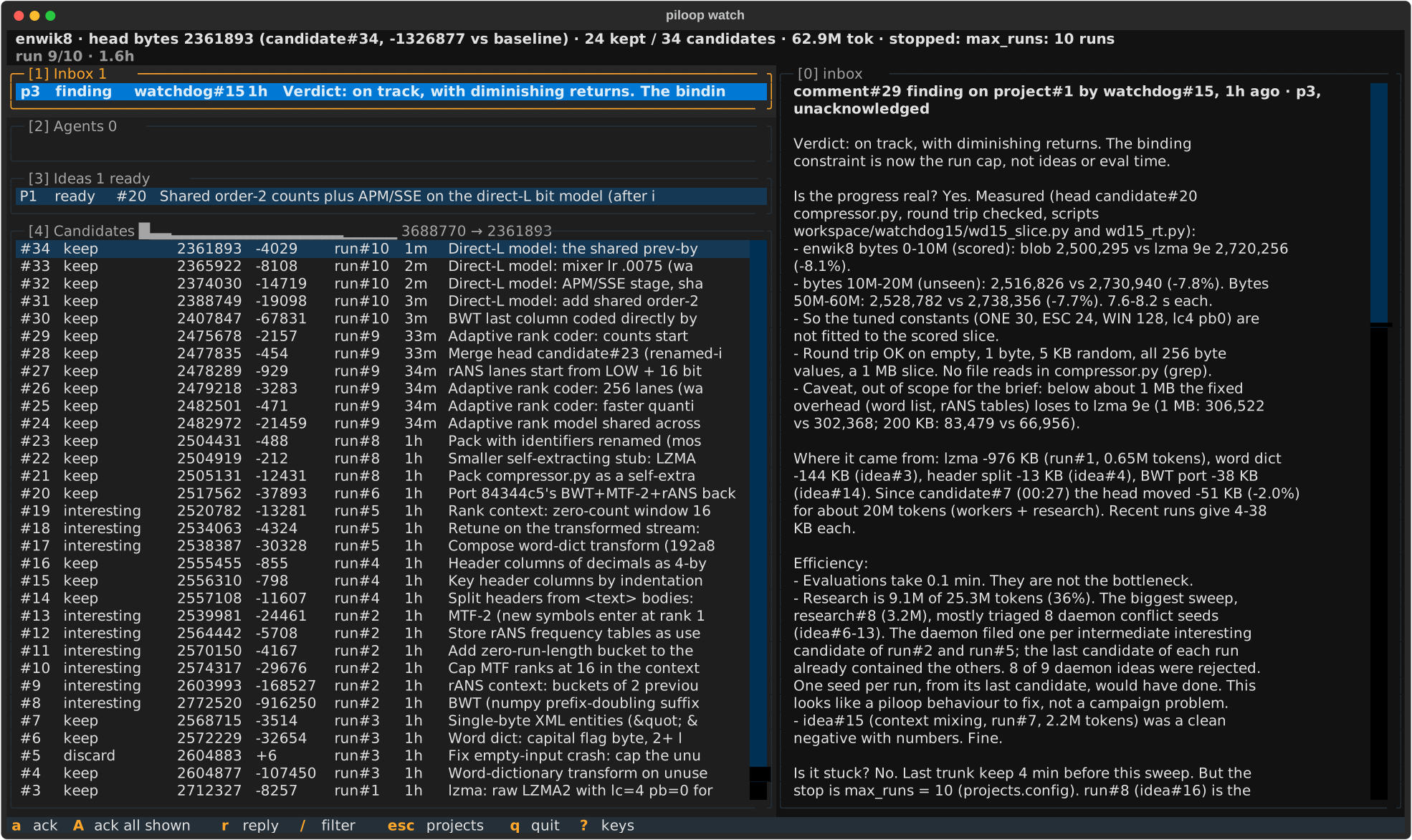
The enwik8 example after 10 worker runs: Claude Code agents took the first 10 MB of Wikipedia from 3,688,770 bytes (zlib) to 2,361,893 bytes (−36%) in 1.6 hours.
piloop keeps its state on your machine: a SQLite database and the run directories in PILOOP_HOME (~/.piloop by
default), and every candidate commit as a git ref in your repo. piloop has no hosted service. The coding agents send
your code and their prompts to their model providers, as they do when you use them yourself.
Start
-
Install piloop and its skills for your coding agents:
curl -fsSL https://raw.githubusercontent.com/hiloopai/piloop/main/install.sh | sh
-
Open your coding agent in your repo: Claude Code, Codex, pi, Gemini CLI or Cursor.
-
Tell it what to improve. Say "piloop", so that the agent uses the piloop skills:
Use piloop to make our tokenizer faster without changing its output.
Use piloop to improve the holdout accuracy of the model in train.py.
Use piloop to make the test suite run faster. Do not delete or skip tests.
What happens next
- Setup. The agent checks your machine and asks you a few questions: the metric, how to measure it, what must
not get worse, which files the agents may edit, and the budget. Then it writes
brief.md,piloop.tomland the evaluate command, measures the baseline and starts the campaign. - The campaign runs. Worker agents try ideas. piloop scores each commit and keeps what wins. A research agent adds ideas, and a watchdog agent looks for problems.
- The agent reports. Your agent answers what the other agents escalate and records each decision in your inbox. It asks you only what needs you. Ask it "how is the campaign going?" at any time.
To look at the campaign yourself, run piloop watch.
Try it on an example
Ask your agent:
Set up the enwik8 example campaign from piloop.
The agents compress the first 10 MB of Wikipedia, as in the Hutter Prize. The baseline is zlib.
Run the example by hand
piloop init --example enwik8 ~/piloop-enwik8
cd ~/piloop-enwik8
piloop idea add enwik8 "Try lzma at the highest preset"
piloop serve --detach
piloop watch
The example uses Claude Code and stops after 20 scored worker runs. See Run a campaign by hand.
Requirements
- Linux or macOS.
- git, with a commit identity.
- uv. The installer installs it.
- At least one worker agent CLI, logged in: Claude Code, Codex or pi.
- Optional: Herdr, to see and steer every agent in a terminal pane. By default, the agents run
in the background. To use Herdr, set
runtime = "herdr". - Optional: Entire, to keep the session of every agent in your repo.
Documentation
- Introduction: what piloop does, and how a campaign works.
- Quickstart: your first campaign, through your agent.
- Concepts: projects, ideas, runs, candidates and the verdict.
- Reference: the CLI, the configuration, the database schema.
Contributing
See CONTRIBUTING.md. Agents that operate piloop start at AGENTS.md.
License
MIT. See LICENSE.
1 maintainer

Metadata
1 maintainer
Release files for piloop 0.1.0
For a detailed explanation of source distributions (sdists) and built distributions (wheels), please see the package formats documentation.
Source distribution (sdist)
| File | Size | Uploaded | |
|---|---|---|---|
| piloop-0.1.0.tar.gz | 592.6 kB | Details |
Built distribution (wheel)
| File | Interpreter | ABI | Platform | Reset |
|---|---|---|---|---|
| piloop-0.1.0-py3-none-any.whl | Python 3 | none | any | Details |
Total release size: 892.5 kB
Release files / piloop-0.1.0.tar.gz
| Download URL | piloop-0.1.0.tar.gz |
|---|---|
| Size | 592.6 kB |
| Tags | Source |
|
SHA-256 checksum How to use checksums |
b76b2f55d727bb6b19a711e7e08b81a8527b9bb29819063d7b6eb297f643e6f9
|
|
BLAKE2b-256 checksum How to use checksums |
83cf75f159512627166d9a3226530b2bd81b6eef7ebf3f4c4f4aef396b4b1cae
|
| Upload date | |
|
Uploaded using Trusted Publishing? What is trusted publishing? |
Yes |
| Uploaded via |
uv/0.13.0 {"installer":{"name":"uv","version":"0.13.0","subcommand":["publish"]},"python":null,"implementation":{"name":null,"version":null},"distro":{"name":"Ubuntu","version":"24.04","id":"noble","libc":null},"system":{"name":null,"release":null},"cpu":null,"openssl_version":null,"setuptools_version":null,"rustc_version":null,"ci":true}
|
Release files / piloop-0.1.0-py3-none-any.whl
| Download URL | piloop-0.1.0-py3-none-any.whl |
|---|---|
| Size | 299.9 kB |
| Tags | Python 3 |
|
SHA-256 checksum How to use checksums |
1ce99f45a2f8ea1986a6780d073d712e988ea769d72feb4757824f28dea2dd15
|
|
BLAKE2b-256 checksum How to use checksums |
25e3907f2e76daf8ba0436caa843ced93f016413757310a2cfa75a6fcfa868f7
|
| Upload date | |
|
Uploaded using Trusted Publishing? What is trusted publishing? |
Yes |
| Uploaded via |
uv/0.13.0 {"installer":{"name":"uv","version":"0.13.0","subcommand":["publish"]},"python":null,"implementation":{"name":null,"version":null},"distro":{"name":"Ubuntu","version":"24.04","id":"noble","libc":null},"system":{"name":null,"release":null},"cpu":null,"openssl_version":null,"setuptools_version":null,"rustc_version":null,"ci":true}
|













