
MICS6814 Breakout Garden Breakout




Installing
Pre-requisites
You must enable i2c:
- i2c:
sudo raspi-config nonint do_i2c 0
You can optionally run sudo raspi-config or the graphical Raspberry Pi Configuration UI to enable interfaces.
Full install (recommended):
We've created an easy installation script that will install all pre-requisites and get your BH1745 up and running with minimal efforts. To run it, fire up Terminal which you'll find in Menu -> Accessories -> Terminal on your Raspberry Pi desktop, as illustrated below:
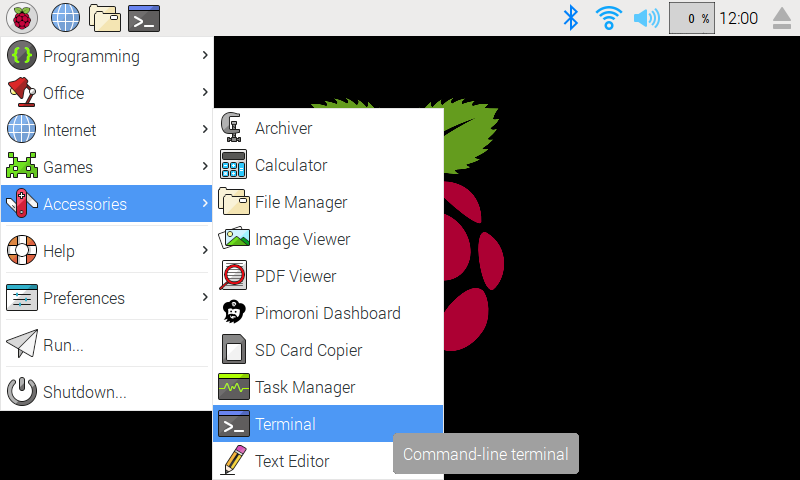
In the new terminal window type the command exactly as it appears below (check for typos) and follow the on-screen instructions:
Stable library and dependencies from GitHub:
git clone https://github.com/pimoroni/mics6814-pythoncd mics6814-pythonsudo ./install.sh
Latest/development library and dependencies from GitHub:
git clone https://github.com/pimoroni/mics6814-pythoncd mics6814-pythonsudo ./install.sh --unstable
Note Libraries will be installed in the "pimoroni" virtual environment, you will need to activate it to run examples:
source ~/.virtualenvs/pimoroni/bin/activate
Stable (library only) from PyPi:
- In your Python Virtual Environment, run
pip install pimoroni-mics6814
1.0.0
- Port to hatch/pyproject.toml
- Bump to ioexpander >= 1.0.0
0.0.2
- Swap Oxidizing/Reducing pins so readings are correct
0.0.1
- Initial Release
1 maintainer

Release files for pimoroni-mics6814 1.0.0
For a detailed explanation of source distributions (sdists) and built distributions (wheels), please see the package formats documentation.
Source distribution (sdist)
| File | Size | Uploaded | |
|---|---|---|---|
| pimoroni_mics6814-1.0.0.tar.gz | 12.9 kB | Details |
Built distribution (wheel)
| File | Interpreter | ABI | Platform | Reset |
|---|---|---|---|---|
| pimoroni_mics6814-1.0.0-py3-none-any.whl | Python 3 | none | any | Details |
Total release size: 20.1 kB
Release files / pimoroni_mics6814-1.0.0.tar.gz
| Download URL | pimoroni_mics6814-1.0.0.tar.gz |
|---|---|
| Size | 12.9 kB |
| Tags | Source |
|
SHA-256 checksum How to use checksums |
f27dea84ce43202db911e1967074728de75eb6f7ba7318d44defa4128918eacc
|
|
BLAKE2b-256 checksum How to use checksums |
20d77489f57368f6f372eb52d416c26b5e667526ab0e0c0b8ed5ea287b8b9469
|
| Upload date | |
|
Uploaded using Trusted Publishing? What is trusted publishing? |
No |
| Uploaded via |
twine/5.0.0 CPython/3.11.2
|
Release files / pimoroni_mics6814-1.0.0-py3-none-any.whl
| Download URL | pimoroni_mics6814-1.0.0-py3-none-any.whl |
|---|---|
| Size | 7.2 kB |
| Tags | Python 3 |
|
SHA-256 checksum How to use checksums |
b408a35b13ff623b5c817a682966903b1a299cf69e0d2c21aeef07d1730d3639
|
|
BLAKE2b-256 checksum How to use checksums |
6f87c6621457cc94e4a7bbdcc6f91318106314359e12714a002b19591cc91b58
|
| Upload date | |
|
Uploaded using Trusted Publishing? What is trusted publishing? |
No |
| Uploaded via |
twine/5.0.0 CPython/3.11.2
|














