
Pin Header Label Generator



Print a pin-out label, push the pins of your pin header through the paper, and every signal name sits right next to its pin. No more counting pins when you plug in jumper wires.
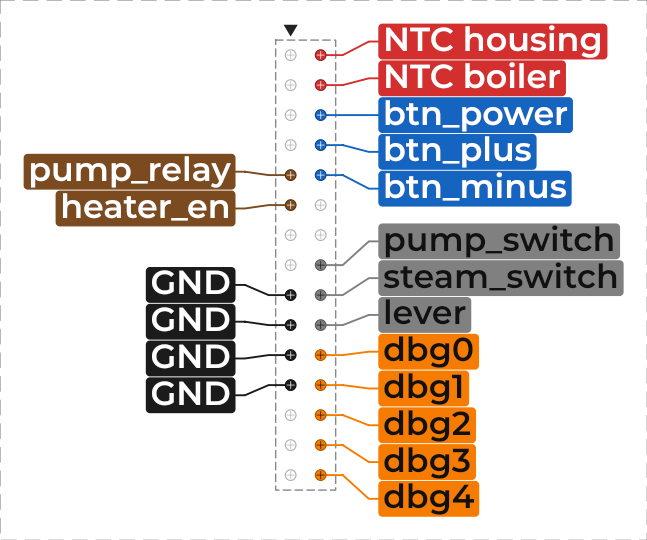
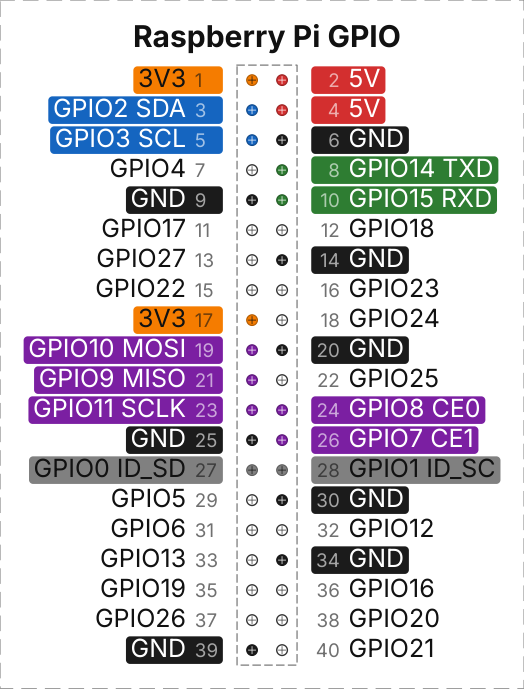
Features
- Single-row and two-row pin headers with any number of rows and any pitch (2.54 mm, 2.0 mm, 1.27 mm, …)
- Labels fan out automatically with leader lines when the text is taller than the pin pitch
- Per-pin colors (typical jumper wire colors or any custom color), shown as background, text color or frame; GND/VCC can be colored automatically
- Optional pin numbers (zigzag, DIP/U shape, column by column), pin 1 mark, title, header outline and cutting frame
- Exact output: vector PDF in millimeters, PNG with DPI metadata, SVG, or direct printing; several copies per A4 page
- Check rulers on the page and a scale correction for printers that do not print at exactly 100 %
- Pin list import from text and CSV files, plus pasting from the clipboard or a spreadsheet
- Graphical user interface in English and German and a command line version for scripts and automation
- Projects are saved as human-readable JSON
Installation
You need Python 3.11 or newer. The only dependency is PySide6 (Qt for Python), which pip installs automatically.
From PyPI (once published):
pip install pin-header-label-generator
Directly from GitHub:
pip install git+https://github.com/shaag7967/pinHeaderLabelGenerator.git
pipx works too and keeps the tool in its own
environment: pipx install pin-header-label-generator.
The package provides two commands:
| Command | Purpose |
|---|---|
pinlabel-gui |
starts the graphical user interface |
pinlabel |
command line: export, import and gui |
python -m pin_header_label is the same as pinlabel.
Using the GUI
pinlabel-gui                      # new project
pinlabel-gui my_header.json       # open a project (or create it under this name)
pinlabel-gui --lang de            # German for this session
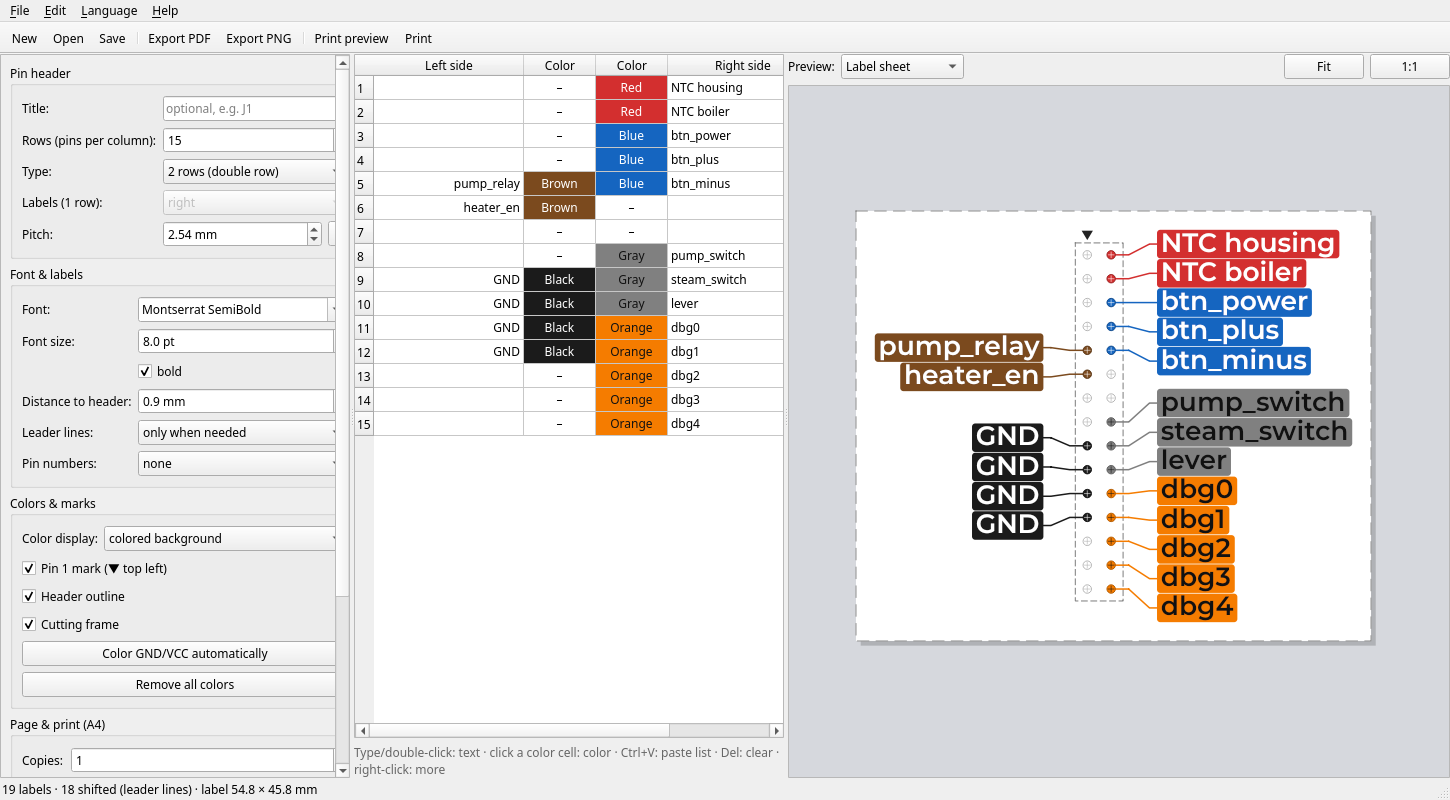
The window has three parts:
- Settings (left): header size and pitch, font, label distance, leader lines, pin numbering, color display, marks, copies and printer scale.
- Pin table (middle): one line per header row. Two-row headers are shown
like the real header:
left label | color | color | right label. - Preview (right): the label or the whole A4 page. Zoom with the mouse wheel, drag to pan, double-click to fit, and use 1:1 for roughly real size.
Editing the pin table:
| Action | How |
|---|---|
| Enter a label | type or double-click a label cell |
| Set a color | click a color cell (applies to all selected pins) |
| Paste a list | Ctrl+V (lines become rows, tabs become columns) |
| Copy labels | Ctrl+C |
| Clear cells | Del / Backspace |
| Insert / delete rows, colors | right-click |
Language: choose Language → English / Deutsch. The interface switches immediately and the choice is remembered. The texts printed on the page (instructions and footer) follow the selected language too.
Printing
- Print at 100 % / "Actual size", not "Fit to page".
- Check the printed 50 mm ruler. If it is not exactly 50 mm, set
Scale X / Y to
50 / measured × 100 %(for example 50 / 49.5 × 100 % = 101.01 %). - You can also check the pitch ruler: put the real header on it.
- Cut the label out along the dashed cutting frame and push the pins through the crosses.
Importing pin lists
There are three ways to get pin names into a project.
1. Paste into the table
Copy a column (or two columns) from a spreadsheet, a datasheet or a text
editor, click the start cell in the pin table and press Ctrl+V. Each line
becomes a row and tab characters separate the left and right side. Rows are
added when the list is longer than the header.
2. Paste pin lists… dialog
Edit → Paste pin lists… opens one text box per header side. Enter one pin
per line, from top to bottom. A blank line, - or empty/leer marks an
unused pin; bullets (*, -, •) at the start of a line are removed. The
number of rows can be adjusted to the longest list. Colors are kept.
3. Import a pin list file
File → Import pin list… (Ctrl+I) in the GUI, or on the command line:
pinlabel import pins.csv -o my_header.json
pinlabel export pins.csv --pdf my_header.pdf     # import and export in one step
An import replaces all labels and colors of the project and sets the number of rows to fit the list. All other settings (font, pitch, …) stay as they are. Three file formats are supported:
Text file (.txt): one label per line, in pin number order
GND
CTS
VCC
TXD
RXD
RTS
Line 1 is pin 1, line 2 is pin 2, and so on. Use - for unused pins at the
end of the list, because trailing blank lines are ignored.
CSV by pin number (pin, label, optional color)
pin,label,color
1,3V3,orange
2,5V,red
3,GPIO2 SDA,blue
6,GND,black
Lines can be in any order and gaps are allowed. See
examples/raspberry_pi_gpio.csv for a
complete Raspberry Pi header.
CSV row by row (left, right, optional left_color, right_color)
left;left_color;right;right_color
VCC;red;GND;black
SDA;blue;SCL;blue
INT;yellow;RESET;
-;;LED;green
Each line is one header row, from top to bottom. This always makes a two-row
header. For a single-row header use a label column (and optionally
color) without a pin column.
How pin numbers are mapped to positions
Pin numbers (text files and pin columns) are placed with the pin
numbering selected in the project:
| Numbering | Two-row header with 3 rows |
|---|---|
| zigzag, or none (default) | 1 2 / 3 4 / 5 6 |
| U shape / DIP | 1 6 / 2 5 / 3 4 |
| column by column | 1 4 / 2 5 / 3 6 |
Single-row headers are always numbered from top to bottom. On the command
line, choose the layout with --cols and --numbering, or take it from an
existing project with --template.
Details
- Column names are case-insensitive. Accepted names:
pin(no,nr,number,#),label(name,signal,function,net),color(colour,farbe),left/right(links/rechts),left_color/right_color. - Without a header line, a file whose first column contains pin numbers
(
1,P1,Pin 1) is read aspin, label, color. Otherwise every column is a list of labels: one column for a single-row header, two columns for left and right. - Colors can be hex values (
#d32f2f,#f00) or palette names in English or German: black, brown, red, orange, yellow, green, blue, violet, gray, white, light red, light yellow, light green, light blue (schwarz, braun, rot, …). - Separators (
,;or tab) are detected automatically, and.tsvfiles always use tabs. Files may be UTF-8 (with or without BOM) or Windows-1252, which Excel writes on German systems. - Errors name the line number, for example
Line 5: unknown color 'plaid'.
Command line
pinlabel [--lang {en,de}] [--version] COMMAND ...
pinlabel export
Exports a project (.json) or a pin list (.txt, .csv, .tsv).
pinlabel export my_header.json --pdf my_header.pdf
pinlabel export my_header.json --png my_header.png --dpi 300
pinlabel export my_header.json --svg label.svg --label-only
pinlabel export pins.csv --template my_header.json --pdf pins.pdf
| Option | Meaning |
|---|---|
--pdf FILE |
write a PDF (A4, vector, exact millimeters) |
--png FILE |
write a PNG |
--svg FILE |
write an SVG (dimensions in mm) |
--dpi N |
PNG resolution, default 600 |
--label-only |
PNG/SVG: only the label, without page decoration |
--template PROJECT |
settings to use when the input is a pin list |
The export also works on Linux machines without a display (servers, CI): Qt's
offscreen platform is selected automatically.
pinlabel import
Creates a project file from a pin list.
pinlabel import pins.txt                          # writes pins.json
pinlabel import pins.txt --cols 1 --pitch 2.0 --title J3
pinlabel import pi.csv -o pi.json --numbering zigzag
pinlabel import pins.csv -o new.json --template old.json --force
| Option | Meaning |
|---|---|
-o, --output FILE |
project file to write (default: pin list name + .json) |
--template PROJECT |
take all settings from this project |
--cols {1,2} |
pin rows of the header |
--numbering ... |
none, zigzag, dip or column |
--pitch MM |
pin pitch in mm |
--title TEXT |
label title |
-f, --force |
overwrite an existing file |
pinlabel gui
pinlabel gui [PROJECT] starts the GUI, just like pinlabel-gui.
Exit codes: 0 success, 1 error (message on stderr), 2 invalid
arguments.
Project files
Projects are JSON files that you can edit or generate yourself:
{
  "format_version": 1,
  "title": "J1",
  "rows": 4,
  "cols": 2,
  "pitch": 2.54,
  "font_family": "",
  "font_pt": 6.0,
  "numbering": "zigzag",
  "color_style": "fill",
  "pins": [
    [{"label": "VCC", "color": "#d32f2f"}, {"label": "GND", "color": "#1b1b1b"}],
    [{"label": "SDA", "color": ""}, {"label": "SCL", "color": ""}]
  ]
}
Missing settings get their default values and invalid values are corrected
when the file is loaded. pins holds one list per row with one entry per pin
column. The other settings are side_mode (right, left, alternate),
bold, gap_mm, leaders (auto, always), pin1_marker, outline,
cut_frame, copies, scale_x, scale_y and scale_bar.
examples/ contains complete projects and pin lists.
Development
git clone https://github.com/shaag7967/pinHeaderLabelGenerator.git
cd pinHeaderLabelGenerator
python -m venv .venv && source .venv/bin/activate   # Windows: .venv\Scripts\activate
pip install -e ".[dev]"

pytest                     # unit tests (Qt runs headless on Linux)
ruff check src tests       # lint
ruff format src tests      # format
Code layout:
src/pin_header_label/
├── core/        colors, palette, label cleaning, GND/VCC auto colors (no Qt)
├── model/       Project, Pin, enums and pin numbering (no Qt)
├── layout/      label placement and page geometry in mm (no Qt)
├── importers/   pin list reader for .txt / .csv / .tsv (no Qt)
├── rendering/   Qt painting and export: PDF, PNG, SVG, printer
├── gui/         PySide6 widgets: main window, settings, pin table, preview
├── i18n/        translator and German catalog
└── cli.py       command line interface
Only rendering/ and gui/ use Qt. The layout algorithm measures text
through a small TextMetrics protocol, so tests can use predictable fake
font metrics.
Translations: UI strings are written in English and wrapped in tr().
German translations live in src/pin_header_label/i18n/catalog_de.py. A
test fails if a string is missing from the catalog or its placeholders do not
match. To add a language, add it to Language and add a catalog.
Publishing to PyPI
The workflow .github/workflows/publish.yml
uses PyPI Trusted Publishing,
so no API token has to be stored in GitHub.
One-time setup:
- On pypi.org add a
pending publisher: project
pin-header-label-generator, ownershaag7967, repositorypinHeaderLabelGenerator, workflowpublish.yml, environmentpypi. - In the GitHub repository go to Settings → Environments and create the
environment
pypi. Recommended: under Deployment branches and tags allow only tags matchingv*. No secrets are needed.
Releasing a version:
- Update
__version__insrc/pin_header_label/__init__.pyandCHANGELOG.md. - Create a GitHub release with the tag
v<version>(for examplev0.1.0). The workflow checks that the tag matches the package version, builds the sdist and wheel and uploads them to PyPI.
License
Copyright © 2026 shaag7967
This program is free software: you can redistribute it and/or modify it under the terms of the GNU General Public License as published by the Free Software Foundation, either version 3 of the License, or (at your option) any later version. See LICENSE.
Everyone may use the tool freely, including for commercial work. If you distribute modified versions, they must also be under the GPL with their source code. The labels you create with the tool are yours: the license does not apply to them.
Acknowledgements
This project was developed with Claude Code, using Anthropic's Claude Opus 5.5 model.
1 maintainer

Metadata
1 maintainer
Release files for pin-header-label-generator 0.1.0
For a detailed explanation of source distributions (sdists) and built distributions (wheels), please see the package formats documentation.
Source distribution (sdist)
| File | Size | Uploaded | Provenance | Actions |
|---|---|---|---|---|
| pin_header_label_generator-0.1.0.tar.gz | 91.1 kB | With provenance | Details for pin_header_label_generator-0.1.0.tar.gz |
Built distribution (wheel)
| File | Interpreter | ABI | Platform | Actions Reset |
|---|---|---|---|---|
| pin_header_label_generator-0.1.0-py3-none-any.whl | Python 3 | none | any | Details for pin_header_label_generator-0.1.0-py3-none-any.whl |
Total release size: 165.2 kB
Release files / pin_header_label_generator-0.1.0.tar.gz
| Download URL | pin_header_label_generator-0.1.0.tar.gz |
|---|---|
| Size | 91.1 kB |
| Tags | Source |
|
SHA-256 checksum How to use checksums |
1668f3c146576153ef64d5e5e2c882d60d49a284b45d2ca020f84dff7d60e279
|
|
BLAKE2b-256 checksum How to use checksums |
d01e34bc704c01844f2af0a06a8022728f9718fb25f450df29560d0d3d3a9974
|
| Upload date | |
|
Uploaded using Trusted Publishing? What is trusted publishing? |
Yes |
| Uploaded via |
twine/7.0.0 CPython/3.13.14
|
Provenance
Provenance describes where a file came from. On PyPI, provenance is shared via attestations, which provide a verifiable record of the build or publishing details. View details, limitations and caveats.


PyPI Publish Attestation
PyPI verified that this artifact, at this checksum, originated from the publisher listed below.
Signed by GitHub Actions, verified by PyPI on Oct 4, 2026.
Transparency logRelease files / pin_header_label_generator-0.1.0-py3-none-any.whl
| Download URL | pin_header_label_generator-0.1.0-py3-none-any.whl |
|---|---|
| Size | 74.1 kB |
| Tags | Python 3 |
|
SHA-256 checksum How to use checksums |
2faf1f66c18422478d3d4e9aa56b6f80e28c17c856cca9d55a133f91f25f341a
|
|
BLAKE2b-256 checksum How to use checksums |
c956787c3e6bcc7ef25bf6c2f2b93acd9a67697ecba6ad04d219fd49baa17292
|
| Upload date | |
|
Uploaded using Trusted Publishing? What is trusted publishing? |
Yes |
| Uploaded via |
twine/7.0.0 CPython/3.13.14
|
Provenance
Provenance describes where a file came from. On PyPI, provenance is shared via attestations, which provide a verifiable record of the build or publishing details. View details, limitations and caveats.
PyPI Publish Attestation
PyPI verified that this artifact, at this checksum, originated from the publisher listed below.
Signed by GitHub Actions, verified by PyPI on Oct 4, 2026.
Transparency logSecurity for pin-header-label-generator 0.1.0
Provenance
Provenance describes where a file came from. On PyPI, provenance is shared via attestations, which provide a verifiable record of the build or publishing details. View details, limitations and caveats.
Full provenance
All 2 files in this release have been uploaded with provenance metadata.
Attestation for pin_header_label_generator-0.1.0.tar.gz
PyPI Publish Attestation
PyPI verified that this artifact, at this checksum, originated from the publisher listed below.
Signed by GitHub Actions, verified by PyPI on Oct 4, 2026.
Transparency logA note on package security
PyPI is a repository for distributing packages, not a service for auditing them. While third-party security researchers and our staff do their best to detect and remove malicious packages, PyPI cannot guarantee the quality, security or suitability of any given package.
To learn more about protecting yourself from malicious actors, visit our package security documentation.













