
Interactively ping one or many hosts from one or multiple locations (locally or via SSH)

Project description
ping-multi-ext
This tool lets you interactively ping:
One host from multiple locations (via SSH)
Multiple hosts from one location (local machine, or remote via SSH)
Multiple hosts from multiple locations (via SSH)
Screenshots
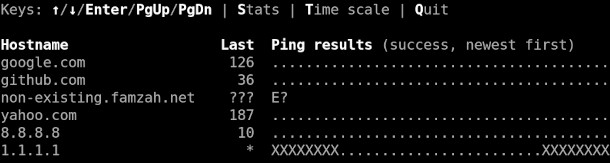
The main screen:
Full history of the “ping” raw output for a selected host:

Description
The ping results are summarized in real-time and you can also observe the following statistics:
TX_cnt: Count of sent PING requests
RX_cnt: Count of received PING replies which are not timeouts
XX_cnt: Count of timeouts and missing PING replies
Loss%: Packet loss defined as the percentage of timed out and missing replies
Avg: Average round trip time (RTT)
Min: Minimum (best) RTT
Max: Maximum (worst) RTT
StDev: Population standard deviation of all RTT data
The interactive UI interface lets you visualize the RTT summary in three modes:
Successful vs. unsuccessful PING replies
The RTT values (ping time) as a number
Scaled per 100 ms where “0” means an RTT between 0 and 99 ms, “1” means an RTT between 100 and 199 ms, and so on
You also have the option to review each host’s “ping” command raw output. The full history is kept and you can navigate using the keys PgUp/PgDn/Home/End.
No “root” privileges are required because for each host an external process is started which uses the standard “ping” command.
You can select the statistics forwards and backwards using the lower “s” and upper “S” keys, similar to the “Vim” behavior.
Installation
pip3 install ping-multi-ext
The executable “ping-multi” is automatically added to your “~/.local/bin” directory which you should add to your “$PATH” environment, so that you can easily execute “ping-multi”.
If you install the package globally using “root” privileges, then the binaries are added in “/usr/local/bin” and you should be able to use them right away with no additional setup.
Examples
Ping multiple hosts specified directly on the command-line; you can also provide just one host:
ping-multi google.com github.com
You can also use SSH to run “ping” on remote machines:
ping-multi google.com github.com github.com@root@my-server.com
Ping multiple hosts specified in a file; you can also add more single hosts directly as additional command-line arguments:
ping-multi -f sample.list
IPv4 CIDR masks are supported:
ping-multi 192.168.0.0/30
The usage help explains the additional command-line options:
$ ping-multi -h

usage: ping-multi [-h] [--version] [--hosts-max-width HOSTS_MAX_WIDTH] [-s {Last,Loss%,Avg,Min,Max,StDev,RX_cnt,TX_cnt,XX_cnt}] [-f FILE] [-W SECS] [-i SECS] [-L COUNT_LIMIT] [-C]
                [host ...]

Ping all hosts from FILE and HOSTs.

positional arguments:
  host                  host to ping; you can specify this option many times

options:
  -h, --help            show this help message and exit
  --version             show program's version number and exit
  --hosts-max-width HOSTS_MAX_WIDTH
                        maximum width of the hosts column; default=0
  -s {Last,Loss%,Avg,Min,Max,StDev,RX_cnt,TX_cnt,XX_cnt}, --stat {Last,Loss%,Avg,Min,Max,StDev,RX_cnt,TX_cnt,XX_cnt}
                        statistic to display initially; default=Last
  -f FILE, --file FILE  read list of hosts from file
  -W SECS, --wait SECS  timeout in seconds to wait for a ping reply; default=1
  -i SECS, --interval SECS
                        time in seconds between sending each request; default=1
  -L COUNT_LIMIT, --count-limit COUNT_LIMIT
                        limit the number of hosts; avoids unintended bulk actions; default=600
  -C, --comments-as-sep
                        display comments from the hosts file as separators. Ignore comments starting with ##
Release history Release notifications | RSS feed


Download files
Download the file for your platform. If you're not sure which to choose, learn more about installing packages.
Source Distribution
Built Distribution
Filter files by name, interpreter, ABI, and platform.
If you're not sure about the file name format, learn more about wheel file names.
Copy a direct link to the current filters
File details
Details for the file ping_multi_ext-1.3.0.tar.gz.
File metadata
- Download URL: ping_multi_ext-1.3.0.tar.gz
- Upload date:
- Size: 17.0 kB
- Tags: Source
- Uploaded using Trusted Publishing? No
- Uploaded via: twine/6.2.0 CPython/3.10.12
File hashes
| Algorithm | Hash digest | |
|---|---|---|
| SHA256 |
e94de38f5c35764b67200fbd5d3342e2257cb0fa2e72e652de2e6187c2d39a47
|
|
| MD5 |
48bf9687f8a77935bab2f158114e256a
|
|
| BLAKE2b-256 |
b9e50fe5f59a2c4d130b887453cf1471384268977fb418e7977d95253265afdc
|
File details
Details for the file ping_multi_ext-1.3.0-py3-none-any.whl.
File metadata
- Download URL: ping_multi_ext-1.3.0-py3-none-any.whl
- Upload date:
- Size: 16.1 kB
- Tags: Python 3
- Uploaded using Trusted Publishing? No
- Uploaded via: twine/6.2.0 CPython/3.10.12
File hashes
| Algorithm | Hash digest | |
|---|---|---|
| SHA256 |
38588a69c5c777ddca98b5e22e6b1b35a3e8d21c740b6994bef31e00b89b5ac1
|
|
| MD5 |
a5b751d0642f7b6e3f8d763a0ff5fa44
|
|
| BLAKE2b-256 |
7b5edb4e95f21cbd2ce0e07d4358f09d2e617200ec4b03947264fdbd522488ec
|






