
Colored, concurrent ICMP/TCP ping monitor for the terminal
Verified details
These details have been verified by PyPIProject links
GitHub Statistics
Maintainers

Project description
pinghue
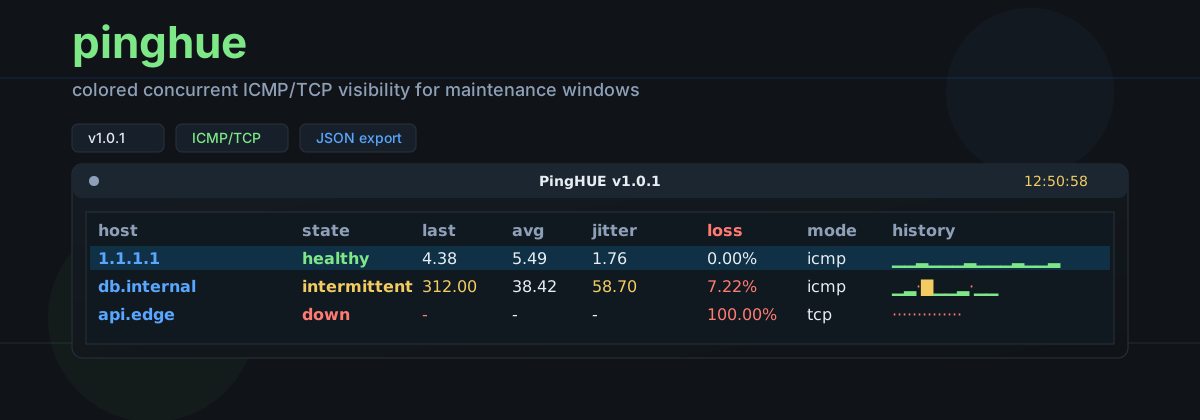




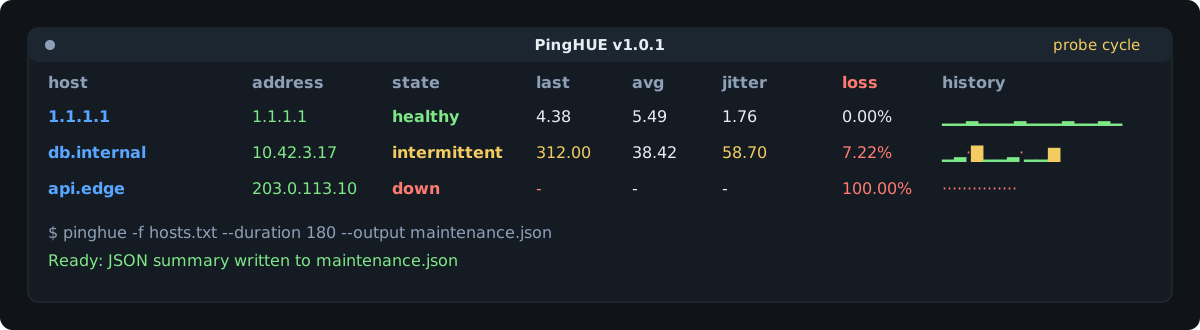
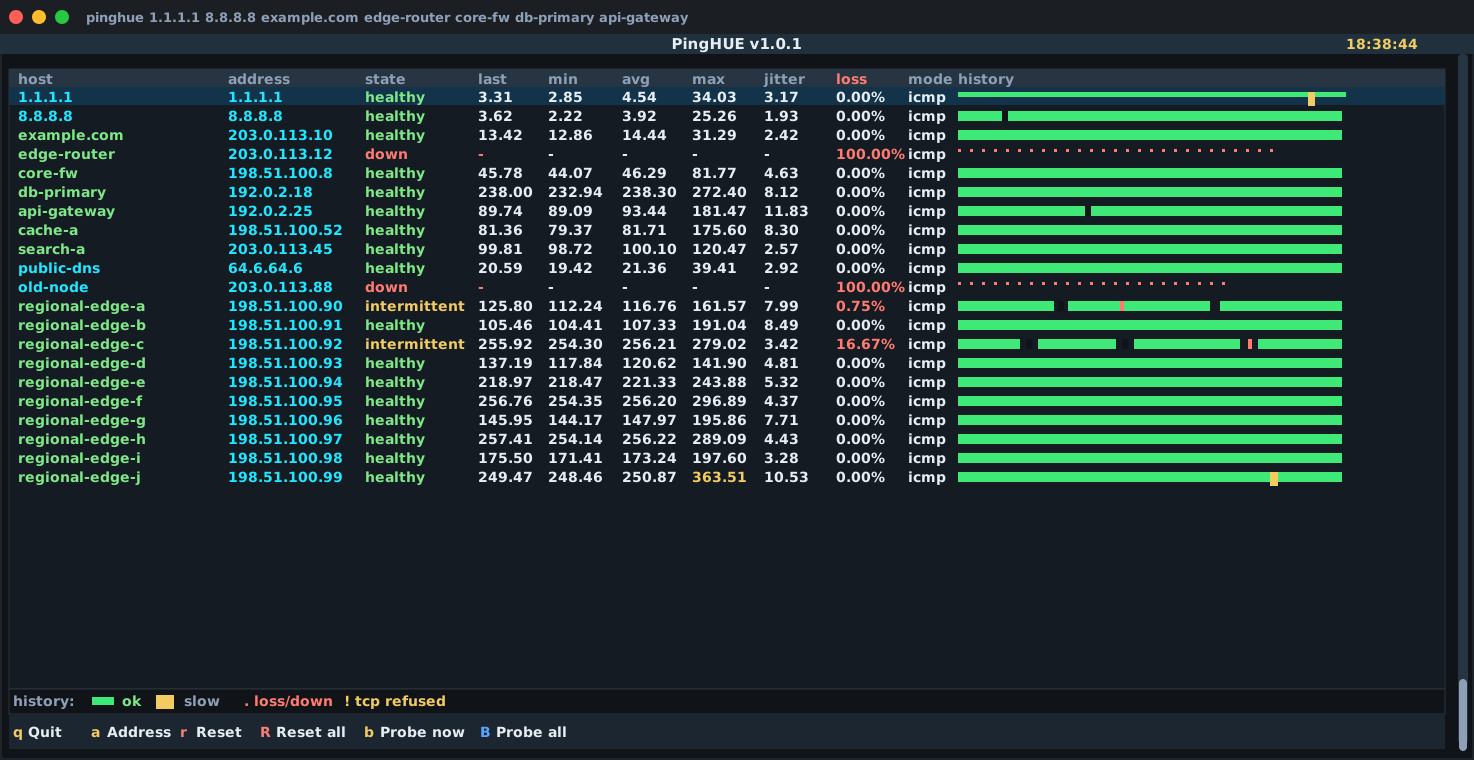
pinghue is a colored, concurrent ICMP/TCP ping monitor for maintenance windows. It gives operators a dense terminal view for many hosts at once and can also write structured JSON for reports, cron jobs, and CI checks.
Current version: 0.2.1.
This is pre-1.0 software. CLI flags and JSON output may change before 1.0.0; breaking JSON changes increment schema_version.
What This Is
- A focused terminal monitor for maintenance windows, migrations, and quick reachability checks.
- A concurrent ICMP/TCP probe runner with a readable Textual TUI.
- A scriptable probe tool with
--no-tui,--count,--duration, and--output. - A JSON-producing report helper for post-maintenance evidence.
- A local operator tool designed for macOS and Linux.
What This Is Not
- Not a Prometheus, Smokeping, Zabbix, or NMS replacement.
- Not a long-running metrics database or alerting system.
- Not a privileged daemon.
- Not a packet capture or traceroute tool.
- Not a service that accepts remote network requests.
Install
Recommended isolated installs from PyPI:
uv tool install pinghue
or:
pipx install pinghue
Plain pip also works inside a virtual environment:
python -m pip install pinghue
Homebrew is available through the inxbit/tap tap:
brew install inxbit/tap/pinghue
The tap repository is inxbit/homebrew-tap; Homebrew exposes it as inxbit/tap.
For contributors, install from a local clone in editable mode:
git clone https://github.com/inxbit/pinghue.git
cd pinghue
python -m venv .venv
. .venv/bin/activate
python -m pip install -e ".[dev]"
The dev extra installs the local package plus the test, type-checking, linting, build, and schema-validation tools used by the repository.
Quick Start
pinghue 1.1.1.1 8.8.8.8 example.com
pinghue -f hosts.txt
pinghue -p 443 example.com
pinghue -p 1 127.0.0.1 -c 1 --no-tui
pinghue --output maintenance.json 1.1.1.1 example.com
pinghue --host-label maintenance-window --output maintenance.json 1.1.1.1
Host files are plain text. Blank lines and lines starting with # are ignored.
Host files must be regular files, at most 1 MiB, and at most 5,000 lines.
# edge and core checks
1.1.1.1
8.8.8.8
example.com
internal-db.corp
Modes
pinghue defaults to ICMP mode:
pinghue 1.1.1.1 example.com
TCP mode is enabled by passing a port:
pinghue -p 443 example.com api.internal
Use no-TUI mode for scripts, cron, CI, and package smoke tests:
pinghue -p 443 example.com -c 3 --no-tui
Example no-TUI output:
2026-05-14T18:32:11.420000+00:00 1.1.1.1 ok latency=9.20ms
2026-05-14T18:32:11.421000+00:00 example.com ok latency=14.08ms
2026-05-14T18:32:12.420000+00:00 api.internal timeout latency=-
CLI Reference
pinghue [OPTIONS] [TARGET ...]
| Option | Default | Description |
|---|---|---|
TARGET ... |
none | Hostnames or IP addresses to probe. Required unless --check is used. |
-f, --file PATH |
none | Read targets from a plain-text host file. Blank lines and # comments are ignored. |
-p, --port PORT |
ICMP | Enable TCP connect checks against PORT. Valid range: 1-65535. |
-4, --ipv4 |
off | Force IPv4 resolution/probing. |
-6, --ipv6 |
off | Force IPv6 resolution/probing. |
-n, --numeric |
off | Skip DNS and require IP literals. |
-i, --interval SEC |
1.0 |
Seconds between probes. Minimum: 0.1. |
--timeout SEC |
interval | Per-probe timeout in seconds. Must be greater than 0. |
-c, --count N |
continuous | Stop after N probes per target. |
--duration SEC |
continuous | Stop after elapsed seconds. |
--no-tui |
off | Print one line per probe instead of launching the TUI. |
--output PATH |
none | Write a JSON run summary on exit. |
--no-samples |
off | Omit per-probe samples from JSON output. |
--concurrency N |
64 |
Maximum concurrent probes; ICMP mode is also bounded by the asyncio default thread pool. |
--jitter-threshold MS |
50.0 |
Mark jitter as attention-worthy above this standard deviation. |
--fail-threshold COUNT |
3 |
Classify a host as down after this many consecutive failed probes. |
--fail-on-down |
off | Return a non-zero exit code when all targets finish down. |
--history-style STYLE |
bar |
One of bar, dots, sparkline, or none. |
--check |
off | Run the environment doctor and exit. |
--resolve-name HOST |
example.com |
With --check, resolve this host for DNS diagnostics. Defaults to the first target when provided. |
--quiet |
off | With --check, suppress output and use only the exit code. |
--host-label LABEL |
local |
Operator-controlled host label written to JSON output. |
-v, --version |
none | Print the installed version. |
-h, --help |
none | Print help. |
TUI Controls
| Key | Action |
|---|---|
q |
Quit. |
a |
Show or hide resolved addresses. |
r |
Reset the selected host. |
R |
Reset all hosts. |
b |
Probe the selected host immediately. |
B |
Probe all hosts immediately. |
History Legend
The default history style is a fixed-scale colored bar:
- Green bar: successful probe.
- Amber bar: successful probe at or above the slow-latency threshold.
- Red
./·: timeout, loss, or down state. - Amber
!: TCP refused.
Successful latency uses ▁▂▃▄▅▆▇█.
The fixed mapping keeps rows comparable:
| Latency | Glyph |
|---|---|
<=1ms |
▁ |
<=3ms |
▂ |
<=10ms |
▃ |
<=30ms |
▄ |
<=100ms |
▅ |
<=300ms |
▆ |
<=1000ms |
▇ |
>1000ms |
█ |
Use --history-style dots, --history-style sparkline, or --history-style none when a terminal font or workflow needs a simpler display.
Slate + Signal Palette
pinghue uses a low-glare Slate + Signal palette designed for long maintenance windows: dark structure, high-contrast text, and saturated status colors that make the affected metric stand out quickly.
| Role | Hex | Used for |
|---|---|---|
| Background | #101418 |
Terminal body and empty space. |
| Panel | #151b22 |
Table surface and primary content areas. |
| Header | #1b2630 |
Title bars and footer bands. |
| Border | #2a313a |
Table outlines and separators. |
| Text | #e6edf3 |
Normal readable values. |
| Muted | #8ea0b8 |
Labels, secondary text, and inactive chrome. |
| Green | #7ee787 |
Healthy state, successful probes, and normal history bars. |
| Amber | #f2cc60 |
Slow latency, high jitter, intermittent state, and TCP refused markers. |
| Red | #ff7b72 |
Loss, down state, timeouts, and failed history markers. |
| Selection Blue | #58a6ff |
Focus accents and selected-row treatment. |
Doctor
Run the doctor before relying on ICMP mode:
pinghue --check
Linux may block unprivileged ICMP sockets. TCP mode does not need special privileges:
pinghue -p 443 example.com
If pinghue --check reports that your GID is outside net.ipv4.ping_group_range, the preferred fix is to allow only your current group:
gid="$(id -g)"
sudo sysctl -w "net.ipv4.ping_group_range=${gid} ${gid}"
echo "net.ipv4.ping_group_range=${gid} ${gid}" \
  | sudo tee /etc/sysctl.d/99-pinghue.conf
The broader range 0 2147483647 also works, but enables unprivileged ICMP for every local group on the system.
The capability alternative is available but must be re-applied after binary upgrades:
sudo setcap cap_net_raw+ep "$(command -v pinghue)"
Do not set capabilities on a shared Python interpreter.
JSON Output
--output PATH writes one JSON document per run. The schema lives at schemas/output-v1.schema.json, and an example lives at examples/pinghue-output-example.json.
pinghue -f hosts.txt --duration 180 --output maintenance.json
Use --no-samples when you only need final per-target statistics.
Every output document includes:
schema_versionpinghue_version- run metadata
- probe configuration
- ordered target results
- per-target stats
- optional per-probe samples
The run.host field defaults to local to avoid leaking workstation hostnames. Use --host-label when a report needs an operator-selected system or maintenance-window label.
Security Model
pinghue is a local CLI/TUI. It does not run a server, accept remote requests, store credentials, or require secrets. The security-sensitive areas are:
- terminal rendering of operator-supplied hostnames and OS error strings
- Linux ICMP privilege configuration
- local output paths selected by the operator
- release workflow integrity
See pinghue-threat-model.md, security-best-practices-report.md, and SECURITY.md.
Release Channels
Published release channels:
- GitHub repository:
inxbit/pinghue - GitHub Actions CI on Linux and macOS
- GitHub Release with sdist and wheel artifacts
- PyPI trusted publishing through a protected
pypienvironment - Homebrew tap:
inxbit/tapfrominxbit/homebrew-tap
The release workflow is tag-driven:
git tag -s vX.Y.Z -m "Release vX.Y.Z"
git push origin vX.Y.Z
Development
pytest
ruff check .
mypy src
pip-audit
SOURCE_DATE_EPOCH=0 python -m build --no-isolation
twine check dist/*
Run the development commands from a clone installed with python -m pip install -e ".[dev]".
License
MIT. See LICENSE.
Project details
Verified details
These details have been verified by PyPIProject links
GitHub Statistics
Maintainers


Download files
Download the file for your platform. If you're not sure which to choose, learn more about installing packages.
Source Distribution
Built Distribution
Filter files by name, interpreter, ABI, and platform.
If you're not sure about the file name format, learn more about wheel file names.
Copy a direct link to the current filters
File details
Details for the file pinghue-0.2.1.tar.gz.
File metadata
- Download URL: pinghue-0.2.1.tar.gz
- Upload date:
- Size: 58.1 kB
- Tags: Source
- Uploaded using Trusted Publishing? Yes
- Uploaded via: twine/6.1.0 CPython/3.13.13
File hashes
| Algorithm | Hash digest | |
|---|---|---|
| SHA256 |
2291d84f781ab99f5bb4ee9c05e48390cc9a4065987a0735c71395c510a51391
|
|
| MD5 |
16183a848b51eb9329fd77ecfba20ff3
|
|
| BLAKE2b-256 |
3d94eda56bfe474bd9a9895137fb83258a7ca0c3de6b0e8f1c0b74930deeaea4
|
Provenance
The following attestation bundles were made for pinghue-0.2.1.tar.gz:
Publisher:
publish.yml on inxbit/pinghue
-
Statement:
-
Statement type:
https://in-toto.io/Statement/v1 -
Predicate type:
https://docs.pypi.org/attestations/publish/v1 -
Subject name:
pinghue-0.2.1.tar.gz -
Subject digest:
2291d84f781ab99f5bb4ee9c05e48390cc9a4065987a0735c71395c510a51391 - Sigstore transparency entry: 1575017384
- Sigstore integration time:
-
Permalink:
inxbit/pinghue@36941dee0bd8bec139dc826c9449fe14eba9fc75 -
Branch / Tag:
refs/tags/v0.2.1 - Owner: https://github.com/inxbit
-
Access:
public
-
Token Issuer:
https://token.actions.githubusercontent.com -
Runner Environment:
github-hosted -
Publication workflow:
publish.yml@36941dee0bd8bec139dc826c9449fe14eba9fc75 -
Trigger Event:
push
-
Statement type:
File details
Details for the file pinghue-0.2.1-py3-none-any.whl.
File metadata
- Download URL: pinghue-0.2.1-py3-none-any.whl
- Upload date:
- Size: 28.2 kB
- Tags: Python 3
- Uploaded using Trusted Publishing? Yes
- Uploaded via: twine/6.1.0 CPython/3.13.13
File hashes
| Algorithm | Hash digest | |
|---|---|---|
| SHA256 |
985253c32fe32db9db5ccb6e133d11efdf5b558e06a29a9a11b4675a325570ae
|
|
| MD5 |
42807b94dae843174589178eea47ce33
|
|
| BLAKE2b-256 |
b6d9be5df0dc5f3bd20e45d354c9cf1c942839089c549451b72e77213f48fce4
|
Provenance
The following attestation bundles were made for pinghue-0.2.1-py3-none-any.whl:
Publisher:
publish.yml on inxbit/pinghue
-
Statement:
-
Statement type:
https://in-toto.io/Statement/v1 -
Predicate type:
https://docs.pypi.org/attestations/publish/v1 -
Subject name:
pinghue-0.2.1-py3-none-any.whl -
Subject digest:
985253c32fe32db9db5ccb6e133d11efdf5b558e06a29a9a11b4675a325570ae - Sigstore transparency entry: 1575017412
- Sigstore integration time:
-
Permalink:
inxbit/pinghue@36941dee0bd8bec139dc826c9449fe14eba9fc75 -
Branch / Tag:
refs/tags/v0.2.1 - Owner: https://github.com/inxbit
-
Access:
public
-
Token Issuer:
https://token.actions.githubusercontent.com -
Runner Environment:
github-hosted -
Publication workflow:
publish.yml@36941dee0bd8bec139dc826c9449fe14eba9fc75 -
Trigger Event:
push
-
Statement type:






