
A dynamic notification delivery system with Redis and Kafka integration.

Project description
PingPong: A Dynamic and Scalable Notification Delivery System
PingPong is a robust, scalable, and highly customizable Dynamic Notification Delivery System designed to efficiently manage and deliver notifications across various channels, including Email, SMS, and Push Notifications. Built with modern technologies and adhering to high-performance standards, PingPong serves as a comprehensive solution for handling diverse notification workflows, ensuring reliability, speed, and scalability.
Features
🔔 Multi-Channel Notification Delivery
- Email: Seamlessly integrates with Mailgun and other email providers for reliable email delivery {Future Scope}.
- SMS: Supports integration with Twilio for fast and secure text message delivery.
- Push Notifications: Will be implementing for real-time, personalized push notifications to mobile and web devices. {Future Scope}
💾 Data Management
- Centralized storage in Google Firestore, optimized for managing user preferences and notification history.
- Flexible and scalable queues powered by Redis and Kafka, ensuring efficient message processing and delivery.
⚡ User-Centric Design
- Supports user preferences to respect channel priorities and avoid unnecessary notifications.
- Allocates unique notification IDs for precise tracking and audit trails.
🛡️ Secure and Robust Architecture
- Authentication and Authorization:
- Implements a secure login and signup feature with JWT-based authentication.
- Dynamically handles notification publishing based on logged-in user context.
- Message Integrity: Ensures notifications are correctly routed to their intended users, leveraging Redis and Kafka filtering logic.
🚀 Scalability and Performance
- Dockerized microservice architecture for seamless deployment and portability.
- Scalable infrastructure to handle millions of notifications, ensuring minimal latency and high throughput.
- Auto-scaling and cost-efficient hosting on GCP Cloud Run with pay-as-you-use billing.
🛠️ Developer-Friendly
- Designed for extensibility with clear and modular code.
- Supports new channel integrations with minimal effort.
- Just import the package for publishing, consuming, and managing notifications.
🛠️ User-Friendly
- Easy-to-use interface with a class-based design for sending notifications.
- You can opt for trail account for sending 3 emails and 1 sms/48 hours.
- Support for configurable parameters, including sender, receiver, notification channels & API/Auth Keys.
- Integration with popular services like Mailgun (for email) and Twilio (for SMS).
- Future-ready: Additional notification services will be supported in upcoming updates.
- Fully customizable by passing API Keys and Auth Tokens.
Tech Stack
- Backend: Python, FastAPI
- Messaging Queues: Kafka, Redis
- Database: Google Firestore
- Notifications: Mailgun, Twilio, OneSignal
- Deployment: Docker, GCP Cloud Run
- Authentication: JWT-based authentication and role management
How It Works
-
Notification Publishing:
- Users or services send notification requests via a REST API endpoint for demo purpose or by importing python package with their personal API keys.
- Notifications are queued in Redis and Kafka for asynchronous processing.
-
User Preferences:
- Every user can configure their preferred notification channels (e.g., Email, SMS).
- Notifications respect user preferences during both publishing and consumption.
-
Message Consumption:
- Consumers retrieve notifications from queues and deliver them through the appropriate channels.
- Redis ensures only recent and relevant messages are processed.
-
Integration with External Services:
- Email and SMS are sent using external providers (Mailgun, Omnisend, Twilio, etc).
-
Analytics and Tracking:
- All notifications are logged with unique IDs in Firestore, enabling detailed tracking and reporting.
GitHub Setup and Usage
-
Clone the repository:
git clone https://github.com/karan-kap00r/PingPong.git
cd pingpongx
-
Build and run the Docker containers:
docker-compose up --build
-
Access the API on
http://localhost:8080and explore the interactive Swagger documentation athttp://localhost:8000/docs. -
Configure your environment variables:
- Redis and Kafka configurations.
- API keys for Mailgun, Twilio, Omnisend, and OneSignal.
-
Enjoy the PingPong.
PyPI Setup and Usage
- To import package:
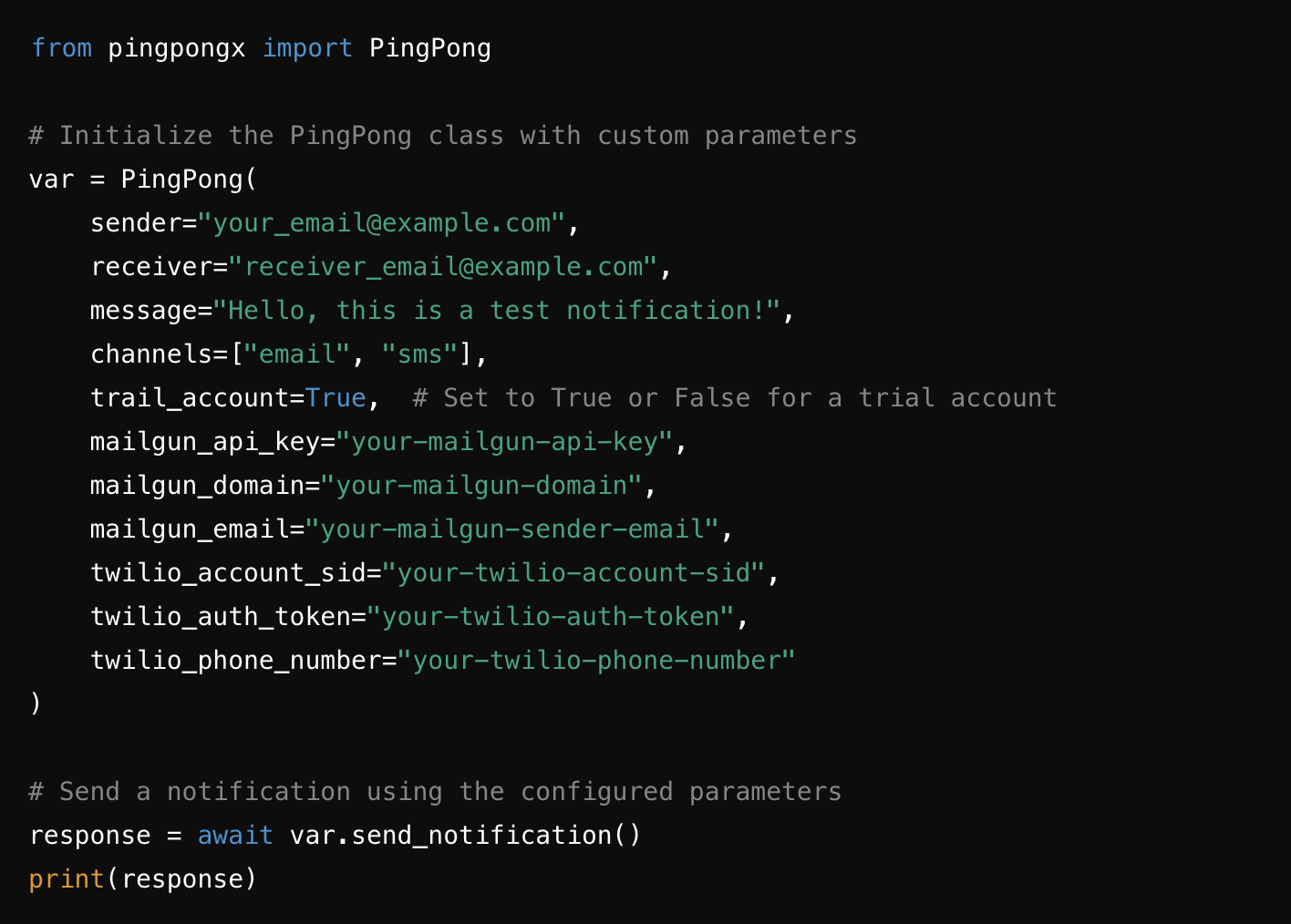
- To send notifications by importing python package:
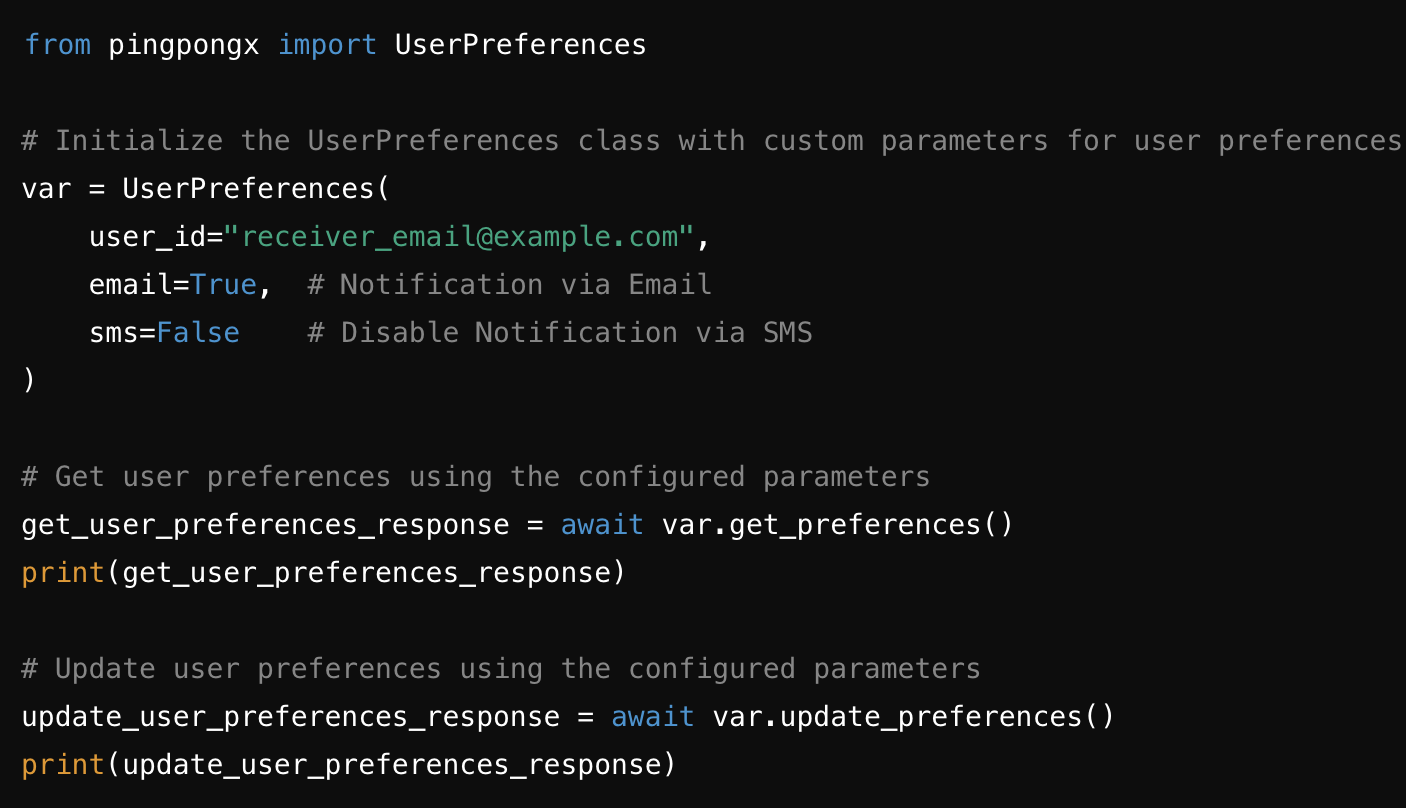
- To set and get user preferences:

Usage Via APIs
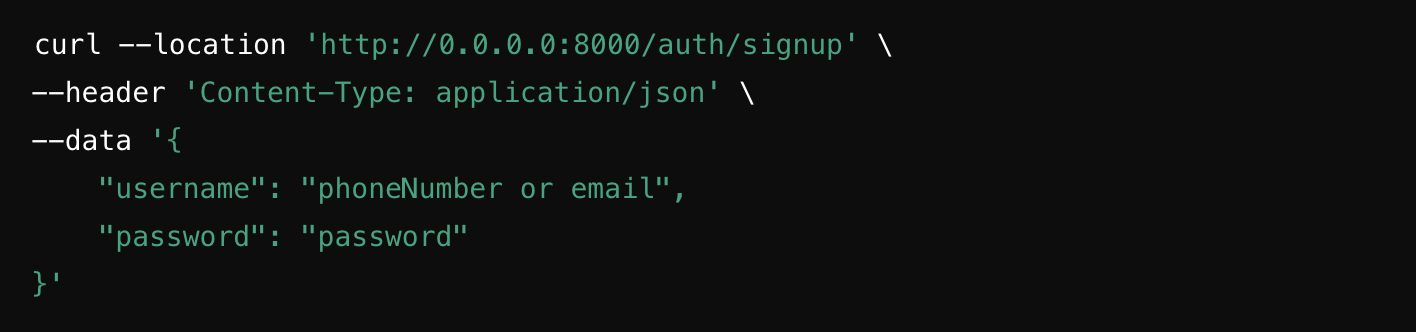
- To SignUp:
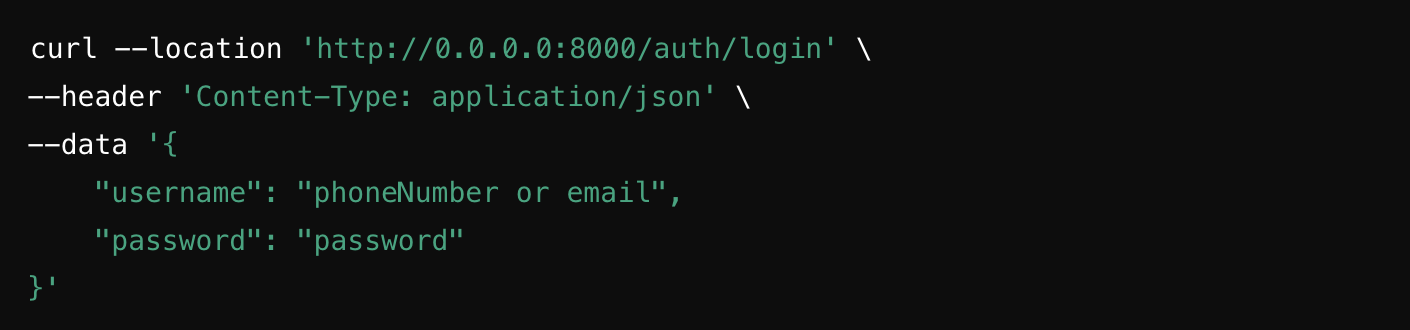
- To Login:
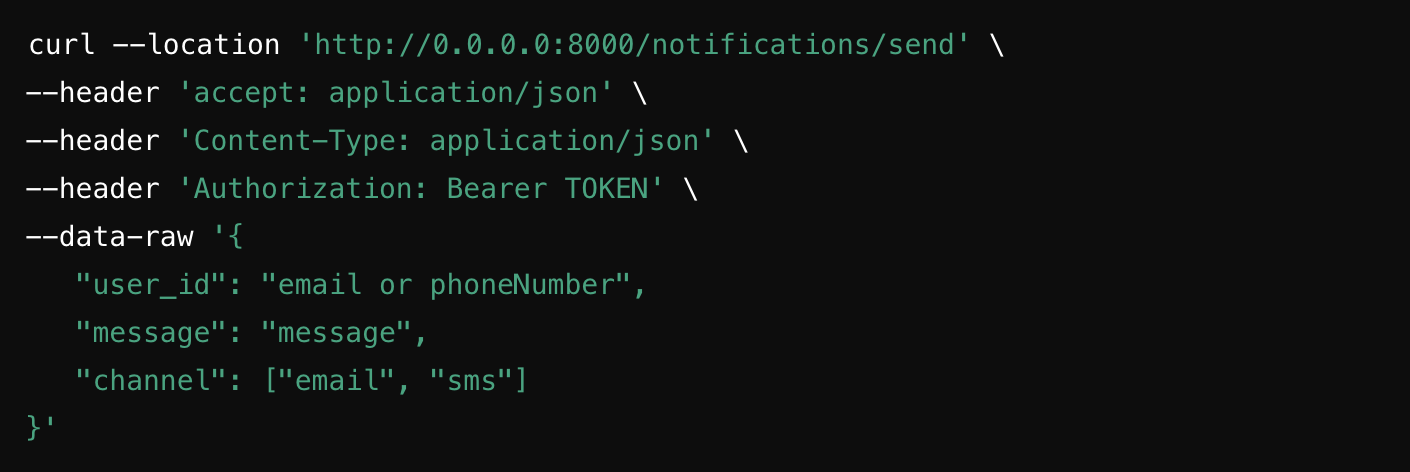
- To Send Notifications:
- To Get User Preferences:
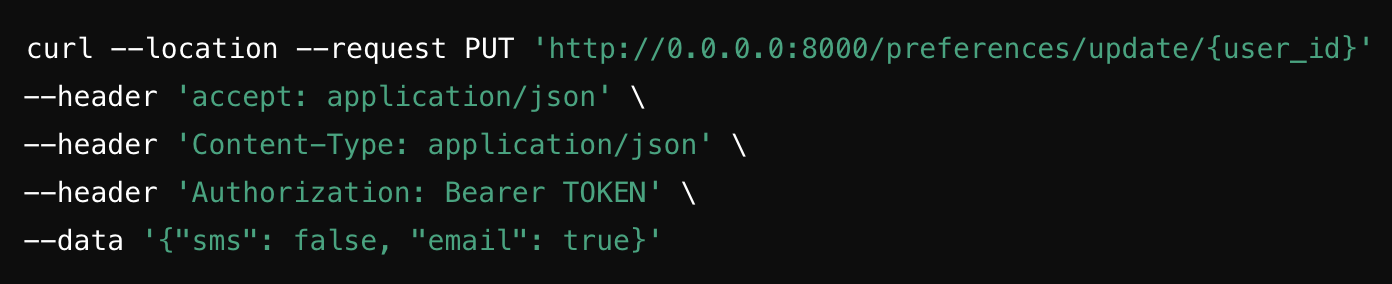
- To Update User Preferences:

Why PingPong?
PingPong is the ultimate notification management solution for projects demanding:
- High performance: Deliver notifications at lightning speed to millions of users.
- Scalability: Handle growing notification workloads with ease.
- Flexibility: Support for multiple notification channels and user preferences.
- Security: Robust authentication and secure data management.
Contributions
We welcome contributions to enhance PingPong! Feel free to submit pull requests, open issues, or share feature ideas.
License
This project is licensed under the MIT License.
Release history Release notifications | RSS feed


Download files
Download the file for your platform. If you're not sure which to choose, learn more about installing packages.
Source Distribution
Built Distribution
Filter files by name, interpreter, ABI, and platform.
If you're not sure about the file name format, learn more about wheel file names.
Copy a direct link to the current filters
File details
Details for the file pingpongx-0.1.5.tar.gz.
File metadata
- Download URL: pingpongx-0.1.5.tar.gz
- Upload date:
- Size: 18.0 kB
- Tags: Source
- Uploaded using Trusted Publishing? No
- Uploaded via: twine/6.0.1 CPython/3.11.8
File hashes
| Algorithm | Hash digest | |
|---|---|---|
| SHA256 |
c9847dbff60ad8ac5ab9a75b42d25bb24d0c83671d8b0ea4e0a912783f75accc
|
|
| MD5 |
f02ae1b5c9980012b7c2352f67ee2c25
|
|
| BLAKE2b-256 |
1c57006ce8f0dfc067a040ea962514890aa7bca0c081288f4c76840231540a08
|
File details
Details for the file pingpongx-0.1.5-py3-none-any.whl.
File metadata
- Download URL: pingpongx-0.1.5-py3-none-any.whl
- Upload date:
- Size: 20.5 kB
- Tags: Python 3
- Uploaded using Trusted Publishing? No
- Uploaded via: twine/6.0.1 CPython/3.11.8
File hashes
| Algorithm | Hash digest | |
|---|---|---|
| SHA256 |
3511ad27be23862e800bbf1e7a1cc50741424a444ecf8cb2d204bdfcbb49c56f
|
|
| MD5 |
329d62c70892a6de1a799fc3e884df99
|
|
| BLAKE2b-256 |
f6412418468f3eceaea160a3f1d727919fb5f59c44400b91d9ad87ce0e4b5fdf
|






