
PingSweeper
A flexible CLI tool built with Python designed to ping an entire IP subnet and return quick results.
Demo gif coming soon here
Features
🚀 Performance
- ⚡ Fast Scans - Scans a /24 subnet (254 hosts) in under 2 seconds
- 🎛️ Configurable Concurrency - Adjust concurrent connections (default: 100) to optimize for pinging larger networks
- ⏱️ Customizable Timeouts - Fine-tune ping timeouts for speed vs accuracy balance
📊 Output
- 📈 Stats - Success rates, response times, and summaries
- 🎯 Progress Tracking - Unicode progress bars with real-time completion status
- 🏠 Hostname Resolution - Automatic reverse DNS lookups for discovered hosts
- 📋 Supported Output Formats:
- 📄 Text files (
--txt) - for reports, something human readable - 📊 CSV files (
--csv) - just because, maybe for spreadsheet analysis idk - 🔗 JSON files (
--json) - Structured data for automation and APIs
- 📄 Text files (
⌨️ Multiple Input Options
- 🌐 Supported IP Formats:
- Single IP:
192.168.1.1 - CIDR Notation:
192.168.1.0/24 - IP Ranges:
192.168.1.1-192.168.1.50
- Single IP:
- ✅ Input Validation - Error checking with "helpful" guidance
- 🛡️ Large Network Protection - Warns before scanning massive networks
🔧 Advanced Configuration
- 🎚️ Customizable Ping Count - Send multiple packets per host for accuracy
- ⏲️ Timeout Control - Per-ping timeout configuration
- 🤫 Quiet Mode - Silence output for scripting
- 🔍 Verbose Debugging - Detailed logging for troubleshooting
- 📊 Progress Control - Option to hide the progress bar that I worked so hard on
🖥️ Cross-Platform Compatibility
- 🪟 Windows - Native support with Windows Terminal optimization
- 🐧 Linux/Unix - Full compatibility including WSL
- 🍎 macOS - I didn't test it but I'm sure it works right?
- 🔄 Automatic OS Detection - Uses appropriate ping commands for each platform
📁 Organized Results Management
- 📂 Automatic Directory Creation - Results saved to
sweep_results/folder - 🕒 Timestamped Files - Each scan gets a unique timestamp
- 💾 Optional File Saving - Save results only if you want to
Installation
The only requirement is to have Python installed.
Use pip to install:
pip install pingsweeper
On Linux
I recommend installing in a virtual environment:
sudo apt update
sudo apt install python3-venv python3-pip
python3 -m venv .psvenv
source .psvenv/bin/activate
pip install pingsweeper
Usage
Running the script:
pingsweeper
To show available arguments:
pingsweeper -h
Example with all available arguments:
pingsweeper -s 192.168.1.0/24 -t 0.5 -c 3 --csv --max-concurrent 50
Command Line Arguments
-s, --subnet→ IP address, range, or subnet in CIDR notation-t, --timeout→ Timeout per ping in seconds (default: 0.2)-c, --count→ Number of ping packets per host (default: 1)--max-concurrent→ Maximum concurrent pings (default: 100)--txt→ Save results as text file--csv→ Save results as CSV file--json→ Save results as JSON file--no-progress→ Disable progress bar--quiet→ Show only summary results--verbose→ Enable detailed debugging output
Usage Examples
# Basic subnet scan
pingsweeper -s 192.168.1.0/24

# Scan with CSV export and custom settings
pingsweeper -s 10.0.0.1-10.0.0.100 --csv -t 1.0 -c 2

# High-speed scan with limited concurrency
pingsweeper -s 192.168.0.0/16 --max-concurrent 200 --quiet

# Detailed scan with all output formats
pingsweeper -s 172.16.1.0/24 --txt --csv --json --verbose
Once the script completes, the console will print a comprehensive summary including the number of hosts pinged, hosts that responded, success rate, and detailed results for all live hosts. Optional output files are saved to the sweep_results/ directory.
Upgrading
To upgrade to the latest version:
python -m pip install --upgrade pingsweeper
To install a specific version:
python pip install pingsweeper==0.1.1
Possible issues
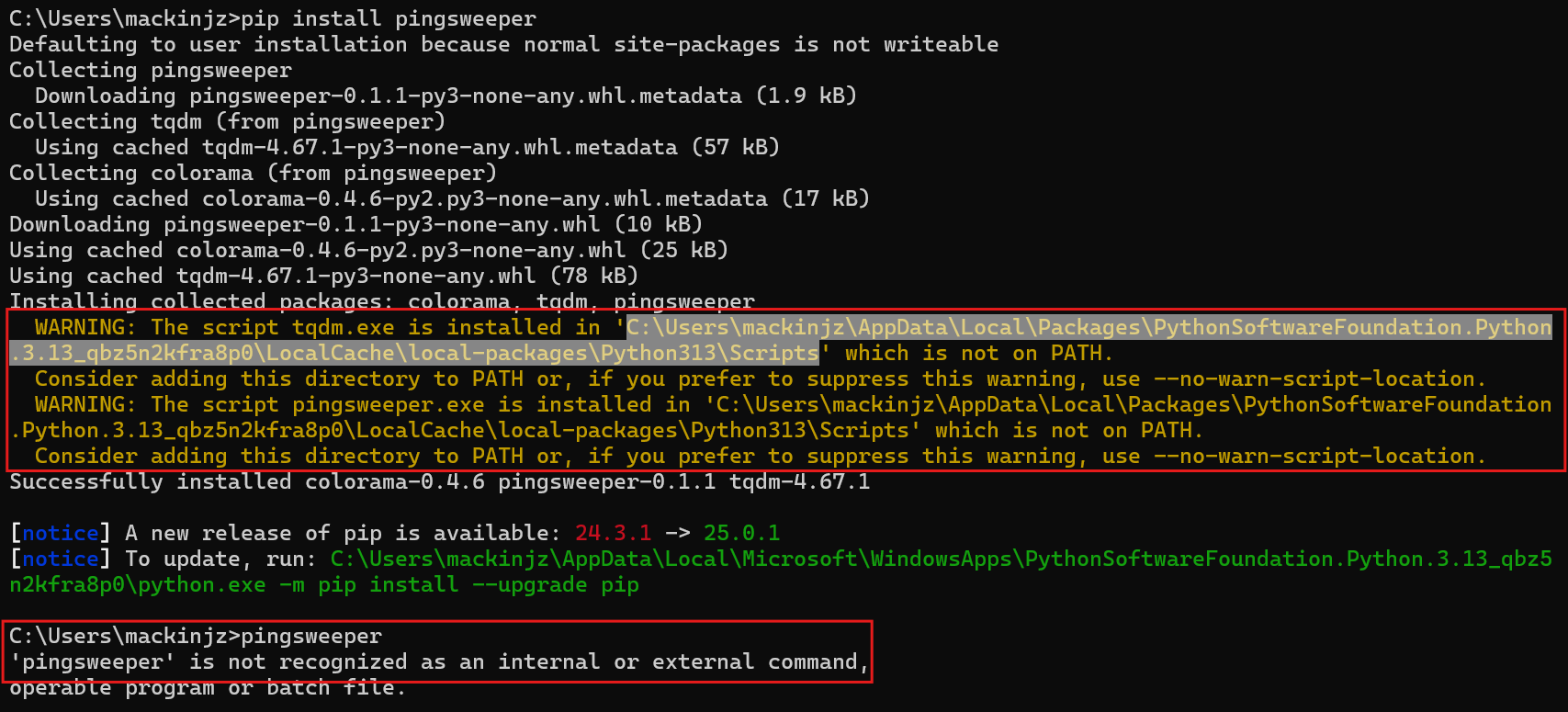
There have been cases where the following warning may be shown after installing the package which will not allow you to run pingsweeper as intended. If you see this warning during install, you may have to add Python to yout PATH environement variable. Or you may have to add the file path (highlighted in the image below) where you have Python packages installed to to your PATH.
License
This project is licensed under the MIT License - see the LICENSE file for details.
1 maintainer

Metadata
1 maintainer
Release files for pingsweeper 1.0.0
For a detailed explanation of source distributions (sdists) and built distributions (wheels), please see the package formats documentation.
Source distribution (sdist)
| File | Size | Uploaded | |
|---|---|---|---|
| pingsweeper-1.0.0.tar.gz | 2.6 MB | Details |
Built distribution (wheel)
| File | Interpreter | ABI | Platform | Reset |
|---|---|---|---|---|
| pingsweeper-1.0.0-py3-none-any.whl | Python 3 | none | any | Details |
Total release size: 2.6 MB
Release files / pingsweeper-1.0.0.tar.gz
| Download URL | pingsweeper-1.0.0.tar.gz |
|---|---|
| Size | 2.6 MB |
| Tags | Source |
|
SHA-256 checksum How to use checksums |
8e76131f9b41e76a69924de04b88df4c656c7bc7fc3b90211f50491494395e31
|
|
BLAKE2b-256 checksum How to use checksums |
f64725e661c8ba7a97bf9779c5976a82f2669ddc7b00321e0acee460e74b09a5
|
| Upload date | |
|
Uploaded using Trusted Publishing? What is trusted publishing? |
No |
| Uploaded via |
twine/5.0.0 CPython/3.12.3
|
Release files / pingsweeper-1.0.0-py3-none-any.whl
| Download URL | pingsweeper-1.0.0-py3-none-any.whl |
|---|---|
| Size | 16.9 kB |
| Tags | Python 3 |
|
SHA-256 checksum How to use checksums |
0fe305d2fa3e6096f8cffa444393782550f61e0c5046fcbc56c44cfd707c934d
|
|
BLAKE2b-256 checksum How to use checksums |
72c82f1c9ee539a6d88ee6d5abfda85861bb7c0f8045676811592c722a1ed0ac
|
| Upload date | |
|
Uploaded using Trusted Publishing? What is trusted publishing? |
No |
| Uploaded via |
twine/5.0.0 CPython/3.12.3
|














