
pinocchiout - STM32 Pinout Solver
Installation
I recommend using uv to install this project.
Then, all you need to do is run uvx pinocchiout and it'll handle the rest.
Usage
With a reqs.yaml/json file
reqs.yaml/json is a simple file describing the requirements of your project.
chip: STM32G431C6
package: UFQFPN48
requirements:
  - name: position-sensor
    kind: spi
    signals:
      - MOSI
      - MISO
      - SCK

reserved_pins:
 - PB8  # boot select pin
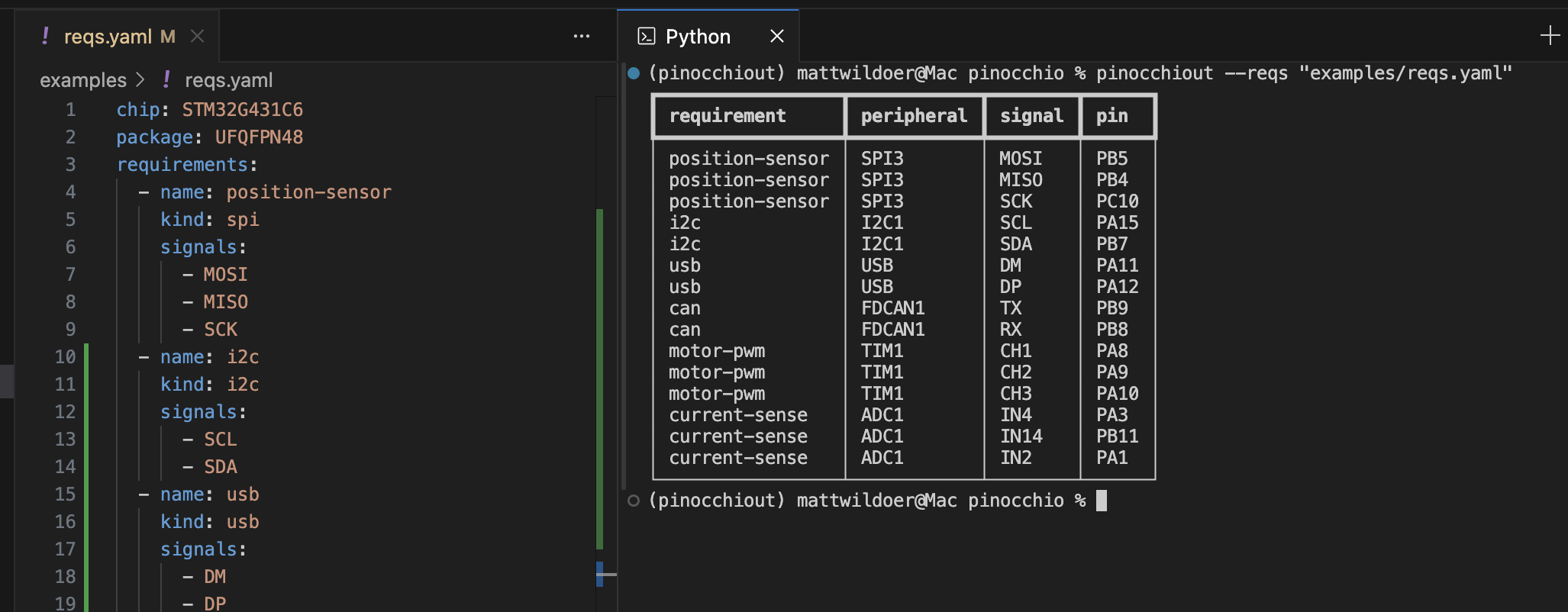
This one, for example, says you're trying to find a pinout for the STM32G431C6 microcontroller, in the UFQFPN48 package, with a SPI peripheral. It also reserves the boot select pin, PB8.
YAML is preferred, because it allows for comments, but JSON is also supported:
{
    "chip": "STM32G431C6",
    "package": "UFQFPN48",
    "requirements": [
        {
            "name": "spi",
            "peripheral": "spi",
            "kind": "spi",
            "signals": ["MOSI", "MISO", "SCK"]
        }
    ]
}
You can print out a table of the pinout like so:
uvx pinocchiout solve --reqs "examples/reqs.yaml"
Listing peripherals
You can also list all available peripherals for a chip/package:
uvx pinocchiout list --reqs "examples/reqs.yaml"
# or specify chip and package directly
uvx pinocchiout list --chip STM32G431C6 --package UFQFPN48
Peripheral names ("peripheral") and signal names ("signals") are treated as regular expressions, so you can use them to match multiple.
As a library
Honestly, it could be better, but see example.py for a simple example of how to use it as a library.
1 maintainer

Metadata
1 maintainer
Release files for pinocchiout 0.3.0
For a detailed explanation of source distributions (sdists) and built distributions (wheels), please see the package formats documentation.
Source distribution (sdist)
| File | Size | Uploaded | |
|---|---|---|---|
| pinocchiout-0.3.0.tar.gz | 223.4 kB | Details |
Built distribution (wheel)
| File | Interpreter | ABI | Platform | Reset |
|---|---|---|---|---|
| pinocchiout-0.3.0-py3-none-any.whl | Python 3 | none | any | Details |
Total release size: 232.5 kB
Release files / pinocchiout-0.3.0.tar.gz
| Download URL | pinocchiout-0.3.0.tar.gz |
|---|---|
| Size | 223.4 kB |
| Tags | Source |
|
SHA-256 checksum How to use checksums |
0d50292e5bd8bd62ceea8ac48ac8051f829ea0da8382d8525965a98518c897dd
|
|
BLAKE2b-256 checksum How to use checksums |
35f509f8a357c32a062666706084dfb305de8035679204f1ea5068de03e6ba19
|
| Upload date | |
|
Uploaded using Trusted Publishing? What is trusted publishing? |
Yes |
| Uploaded via |
twine/6.1.0 CPython/3.12.9
|
Provenance
Provenance describes where a file came from. On PyPI, provenance is shared via attestations, which provide a verifiable record of the build or publishing details. View details, limitations and caveats.


PyPI Publish Attestation
PyPI verified that this artifact, at this checksum, originated from the publisher listed below.
Signed by GitHub Actions, verified by PyPI on Jul 23, 2025.
Transparency logRelease files / pinocchiout-0.3.0-py3-none-any.whl
| Download URL | pinocchiout-0.3.0-py3-none-any.whl |
|---|---|
| Size | 9.1 kB |
| Tags | Python 3 |
|
SHA-256 checksum How to use checksums |
53a1cbe004e7d457ac5325a3be9bf9e045a3e9f22af8d09efffc54469f462af5
|
|
BLAKE2b-256 checksum How to use checksums |
2ff7ce0643982ac5a81f015c7e2606f58ca4b0a76dd43139122a03507d7644e8
|
| Upload date | |
|
Uploaded using Trusted Publishing? What is trusted publishing? |
Yes |
| Uploaded via |
twine/6.1.0 CPython/3.12.9
|
Provenance
Provenance describes where a file came from. On PyPI, provenance is shared via attestations, which provide a verifiable record of the build or publishing details. View details, limitations and caveats.
PyPI Publish Attestation
PyPI verified that this artifact, at this checksum, originated from the publisher listed below.
Signed by GitHub Actions, verified by PyPI on Jul 23, 2025.
Transparency log













