
PinViz







Programmatically generate beautiful GPIO connection diagrams for Raspberry Pi and ESP32/ESP8266 boards in SVG format.
PinViz makes it easy to create clear, professional wiring diagrams for your microcontroller projects. Define your connections using simple YAML/JSON files or Python code, and automatically generate publication-ready SVG diagrams.

Features
- 📝 Declarative Configuration: Define diagrams using YAML or JSON files
- 🎨 Automatic Wire Routing: Smart wire routing with configurable styles (orthogonal, curved, mixed)
- 🎯 Color-Coded Wires: Automatic color assignment based on pin function (I2C, SPI, power, ground, etc.)
- ⚡ Inline Components: Add resistors, capacitors, and diodes directly on wires
- 🔌 Built-in Templates: Pre-configured boards (Raspberry Pi, ESP32, ESP8266) and common devices
- 🐍 Python API: Create diagrams programmatically with Python code
- 🤖 MCP Server: Generate diagrams from natural language with AI assistants
- 🌙 Dark Mode: Built-in light and dark themes for better visibility
- 🍞 Breadboard Layout (experimental): Draw a TMC2209 stepper driver on a solderless breadboard next to the Pi
- 📦 SVG Output: Scalable, high-quality vector graphics
- ✨ Modern CLI: Rich terminal output with progress indicators and colored messages
- 🔧 JSON Output: Machine-readable output for CI/CD integration
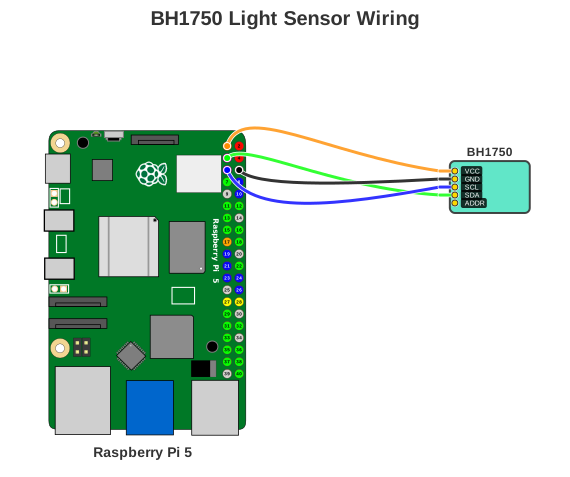
Example Diagram
Installation
Homebrew (macOS)
brew tap nordstad/pinviz
brew install pinviz
pip / uv (cross-platform)
uv tool install pinviz
pip install pinviz
Or as a project dependency:
uv add pinviz
Upgrading
brew upgrade pinviz
uv tool upgrade pinviz
pip install --upgrade pinviz
Or as a project dependency:
uv lock --upgrade-package pinviz && uv sync
Supported Boards
| Board | Aliases | GPIO Pins | Description |
|---|---|---|---|
| Raspberry Pi 5 | raspberry_pi_5, rpi5, rpi |
40-pin | Latest Raspberry Pi with improved GPIO capabilities |
| Raspberry Pi 4 | raspberry_pi_4, rpi4 |
40-pin | Popular Raspberry Pi model with full GPIO header |
| Raspberry Pi Pico | raspberry_pi_pico, pico |
40-pin (dual-sided) | RP2040-based microcontroller board |
| ESP32 DevKit V1 | esp32_devkit_v1, esp32, esp32_devkit |
30-pin (dual-sided) | ESP32 development board with WiFi/Bluetooth |
| ESP32-S3-DevKitC-1 | esp32_s3_devkitc1, esp32s3, esp32_s3 |
44-pin (dual-sided) | ESP32-S3 board (realistic artwork; _schematic variant available) |
| ESP8266 NodeMCU | esp8266_nodemcu, esp8266, nodemcu |
30-pin (dual-sided) | ESP8266 WiFi development board |
| Wemos D1 Mini | wemos_d1_mini, d1mini, wemos |
16-pin (dual-sided) | Compact ESP8266 development board |
All boards include full pin definitions with GPIO numbers, I2C, SPI, UART, and PWM support.
Quick Start

Try a Built-in Example
# Generate a BH1750 light sensor wiring diagram
pinviz example bh1750 -o bh1750.svg

# See all available examples
pinviz list
Create Your Own Diagram
Create a YAML configuration file (my-diagram.yaml):
title: "BH1750 Light Sensor Wiring"
board: "raspberry_pi_5"

devices:
  - type: "bh1750"
    name: "BH1750"
    color: "turquoise"  # Named color support (or use hex: "#50E3C2")

connections:
  - board_pin: 1     # 3V3
    device: "BH1750"
    device_pin: "VCC"

  - board_pin: 6     # GND
    device: "BH1750"
    device_pin: "GND"

  - board_pin: 5     # GPIO3 (I2C SCL)
    device: "BH1750"
    device_pin: "SCL"

  - board_pin: 3     # GPIO2 (I2C SDA)
    device: "BH1750"
    device_pin: "SDA"
Generate your diagram:
pinviz render my-diagram.yaml -o output.svg
Python API
from pinviz import boards, devices, Connection, Diagram, SVGRenderer

board = boards.raspberry_pi_5()
sensor = devices.bh1750_light_sensor()

connections = [
    Connection(1, "BH1750", "VCC"),  # 3V3 to VCC
    Connection(6, "BH1750", "GND"),  # GND to GND
    Connection(5, "BH1750", "SCL"),  # GPIO3/SCL to SCL
    Connection(3, "BH1750", "SDA"),  # GPIO2/SDA to SDA
]

diagram = Diagram(
    title="BH1750 Light Sensor",
    board=board,
    devices=[sensor],
    connections=connections
)

renderer = SVGRenderer()
renderer.render(diagram, "output.svg")
CLI Commands Examples
PinViz provides a modern CLI
Rendering Diagrams
# Generate diagram from YAML config
pinviz render examples/bh1750.yaml -o output.svg
Validation
# Validate diagram configuration
pinviz validate examples/bh1750.yaml
List Templates
# List all boards, devices, and examples
pinviz list
MCP Server (AI-Powered)
PinViz includes an MCP (Model Context Protocol) server that enables natural language diagram generation through AI assistants like Claude Desktop. Generate diagrams with prompts like "Connect a BME280 temperature sensor to my Raspberry Pi 5" with intelligent pin assignment, automatic I2C bus sharing, and conflict detection.
Documentation
Full documentation: nordstad.github.io/PinViz
- Installation Guide - Detailed installation instructions
- Quick Start Tutorial - Step-by-step getting started guide
- CLI Usage - Command-line interface reference
- YAML Configuration - Complete YAML configuration guide
- Python API - Programmatic API reference
- Examples Gallery - More example diagrams and configurations
- API Reference - Complete API documentation
Contributing
Contributions are welcome! Please see our Contributing Guide for details.
Adding new devices: See guides/adding-devices.md for device configuration details.
License
MIT License - See LICENSE file for details
Credits
Board and GPIO pin SVG assets courtesy of Wikimedia Commons
Author
Even Nordstad
- GitHub: @nordstad
- Project: PinViz
- Documentation: nordstad.github.io/PinViz
1 maintainer

Metadata
1 maintainer
Release files for pinviz 0.20.0
For a detailed explanation of source distributions (sdists) and built distributions (wheels), please see the package formats documentation.
Source distribution (sdist)
| File | Size | Uploaded | |
|---|---|---|---|
| pinviz-0.20.0.tar.gz | 466.7 kB | Details |
Built distribution (wheel)
| File | Interpreter | ABI | Platform | Reset |
|---|---|---|---|---|
| pinviz-0.20.0-py3-none-any.whl | Python 3 | none | any | Details |
Total release size: 980.0 kB
Release files / pinviz-0.20.0.tar.gz
| Download URL | pinviz-0.20.0.tar.gz |
|---|---|
| Size | 466.7 kB |
| Tags | Source |
|
SHA-256 checksum How to use checksums |
79d3d5ddba6ec4b1ac5b094f2eb6a455ae24f4c805f0b88ba26e02fc99dc2c24
|
|
BLAKE2b-256 checksum How to use checksums |
5374d6189ee1fa2f968eb06dc911bd113ba90015e2bd0d6914e575e38a5efdea
|
| Upload date | |
|
Uploaded using Trusted Publishing? What is trusted publishing? |
Yes |
| Uploaded via |
uv/0.12.22 {"installer":{"name":"uv","version":"0.12.22","subcommand":["publish"]},"python":null,"implementation":{"name":null,"version":null},"distro":{"name":"Ubuntu","version":"24.04","id":"noble","libc":null},"system":{"name":null,"release":null},"cpu":null,"openssl_version":null,"setuptools_version":null,"rustc_version":null,"ci":true}
|
Release files / pinviz-0.20.0-py3-none-any.whl
| Download URL | pinviz-0.20.0-py3-none-any.whl |
|---|---|
| Size | 513.3 kB |
| Tags | Python 3 |
|
SHA-256 checksum How to use checksums |
8c4f71fe081d395412600fed867fbcdcf9d8d1e245bd55071c652ad10cf88b3a
|
|
BLAKE2b-256 checksum How to use checksums |
80244a9919230f5742a7d3d60ad096b00e415ad321376deb5323d81fd494a062
|
| Upload date | |
|
Uploaded using Trusted Publishing? What is trusted publishing? |
Yes |
| Uploaded via |
uv/0.12.22 {"installer":{"name":"uv","version":"0.12.22","subcommand":["publish"]},"python":null,"implementation":{"name":null,"version":null},"distro":{"name":"Ubuntu","version":"24.04","id":"noble","libc":null},"system":{"name":null,"release":null},"cpu":null,"openssl_version":null,"setuptools_version":null,"rustc_version":null,"ci":true}
|














