
A CLI toolkit

Project description
Piou




A CLI tool to build beautiful command-line interfaces with type validation.
Quick Example
from piou import Cli, Option

cli = Cli(description='A CLI tool')


@cli.command(cmd='foo', help='Run foo command')
def foo_main(
        bar: int = Option(help='Bar positional argument (required)'),
        baz: str = Option('-b', '--baz', help='Baz keyword argument (required)'),
        foo: str | None = Option(None, '--foo', help='Foo keyword argument'),
):
    """
    A longer description on what the function is doing.
    """
    pass


if __name__ == '__main__':
    cli.run()

Installation
pip install piou
Or with uv:
uv add piou
Or with conda:
conda install piou -c conda-forge
Raw Formatter
By default, Piou uses Rich for beautiful terminal output. If you prefer plain text output, you can use the raw formatter:
# Force raw output via environment variable
PIOU_FORMATTER=raw python your_cli.py --help
Documentation
Full documentation is available at andarius.github.io/piou.
Features
- FastAPI-like developer experience with type hints
- Custom formatters (Rich-based by default)
- Nested command groups / sub-commands
- Derived options for reusable argument patterns
- Async command support
- Type validation and casting
- Interactive TUI mode with command suggestions and history
Why Piou?
I could not find a library that provided:
- The same developer experience as FastAPI
- Customization of the interface (to build a CLI similar to Poetry)
- Type validation / casting
Typer is the closest alternative but lacks the possibility to format the output in a custom way using external libraries (like Rich).
Piou provides all these possibilities and lets you define your own Formatter.
Async Commands
Commands can be async functions — piou detects coroutines and runs them automatically, no manual asyncio.run() needed:
from piou import Cli, Option

cli = Cli(description='Async example')

@cli.command(cmd='fetch', help='Fetch data')
async def fetch(url: str = Option(help='URL to fetch')):
    import niquests
    async with niquests.AsyncSession() as client:
        r = await client.get(url)
        print(r.status_code)

if __name__ == '__main__':
    cli.run()
This works the same way for commands inside command groups.
Interactive TUI Mode
Piou includes an optional interactive TUI (Text User Interface) mode powered by Textual. This provides a rich terminal experience with command suggestions, history, and inline completions.
Installation
pip install piou[tui]

# With auto-reload support for development
pip install piou[tui-reload]
Usage
Enable TUI mode by setting tui=True when creating your CLI:
from piou import Cli, Option

cli = Cli(description='My Interactive CLI', tui=True)

@cli.command(cmd='hello', help='Say hello')
def hello(name: str = Option(..., help='Name to greet')):
    print(f'Hello, {name}!')

if __name__ == '__main__':
    cli.run()
Or via the --tui flag:
python my_cli.py --tui
Or via the PIOU_TUI=1 environment variable:
PIOU_TUI=1 python my_cli.py
TUI Features
- Command suggestions: Type
/to see available commands with descriptions - Subcommand navigation: Use
:to navigate subcommands (e.g.,/stats:uploads) - Inline completions: See argument placeholders as you type
- Command history: Navigate previous commands with up/down arrows (persisted across sessions)
- Rich output: ANSI colors and formatting preserved in output
- Keyboard shortcuts:
Tab- Confirm selected suggestionUp/Down- Navigate suggestions or historyCtrl+C- Clear input (press twice to exit)Escape- Quit
- Dev mode: Auto-reload commands when source files change (see below)

Dev Mode with Auto-Reload
For faster development iteration, enable dev mode to automatically reload your commands when source files change:
pip install piou[tui-reload]
Then use the --tui-reload flag:
python my_cli.py --tui-reload
Or via environment variable:
PIOU_TUI_DEV=1 python my_cli.py --tui
When enabled, Piou watches your command source files and hot-reloads them on save. You can also toggle reload mode at runtime with the /tui-reload command.
To run custom code after each reload (e.g., refresh cached data), use the @cli.tui_on_reload decorator:
@cli.tui_on_reload
def on_reload():
    print('Code reloaded!')
Advanced Example: HTTP Benchmark
The TUI mode supports mounting custom Textual widgets for rich interactive displays. This example benchmarks HTTP libraries with live progress grids:
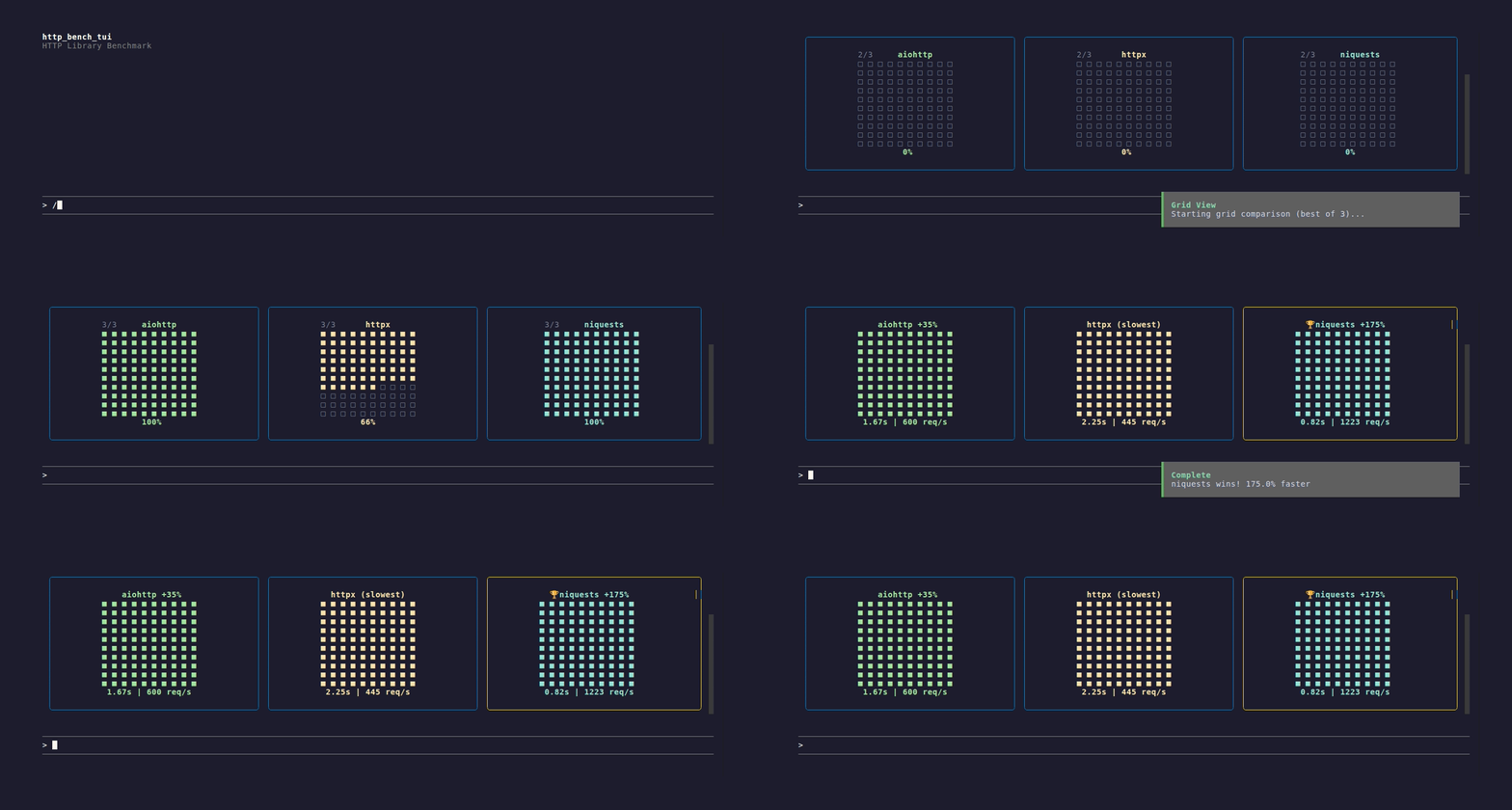
See examples/http_bench_tui.py for the full implementation using TuiContext and custom widgets.
Development
Running Tests
uv run pytest
Generating Documentation
# Build docs
uv run --group docs mkdocs build

# Serve locally
uv run --group docs mkdocs serve
Generating Screenshots and GIFs
Terminal recordings are created with VHS. Install it first:
# Ubuntu/Debian
sudo apt install vhs ttyd

# macOS
brew install vhs

# Or via Go
go install github.com/charmbracelet/vhs@latest
Then generate recordings from tape files:
vhs docs/static/tui-demo.tape
Tape files are located in docs/static/ and define scripted terminal sessions that produce GIFs.
Release history Release notifications | RSS feed


Download files
Download the file for your platform. If you're not sure which to choose, learn more about installing packages.
Source Distribution
Built Distribution
Filter files by name, interpreter, ABI, and platform.
If you're not sure about the file name format, learn more about wheel file names.
Copy a direct link to the current filters
File details
Details for the file piou-0.34.0.tar.gz.
File metadata
- Download URL: piou-0.34.0.tar.gz
- Upload date:
- Size: 1.6 MB
- Tags: Source
- Uploaded using Trusted Publishing? No
- Uploaded via: uv/0.10.10 {"installer":{"name":"uv","version":"0.10.10","subcommand":["publish"]},"python":null,"implementation":{"name":null,"version":null},"distro":{"name":"Ubuntu","version":"24.04","id":"noble","libc":null},"system":{"name":null,"release":null},"cpu":null,"openssl_version":null,"setuptools_version":null,"rustc_version":null,"ci":true}
File hashes
| Algorithm | Hash digest | |
|---|---|---|
| SHA256 |
5a66695a59bbc963d16f249d6db4556bebd53088c6614597d9d0c3c55c0b97e3
|
|
| MD5 |
0d165e82a1d9587e8e7090f93e70fb1c
|
|
| BLAKE2b-256 |
998edefaa7bef764d5401143ee84537a56f776126d1268aa74faed38a0e98cc4
|
File details
Details for the file piou-0.34.0-py3-none-any.whl.
File metadata
- Download URL: piou-0.34.0-py3-none-any.whl
- Upload date:
- Size: 54.4 kB
- Tags: Python 3
- Uploaded using Trusted Publishing? No
- Uploaded via: uv/0.10.10 {"installer":{"name":"uv","version":"0.10.10","subcommand":["publish"]},"python":null,"implementation":{"name":null,"version":null},"distro":{"name":"Ubuntu","version":"24.04","id":"noble","libc":null},"system":{"name":null,"release":null},"cpu":null,"openssl_version":null,"setuptools_version":null,"rustc_version":null,"ci":true}
File hashes
| Algorithm | Hash digest | |
|---|---|---|
| SHA256 |
b0d9c069f7517e9cbc84145c91eb79efb0b7afe2c846ec51653cf5ed654b425c
|
|
| MD5 |
367102b822044104cb5253683291c1e0
|
|
| BLAKE2b-256 |
4ee87425f8b3c039e153603cef03b1c1ce7dc74d91455bab7a1b82f5fd12a1b2
|






