
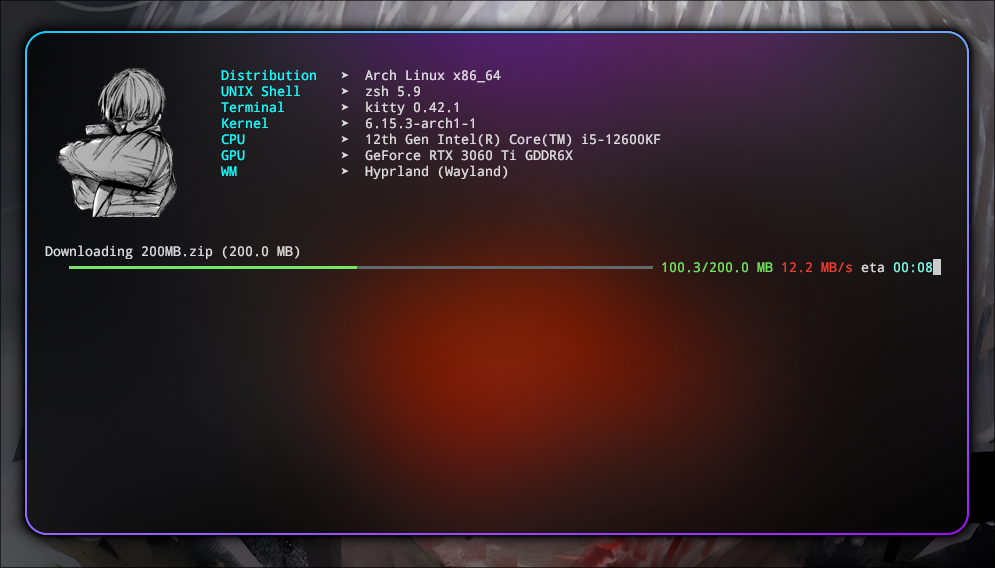
Lightweight and stylish command-line progress bar written in pure Python with colorful ANSI output. Perfect for downloads, iterations, or pipelines where you want clean, responsive visual feedback.
🚀 Features
- ⏱️ ETA and speed tracking
- 🎨 Colorful and modern terminal output (no external dependencies)
- 📦 Works as iterator or manual
.update()style - ✅ Minimal and production-ready
🧪 Usage
from pipebar import ProgressBar

n = 100_000_000

with ProgressBar(total=n, unit='M', scale=1_000_000) as pbar:
    result = 0

    for i in range(n):
        result += i ** 2
        pbar.update()

print(f'Result: {result}')
📁 For file downloads
from pipebar import ProgressBar
import requests
import os

red = '\033[38;2;235;64;52m'
end = '\033[0m'

def download_file(url):
    url = url.strip('/')
    file_name = url.split('/')[-1]
    response = requests.get(url, stream=True)
    total_size = int(response.headers.get('content-length', 0))
    total_size_mb = total_size / (1024 * 1024)
    print(f'Downloading {file_name} ({total_size_mb:.1f} MB)')

    with ProgressBar(total=total_size, unit='MB', scale=1024*1024) as pbar:
        try:
            with open(file_name, 'wb') as file:
                for data in response.iter_content(chunk_size=1024):
                    file.write(data)
                    pbar.update(len(data))
        except KeyboardInterrupt:
            print(f'\n{red}ERROR: Aborted by user.{end}')
            if os.path.exists(file_name):
                os.remove(file_name)
            raise SystemExit(0)

download_file('http://ipv4.download.thinkbroadband.com/200MB.zip')
⚙️ ProgressBar Parameters
| Parameter | Type | Default | Description |
|---|---|---|---|
iterable |
Iterable |
None |
Optional iterable to wrap. If provided, ProgressBar acts as a generator. |
total |
int |
None |
Total number of units (e.g., items, bytes). Required for ETA/speed display. |
unit |
str |
'it' |
Unit name (e.g., 'MB', 'files', 'records'). Displayed after progress numbers. |
scale |
int/float |
1 |
Scale factor to convert units (e.g., 1024*1024 to convert bytes to MB). |
bar_length |
int |
auto | Visual length of the progress bar in characters. Auto-adjusts to terminal size if not set. |
1 maintainer

Metadata
1 maintainer
Release files for pipebar 1.0.4
For a detailed explanation of source distributions (sdists) and built distributions (wheels), please see the package formats documentation.
Source distribution (sdist)
| File | Size | Uploaded | Provenance | Actions |
|---|---|---|---|---|
| pipebar-1.0.4.tar.gz | 4.0 kB | Without provenance | Details for pipebar-1.0.4.tar.gz |
Built distribution (wheel)
| File | Interpreter | ABI | Platform | Actions Reset |
|---|---|---|---|---|
| pipebar-1.0.4-py3-none-any.whl | Python 3 | none | any | Details for pipebar-1.0.4-py3-none-any.whl |
Total release size: 8.3 kB
Release files / pipebar-1.0.4.tar.gz
| Download URL | pipebar-1.0.4.tar.gz |
|---|---|
| Size | 4.0 kB |
| Tags | Source |
|
SHA-256 checksum How to use checksums |
c5015dc137498e6e1a4192d6f3fa4366979ac162acf338bb7c444c53a68b1aa5
|
|
BLAKE2b-256 checksum How to use checksums |
2740e299e0fbad4e5b2f042a4254d2ac42dddc334bb9b6a7b6cff73f7f1fe5e5
|
| Upload date | |
|
Uploaded using Trusted Publishing? What is trusted publishing? |
No |
| Uploaded via |
twine/6.1.0 CPython/3.13.5
|
Release files / pipebar-1.0.4-py3-none-any.whl
| Download URL | pipebar-1.0.4-py3-none-any.whl |
|---|---|
| Size | 4.3 kB |
| Tags | Python 3 |
|
SHA-256 checksum How to use checksums |
ead0d460142fee6b4c9669492fa5f2e7e0b9357ab1c1ca14b7c381c553eca190
|
|
BLAKE2b-256 checksum How to use checksums |
0395d95071659207dcd490ab4cea9dce21be03f658e859d7d0774cdd4a6dcc64
|
| Upload date | |
|
Uploaded using Trusted Publishing? What is trusted publishing? |
No |
| Uploaded via |
twine/6.1.0 CPython/3.13.5
|
Security for pipebar 1.0.4
Provenance
Provenance describes where a file came from. On PyPI, provenance is shared via attestations, which provide a verifiable record of the build or publishing details. View details, limitations and caveats.
No provenance found
None of the files in this release were uploaded with provenance metadata.
A note on package security
PyPI is a repository for distributing packages, not a service for auditing them. While third-party security researchers and our staff do their best to detect and remove malicious packages, PyPI cannot guarantee the quality, security or suitability of any given package.
To learn more about protecting yourself from malicious actors, visit our package security documentation.














