
Colorful terminal progress bar with ETA and speed tracking

Project description
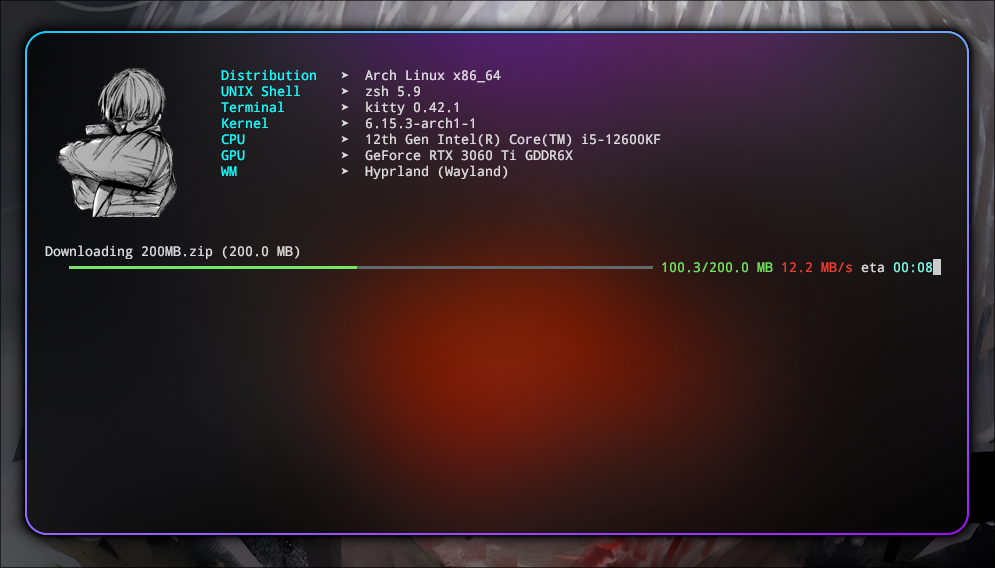
Lightweight and stylish command-line progress bar written in pure Python with colorful ANSI output. Perfect for downloads, iterations, or pipelines where you want clean, responsive visual feedback.
🚀 Features
- ⏱️ ETA and speed tracking
- 🎨 Colorful and modern terminal output (no external dependencies)
- 📦 Works as iterator or manual
.update()style - ✅ Minimal and production-ready
🧪 Usage
from pipebar import ProgressBar

n = 100_000_000

with ProgressBar(total=n, unit='M', scale=1_000_000) as pbar:
    result = 0

    for i in range(n):
        result += i ** 2
        pbar.update()

print(f'Result: {result}')
📁 For file downloads
from pipebar import ProgressBar
import requests
import os

red = '\033[38;2;235;64;52m'
end = '\033[0m'

def download_file(url):
    url = url.strip('/')
    file_name = url.split('/')[-1]
    response = requests.get(url, stream=True)
    total_size = int(response.headers.get('content-length', 0))
    total_size_mb = total_size / (1024 * 1024)
    print(f'Downloading {file_name} ({total_size_mb:.1f} MB)')

    with ProgressBar(total=total_size, unit='MB', scale=1024*1024) as pbar:
        try:
            with open(file_name, 'wb') as file:
                for data in response.iter_content(chunk_size=1024):
                    file.write(data)
                    pbar.update(len(data))
        except KeyboardInterrupt:
            print(f'\n{red}ERROR: Aborted by user.{end}')
            if os.path.exists(file_name):
                os.remove(file_name)
            raise SystemExit(0)

download_file('http://ipv4.download.thinkbroadband.com/200MB.zip')
⚙️ ProgressBar Parameters
| Parameter | Type | Default | Description |
|---|---|---|---|
iterable |
Iterable |
None |
Optional iterable to wrap. If provided, ProgressBar acts as a generator. |
total |
int |
None |
Total number of units (e.g., items, bytes). Required for ETA/speed display. |
unit |
str |
'it' |
Unit name (e.g., 'MB', 'files', 'records'). Displayed after progress numbers. |
scale |
int/float |
1 |
Scale factor to convert units (e.g., 1024*1024 to convert bytes to MB). |
bar_length |
int |
auto | Visual length of the progress bar in characters. Auto-adjusts to terminal size if not set. |
Release history Release notifications | RSS feed


Download files
Download the file for your platform. If you're not sure which to choose, learn more about installing packages.
Source Distribution
pipebar-1.0.4.tar.gz
(4.0 kB
view details)
Built Distribution
Filter files by name, interpreter, ABI, and platform.
If you're not sure about the file name format, learn more about wheel file names.
Copy a direct link to the current filters
File details
Details for the file pipebar-1.0.4.tar.gz.
File metadata
- Download URL: pipebar-1.0.4.tar.gz
- Upload date:
- Size: 4.0 kB
- Tags: Source
- Uploaded using Trusted Publishing? No
- Uploaded via: twine/6.1.0 CPython/3.13.5
File hashes
| Algorithm | Hash digest | |
|---|---|---|
| SHA256 |
c5015dc137498e6e1a4192d6f3fa4366979ac162acf338bb7c444c53a68b1aa5
|
|
| MD5 |
2dcbbb69161b35d960a7fe871209cd91
|
|
| BLAKE2b-256 |
2740e299e0fbad4e5b2f042a4254d2ac42dddc334bb9b6a7b6cff73f7f1fe5e5
|
File details
Details for the file pipebar-1.0.4-py3-none-any.whl.
File metadata
- Download URL: pipebar-1.0.4-py3-none-any.whl
- Upload date:
- Size: 4.3 kB
- Tags: Python 3
- Uploaded using Trusted Publishing? No
- Uploaded via: twine/6.1.0 CPython/3.13.5
File hashes
| Algorithm | Hash digest | |
|---|---|---|
| SHA256 |
ead0d460142fee6b4c9669492fa5f2e7e0b9357ab1c1ca14b7c381c553eca190
|
|
| MD5 |
e3bee810eebc1ade205eb01a0cc2da5b
|
|
| BLAKE2b-256 |
0395d95071659207dcd490ab4cea9dce21be03f658e859d7d0774cdd4a6dcc64
|






