
Conversation Flow management for Pipecat AI applications
Project description




Pipecat Flows is an add-on framework for Pipecat that allows you to build structured conversations in your AI applications. It enables you to create both predefined conversation paths and dynamically generated flows while handling the complexities of state management and LLM interactions.
The framework consists of:
- A Python module for building conversation flows with Pipecat
- A visual editor for designing and exporting flow configurations
Dependencies
- Python 3.11 or higher
- Pipecat
Installation
-
Install uv
curl -LsSf https://astral.sh/uv/install.sh | sh
Need help? Refer to the uv install documentation.
-
Install the module
# For new projects
uv init my-pipecat-flows-app
cd my-pipecat-flows-app
uv add pipecat-ai-flows

# Or for existing projects
uv add pipecat-ai-flows
Using pip? You can still use
pip install pipecat-ai-flowsto get set up.
Quick Start
See Quick Start README.
For more detailed examples and guides, visit our documentation.
Examples
The repository includes several complete example implementations demonstrating various features of Pipecat Flows.
Available Examples
The examples demonstrate various conversation flows including food ordering, restaurant reservations, patient intake, insurance quotes, and warm transfers. All examples support multiple LLM providers (OpenAI, Anthropic, Google Gemini, AWS Bedrock) to demonstrate cross-platform compatibility.
Getting Started with Examples
For detailed setup instructions, configuration, and running examples, see the Examples README.
Quick start:
# Install dependencies
uv sync
uv pip install "pipecat-ai[daily,openai,deepgram,cartesia,silero,examples]"

# Configure environment
cp env.example .env  # Add your API keys

# Run an example
uv run examples/food_ordering.py
Contributing to the framework
-
Clone the repository and navigate to it:
git clone https://github.com/pipecat-ai/pipecat-flows.git
cd pipecat-flows
-
Install development dependencies:
uv sync --group dev
-
Install the git pre-commit hooks (these help ensure your code follows project rules):
uv run pre-commit install
The package is automatically installed in editable mode when you run
uv sync.
Tests
The package includes a comprehensive test suite covering the core functionality.
Setup Test Environment
Install venv and dependencies:
uv sync --group dev
Running Tests
Run all tests:
uv run pytest tests/
Run specific test file:
uv run pytest tests/test_state.py
Run specific test:
uv run pytest tests/test_state.py -k test_initialization
Run with coverage report:
uv run pytest tests/ --cov=pipecat_flows
Pipecat Flows Editor
A visual editor for creating and managing Pipecat conversation flows.
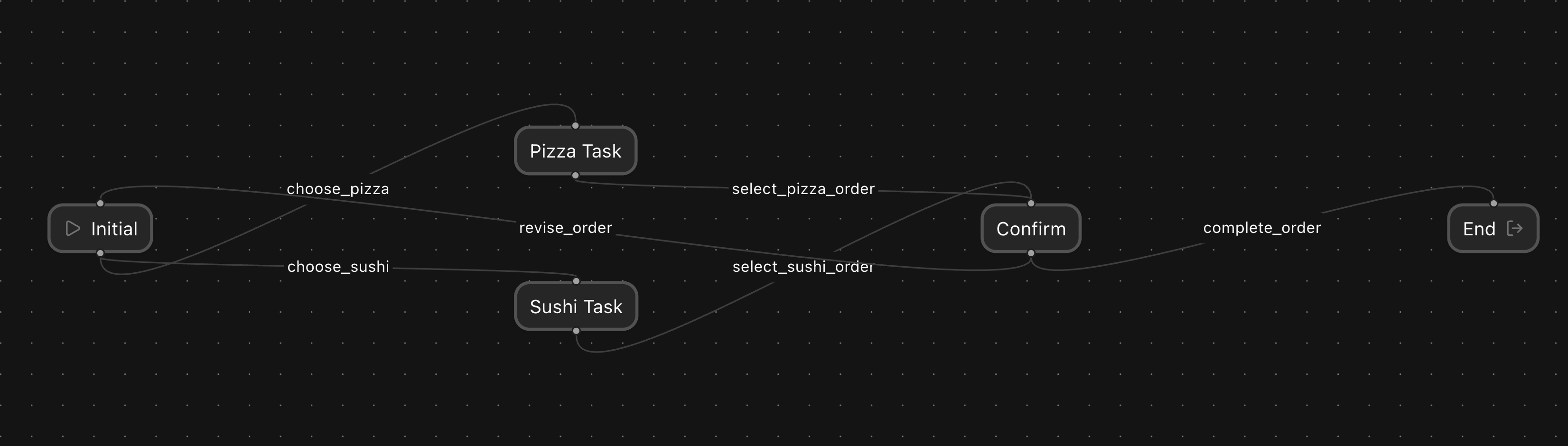
Visit the Pipecat Flows Editor repo to learn more.
Contributing
We welcome contributions from the community! Whether you're fixing bugs, improving documentation, or adding new features, here's how you can help:
- Found a bug? Open an issue
- Have a feature idea? Start a discussion
- Want to contribute code? Check our CONTRIBUTING.md guide
- Documentation improvements? Docs PRs are always welcome
Before submitting a pull request, please check existing issues and PRs to avoid duplicates.
We aim to review all contributions promptly and provide constructive feedback to help get your changes merged.
Getting help
Project details
Release history Release notifications | RSS feed


Download files
Download the file for your platform. If you're not sure which to choose, learn more about installing packages.
Source Distribution
Built Distribution
Filter files by name, interpreter, ABI, and platform.
If you're not sure about the file name format, learn more about wheel file names.
Copy a direct link to the current filters
File details
Details for the file pipecat_ai_flows-1.0.0.tar.gz.
File metadata
- Download URL: pipecat_ai_flows-1.0.0.tar.gz
- Upload date:
- Size: 4.9 MB
- Tags: Source
- Uploaded using Trusted Publishing? Yes
- Uploaded via: twine/6.1.0 CPython/3.13.12
File hashes
| Algorithm | Hash digest | |
|---|---|---|
| SHA256 |
16f70c749fdb68258c68631819fc5b73fe025f511acc0e4328a5c5b5f1674efa
|
|
| MD5 |
845734e7a143c057bc6a0f7f352aec9e
|
|
| BLAKE2b-256 |
31dea9bbd7306039b9b46cd4cabf4ab4a5312b8434b4ef6141bda31129c1412d
|
Provenance
The following attestation bundles were made for pipecat_ai_flows-1.0.0.tar.gz:
Publisher:
publish-pypi.yml on pipecat-ai/pipecat-flows
-
Statement:
-
Statement type:
https://in-toto.io/Statement/v1 -
Predicate type:
https://docs.pypi.org/attestations/publish/v1 -
Subject name:
pipecat_ai_flows-1.0.0.tar.gz -
Subject digest:
16f70c749fdb68258c68631819fc5b73fe025f511acc0e4328a5c5b5f1674efa - Sigstore transparency entry: 1312822189
- Sigstore integration time:
-
Permalink:
pipecat-ai/pipecat-flows@119e0af8aa3dfaf3ddf07379d6ba8959575b1565 -
Branch / Tag:
refs/heads/main - Owner: https://github.com/pipecat-ai
-
Access:
public
-
Token Issuer:
https://token.actions.githubusercontent.com -
Runner Environment:
github-hosted -
Publication workflow:
publish-pypi.yml@119e0af8aa3dfaf3ddf07379d6ba8959575b1565 -
Trigger Event:
workflow_dispatch
-
Statement type:
File details
Details for the file pipecat_ai_flows-1.0.0-py3-none-any.whl.
File metadata
- Download URL: pipecat_ai_flows-1.0.0-py3-none-any.whl
- Upload date:
- Size: 24.5 kB
- Tags: Python 3
- Uploaded using Trusted Publishing? Yes
- Uploaded via: twine/6.1.0 CPython/3.13.12
File hashes
| Algorithm | Hash digest | |
|---|---|---|
| SHA256 |
2b7202c23db45af48f35e7073ac5e6d508b823bf76f52061f39da47d88291879
|
|
| MD5 |
edc5e8c46d23c8ea2dbac38d2e99a482
|
|
| BLAKE2b-256 |
87bf2b6e9a0d6b6fcda5900a14a92b08d2f1c631b0f815613df8d95d01bc5e01
|
Provenance
The following attestation bundles were made for pipecat_ai_flows-1.0.0-py3-none-any.whl:
Publisher:
publish-pypi.yml on pipecat-ai/pipecat-flows
-
Statement:
-
Statement type:
https://in-toto.io/Statement/v1 -
Predicate type:
https://docs.pypi.org/attestations/publish/v1 -
Subject name:
pipecat_ai_flows-1.0.0-py3-none-any.whl -
Subject digest:
2b7202c23db45af48f35e7073ac5e6d508b823bf76f52061f39da47d88291879 - Sigstore transparency entry: 1312822275
- Sigstore integration time:
-
Permalink:
pipecat-ai/pipecat-flows@119e0af8aa3dfaf3ddf07379d6ba8959575b1565 -
Branch / Tag:
refs/heads/main - Owner: https://github.com/pipecat-ai
-
Access:
public
-
Token Issuer:
https://token.actions.githubusercontent.com -
Runner Environment:
github-hosted -
Publication workflow:
publish-pypi.yml@119e0af8aa3dfaf3ddf07379d6ba8959575b1565 -
Trigger Event:
workflow_dispatch
-
Statement type:






