






Pipecat Subagents is a distributed multi-agent framework for Pipecat. Each agent runs its own Pipecat pipeline and communicates with other agents through a shared message bus, enabling you to decompose complex systems into specialized, coordinating agents that can run locally or across machines.
Whether local or distributed, the programming model is the same: create an AgentRunner, connect it to the bus, and add agents.
🧠 Why Pipecat Subagents?
Pipecat is a powerful real-time framework for building voice and multimodal AI applications. Pipecat Subagents extends it with distributed multi-agent coordination where each agent runs its own Pipecat pipeline.
Some things you can build:
- A customer support system where each specialist runs its own LLM with dedicated tools and context, transferring seamlessly between each other.
- A video game where multiple LLMs independently control different characters, environments, or game mechanics.
- A stock analysis app that dispatches parallel research to multiple worker agents and synthesizes their findings.
- A video or image analysis pipeline where worker agents process media using Pipecat processors and stream updates back.
- An IoT system where remote devices run agents on specialized hardware, reporting status and receiving commands.
If a single Pipecat pipeline covers your use case, you don't need subagents. When you outgrow it, the transition is straightforward: your existing pipeline becomes one agent among many.
✨ Features
- Per-agent pipeline: every agent runs its own Pipecat pipeline with access to all services, processors, and transports (e.g. different LLMs, local models, image analysis, custom processors).
- Agent handoff: transfer control between agents mid-conversation, seamlessly switching context and capabilities.
- Task coordination: dispatch work to specialized worker agents in parallel, track progress with timeouts and cancellation, and stream results back.
- Distributed agents: run agents across machines, scaling each independently. Agents communicate via a shared bus that works the same locally or over the network.
- Mixed agent types: combine free-form LLM agents with structured Pipecat Flows agents or wrap third-party frameworks as subagents.
- Agent lifecycle: activation, deactivation, error propagation, and graceful shutdown across a tree of agents.
📦 Installation
uv add pipecat-ai-subagents

# or: pip install pipecat-ai-subagents
Requires Python 3.11+ and Pipecat.
🚀 Examples
See the examples directory for complete, runnable demos.
🔍 Observability with Clowder
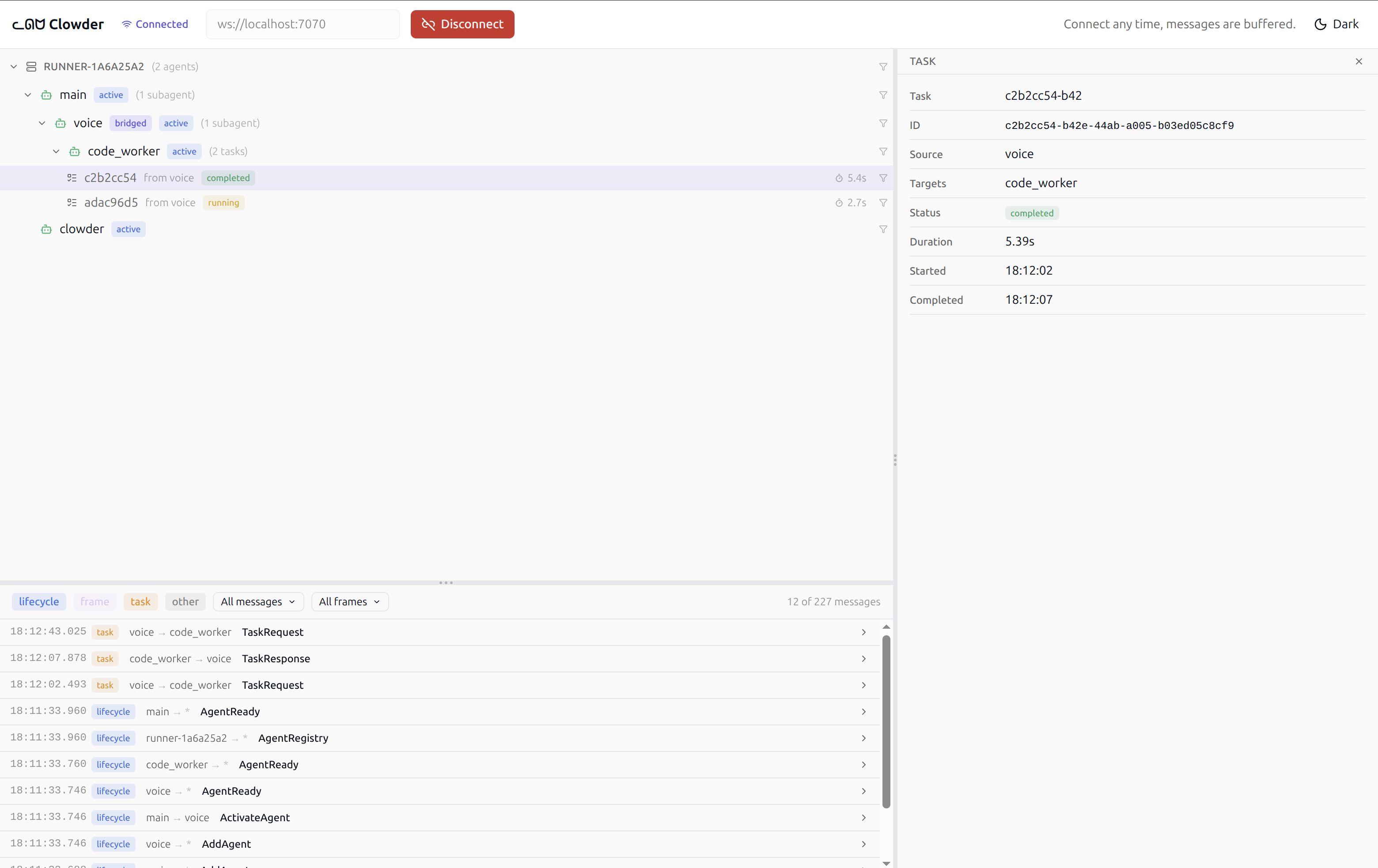
Clowder (a group of cats) is a real-time observability tool for Pipecat Subagents. It shows runners, agents, tasks, and bus messages in a web UI, whether local or distributed.
Adding Clowder to your system
Add a ClowderAgent to any runner:
from pipecat_subagents.clowder import ClowderAgent

clowder = ClowderAgent("clowder", bus=runner.bus, port=7070)
await runner.add_agent(clowder)
Or use a setup file to add Clowder without modifying your application code. Create a file (e.g. clowder_setup.py):
from pipecat_subagents.clowder import ClowderAgent
from pipecat_subagents.runner import AgentRunner


async def setup_runner(runner: AgentRunner):
    clowder = ClowderAgent(bus=runner.bus)
    await runner.add_agent(clowder)
Then set the environment variable:
export PIPECAT_SUBAGENTS_SETUP_FILES=/path/to/clowder_setup.py
Running the UI
cd clowder-ui
npm install
npm run dev
Open http://localhost:5173 and click Connect. The UI shows agents grouped by runner, tasks with live duration, and a filterable bus message stream. Connect at any time; all messages are buffered.
🤝 Contributing
We welcome contributions from the community! Whether you're fixing bugs, improving documentation, or adding new features, here's how you can help:
- Found a bug? Open an issue
- Have a feature idea? Start a discussion
- Documentation improvements? Docs PRs are always welcome
Before submitting a pull request, please check existing issues and PRs to avoid duplicates.
We aim to review all contributions promptly and provide constructive feedback to help get your changes merged.
💬 Getting help
Metadata
Release files for pipecat-ai-subagents 0.6.0
For a detailed explanation of source distributions (sdists) and built distributions (wheels), please see the package formats documentation.
Source distribution (sdist)
| File | Size | Uploaded | |
|---|---|---|---|
| pipecat_ai_subagents-0.6.0.tar.gz | 756.0 kB | Details |
Built distribution (wheel)
| File | Interpreter | ABI | Platform | Reset |
|---|---|---|---|---|
| pipecat_ai_subagents-0.6.0-py3-none-any.whl | Python 3 | none | any | Details |
Total release size: 832.4 kB
Release files / pipecat_ai_subagents-0.6.0.tar.gz
| Download URL | pipecat_ai_subagents-0.6.0.tar.gz |
|---|---|
| Size | 756.0 kB |
| Tags | Source |
|
SHA-256 checksum How to use checksums |
067185823fb3c8cd7fbafa9eb8903182ef01133eb8aebdd12224295cd74dad62
|
|
BLAKE2b-256 checksum How to use checksums |
c4742c7cde7c9acf78f1ce2648400d5a5d917c444a739e8e59b96ac4c6f2c053
|
| Upload date | |
|
Uploaded using Trusted Publishing? What is trusted publishing? |
Yes |
| Uploaded via |
twine/6.1.0 CPython/3.13.12
|
Provenance
Provenance describes where a file came from. On PyPI, provenance is shared via attestations, which provide a verifiable record of the build or publishing details. View details, limitations and caveats.


PyPI Publish Attestation
PyPI verified that this artifact, at this checksum, originated from the publisher listed below.
Signed by GitHub Actions, verified by PyPI on May 14, 2026.
Transparency logRelease files / pipecat_ai_subagents-0.6.0-py3-none-any.whl
| Download URL | pipecat_ai_subagents-0.6.0-py3-none-any.whl |
|---|---|
| Size | 76.5 kB |
| Tags | Python 3 |
|
SHA-256 checksum How to use checksums |
b0a11676ad5cfd07d4a2311eb0e7d4c4831fdf03da4e96d8e1634b8a0858a618
|
|
BLAKE2b-256 checksum How to use checksums |
c59c20faccc99498f1bda52a4aa8c31fc7228ef7dea998dd162a2fe35ab792da
|
| Upload date | |
|
Uploaded using Trusted Publishing? What is trusted publishing? |
Yes |
| Uploaded via |
twine/6.1.0 CPython/3.13.12
|
Provenance
Provenance describes where a file came from. On PyPI, provenance is shared via attestations, which provide a verifiable record of the build or publishing details. View details, limitations and caveats.
PyPI Publish Attestation
PyPI verified that this artifact, at this checksum, originated from the publisher listed below.
Signed by GitHub Actions, verified by PyPI on May 14, 2026.
Transparency log













