
A pipeline runner for Pipecat
Project description



ᓚᘏᗢ Tail: A terminal dashboard for Pipecat
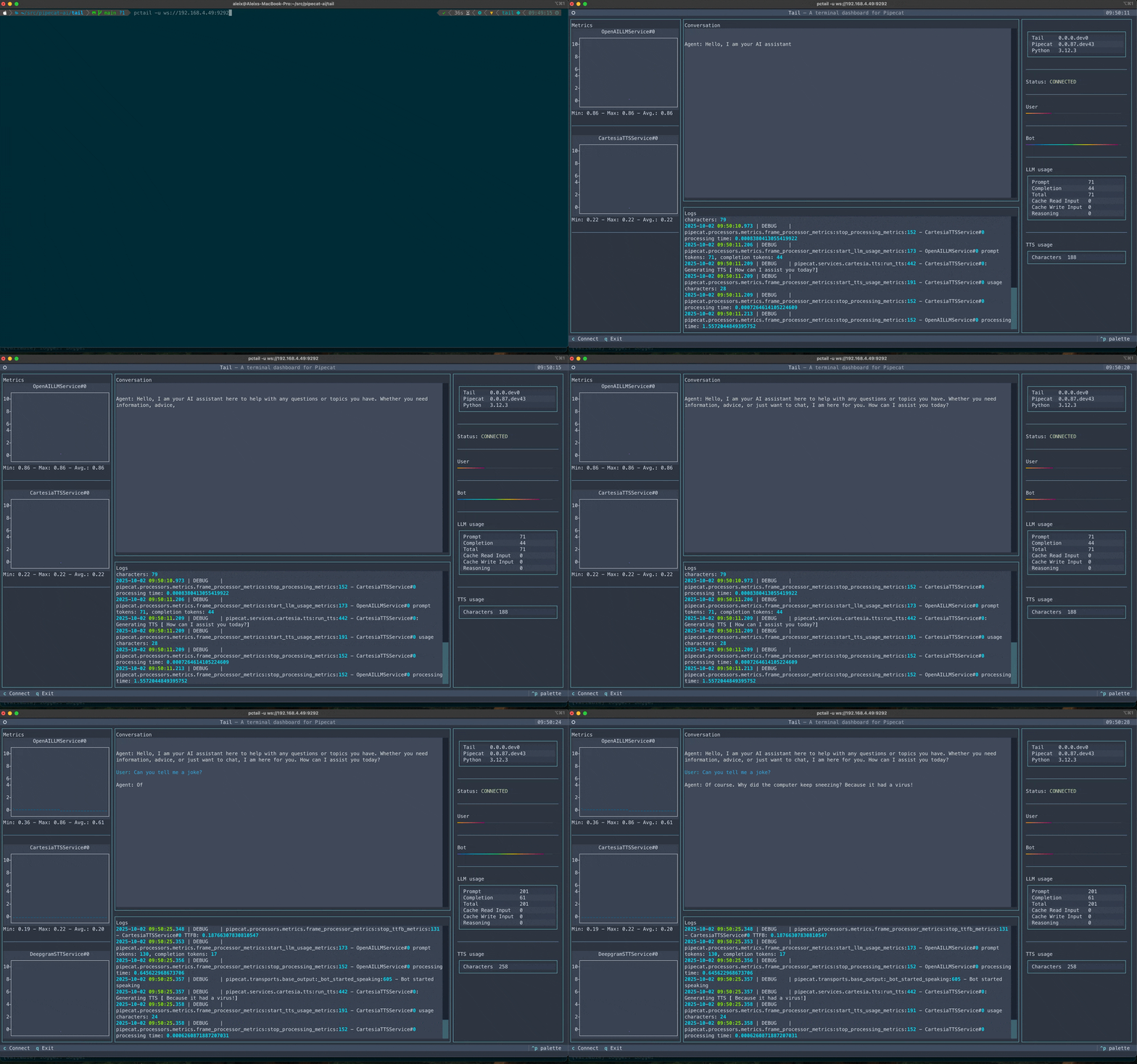
Tail is a terminal dashboard for the Pipecat voice and multimodal conversational AI framework.
It lets you monitor your Pipecat sessions in real time with logs, conversations, metrics, and audio levels all in one place.
With Tail you can:
- 📜 Follow system logs in real time
- 💬 Track conversations as they happen
- 🔊 Monitor user and agent audio levels
- 📈 Keep an eye on service metrics and usage
- 🖥️ Run locally as a pipeline runner or connect to a remote session
🧭 Getting started
Requirements
- Python 3.10+
- Pipecat installed
Install Tail for Python
uv pip install pipecat-ai-tail
⚡ Option A: Pipeline runner
Use TailRunner as a drop-in replacement for PipelineRunner. For example:
runner = PipelineRunner()

await runner.run(task)
becomes
from pipecat_tail.runner import TailRunner

runner = TailRunner()

await runner.run(task)
🏠 Option B: Standalone app
You can also start Tail as a standalone application. This lets you connect to a running session, whether local or remote. All you need to do is add the TailObserver to your pipeline task:
from pipecat_tail.observer import TailObserver

task = PipelineTask(..., observers=[TailObserver()])
Then start the app:
pctail [--uri URI]
or
pipecat-tail [--uri URI]
By default, it will connect to ws://localhost:9292.
📚 Next steps
- See the Pipecat documentation for more about building bots
Project details


Download files
Download the file for your platform. If you're not sure which to choose, learn more about installing packages.
Source Distribution
Built Distribution
Filter files by name, interpreter, ABI, and platform.
If you're not sure about the file name format, learn more about wheel file names.
Copy a direct link to the current filters
File details
Details for the file pipecat_ai_tail-0.0.1.tar.gz.
File metadata
- Download URL: pipecat_ai_tail-0.0.1.tar.gz
- Upload date:
- Size: 1.5 MB
- Tags: Source
- Uploaded using Trusted Publishing? Yes
- Uploaded via: twine/6.1.0 CPython/3.13.7
File hashes
| Algorithm | Hash digest | |
|---|---|---|
| SHA256 |
092f7f8f4a660423e032d8f84a3860e0bdaf080590418617f11116b0c1451b6c
|
|
| MD5 |
8a46c34e8811ccc82b308986bf939ab4
|
|
| BLAKE2b-256 |
ff0ff36ffe205e337e40ca910d9945517b7d5d6e7cc3b79f4820aa4a20997a20
|
Provenance
The following attestation bundles were made for pipecat_ai_tail-0.0.1.tar.gz:
Publisher:
publish.yaml on pipecat-ai/tail
-
Statement:
-
Statement type:
https://in-toto.io/Statement/v1 -
Predicate type:
https://docs.pypi.org/attestations/publish/v1 -
Subject name:
pipecat_ai_tail-0.0.1.tar.gz -
Subject digest:
092f7f8f4a660423e032d8f84a3860e0bdaf080590418617f11116b0c1451b6c - Sigstore transparency entry: 581107812
- Sigstore integration time:
-
Permalink:
pipecat-ai/tail@601b451cae021d2f77dc5de698f5740f210bca77 -
Branch / Tag:
refs/heads/main - Owner: https://github.com/pipecat-ai
-
Access:
public
-
Token Issuer:
https://token.actions.githubusercontent.com -
Runner Environment:
github-hosted -
Publication workflow:
publish.yaml@601b451cae021d2f77dc5de698f5740f210bca77 -
Trigger Event:
workflow_dispatch
-
Statement type:
File details
Details for the file pipecat_ai_tail-0.0.1-py3-none-any.whl.
File metadata
- Download URL: pipecat_ai_tail-0.0.1-py3-none-any.whl
- Upload date:
- Size: 23.4 kB
- Tags: Python 3
- Uploaded using Trusted Publishing? Yes
- Uploaded via: twine/6.1.0 CPython/3.13.7
File hashes
| Algorithm | Hash digest | |
|---|---|---|
| SHA256 |
10f4d5d667757e051ba94081ae78c20b6029753f7559bd9df4e52ed4807026d3
|
|
| MD5 |
dc88c9e21028f91d703a01b075769cae
|
|
| BLAKE2b-256 |
5d2c4f18094ff5362d230ed41f71cec5bfbc2408d27c8b6e75270e321d4ec4ca
|
Provenance
The following attestation bundles were made for pipecat_ai_tail-0.0.1-py3-none-any.whl:
Publisher:
publish.yaml on pipecat-ai/tail
-
Statement:
-
Statement type:
https://in-toto.io/Statement/v1 -
Predicate type:
https://docs.pypi.org/attestations/publish/v1 -
Subject name:
pipecat_ai_tail-0.0.1-py3-none-any.whl -
Subject digest:
10f4d5d667757e051ba94081ae78c20b6029753f7559bd9df4e52ed4807026d3 - Sigstore transparency entry: 581107827
- Sigstore integration time:
-
Permalink:
pipecat-ai/tail@601b451cae021d2f77dc5de698f5740f210bca77 -
Branch / Tag:
refs/heads/main - Owner: https://github.com/pipecat-ai
-
Access:
public
-
Token Issuer:
https://token.actions.githubusercontent.com -
Runner Environment:
github-hosted -
Publication workflow:
publish.yaml@601b451cae021d2f77dc5de698f5740f210bca77 -
Trigger Event:
workflow_dispatch
-
Statement type:






