
A black box recorder for data pipeline incidents.

Project description
Pipeflight




A black box recorder for data pipelines.
Most data quality tools tell you that something failed. Pipeflight preserves the evidence you need to debug it later: failing rows, schema snapshot, stats, report, and a replay script.
pipeflight record orders.parquet --key order_id --contract orders.contract.json
Pipeflight creates a small incident folder:
incident_2026_05_18_112233/
  manifest.json
  failing_rows.parquet
  schema.json
  stats.json
  replay.py
  report.html
You can attach that folder to a ticket, send it to another engineer, or replay it locally without sharing the full source dataset.
Demo
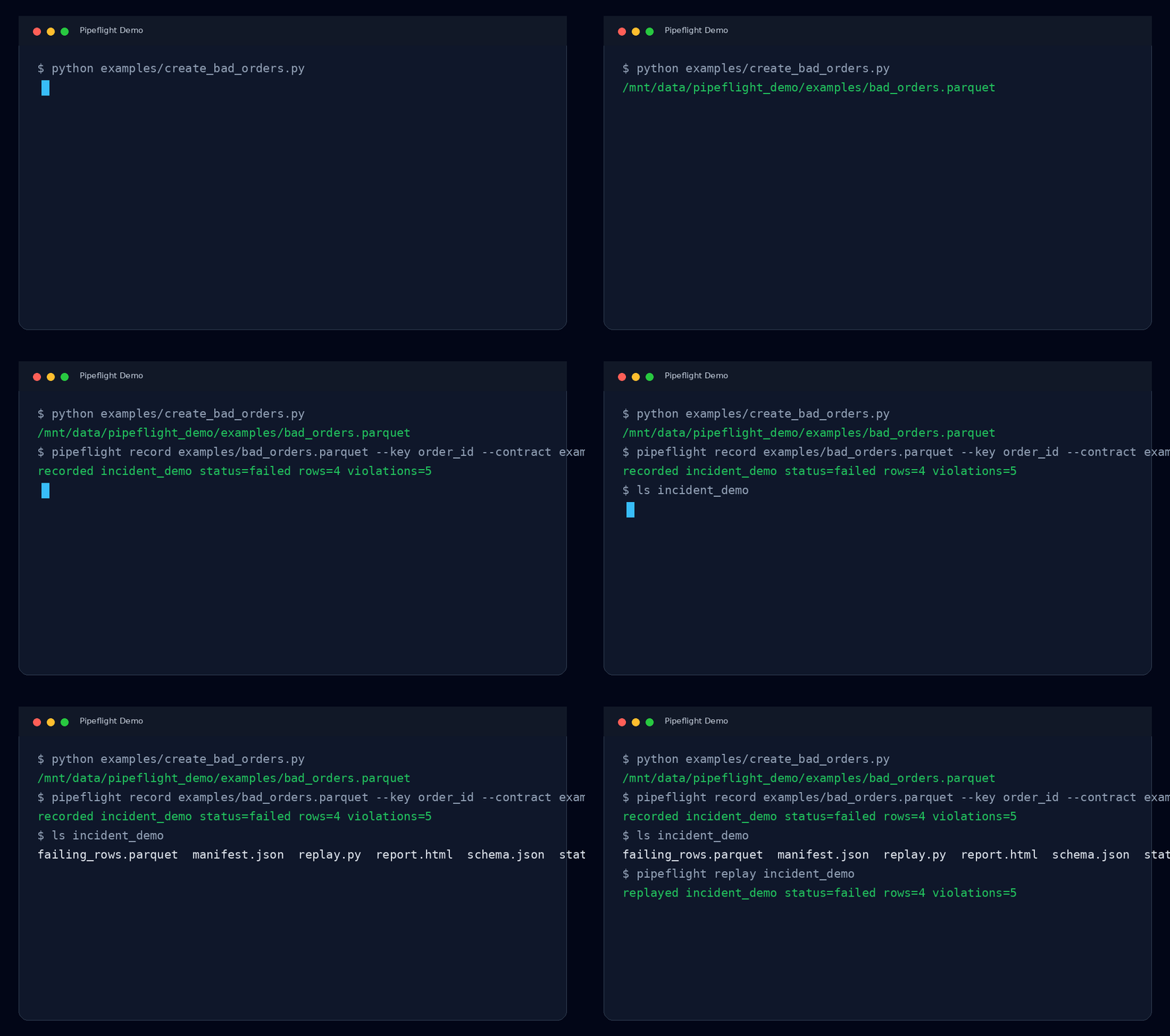
Pipeflight turns a failing dataset into a portable incident bundle:
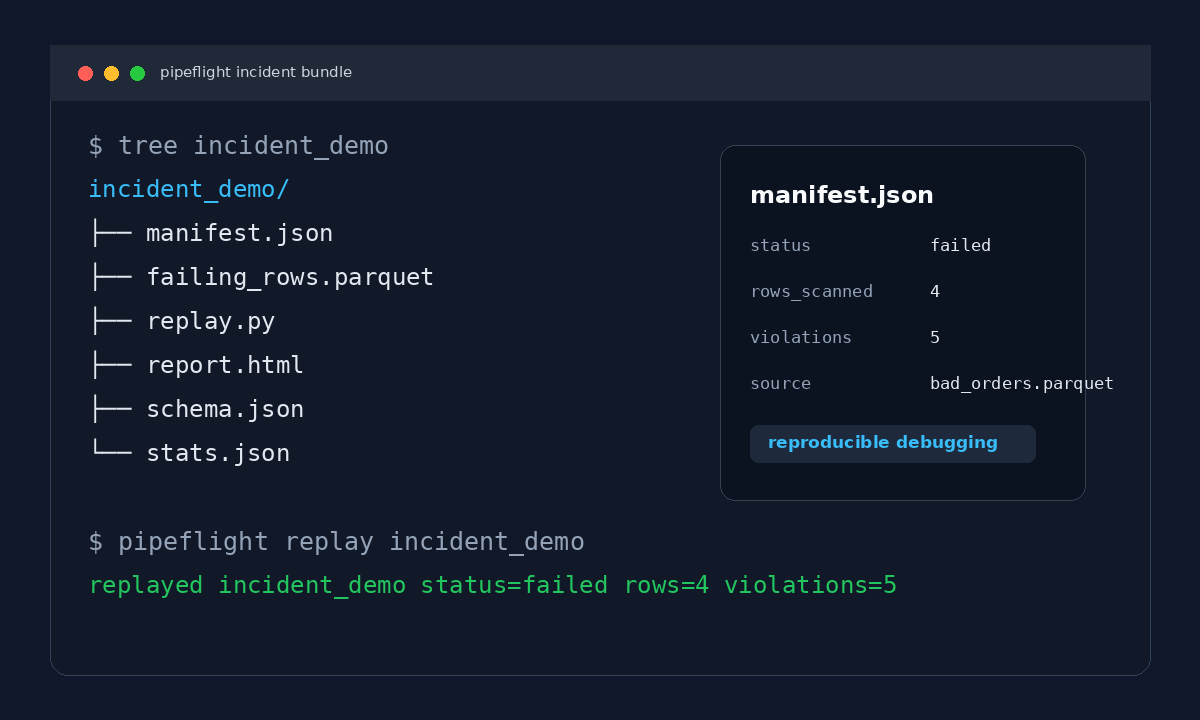
Why Incident Replay Matters
When a production data pipeline fails, the original dataset can be huge, sensitive, temporary, or already overwritten. The team may know that validation failed, but not have the exact rows, schema, or stats needed to reproduce the incident.
Pipeflight records a compact evidence bundle at failure time so debugging is reproducible.
It helps answer:
- Which exact rows failed validation?
- Which rule failed?
- What did the schema look like?
- How many rows were scanned?
- Was the timestamp data stale?
- Can another engineer replay the incident locally?
How It Works
Dataset + optional contract
       |
       v
pipeflight record orders.parquet --key order_id --contract orders.contract.json
       |
       v
Incident bundle
  |-- manifest.json
  |-- failing_rows.parquet
  |-- schema.json
  |-- stats.json
  |-- replay.py
  `-- report.html
       |
       v
pipeflight replay incident_2026_05_18_112233
       |
       v
Reproducible debugging
Input And Output
Input
Pipeflight accepts:
- CSV files:
.csv - JSON Lines files:
.jsonlor.ndjson - Parquet files:
.parquet - optional contract files: JSON, or YAML when installed with
pipeflight[yaml] - optional key column: used to detect missing identifiers
Pipeflight is designed for tabular datasets: rows with columns/fields and scalar values.
Example:
pipeflight record examples/validation_matrix.csv --key order_id --contract examples/validation_matrix.contract.json --out incident_validation_matrix
Output
Pipeflight writes an incident directory containing:
manifest.json: run metadata, status, source path, row count, violation countfailing_rows.parquet: only the rows that failed validationschema.json: inferred column typesstats.json: row count, null counts, min/max values, max datetimesreport.html: human-readable incident reportreplay.py: tiny script for replaying the incident folder
Example output:
recorded incident_validation_matrix status=failed rows=13 violations=16
Supported Data In v0.1
Pipeflight works with common tabular data files:
pipeflight record your_data.csv
pipeflight record your_data.parquet
pipeflight record your_data.jsonl
Without a contract, Pipeflight still records useful evidence: schema, stats, manifest, report, replay script, and an empty failing-rows artifact if no validation rules fail.
To detect data quality failures, provide a contract:
pipeflight record your_data.csv --key id --contract your_contract.json
Example contract:
{
  "columns": {
    "id": { "required": true, "unique": true },
    "amount": { "type": "number", "min": 0 },
    "created_at": { "type": "datetime", "required": true }
  }
}
Current limits:
- Excel files are not supported yet:
.xlsx - databases are not supported directly yet
- nested JSON arrays are not supported directly
- JSON input should be JSON Lines: one object per line
- each row should be tabular: column names mapped to values
- Parquet support requires
pyarrow, which is installed as a package dependency
Why Pipeflight?
Existing tools are good at detection. But when a pipeline fails in production, engineers often still ask:
- Which exact rows caused this?
- What did the schema look like at failure time?
- How many rows were scanned?
- Can another engineer reproduce the incident locally?
- Can this evidence be attached to a ticket without copying the whole dataset?
Pipeflight focuses on incident reproducibility + replay.
Why This Exists
In many production incidents, teams know a dataset failed validation, but they cannot reproduce the exact conditions that caused the failure later.
Pipeflight was created to preserve small, shareable evidence bundles so data incidents can be debugged quickly and collaboratively.
Who Is This For?
- Data engineers debugging pipeline failures.
- ML engineers investigating corrupted training data.
- Platform teams tracking schema drift.
- CI/CD workflows that validate data before promotion.
- Incident response teams that need reproducible evidence.
Pipeflight vs Traditional Data Quality Tools
Traditional tools usually focus on:
- detection
- monitoring
- dashboards
- long-running observability
Pipeflight focuses on:
- reproducibility
- evidence preservation
- replayable incidents
- forensic debugging
It is intentionally small in v0.1. No dashboards, no orchestration, no RBAC, no distributed system. Just a clean incident bundle.
Pipeflight intentionally prioritizes portable incident artifacts over centralized observability infrastructure.
Install
From PyPI:
pip install pipeflight
For local development:
uv venv
uv pip install -e ".[dev]"
If your local Python environment is stale, you can run commands through uv directly:
uv run pipeflight --help
Quick Demo: Bad Orders
Create a demo Parquet file:
python examples/create_bad_orders.py
Record an incident:
pipeflight record examples/bad_orders.parquet --key order_id --contract examples/orders.contract.json
Replay it:
pipeflight replay incident_2026_05_18_112233
Example output:
recorded incident_2026_05_18_112233 status=failed rows=4 violations=5
replayed incident_2026_05_18_112233 status=failed rows=4 violations=5
The demo is expected to fail because the input intentionally contains invalid rows. A failed status means Pipeflight found evidence and preserved it.
Full Validation Matrix
The repository includes a CSV that exercises the main validation rules:
- valid row
- duplicate key
- missing key
- bad number type
- minimum value failure
- maximum value failure
- bad datetime
- invalid allowed value
- missing required value
Input snapshot from examples/validation_matrix.csv:
order_id,amount,created_at,status,discount
ok-001,99.95,2026-05-17T10:00:00+00:00,paid,10
dup-001,25.00,2026-05-17T10:05:00+00:00,new,0
dup-001,30.00,2026-05-17T10:10:00+00:00,paid,5
,12.00,2026-05-17T10:15:00+00:00,paid,3
bad-amount-type,not-a-number,2026-05-17T10:20:00+00:00,paid,8
bad-amount-min,-1,2026-05-17T10:25:00+00:00,paid,8
bad-amount-max,1500,2026-05-17T10:30:00+00:00,paid,8
bad-date,42.00,not-a-date,paid,8
bad-status,42.00,2026-05-17T10:35:00+00:00,cancelled,8
missing-status,42.00,2026-05-17T10:40:00+00:00,,8
bad-discount-min,42.00,2026-05-17T10:45:00+00:00,paid,-5
bad-discount-max,42.00,2026-05-17T10:50:00+00:00,paid,105
bad-discount-type,42.00,2026-05-17T10:55:00+00:00,paid,free
Run it:
uv run pipeflight record examples/validation_matrix.csv --key order_id --contract examples/validation_matrix.contract.json --out incident_validation_matrix
uv run pipeflight replay incident_validation_matrix
Expected output:
recorded incident_validation_matrix status=failed rows=13 violations=16
replayed incident_validation_matrix status=failed rows=13 violations=16
rows=13 means Pipeflight scanned 13 CSV records.
violations=16 means Pipeflight found 16 broken rules. This is not the same as 16 bad rows. Some rows break more than one rule.
For example:
bad-amount-type,not-a-number,2026-05-17T10:20:00+00:00,paid,8
That one row creates 3 violations because amount is expected to be a number, must be at least 0, and must be at most 1000. Since not-a-number is not numeric, it fails all three amount checks.
Capability proof:
| Capability | Example input row | Expected result |
|---|---|---|
| Accept valid data | ok-001,99.95,...,paid,10 |
0 violations |
| Detect duplicate IDs | second dup-001 row |
1 violation: order_id unique |
| Detect missing required key | row with empty order_id |
2 violations: order_id required, order_id key |
| Detect wrong numeric type | amount=not-a-number |
3 violations: amount type, amount min, amount max |
| Detect value below minimum | amount=-1 |
1 violation: amount min |
| Detect value above maximum | amount=1500 |
1 violation: amount max |
| Detect bad datetime | created_at=not-a-date |
1 violation: created_at type |
| Detect value outside allowed set | status=cancelled |
1 violation: status allowed |
| Detect missing required field | empty status |
1 violation: status required |
| Detect optional field below minimum | discount=-5 |
1 violation: discount min |
| Detect optional field above maximum | discount=105 |
1 violation: discount max |
| Detect wrong optional numeric type | discount=free |
3 violations: discount type, discount min, discount max |
Violation count:
0 valid-row violations
+ 1 duplicate key
+ 2 missing key checks
+ 3 bad amount type checks
+ 1 amount minimum
+ 1 amount maximum
+ 1 bad datetime
+ 1 invalid status
+ 1 missing status
+ 1 discount minimum
+ 1 discount maximum
+ 3 bad discount type checks
= 16 violations
The same run also proves the output bundle:
incident_validation_matrix/
  manifest.json          # status=failed, rows=13, violations=16
  failing_rows.parquet   # only rows that failed validation
  schema.json            # inferred types such as amount=mixed
  stats.json             # null counts, min/max values, latest timestamps
  report.html            # human-readable list of violations
  replay.py              # local replay helper
Security Note
Pipeflight may preserve failing rows inside incident bundles. Avoid storing sensitive production data without masking, tokenization, or redaction policies.
Future versions may include optional PII masking before writing failing_rows.parquet and report.html.
Run Tests
uv run pytest --basetemp .pytest_tmp -p no:cacheprovider
Expected result:
3 passed
Python API
from pipeflight import record_incident, replay_incident

incident = record_incident(
    "orders.parquet",
    key="order_id",
    contract="orders.contract.json",
)

print(incident.path)
print(incident.status)

replayed = replay_incident(incident.path)
print(replayed.violation_count)
Contract Example
Contracts describe the checks Pipeflight should run.
{
  "columns": {
    "order_id": { "type": "string", "required": true, "unique": true },
    "amount": { "type": "number", "required": true, "min": 0 },
    "created_at": { "type": "datetime", "required": true }
  },
  "freshness": {
    "column": "created_at",
    "max_age_seconds": 86400
  }
}
Supported column rules in v0.1:
type:string,number,integer,datetime, orbooleanrequired: value must be present and not emptyunique: duplicate values fail validationmin: numeric minimummax: numeric maximumallowed: list of accepted values
Supported freshness rule:
freshness.column: datetime column to inspectfreshness.max_age_seconds: maximum allowed age of the latest timestamp
Example Scenarios
- Schema drift: detect missing or unexpected contract columns.
- Freshness failure: capture evidence when the latest event timestamp is too old.
- Null explosion: capture rows where required fields disappear.
- Replay demo: send a small incident folder to another engineer instead of the entire source data.
Release Plan
v0.1 stays intentionally narrow:
pipeflight record orders.parquetpipeflight replay incident_*- local incident bundle
- Parquet failing rows
- HTML report
- publish-ready packaging
Later versions can add integrations, but the first promise is simple:
Preserve reproducible evidence when data pipelines fail.
Later Roadmap
The flagship future command is incident comparison:
pipeflight compare incident_a incident_b
Potential output:
- schema diff
- row count delta
- null drift
- freshness drift
- cardinality changes
- changed violation patterns
- newly failing or newly passing columns
License
MIT
Release history Release notifications | RSS feed

Download files
Download the file for your platform. If you're not sure which to choose, learn more about installing packages.
Source Distribution
Built Distribution
Filter files by name, interpreter, ABI, and platform.
If you're not sure about the file name format, learn more about wheel file names.
Copy a direct link to the current filters
File details
Details for the file pipeflight-0.1.0.tar.gz.
File metadata
- Download URL: pipeflight-0.1.0.tar.gz
- Upload date:
- Size: 14.6 kB
- Tags: Source
- Uploaded using Trusted Publishing? No
- Uploaded via: twine/6.2.0 CPython/3.10.11
File hashes
| Algorithm | Hash digest | |
|---|---|---|
| SHA256 |
e493953db48eaaf7fcc2a63e7e13daec95183f578d39c9c8727f4149e0076b13
|
|
| MD5 |
7cb2831b44e999dc00bb8d5b6af04fb1
|
|
| BLAKE2b-256 |
9ce9de39a8e9b014990881d67ebc955d5a2b551b56330df1e6a510a12648343d
|
File details
Details for the file pipeflight-0.1.0-py3-none-any.whl.
File metadata
- Download URL: pipeflight-0.1.0-py3-none-any.whl
- Upload date:
- Size: 15.4 kB
- Tags: Python 3
- Uploaded using Trusted Publishing? No
- Uploaded via: twine/6.2.0 CPython/3.10.11
File hashes
| Algorithm | Hash digest | |
|---|---|---|
| SHA256 |
c13676a7f74ca499750dc30b4df72f3eb31048605f8699bf6133133717b74f0e
|
|
| MD5 |
f6f23b5790e757dac90dbd97a745135e
|
|
| BLAKE2b-256 |
b49a07516b59de14a23f5787cda13c481548db0b5f797b9678593b713e8ad6b1
|






