
PipeFunc: Structure, Automate, and Simplify Your Computational Workflows
Stop micromanaging execution. Focus on the science. Capture your workflow's essence with function pipelines, represent computations as DAGs, and automate parallel sweeps.











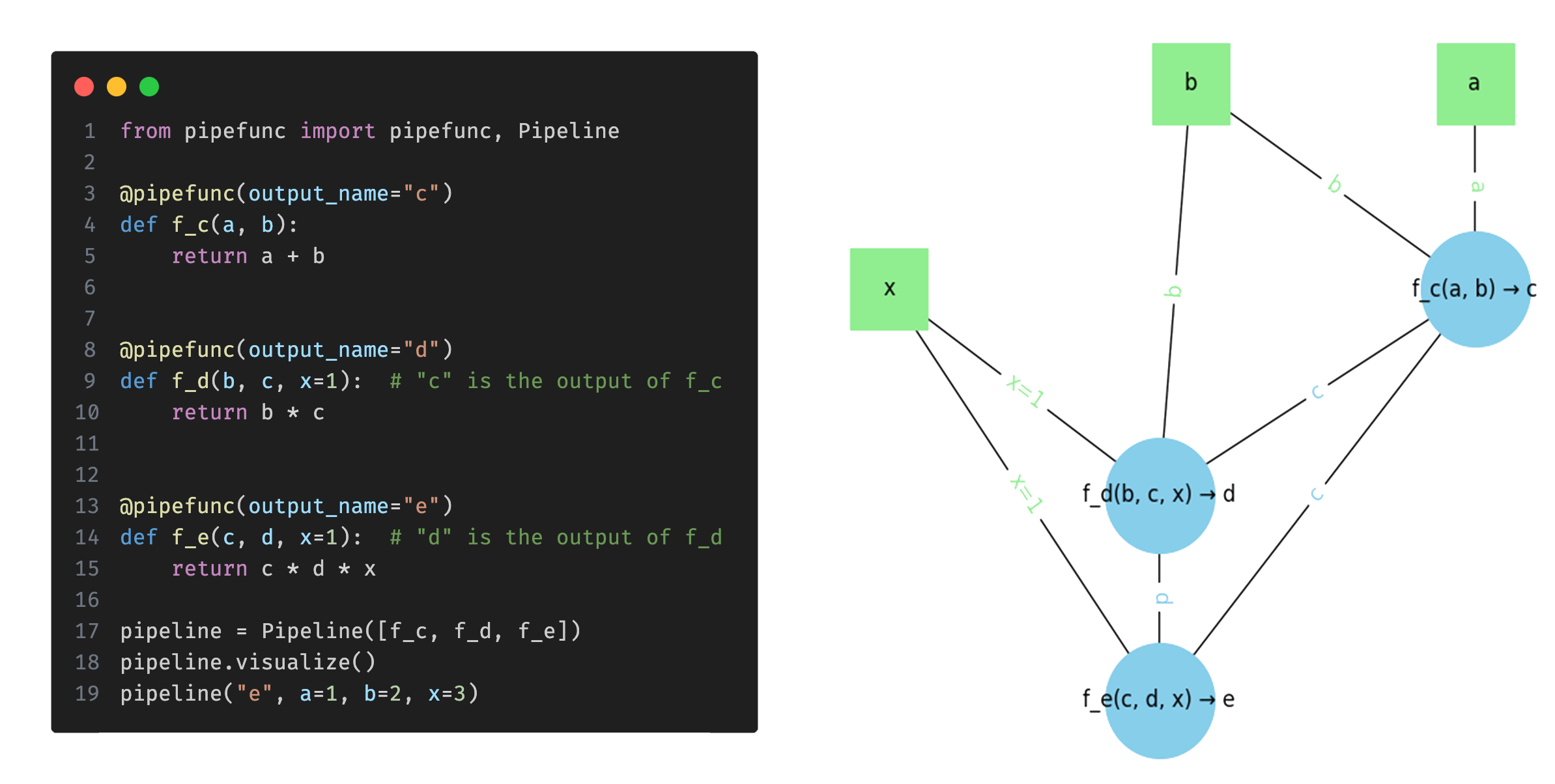
Table of Contents
What is this?
pipefunc is a Python library designed for creating and executing function pipelines.
By simply annotating functions and specifying their outputs, it builds a pipeline that automatically manages the execution order based on dependencies.
Visualize the pipeline as a directed graph, execute the pipeline for all (or specific) outputs, add multidimensional sweeps, automatically parallelize the pipeline, and get nicely structured data back.
Whether you're working with data processing, scientific computations, machine learning (AI) workflows, or any other scenario involving interdependent functions, pipefunc helps you focus on the logic of your code while it handles the intricacies of function dependencies and execution order.
Key Features
- 🚀 Function Composition and Pipelining: Create pipelines by using the
@pipefuncdecorator; execution order is automatically handled. - 📊 Pipeline Visualization: Generate visual graphs of your pipelines to better understand the flow of data.
- 👥 Multiple Outputs: Handle functions that return multiple results, allowing each result to be used as input to other functions.
- 🔁 Map-Reduce Support: Perform "map" operations to apply functions over data and "reduce" operations to aggregate results, allowing n-dimensional mappings.
- 👮 Type Annotations Validation: Validates the type annotations between functions to ensure type consistency.
- 🎛️ Resource Usage Profiling: Get reports on CPU usage, memory consumption, and execution time to identify bottlenecks and optimize your code.
- 🔄 Automatic Parallelization: Automatically runs pipelines in parallel (local or remote) with shared memory and disk caching options.
- ⚡ Fast Performance: Minimal overhead of about 15 µs per function in the graph.
- 🔍 Parameter Sweep Utilities: Generate parameter combinations for parameter sweeps and optimize the sweeps with result caching.
- 💡 Flexible Function Arguments: Call functions with different argument combinations, letting
pipefuncdetermine which other functions to call based on the provided arguments. - 🏗️ Leverages giants: Builds on top of NetworkX for graph algorithms, NumPy for multi-dimensional arrays, and optionally Xarray for labeled multi-dimensional arrays, Zarr to store results in memory/disk/cloud or any key-value store, and Adaptive for parallel sweeps.
- 🤓 Nerd stats: >1000 tests with 100% test coverage, fully typed, only 3 required dependencies, all Ruff Rules, all public API documented.
How does it work?
pipefunc provides a Pipeline class that you use to define your function pipeline.
You add functions to the pipeline using the pipefunc decorator, which also lets you specify the function's output name.
Once your pipeline is defined, you can execute it for specific output values, simplify it by combining function nodes, visualize it as a directed graph, and profile the resource usage of the pipeline functions.
For more detailed usage instructions and examples, please check the usage example provided in the package.
Here is a simple example usage of pipefunc to illustrate its primary features:
from pipefunc import pipefunc, Pipeline

# Define three functions that will be a part of the pipeline
@pipefunc(output_name="c")
def f_c(a, b):
    return a + b

@pipefunc(output_name="d")
def f_d(b, c):
    return b * c

@pipefunc(output_name="e")
def f_e(c, d, x=1):
    return c * d * x

# Create a pipeline with these functions
pipeline = Pipeline([f_c, f_d, f_e], profile=True)  # `profile=True` enables resource profiling

# Call the pipeline directly for different outputs:
assert pipeline("d", a=2, b=3) == 15
assert pipeline("e", a=2, b=3) == 75

# Visualize the pipeline
pipeline.visualize()

# Show resource reporting (only works if profile=True)
pipeline.print_profiling_stats()
This example demonstrates defining a pipeline with f_c, f_d, f_e functions, accessing and executing these functions using the pipeline, visualizing the pipeline graph, getting all possible argument mappings, and reporting on the resource usage.
This basic example should give you an idea of how to use pipefunc to construct and manage function pipelines.
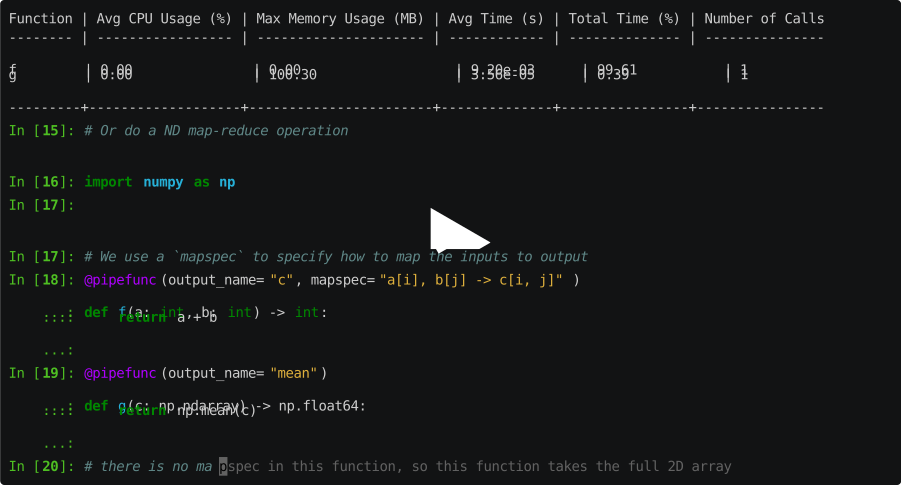
The following example demonstrates how to perform a map-reduce operation using pipefunc:
from pipefunc import pipefunc, Pipeline
from pipefunc.map import load_outputs
import numpy as np

@pipefunc(output_name="c", mapspec="a[i], b[j] -> c[i, j]")  # the mapspec is used to specify the mapping
def f(a: int, b: int):
    return a + b

@pipefunc(output_name="mean")  # there is no mapspec, so this function takes the full 2D array
def g(c: np.ndarray):
    return np.mean(c)

pipeline = Pipeline([f, g])
inputs = {"a": [1, 2, 3], "b": [4, 5, 6]}
pipeline.map(inputs, run_folder="my_run_folder", parallel=True)
result = load_outputs("mean", run_folder="my_run_folder")
print(result)  # prints 7.0
Here the mapspec argument is used to specify the mapping between the inputs and outputs of the f function, it creates the product of the a and b input lists and computes the sum of each pair. The g function then computes the mean of the resulting 2D array. The map method executes the pipeline for the inputs, and the load_outputs function is used to load the results of the g function from the specified run folder.
Jupyter Notebook Example
See the detailed usage example and more in our example.ipynb.
Installation
Install the latest stable version from conda (recommended):
conda install pipefunc
or from PyPI:
pip install "pipefunc[all]"
or install main with:
pip install -U https://github.com/pipefunc/pipefunc/archive/main.zip
or clone the repository and do a dev install (recommended for dev):
git clone git@github.com:pipefunc/pipefunc.git
cd pipefunc
pip install -e ".[dev]"
Development
We use pre-commit to manage pre-commit hooks, which helps us ensure that our code is always clean and compliant with our coding standards.
To set it up, install pre-commit with pip and then run the install command:
pip install pre-commit
pre-commit install
1 maintainer

Release files for pipefunc 0.93.2
For a detailed explanation of source distributions (sdists) and built distributions (wheels), please see the package formats documentation.
Source distribution (sdist)
| File | Size | Uploaded | |
|---|---|---|---|
| pipefunc-0.93.2.tar.gz | 478.6 kB | Details |
Built distribution (wheel)
| File | Interpreter | ABI | Platform | Reset |
|---|---|---|---|---|
| pipefunc-0.93.2-py3-none-any.whl | Python 3 | none | any | Details |
Total release size: 721.6 kB
Release files / pipefunc-0.93.2.tar.gz
| Download URL | pipefunc-0.93.2.tar.gz |
|---|---|
| Size | 478.6 kB |
| Tags | Source |
|
SHA-256 checksum How to use checksums |
4dd295b8e330fc9e593d43596cb2563c13a9fde76e531f05916d3e8fe296861a
|
|
BLAKE2b-256 checksum How to use checksums |
70eabfd076ffdd5947c0542f093374ed6a2fc8b41b4f3bb202b47a5338c5582b
|
| Upload date | |
|
Uploaded using Trusted Publishing? What is trusted publishing? |
Yes |
| Uploaded via |
twine/7.0.0 CPython/3.13.14
|
Provenance
Provenance describes where a file came from. On PyPI, provenance is shared via attestations, which provide a verifiable record of the build or publishing details. View details, limitations and caveats.


PyPI Publish Attestation
PyPI verified that this artifact, at this checksum, originated from the publisher listed below.
Signed by GitHub Actions, verified by PyPI on Sep 21, 2026.
Transparency logRelease files / pipefunc-0.93.2-py3-none-any.whl
| Download URL | pipefunc-0.93.2-py3-none-any.whl |
|---|---|
| Size | 243.0 kB |
| Tags | Python 3 |
|
SHA-256 checksum How to use checksums |
783d834d585c1f29c3b8a3bc5a4214df69d142d87571b332c4f20edc466d1089
|
|
BLAKE2b-256 checksum How to use checksums |
ce2af8367f340043fe73bd18d5d0ab0b451fee7d10b98c264ccd7fa218f33778
|
| Upload date | |
|
Uploaded using Trusted Publishing? What is trusted publishing? |
Yes |
| Uploaded via |
twine/7.0.0 CPython/3.13.14
|
Provenance
Provenance describes where a file came from. On PyPI, provenance is shared via attestations, which provide a verifiable record of the build or publishing details. View details, limitations and caveats.
PyPI Publish Attestation
PyPI verified that this artifact, at this checksum, originated from the publisher listed below.
Signed by GitHub Actions, verified by PyPI on Sep 21, 2026.
Transparency log













