
A Python library for creating and optimizing processing pipeline.


Project description
PipeOptz: A Framework for Pipeline Optimization



PipeOptz is a Python library for building, visualizing, and optimizing complex processing pipelines. It allows you to define a series of operations as a graph, manage the flow of data, and then automatically tune the parameters of those operations to achieve a desired outcome.
The library is built around a few key ideas:
-
Node: ANodeis the basic building block of a pipeline. It wraps a single Python function and its parameters. -
Pipeline: ThePipelineholds the entire workflow. You add nodes to it and define their dependencies, forming a Directed Acyclic Graph (DAG). The pipeline manages the execution order. -
Parameter: AParameterdefines the search space for a value you want to optimize. The library provides different types, likeIntParameter,FloatParameter, andChoiceParameter. -
PipelineOptimizer: This is the engine that tunes your pipeline. It takes your pipeline, a set ofParameters to vary, and aloss_functionto minimize, and uses metaheuristic algorithms (like Genetic Algorithms, Bayesian Optimization, etc.) to find the best parameter values.
The package is provided with a LICENSE file which contains the license terms.
Installation
Installation from PyPi
The easiest way to install PipeOptz is through pip. Open your terminal and run the follwing command:
pip install --upgrade --user pipeoptz
Installation from source
If you're reading this README from a source distribution, you can install PipeOptz after downloading it with:
pip install --upgrade --user .
You can also install the latest development version directly from Github:
pip install --upgrade --user https://github.com/centralelyon/pipeoptz/archive/main.zip
For local development install PipeOptz in editable mode:
Quick Start
Let's create a basic pipeline with a few arithmetic operations to see how it works.
from pipeoptz import Pipeline, Node

# 1. Define the functions your nodes will execute
def add(x, y):
    return x + y

def multiply(a, b):
    return a * b

# 2. Create a pipeline
pipeline = Pipeline(name="arithmetic_pipeline")

# 3. Create nodes and add them to the pipeline with dependencies
# Node A: 5 + 3 = 8
pipeline.add_node(Node(id="A", func=add, fixed_params={"x": 5, "y": 3}))

# Node B: Takes the output of A as input -> 8 * 10 = 80
pipeline.add_node(Node(id="B", func=multiply, fixed_params={"b": 10}), predecessors={"a": "A"})

# Node C: Takes the output of B as input -> 80 + 1 = 81
pipeline.add_node(Node(id="C", func=add, fixed_params={"y": 1}), predecessors={"x": "B"})


# 4. Run the pipeline
# The result is a tuple: (last_node_id, history_of_all_node_outputs, execution_times)
last_node, history, _ = pipeline.run()

print(f"Pipeline finished at node: {last_node}")
print(f"Result of final node 'C': {history[last_node]}")
print(f"History of all node outputs: {history}")

# 5. Visualize the pipeline
# This creates a .dot file and a .png image of the graph
pipeline.to_dot("basic.dot", generate_png=True)
This script will output:
Pipeline finished at node: C
Result of final node 'C': 81
History of all node outputs: {'A': 8, 'B': 80, 'C': 81}
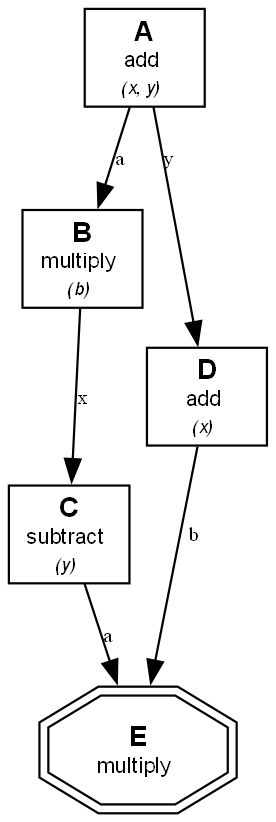
And it will generate an image (basic.png) of your pipeline's structure, taken from the basic.ipynb example:
Optimizing a Pipeline
The real power of PipeOptz comes from optimization. The simple example above uses fixed parameters, but you can easily make them tunable.
To do this, you would:
- Create a
PipelineOptimizer. - Define which parameters to tune using objects like
IntParameterorFloatParameter. - Provide a
loss_functionthat calculates how "good" the pipeline's output is. - Run the
optimizer.optimize()method.
For a complete, runnable optimization example, please see the Jupyter Notebook at: examples/advanced/simple.ipynb.
Examples
Several example pipelines are provided in the examples/ directory. These include:
basic/: A simple pipeline with arithmetic operations.cond/: A pipeline demonstrating conditional branching.for/: A pipeline demonstrating for loops.while/: A pipeline demonstrating while loops.opti/: A pipeline demonstrating optimization pipeline with tunable parameters.
Building Docs
This project uses MkDocs to generate documentation.
To serve the documentation locally, run the following command from the root of the project:
mkdocs serve
This will start a local server, and you can view the documentation by opening your browser to http://127.0.0.1:8000.
Testing
PipeOptz makes use of pytest for its test suite.
pip install pytest
pytest
Contributing
Contributions are welcome! Please see the CONTRIBUTING.md file for details on how to get started.
License
This project is licensed under the MIT License. See the LICENSE file for details.
This research is partially funded by ANR, the French National Research Agency with the GLACIS project (grant ANR-21-CE33-0002).


Download files
Download the file for your platform. If you're not sure which to choose, learn more about installing packages.
Source Distribution
Built Distribution
Filter files by name, interpreter, ABI, and platform.
If you're not sure about the file name format, learn more about wheel file names.
Copy a direct link to the current filters
File details
Details for the file pipeoptz-0.1.6.tar.gz.
File metadata
- Download URL: pipeoptz-0.1.6.tar.gz
- Upload date:
- Size: 39.7 kB
- Tags: Source
- Uploaded using Trusted Publishing? No
- Uploaded via: twine/6.2.0 CPython/3.13.7
File hashes
| Algorithm | Hash digest | |
|---|---|---|
| SHA256 |
dd867be3d2e5ca0bdf22d1a3f371929c79e20c90dccb0e83309c98f4edf5ca6a
|
|
| MD5 |
5cc7dc3394ce4d1b793977eee654798a
|
|
| BLAKE2b-256 |
f5fa41d4a663db12fc4bb3e8b56beb322ddf9dfcc37016fe8d8c7040c3784ffb
|
File details
Details for the file pipeoptz-0.1.6-py3-none-any.whl.
File metadata
- Download URL: pipeoptz-0.1.6-py3-none-any.whl
- Upload date:
- Size: 29.8 kB
- Tags: Python 3
- Uploaded using Trusted Publishing? No
- Uploaded via: twine/6.2.0 CPython/3.13.7
File hashes
| Algorithm | Hash digest | |
|---|---|---|
| SHA256 |
dbebf0c358eefb820b035c7d28ee4f5d43dbe7f9abd1fde80bded8c65b6fe8e7
|
|
| MD5 |
49ee86fa559b0efe8542851ebd66fc4f
|
|
| BLAKE2b-256 |
47f157e226d6afa92709310cf9ea1e1f2ea63fa27a653386a85a89ab06b43e0a
|






