
PipeRider: Data Reliability Automated








What's PipeRider?
PipeRider is a light-weight data quality tool so you can be confident of your data without writing tests for every single pipeline.
We're in an early stage, so let us know if you have any questions, feedback, or need help installing PipeRider! :heart:
Key Features
- Generate an HTML Report featuring your data profile and data assertion test results (interactive sample)
- Compare two reports to understand how your data has changed over time (interactive sample)
- Test your data with data assertions:
- Built-in data assertions
- Extensible through custom assertions
- Auto-generated data assertions
- Currently supports Postgres, Snowflake, SQLite, BigQuery, Redshift, DuckDB, CSV and Parquet.
- Zero-config support for dbt projects
- Automation through GitHub Actions, save reports in S3
Made for...
For data engineers
- :zap: 2 min install & set-up
- :relieved: non-intrusive & open-source: install and use locally
- :moneybag: fast & cheap: 10M rows, 8 columns takes only 16s to profile
For data analysts
- :bowtie: never waste time on analyzing wrong data: collects various metadata metrics such as freshness, uniqueness, distribution... check all metrics
- :speech_balloon: communicate easily your data expectations by showing the report
Live Demo
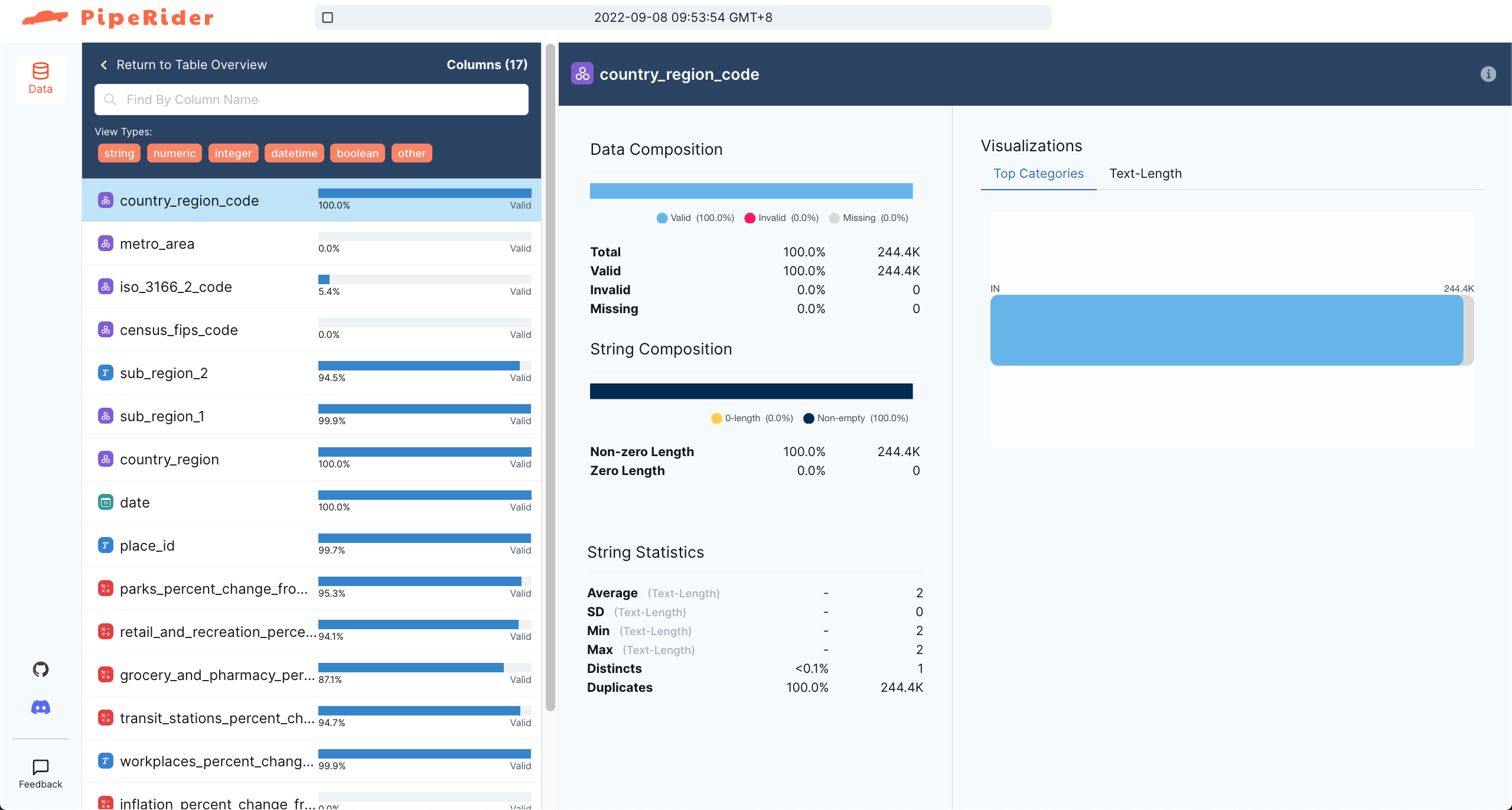
Click here or on image to interact
Getting started
Get started quickly below, or go to the docs
Install PipeRider
pip install piperider
By default, PipeRider supports built-in SQLite connector, extra connectors are available:
| connectors | install | supported since |
|---|---|---|
| snowflake | pip install 'piperider[snowflake]' | |
| postgres | pip install 'piperider[postgres]' | |
| bigquery | pip install 'piperider[bigquery]' | PipeRider v0.7.0 |
| redshift | pip install 'piperider[redshift]' | PipeRider v0.7.0 |
| parquet | pip install 'piperider[parquet]' | PipeRider v0.8.0 |
| csv | pip install 'piperider[csv]' | PipeRider v0.8.0 |
| duckdb | pip install 'piperider[duckdb]' | PipeRider v0.8.0 |
Use comma to install multiple connectors in one line:
pip install 'piperider[postgres,snowflake]'
You can follow the quick start guide to learn more about PipeRider.
Attach PipeRider to a dbt project
piperider init creates /.piperider under a dbt project root and generates necessary configurations.
Scan data quality from models
piperider run runs profiling, and tests against assertions, and will render an HTML report /.piperider/outputs
You can do a run for a specific table using piperider run --table $TABLENAME
You can specifying the output location of a report using piperider generate-report -o $PATHNAME or specifying it in the config file.
All details on generating reports
Generate comparison view
You can use piperider compare-report to compare 2 reports.
Learn More
| PipeRider Resources | Description |
|---|---|
| Documentation | PipeRider Main Doc Site |
| Sample_Project | Sample Project with with sqlite |
| dbt_Sample_Project | Sample Project with dbt |
| Roadmap | PipeRider Roadmap |
| Blog | How we got started |
Get involved
Support :heart:
If you like what we are building, support us! Give us a :star: or get in touch. We'd love your feedback! Send us a message on piperider.io, join our Discord, or report an issue on GitHub
Contributions
We welcome contributions. See the Set up dev environment and the Contributing guildline to get started.
1 maintainer

Metadata
1 maintainer
Release files for piperider-nightly 0.9.0.20220919
For a detailed explanation of source distributions (sdists) and built distributions (wheels), please see the package formats documentation.
Source distribution (sdist)
| File | Size | Uploaded | |
|---|---|---|---|
| piperider-nightly-0.9.0.20220919.tar.gz | 3.6 MB | Details |
Built distribution (wheel)
| File | Interpreter | ABI | Platform | Reset |
|---|---|---|---|---|
| piperider_nightly-0.9.0.20220919-py3-none-any.whl | Python 3 | none | any | Details |
Total release size: 7.3 MB
Release files / piperider-nightly-0.9.0.20220919.tar.gz
| Download URL | piperider-nightly-0.9.0.20220919.tar.gz |
|---|---|
| Size | 3.6 MB |
| Tags | Source |
|
SHA-256 checksum How to use checksums |
f7c275ee59b4f53840a3663c7aff34524bdb1c45a67d5be52bdcf8c9f30bc2ce
|
|
BLAKE2b-256 checksum How to use checksums |
1f743768b9559c5bdd696e435e024bc8f59a20431e8bd98f3a8cc46ebcd53ad5
|
| Upload date | |
|
Uploaded using Trusted Publishing? What is trusted publishing? |
No |
| Uploaded via |
twine/4.0.1 CPython/3.8.13
|
Release files / piperider_nightly-0.9.0.20220919-py3-none-any.whl
| Download URL | piperider_nightly-0.9.0.20220919-py3-none-any.whl |
|---|---|
| Size | 3.7 MB |
| Tags | Python 3 |
|
SHA-256 checksum How to use checksums |
8b3b5719f132750429869a16622d72e69cdc0ad23eef86b6da5e169ee610a1a7
|
|
BLAKE2b-256 checksum How to use checksums |
531c85b3d68a1a17d3261a2b87b9740a787d6da7da8080d1dd3d4787d39b192a
|
| Upload date | |
|
Uploaded using Trusted Publishing? What is trusted publishing? |
No |
| Uploaded via |
twine/4.0.1 CPython/3.8.13
|














