
PipeWire Controller


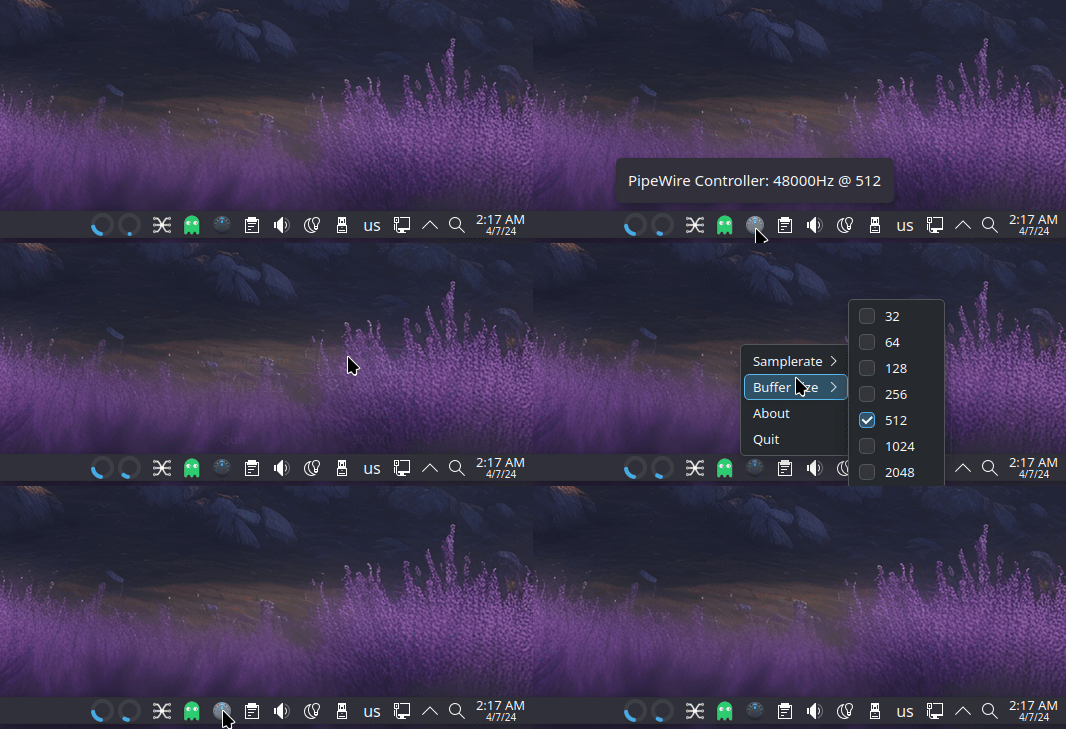
A modern, production-ready system tray application for controlling PipeWire audio server settings on Linux.
Features
- 🎛️ Dynamic Sample Rate Control - Automatically detects hardware-supported sample rates
- 🔧 Buffer Size Management - Adjust quantum/buffer size for latency optimization
- 💾 Persistent Settings - Automatically saves and restores your preferences
- 🖥️ Desktop Integration - System tray icon compatible with Wayland and X11
- 🔍 Hardware Detection - Queries connected DACs for supported capabilities
- 🧪 Fully Tested - Comprehensive test suite with pytest
- 📦 Modern Packaging - Standard Python package with pyproject.toml
Requirements
- Python: 3.10 or higher
- PipeWire: Audio server with
pw-metadata,pw-dump, andwpctlutilities - PyQt6: Qt6 bindings for Python
- Linux: Any distribution with system tray support
Installation
From PyPI (Recommended)
pip install pipewire-controller
From Source
git clone https://github.com/apapamarkou/pipewire-controller.git
cd pipewire-controller
pip install .
Development Installation
git clone https://github.com/apapamarkou/pipewire-controller.git
cd pipewire-controller
pip install -e ".[dev]"
Distribution-Specific Dependencies
Arch Linux / Manjaro / Garuda:
sudo pacman -S python-pyqt6 pipewire wireplumber
Fedora / RHEL:
sudo dnf install python3-pyqt6 pipewire pipewire-utils
Debian / Ubuntu / Mint:
sudo apt install python3-pyqt6 pipewire pipewire-bin wireplumber
openSUSE:
sudo zypper install python3-qt6 pipewire pipewire-tools
Usage
Running the Application
After installation, simply run:
pipewire-controller
Or as a Python module:
python -m pipewire_controller
Autostart
To start automatically on login, create a desktop entry:
mkdir -p ~/.config/autostart
cat > ~/.config/autostart/pipewire-controller.desktop << EOF
[Desktop Entry]
Type=Application
Name=PipeWire Controller
Exec=pipewire-controller
Icon=audio-card
Terminal=false
Categories=AudioVideo;Audio;
EOF
Configuration
Settings are stored in ~/.config/pipewire-controller/settings.json:
{
  "samplerate": 48000,
  "buffer_size": 512
}
Development
Project Structure
pipewire-controller/
├── src/pipewire_controller/
│   ├── engine.py          # PipeWire logic (no GUI dependencies)
│   ├── core/              # Legacy modules (deprecated)
│   ├── ui/                # PyQt6 interface components
│   └── utils/             # Configuration & process management
├── tests/                 # Pytest test suite
├── pyproject.toml         # Package configuration
└── README.md
Running Tests
# Install development dependencies
pip install -e ".[dev]"

# Run tests
pytest

# Run with coverage
pytest --cov=src/pipewire_controller --cov-report=html
Code Quality
# Format code
black src/ tests/

# Lint code
ruff check src/ tests/
How It Works
- Hardware Detection: Engine queries PipeWire via
pw-dumpto detect connected audio devices and their supported sample rates - Logic Layer:
PipewireEngineclass handles all PipeWire interactions without GUI dependencies - Dynamic UI: System tray populates menu with only hardware-supported rates
- Settings Application: Engine uses
pw-metadatato apply sample rate and buffer size changes - Persistence: Settings saved to JSON and reapplied on startup
Troubleshooting
Tray Icon Not Showing
Ensure your desktop environment supports system tray icons:
- GNOME: Install
gnome-shell-extension-appindicator - KDE Plasma: Built-in support
- i3/Sway: Use
waybarori3status
PipeWire Commands Not Found
Install PipeWire utilities:
# Check if installed
which pw-metadata pw-dump wpctl

# Install if missing (Arch example)
sudo pacman -S pipewire wireplumber
Settings Not Persisting
Check permissions on config directory:
ls -la ~/.config/pipewire-controller/
Contributing
Contributions are welcome! Please follow these guidelines:
- Fork the repository
- Create a feature branch (
git checkout -b feature/amazing-feature) - Write tests for new functionality
- Ensure tests pass (
pytest) - Format code (
black src/ tests/) - Commit changes (
git commit -m 'Add amazing feature') - Push to branch (
git push origin feature/amazing-feature) - Open a Pull Request
Code Style
- Follow PEP 8
- Use type hints where appropriate
- Write docstrings for public APIs
- Keep functions focused and testable
Acknowledgments
Special thanks to:
- @ItzSelenux - Contributions and testing
- @Axel-Erfurt - UI improvements
- PipeWire Team - For the excellent audio server
License
This project is licensed under the GNU General Public License v3.0 - see the LICENSE file for details.
Support
- Issues: GitHub Issues
- Discussions: GitHub Discussions
Author: Andrianos Papamarkou
Repository: https://github.com/apapamarkou/pipewire-controller
1 maintainer

Metadata
1 maintainer
Release files for pipewire-controller 1.0.0
For a detailed explanation of source distributions (sdists) and built distributions (wheels), please see the package formats documentation.
Source distribution (sdist)
| File | Size | Uploaded | |
|---|---|---|---|
| pipewire_controller-1.0.0.tar.gz | 26.2 kB | Details |
Built distribution (wheel)
| File | Interpreter | ABI | Platform | Reset |
|---|---|---|---|---|
| pipewire_controller-1.0.0-py3-none-any.whl | Python 3 | none | any | Details |
Total release size: 51.7 kB
Release files / pipewire_controller-1.0.0.tar.gz
| Download URL | pipewire_controller-1.0.0.tar.gz |
|---|---|
| Size | 26.2 kB |
| Tags | Source |
|
SHA-256 checksum How to use checksums |
f1554a336fc41bdbe4049f5aec2514fe240ab3a94e268b0aece476ca3f743d79
|
|
BLAKE2b-256 checksum How to use checksums |
3bb9ec7a92f6fde8fc028b8debe1e1f3f21ea35976ecf51907a713fdb084f6d5
|
| Upload date | |
|
Uploaded using Trusted Publishing? What is trusted publishing? |
Yes |
| Uploaded via |
twine/6.1.0 CPython/3.13.7
|
Provenance
Provenance describes where a file came from. On PyPI, provenance is shared via attestations, which provide a verifiable record of the build or publishing details. View details, limitations and caveats.


PyPI Publish Attestation
PyPI verified that this artifact, at this checksum, originated from the publisher listed below.
Signed by GitHub Actions, verified by PyPI on Feb 13, 2026.
Transparency logRelease files / pipewire_controller-1.0.0-py3-none-any.whl
| Download URL | pipewire_controller-1.0.0-py3-none-any.whl |
|---|---|
| Size | 25.5 kB |
| Tags | Python 3 |
|
SHA-256 checksum How to use checksums |
edbb27417b6dc6fd9a3285ab310649d4357db4aa0e9a36456b9dce4ca00b859a
|
|
BLAKE2b-256 checksum How to use checksums |
71cc2845386d888b447b20b0e64114525ccbe86c1fe5384abafea78c99f9ebff
|
| Upload date | |
|
Uploaded using Trusted Publishing? What is trusted publishing? |
Yes |
| Uploaded via |
twine/6.1.0 CPython/3.13.7
|
Provenance
Provenance describes where a file came from. On PyPI, provenance is shared via attestations, which provide a verifiable record of the build or publishing details. View details, limitations and caveats.
PyPI Publish Attestation
PyPI verified that this artifact, at this checksum, originated from the publisher listed below.
Signed by GitHub Actions, verified by PyPI on Feb 13, 2026.
Transparency log












