
Pipewright
Configurable, governed MLOps on Google Cloud. Build, release, run and monitor models from configuration, with a human in the loop for every retrain decision.
Pipewright is open source under the Apache License 2.0 and maintained by Fluxor Software.
Status: 1.0.0. Working end to end on Google Cloud, including private environments with customer-managed keys, enforced organization policies and an enforced VPC Service Controls perimeter. The configuration format is stable (STABILITY.md). Releases are on GitHub (the wheel as a release file, the launcher image in GitHub Container Registry) and on PyPI as
pipewright-mlops.
At a glance
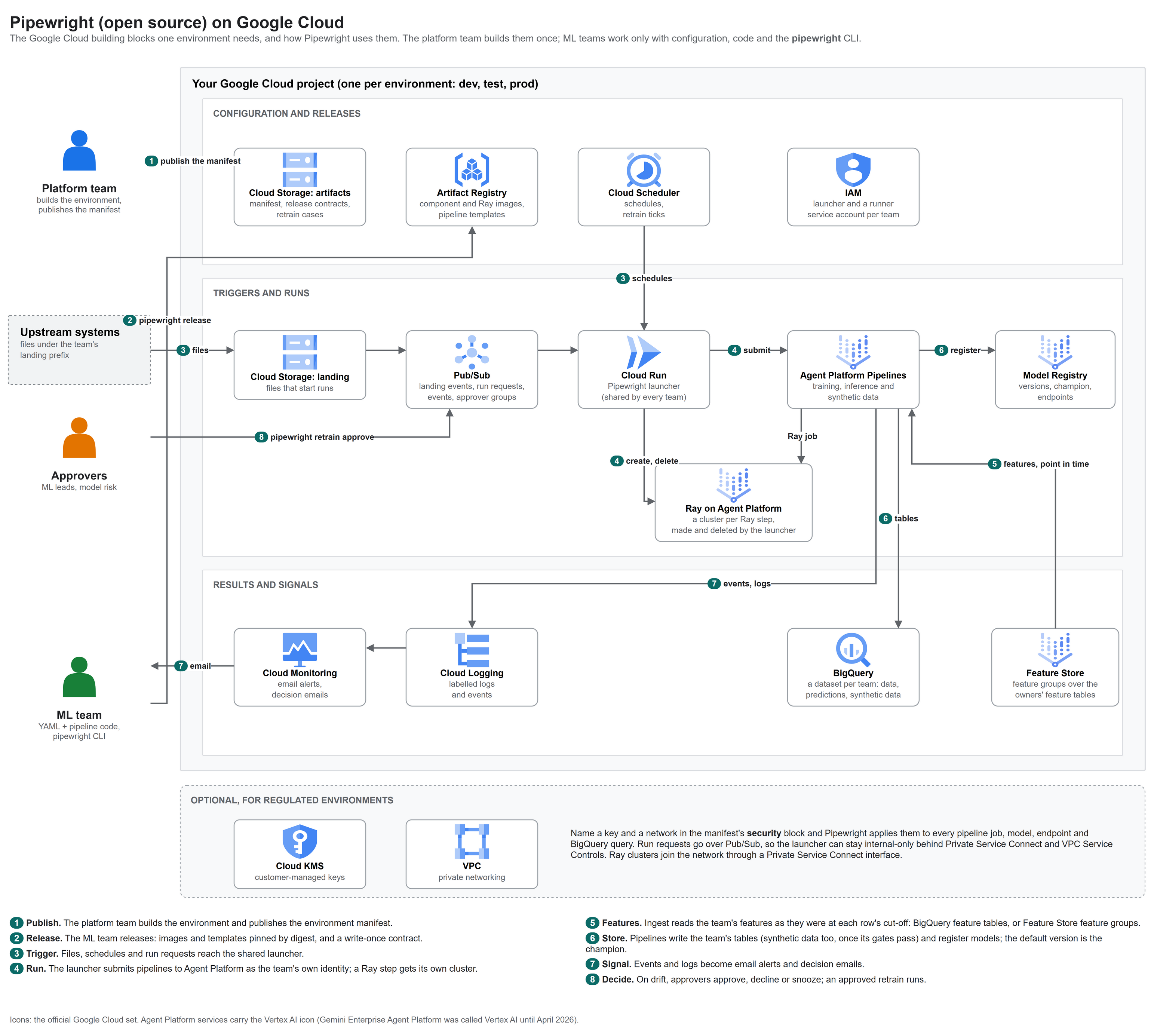
Editable source: docs/images/pipewright-architecture.drawio (draw.io, official Google Cloud icons).
The same environment on private GKE. One setting in the manifest (orchestrator: kfp) runs the same pipelines
on Kubeflow Pipelines in a private GKE cluster, with Ray on KubeRay and online serving on KServe. Templates,
contracts, the CLI and everything outside the cluster stay the same.
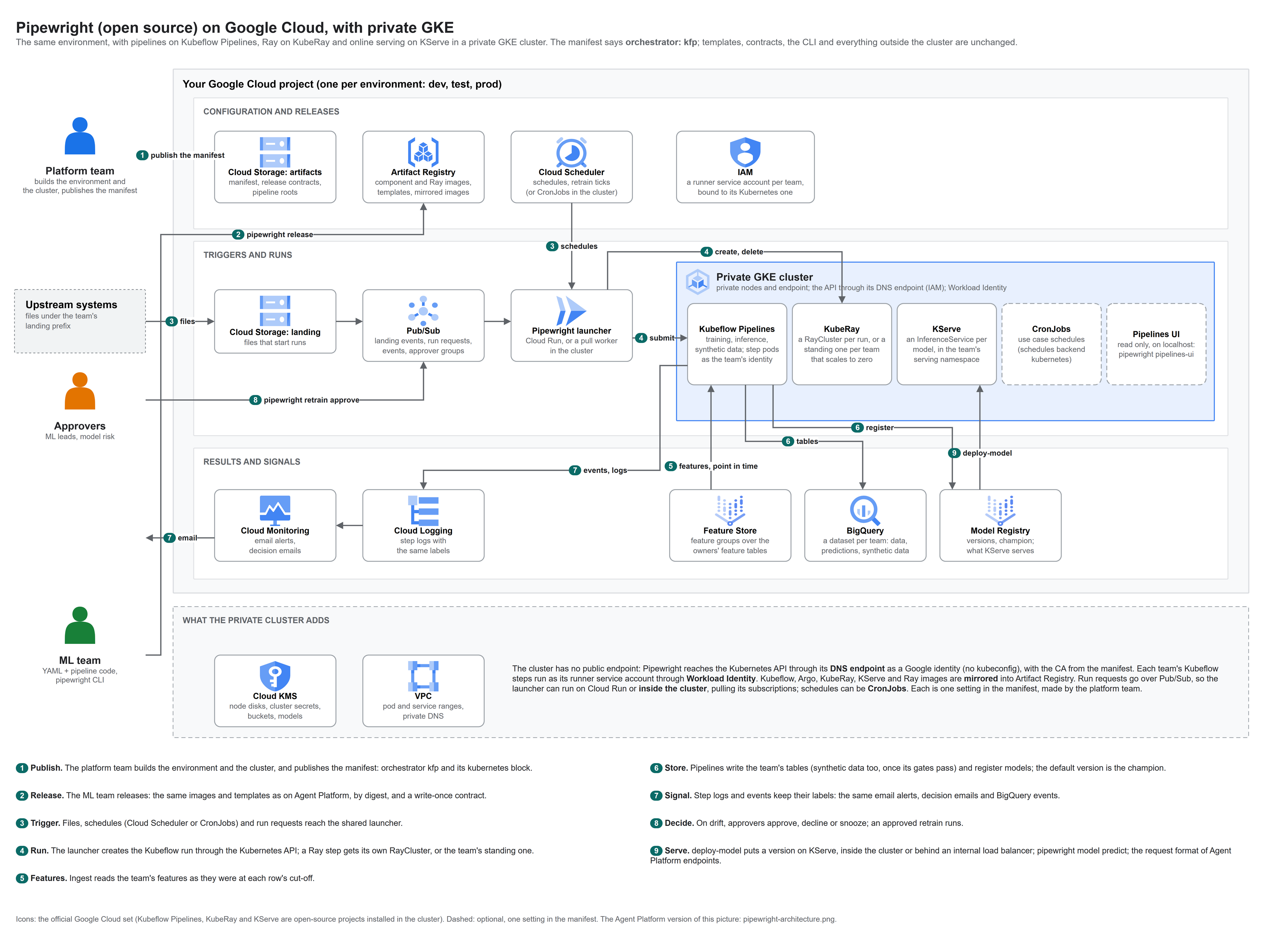
Editable source: docs/images/pipewright-gke-architecture.drawio.
The platform team builds the environment once and publishes an environment manifest: the names of everything a
team may use. ML teams then work only with their own configuration and code; the pipewright CLI and the shared
launcher do the rest.
Building blocks: what you need on Google Cloud
Pipewright does not create infrastructure. Before an ML team runs pipewright, the platform side provides these
resources in each environment's project and describes them in the manifest
(src/pipewright/config/schemas/manifest.schema.json).
| Building block | Google Cloud service | What Pipewright uses it for | Needed |
|---|---|---|---|
| Artifacts bucket | Cloud Storage | The environment manifest, release contracts and live pointers, pipeline roots, retrain cases | Always |
| Landing bucket | Cloud Storage, with a Pub/Sub notification | Files dropped under a team's prefix start runs | For file triggers |
| Registries | Artifact Registry: a Docker and a KFP repository (Python optional) | Component images and compiled pipeline templates, pinned by digest | Always |
| Pipelines | Agent Platform Pipelines (formerly Vertex AI Pipelines), or Kubeflow Pipelines v2 in a private GKE cluster (manifest orchestrator: kfp) |
Training and inference runs | Always (one of the two) |
| Kubernetes (private GKE only) | GKE: private nodes and endpoint, the API through its DNS endpoint, Workload Identity; Kubeflow Pipelines, KubeRay and optionally KServe installed, their images mirrored into Artifact Registry | Kubeflow runs as each team's identity, Ray clusters, online serving, optionally schedules as CronJobs and the launcher as a pull worker | With orchestrator: kfp |
| Models | Model Registry; Agent Platform endpoints or KServe for online serving | Versions, the champion, approvals; serving (canary on endpoints) | Always (serving optional) |
| Team data | BigQuery: one dataset per team | Raw data, predictions, metrics and monitoring tables, synthetic data | Always |
| Launcher | Cloud Run, from images/launcher.Dockerfile, with its own service account |
Turns files, schedules, API calls and run requests into pipeline runs; handles retrain decisions | Always |
| Identities | IAM service accounts: the launcher, one runner per team, CI (Workload Identity Federation) | Every pipeline step runs as its team's runner; nothing uses keys | Always |
| Messaging | Pub/Sub topics: landing events, run requests, lifecycle events, one per approver group | Triggers, runs from inside a private network, events for alerts and audit, approvals | Events and approvals recommended; run requests for private networks |
| Schedules | Cloud Scheduler, or Kubernetes CronJobs on private GKE | Scheduled runs; the hourly retrain tick and weekly digest | For schedules and retrain decisions |
| Alerts | Cloud Logging and Cloud Monitoring | Labelled logs, email alerts per use case, decision emails | Recommended |
| Encryption | Cloud KMS (customer-managed keys) | Applied to pipeline jobs, models, endpoints and BigQuery queries | Optional (regulated environments) |
| Private network | VPC, Private Service Connect, Private Services Access, VPC Service Controls | No public endpoints; pipeline workers peered with your network | Optional (regulated environments) |
APIs to enable: aiplatform, artifactregistry, bigquery, cloudscheduler, iam, iamcredentials,
logging, monitoring, pubsub, run, storage (all .googleapis.com), plus cloudkms for customer-managed
keys and container for private GKE.
Setting up the platform side. This repository does not include Terraform for the environment. If you would like help building one, or the Terraform we use, email hello@fluxorsoft.com or open a GitHub Discussion: we are happy to share, and it helps us shape what comes next.
The problem
Most organisations that put machine learning into production on Google Cloud hit the same gaps, team after team:
- Every ML team rebuilds the same plumbing. Triggers, release scripts, registry conventions, drift monitoring, alerting and IAM are written again for each use case. Months pass between a working notebook and a model in production, and every team does it slightly differently.
- A pipeline run is not a release. Ask "what exactly is running in production, and can we go back?" and the
answer is usually a guess: images tagged
latest, templates overwritten in place, no single record of what was approved. - Platform and ML teams block each other. ML teams wait on infrastructure tickets for buckets, datasets and permissions; platform changes break pipelines nobody told them about. There is no contract between the two.
- Settings live in code. A gate threshold, a drift limit or a machine size needs a code change and an engineer. Dev and production quietly drift apart, so the model you tested is not quite the model you ship.
- Drift alerts lead to blind retraining, or to nothing. Drift says the inputs changed, not why. An upstream data bug, a seasonal blip and a real change look the same. Automatic retraining bakes the bug into the next model or fits the blip; retraining on the same data does not improve anything. Ignoring alerts is worse.
- Governance is assembled after the fact. Auditors and model-risk teams ask which data trained a model, who approved it, where it runs, which key encrypts it and why it was retrained. The answers come from spreadsheets and memory.
- Regulated environments break the usual tools. Customer-managed keys on every query, no public endpoints, VPC Service Controls and enforced organization policies stop most off-the-shelf MLOps tooling at the door.
How Pipewright closes them
| Gap | What Pipewright does |
|---|---|
| 1. Rebuilt plumbing | One shared launcher per environment starts runs from file drops, schedules and API calls for every team. A use case is a folder of configuration plus your own pipeline code; pipewright new-usecase starts one from a working example |
| 2. Runs are not releases | pipewright release builds the component image and every pipeline template, pins both by digest, writes a write-once release contract, verifies it, then moves a live pointer. rollback moves the pointer back |
| 3. Teams blocking each other | The platform team publishes one environment manifest per environment: the names of everything a team may use. App configuration refers to those names and never creates infrastructure. pipewright doctor checks the live environment and says who to ask for anything missing |
| 4. Settings in code | Data contract, features, training, evaluation gates, triggers, monitoring and retraining policy are declared in YAML, validated against JSON Schemas and checked against each other. Only a fixed list of keys may differ per environment, so production is the same model judged the same way |
| 5. Blind retraining | Drift or a performance drop opens a retrain decision case with a short decision pack (what moved, the trend, data checks, the champion, what retraining would use). Named approver groups approve, decline or snooze with their own identity; nothing trains until the required groups agree |
| 6. Governance after the fact | Every key moment is a lifecycle event and a labelled log line: releases, runs, evaluations, registrations, approvals, deployments, alerts and decisions, each with who did it. Tools and auditors read the record instead of reconstructing it |
| 7. Regulated environments | The manifest's security block (CMEK key, network, reserved ranges) is applied to every pipeline job, model, endpoint and BigQuery query at run time. Run requests travel over Pub/Sub, so the launcher can stay internal-only |
What it looks like
A use case's operations file, owned and reviewed by the ML team:
# usecases/churn/config/operations.yaml
monitoring:
  output_table: churn_model_monitoring
  drift: { enabled: true, method: psi, threshold: 0.2 }
  performance: { enabled: true, metric: auc, min: 0.7,
                 labels: { table: churn_outcomes, key: customer_id, label: churned } }
  alerts: { notify: [ml-team@example.com], events: [monitoring.alert, training.rejected] }

retraining:
  mode: propose                     # off | propose | candidate (trains, never promotes)
  when: [drift, performance]
  decisions: { notify: [ml-team@example.com], publish: true }
  approvals: { required: [ml-leads, model-risk] }
  snooze: { max_days: 14 }
And the lifecycle, from the MLOps repository:
pipewright new-usecase --name churn --tenant retention --owner team-retention
pipewright validate     --env dev                     # schemas, references, cross-checks, offline
pipewright doctor       --env dev                     # read-only checks against the live project
pipewright tables sync  --env dev                     # create tables; additive changes only
pipewright release      --env dev                     # build, pin by digest, verify, go live
pipewright run          --env dev --usecase churn --pipeline inference --source-uri gs://...
pipewright monitor status --env dev --usecase churn   # drift, performance, open retrain cases
pipewright retrain show   --env dev --usecase churn   # the decision pack
pipewright retrain approve --env dev --usecase churn --reason "real shift after the price change"
Features
| Stage | Capabilities |
|---|---|
| Configure | Multi-file use cases (one concern per file), JSON Schema validation with path-qualified errors, ${...} references to manifest names, per-environment overrides on a fixed list of keys, resolve to print the effective configuration |
| Data | Data contracts (types, ranges, allowed values, uniqueness, minimum rows), CSV and Parquet on GCS or BigQuery tables and views as sources, features from feature tables joined point in time (no value from after a row's cut-off reaches training), tables in BigQuery, Parquet on GCS (with external tables) or both, from one schema file |
| Train | Random, stratified and time splits; tuning with parallel trials; experiments; compute per step set in configuration (steps), patched into the compiled template with no code change; Ray for a step that needs a cluster: on Agent Platform, or on KubeRay in private GKE; one cluster per run, sized in steps.<step>.ray within the platform's limits and deleted when the step ends, or on private GKE a standing cluster per team that scales its workers to zero |
| Evaluate | Metric gates, slice gates, calibration, explainability, comparison with the current champion on the same data, a model card |
| Release | Component image and pipeline templates by digest, write-once release contracts, a verify gate before going live, live pointers, rollback, several pipelines per use case (training and inference) released together |
| Run | A shared, multi-tenant launcher on Cloud Run, or inside a private GKE cluster pulling its subscriptions: file drops, schedules (Cloud Scheduler, or Kubernetes CronJobs where the platform's manifest says so), API calls and Pub/Sub run requests; deterministic run IDs, so retries never start duplicates |
| Serve | Model Registry with the default version as the champion, promotion following an approval policy, online serving with an approval gate, canary, promote and undeploy (Agent Platform endpoints, or KServe on private GKE with the same request format), pipewright model predict |
| Monitor | Feature drift and prediction drift (PSI) against training baselines, live performance once outcomes arrive, monitor status, email alerts configured in YAML |
| Decide | Retrain decision cases: modes, decision packs, approver groups with a quorum, snoozes and declines that expire, re-opening when things get worse, escalation, a weekly digest, an opt-in Pub/Sub feed for your own apps |
| Observe | Lifecycle events on Pub/Sub and labelled structured logs for every key moment, with no vendor code in pipelines |
| Protect | Personal data declared in the data contract and never used as a feature; erasure by key across a team's tables (BigQuery and Parquet) |
| Synthesize | Synthetic data, off until a team switches it on: learned inside the environment by an engine (MOSTLY AI local mode by default; SDV if the team installs it), gated on fidelity, utility and privacy before anything is published; one table, or an entity table with its feature tables and event sequences, keys and timing intact; or rows from the data contract alone, with no real data |
| Automate | pipewright ci init writes GitHub Actions workflows for pull requests, releases and operations, including self-hosted runners |
| Extend | Other packages add CLI commands through the pipewright.commands entry point, without patching the core |
How it works
Two personas, one contract between them (the diagram at the top shows the flow):
- The platform team owns durable, shared and security-relevant resources, and publishes the environment manifest.
- ML teams own pipeline code, configuration, tables inside their dataset, releases, schedules and model versions. Neither side edits the other's files.
- The launcher is deployed once per environment and never redeployed for a model release: a release only moves a pointer to a new, verified contract.
- Every step runs as the team's own identity, with the environment's key and network applied from the manifest.
CONTEXT.md describes the design, the decisions behind it and every interface in detail.
Your code and Pipewright
Teams write their pipelines and ML code their own way. Pipewright needs only a small contract at the edges:
| Free (your choice) | Fixed (the contract) | |
|---|---|---|
| Layout | Pipeline file and function names, the components folder, how config is split into files (include: patterns), table schema file names |
usecases/<name>/usecase.yaml, with metadata.name equal to the folder; overrides in usecases/<name>/environments/<env>.yaml |
| Pipelines | Steps, libraries, frameworks, models; anything inside a step, including Ray jobs on a cluster Pipewright makes for the step (ray_cluster(), below) |
Kubeflow Pipelines v2 (kfp pinned to the version Pipewright compiles with); every pipeline accepts project, region, source_uri and run_id; components take their image from COMPONENT_IMAGE |
| Configuration | Which sections you use; most have defaults | Optional ml_config parameter: when a pipeline declares it, it receives the resolved configuration (data contract, gates, monitoring, retraining) |
| Evaluation | How you compute metrics | Training writes an evaluation record, evaluation.json next to the model artifacts, with the metrics, slices and champion comparison (see below) |
| Files | Configuration files end in .yaml; a .yml file is refused with a message to rename it |
Pipewright checks the gates itself. Your evaluation step may apply the gates, but Pipewright does not take its
word for it. Before a version becomes the champion (pipewright model approve) or is served (pipewright deploy-model), Pipewright recomputes every metric gate, slice gate and the champion margin from the version's
evaluation record, against the configuration in force now. A rewritten evaluation step that drops a gate cannot
promote a failing model, and pipewright model list shows each version's result. The record:
{
  "metrics":  {"auc": 0.81, "calibration_error": 0.03},
  "slices":   {"contract_length_months": {"12": {"rows": 400, "auc": 0.79}}},
  "champion": {"auc": 0.80, "_version": "3"},
  "decision": "approve"
}
slices is needed for slice gates; champion holds the champion's metrics on the same test data, or null when
there was no champion yet. The churn example writes this record in its evaluate and register steps.
Ray steps
A step that needs a cluster asks for one in configuration and uses it in code. The cluster exists only for that step of that run:
steps:
  tune-on-ray:
    ray: { head_machine: n1-standard-4, workers: 1 }   # within the platform's limits; may differ per environment
components:
  ray_requirements: ray-requirements.txt               # extra packages for the cluster's nodes
from pipewright_runtime import ray_cluster, ray_job

with ray_cluster(ml_config, "tune-on-ray", run_id) as cluster:      # created by the launcher, deleted after
    ray_job(ml_config, cluster, f"python -m ray_tune_job {trials.uri}", run_id=run_id)
-
Who makes the cluster: the launcher, as the tenant's runner identity, from the live release (the step only names itself). It applies the environment's key and network, and labels the cluster with the run.
-
What it runs: a Ray image
pipewright releasebuilds for the use case, on the platform's Ray on Agent Platform base image, with the component code andray_requirements. -
Cleanup: the step deletes the cluster when it ends, even on errors; the launcher's tick deletes any cluster whose run ended or whose
max_minutespassed, so a killed step never leaves one running. -
The platform's side: an optional
rayblock in the manifest (environment and per tenant): whether Ray is on, the Ray version, base image, a Private Service Connect network attachment, and limits on machines, workers, accelerators and minutes. Without it: a cluster per run on a public endpoint, the runner identity, a prebuilt image, small limits. -
What the platform must grant (not in the starter Terraform):
- the launcher's identity:
aiplatform.persistentResources.create,delete,getandlist(a custom role;roles/aiplatform.useronly gets and lists); - each tenant runner, on itself:
roles/iam.serviceAccountUser(it reaches its own cluster's job API only if it may act as itself) androles/iam.serviceAccountOpenIdTokenCreator(the step signs the ID token it asks the launcher with: Agent Platform workers' metadata server does not reliably issue one).
Pipewright Enterprise's Terraform grants all of it, with the Private Service Connect network for private environments.
- the launcher's identity:
-
A Ray head needs at least 16 vCPUs and more than 18 GB of memory: with fewer vCPUs the cluster runs but its job API never answers (found live), and Agent Platform refuses less memory.
validatechecks both. -
A Ray step does not size itself: no
cpu,memoryorgpuon a Ray step (Agent Platform runs sized steps where the metadata server issues no ID tokens, so the step could not ask the launcher); size the cluster instead. -
Checks:
validaterefuses a step over the limits and a Ray client that does not match the clusters (ray[default]pinned in the component requirements, withgoogle-cloud-aiplatform[ray]). -
On private GKE (
orchestrator: kfp): the sameray_cluster()andray_job()calls get a KubeRay RayCluster on the cluster's Ray node pool, from the mirrored Ray image, and the job is submitted inside the cluster. The platform can instead give a team a standing cluster (tenants.<t>.ray.mode: standingin the manifest'srayblock):ray-<tenant>, kept by the platform, whose autoscaler adds workers for a job and removes them after the idle minutes. A release records the mode, so changing it makes a new release. The step code is the same.
pipewright new-usecase --from ray starts from an example that runs the churn tuning trials in parallel on Ray.
Development and pipelines: while developing, data scientists use a standalone Ray cluster of their own (made
in the console, used from a notebook with ray.init("vertex_ray://<cluster>"), Python and Ray versions matching
the cluster). Pipelines never use it: every run, dev to prod, gets its own cluster from Pipewright. The same Ray
code runs in both; only who owns the cluster changes.
Features from feature tables
Instead of one prepared table per use case, a use case can name the features it needs and the BigQuery feature tables that hold them. Feature tables belong to whoever produces the features (a data team, or the team itself); Pipewright only reads them. The recommended way to use features, how a feature table must look and the mistakes to avoid: docs/FEATURES.md.
# config/data.yaml
data:
  contract: { ... }                       # unchanged: every column the model and the checks see
  features_from:
    entity: { columns: [customer_id], time_column: snapshot_date }    # in the run's source, the entity table
    sources:
      - table: bq://features.customer_profile          # entity columns, feature_timestamp, one column per feature
        features: [tenure_months, monthly_charges]
      - table: bq://features.support_activity
        features: [num_support_tickets]
- The run's source is the entity table: who, as of when, and the label (
pipewright run --source-uri bq://...). Each row gets the newest value of each feature dated at or before its cut-off, so nothing from after it reaches training. Adatecut-off is the start of that day (UTC). - Scoring uses the same query, so training and batch scoring read features the same way. A scoring table
usually carries the cut-off column as the scoring date, which also makes the scores reproducible. Without it
(the contract must then mark that column
required: false) the cut-off is the query time. - One query, in BigQuery, run as the runner with the environment's key; everything after ingest (the data
contract, validation, training, gates, monitoring) is unchanged. A
data.features.resolvedevent records the tables, features, query job and time, and how many rows found a value. - Checks:
validatechecks the block against the data contract (every feature in the contract, no clashes, not the label, a date or timestamp cut-off) and refuses landing-file triggers, since the source must be abq://table;doctorchecks each feature table has the columns, with types the contract accepts. - The platform decides where features may come from (manifest):
tenants.<t>.features.datasetslists a tenant's feature datasets, andfeatures.required: truemakes feature tables the only source of model features.validaterefuses anything else.
Why tables and not a feature store product: the offline store of Google's Agent Platform Feature Store is
BigQuery itself, and its training-data fetch is still in Preview. Registered feature groups are a second kind of
source that resolves to the same tables: - feature_group: customer_profile with registered feature names, read
from the Feature Registry at each run. pipewright new-usecase --from features starts from an example with two
feature tables.
Synthetic data
Off until your team needs it. A synthetic section in the use case switches it on; without it nothing is built,
compiled or released for it, and the use case behaves exactly as before.
# config/synthetic.yaml
synthetic:
  enabled: true                          # may differ per environment
  purpose: test-data                     # sets the gates: test-data stays in the organisation, sharing leaves it
  source_uri: bq://${project}.${resources.bigquery_dataset}.customers    # read like training data, point in time
  output_table: synthetic_customers      # in outputs.bigquery.tables: the contract's columns plus run_id
  columns:
    customer_id: { rule: key, prefix: "SYN-" }     # keys and personal data are never learned
- Two tiers.
learned: an engine learns from the real data inside the environment, in asyntheticpipeline Pipewright provides (no code to write):pipewright run --pipeline synthetic, or a schedule withpipeline: synthetic.contract: no real data at all;pipewright synthetic generate --out rows.csvwrites rows from the data contract and the column rules, for development, CI and demos. - Engines. MOSTLY AI's Synthetic Data SDK in local mode (Apache-2.0) is the default; it makes no network
calls. SDV is available as an engine your team installs itself (
synthetic.requirements), under its own licence (Business Source Licence 1.1); Pipewright never ships it. - Gated, never trusted. Each candidate (by default the engine at sampling temperatures 1.0 and 1.3, in
parallel) is scored the same way: fidelity, utility (a model trained on synthetic data tested on a real holdout)
and privacy (exact copies, distance to the closest record, singling-out, linkability and inference attacks).
Pipewright recomputes the purpose's gates and publishes the best candidate that passes all of them, or nothing.
pipewright synthetic gateslists them; privacy gates may only be made stricter. - Never learned: personal-data columns (
data_protection.personal_data_columns) and keys get new values from rules; a real holdout is kept back from the engine; the generator stays inside the step. - Released like any pipeline: the synthetic pipeline runs on two images Pipewright builds (the engine, and
the evaluation), recorded in the release contract by digest, verified, and copied by
promote. - Relational and sequential (
mode: relational): the entity table and its child tables in one model, the feature tables ofdata.features_fromand event tables insynthetic.sequences(ordered per entity). Keys stay consistent across tables, history keeps its timing against each cut-off, and the gates are measured on the point-in-time join of the synthetic tables; each table goes to its own output table. - Events:
synthetic.evaluated,synthetic.rejectedandsynthetic.generatedcarry the gates, the chosen candidate and where the rows went.
Approval of a synthetic release by named approver groups, releasing it into other environments, evidence and per-environment privacy policy are in Pipewright Enterprise.
Promotion between environments
What runs in production is what was tested: pipewright promote --from test --to prod --usecase <name> takes the
release live in test (and its approved model) to production without rebuilding anything.
- Allowed source: only from the environment the destination names (
promotion: { from: test }in its environment file), and from a clean checkout of the source release's commit. - Destination policies first: the use case is resolved under production's manifest (approval policies, feature rules, Ray limits); a refusal stops before anything is copied.
- The same code: images are copied by digest and checked. Templates are compiled for production and must equal
the tested ones with only the registry address changed; an override that changes a pipeline's shape is refused
unless accepted with
--accept-template-change(recorded). - The same model (
model.promotion: model): the approved version's files, verified, registered in production as a candidate;pipewright model approvethere makes it the default. A model's first version needs--approvewith the promotion, since Model Registry makes it the default. Withmodel.promotion: retrain, production trains its own candidate. - Safe to repeat, recorded, reversible: the contract is written once and the pointer moved last; repeating is a
no-op;
promoted_fromand arelease.promotedevent record what came from where, by whom;pipewright rollbackgoes back without rebuilding.
Getting started
What you need
- On your machine: Python 3.11, uv, Docker (component images), and the Google Cloud CLI or Application Default Credentials.
- On Google Cloud: an environment with the building blocks above and its environment manifest. docs/ONBOARDING.md lists what the platform team hands to each ML team.
Install a release
pip install "pipewright-mlops[gcp]==1.0.0" # the command is `pipewright`
Each release is also on GitHub, with the wheel and sdist as release files
(gh release download v1.0.0 -R fluxorsoft/pipewright). Pin the version everywhere, CI included, directly from
PyPI or through your organisation's package index. The launcher image for platform teams is in GitHub Container Registry
(ghcr.io/fluxorsoft/pipewright-launcher), with its digest in the release notes.
Install from source
git clone https://github.com/fluxorsoft/pipewright.git
cd pipewright
uv sync --all-extras                # Python 3.11 virtual environment with the gcp and launcher extras
uv run pipewright --help
Or install the CLI into another environment from the checkout: pip install "<path to the checkout>[gcp]".
Your first use case
From an MLOps repository with an environments/<env>.yaml that points at your manifest:
apiVersion: pipewright/v1
kind: Environment
metadata: { name: dev }
spec:
  manifest: gs://<artifacts-bucket>/pipewright/environment.json
pipewright new-usecase --name churn --tenant <your-tenant> --owner <your-team>   # copies the churn example
pipewright validate --env dev
pipewright doctor   --env dev
pipewright tables sync --env dev
git commit -am "churn: first release"     # releases are named after the commit
pipewright release  --env dev
The churn example (examples/churn/) is a complete reference: training and inference pipelines, components, a
data contract, gates, monitoring, retrain decisions, table schemas, tests and generated sample data. The full
walkthrough, including what the platform team hands over, is in docs/ONBOARDING.md.
Help with the YAML
| You want | Use |
|---|---|
| Fewer keys to start with | pipewright new-usecase --from minimal ...: the churn example's training code with only the required configuration (two files) and one gate; everything else takes its default |
| The data contract written for you | pipewright new-usecase --name <name> --tenant <tenant> --owner <team> --from-bq <project.dataset.table> --label <column> drafts config/data.yaml (columns, types, label, split, features) and the raw table's schema from a BigQuery table or view. Then train on it with pipewright run --source-uri bq://<project.dataset.table> |
| Completion and hover help in the editor | Every YAML file new-usecase writes starts with # yaml-language-server: $schema=..., pointing at schemas in .pipewright-schemas/ (in VS Code, with the Red Hat YAML extension). Keys are suggested, explained on hover, and mistakes underlined. pipewright schemas adds the line to existing files and refreshes the schemas after an upgrade |
| What a key means | pipewright explain data.split.strategy prints its description, type, allowed values, default and whether it may vary per environment; pipewright explain --list lists every key |
Credentials: Application Default Credentials, or GCLOUD_CONFIG=<gcloud configuration> for refreshable gcloud
user credentials. Behind a TLS-inspecting proxy, set REQUESTS_CA_BUNDLE, GRPC_DEFAULT_SSL_ROOTS_FILE_PATH and
PIPEWRIGHT_BUILD_CA_BUNDLE.
Commands
| Stage | Commands |
|---|---|
| Configure | new-usecase, validate, resolve, explain, schemas, doctor, test |
| Release | tables sync, release, status, rollback, promote, schedules sync, alerts sync, ci init |
| Operate | run, model list, model approve, deploy-model, model predict, monitor status, data erase, synthetic generate, synthetic gates, pipelines-ui (private GKE) |
| Decide | retrain list, retrain show, retrain approve, retrain decline, retrain snooze |
| Extend | plugins (commands added by installed packages) |
Every command takes --env and most take --usecase. pipewright <command> --help lists the options.
Open source and Enterprise
Pipewright is open core. Everything an ML team uses is open source; Pipewright Enterprise adds what regulated organisations need around it, through published extension points (manifest fields, launcher routes, CLI plugins), never by patching this package.
| Pipewright (this repository) | Pipewright Enterprise | |
|---|---|---|
| CLI, configuration model, examples | Yes | Yes |
| Shared launcher, release contracts, rollback | Yes | Yes |
| Monitoring, alerts, lifecycle events | Yes | Yes |
| Retrain decisions with approver quorum | Yes | Yes |
| Promotion between environments by digest | Yes | Yes |
| Features from feature tables and Feature Store groups, point in time | Yes | Yes |
| Ray steps; Kubeflow Pipelines, KubeRay and KServe on private GKE | Yes | Yes |
| Synthetic data: learned and gated in the environment, one table or related tables and sequences | Yes | Yes |
| Private-managed Terraform blueprint (CMEK everywhere, private network, internal launcher, VPC Service Controls, organization policies), with private GKE | No | Yes |
| Approver groups, decision feeds and scheduler jobs provisioned | You provide them | Yes |
| Evidence packs: a tamper-evident audit record per model version | No | Yes |
| Synthetic data releases between environments: approver groups, policy per environment, evidence; settings drafted with Gemini | No | Yes |
| Fleet View: every environment, team and model in one read-only view | No | Yes |
| Support, onboarding and platform build-outs | Community | Fluxor Software |
Enterprise enquiries: fluxorsoft.com/pipewright.
Project status and roadmap
| Area | Status |
|---|---|
| App-team CLI, configuration model, ML lifecycle sections | Built and used end to end |
| Shared launcher, release contract v3, multi-pipeline releases | Built and used end to end |
| Retrain decisions | Built and used end to end |
| Private-environment support (CMEK, VPC, internal launcher, Pub/Sub run requests) | Built and used end to end |
| Promotion of a release and its approved model between environments | Built and used end to end |
Kubeflow Pipelines on private GKE (kfp adapter), KubeRay, KServe, CronJob schedules, the launcher in the cluster, a read-only Kubeflow UI (pipewright pipelines-ui) |
Built and used end to end, inside an enforced perimeter |
| Per-tenant pipeline roots | Built |
| OpenTelemetry export | Planned |
| 1.0.0 release on GitHub (package as release files, launcher image in GitHub Container Registry) | Released |
PyPI release (pipewright-mlops) |
Released (1.0.0) |
| Ray on Agent Platform or KubeRay, a cluster per Ray step of a run | Built |
| Features from BigQuery feature tables, point in time, for training and batch scoring | Built |
| Agent Platform Feature Store feature groups as a feature source | Built |
| Online serving from Bigtable (endpoints read features by entity ID) | Planned |
| Standing Ray clusters, one per team (private GKE; workers scale to zero) | Built; a cluster per run stays the default |
| Synthetic data (learned inside the environment and gated, or from the data contract alone) | Released in 1.0.0; used end to end on Agent Platform Pipelines and on Kubeflow in private GKE, inside an enforced perimeter |
Relational and sequential synthetic data (mode: relational: the entity table with its feature tables and event sequences) |
Released in 1.0.0; used end to end on Kubeflow in private GKE |
| SmartNoise as a differentially private engine | Roadmap (later) |
Google Cloud only, by design. Pipelines are Kubeflow Pipelines v2; bring any Python ML framework (the example uses PyTorch).
Development
uv sync --all-extras
uv run pytest                     # unit tests
uv run ruff check .               # lint
uv run --no-project --with-requirements examples/churn/tests/requirements.txt python -m pytest examples/churn/tests
CONTEXT.md is the place to start before changing anything: requirements, decisions, design and conventions, with stable IDs to refer to. See CONTRIBUTING.md for how to propose changes, and SECURITY.md to report a vulnerability.
License
Copyright 2026 Fluxor Software Limited. Licensed under the Apache License, Version 2.0; see NOTICE. "Pipewright" and "Fluxor" are names of Fluxor Software Limited; the license does not grant permission to use them beyond describing the origin of the work.
1 maintainer

Metadata
1 maintainer
Release files for pipewright-mlops 1.0.0
For a detailed explanation of source distributions (sdists) and built distributions (wheels), please see the package formats documentation.
Source distribution (sdist)
| File | Size | Uploaded | Provenance | |
|---|---|---|---|---|
| pipewright_mlops-1.0.0.tar.gz | 3.5 MB | With provenance | Details |
Built distribution (wheel)
| File | Interpreter | ABI | Platform | Reset |
|---|---|---|---|---|
| pipewright_mlops-1.0.0-py3-none-any.whl | Python 3 | none | any | Details |
Total release size: 4.2 MB
Release files / pipewright_mlops-1.0.0.tar.gz
| Download URL | pipewright_mlops-1.0.0.tar.gz |
|---|---|
| Size | 3.5 MB |
| Tags | Source |
|
SHA-256 checksum How to use checksums |
b6d5aec85ede5dc2e0018dfa076886624f1edc2553a4a414192cfe651c2ade5c
|
|
BLAKE2b-256 checksum How to use checksums |
69ccab5988d6e42a6ce00fe26bf923bc39cf9351a1c6b59fca495d25a122c09f
|
| Upload date | |
|
Uploaded using Trusted Publishing? What is trusted publishing? |
Yes |
| Uploaded via |
twine/7.0.0 CPython/3.13.14
|
Provenance
Provenance describes where a file came from. On PyPI, provenance is shared via attestations, which provide a verifiable record of the build or publishing details. View details, limitations and caveats.


PyPI Publish Attestation
PyPI verified that this artifact, at this checksum, originated from the publisher listed below.
Signed by GitHub Actions, verified by PyPI on Oct 19, 2026.
Transparency logRelease files / pipewright_mlops-1.0.0-py3-none-any.whl
| Download URL | pipewright_mlops-1.0.0-py3-none-any.whl |
|---|---|
| Size | 676.6 kB |
| Tags | Python 3 |
|
SHA-256 checksum How to use checksums |
aa4f68d5c47a2f6c31d83ce972f68468e28e6e08b47055c9474dac05de66f324
|
|
BLAKE2b-256 checksum How to use checksums |
764f609aaba5556de783dad54eb85acb1197b45e1b9048c20993a17f943af76d
|
| Upload date | |
|
Uploaded using Trusted Publishing? What is trusted publishing? |
Yes |
| Uploaded via |
twine/7.0.0 CPython/3.13.14
|
Provenance
Provenance describes where a file came from. On PyPI, provenance is shared via attestations, which provide a verifiable record of the build or publishing details. View details, limitations and caveats.
PyPI Publish Attestation
PyPI verified that this artifact, at this checksum, originated from the publisher listed below.
Signed by GitHub Actions, verified by PyPI on Oct 19, 2026.
Transparency logSecurity for pipewright-mlops 1.0.0
Provenance
Provenance describes where a file came from. On PyPI, provenance is shared via attestations, which provide a verifiable record of the build or publishing details. View details, limitations and caveats.
Full provenance
All 2 files in this release have been uploaded with provenance metadata.
Attestation for pipewright_mlops-1.0.0.tar.gz
PyPI Publish Attestation
PyPI verified that this artifact, at this checksum, originated from the publisher listed below.
Signed by GitHub Actions, verified by PyPI on Oct 19, 2026.
Transparency logA note on package security
PyPI is a repository for distributing packages, not a service for auditing them. While third-party security researchers and our staff do their best to detect and remove malicious packages, PyPI cannot guarantee the quality, security or suitability of any given package.













